Advert


Sarmistha
-
Posts
7 -
Joined
-
Last visited
Sarmistha's Achievements

Seeker (1/7)
0
Reputation
-
How to Send Text SMS from AutoIT
Sarmistha replied to Sarmistha's topic in AutoIt General Help and Support
No, I checked now, the sms never received I think the problem is with sms gateway. i checked everything but seems nothing works. Does anyone from India tried sending sms?? -
Sometimes back i faced the similar kind of problem. Just Put AutoItSetOption("MouseCoordMode", 2) inside the function and it worked. but if your screen is maximize screen then you can use any spy tool to get the co-ordinate.
-
How to Send Text SMS from AutoIT
Sarmistha replied to Sarmistha's topic in AutoIt General Help and Support
the value of @error is 0 -
Hi all, I need to send a sms from my autoit script when some error occurs in the system. I am stuck in the sms part. I checked the forum and got some code for sending sms. i am sending sms using my gmail and i can see the message in my gmail send mail items but the message never arrives in my phone. I am in india and service provider i am using is airtel. Please help me. I am not sure what wrong i am doing here $server = "smtp.gmail.com" $email = "xxxx@gmail.com" $username = "xxxx" $password = "xxxxxxxxx" $port = 25 $ssl = 1 ;$number= 123456 $service = "91n@airtelmobile.com" $message = "This is a test SMS" $sms = _SMS_Start($server,$email,$username,$password,$port,$ssl) _SMS_Send($sms,$number,$service,$message)
-
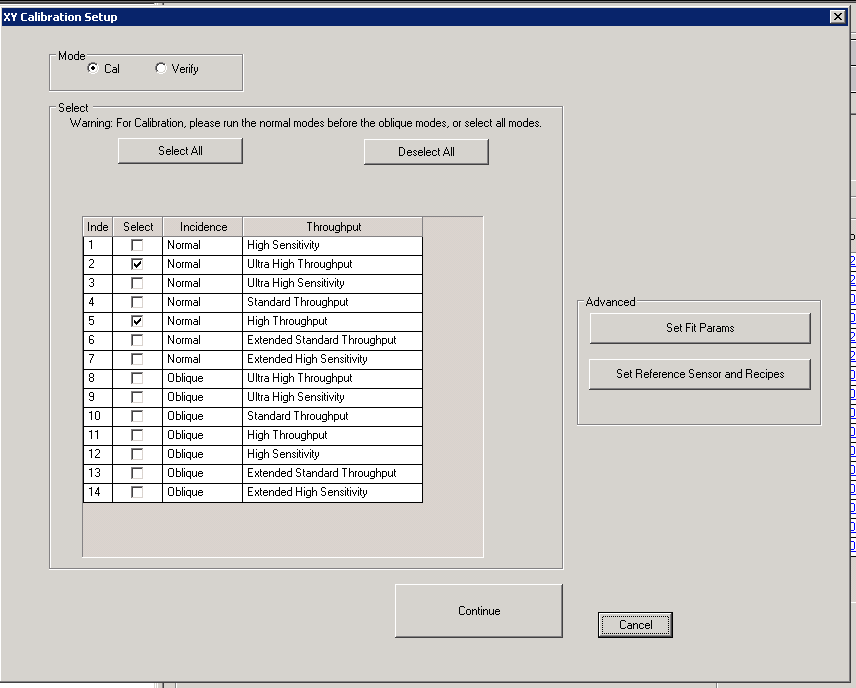
Hi, I am using the follwing code to get the items from grid. controlgethandle is getting me the control id but _GUICtrlListView_GetItemCount returns Null GUI is a external application window. Please help. screenshot for the GUI is attached. $hCtrl = ControlGetHandle("XY Calibration Setup", "", "[NAME:m_ultraGrid]") $sMsg &= @TAB & "Handle= = " & $hCtrl & @CRLF $Finditem = _GUICtrlListView_GetItemCount($hCtrl) $sMsg &= @TAB & "ITEM= " & $Finditem & @CRLF ConsoleWrite($sMsg)
-
Hi All, I am new to AutoIT GUI, Can anyone help me in Grid Control. I have a table That have 4 column. I need to read the data from 4th Col. Follwing property I got from AutoIT window info. >>>> Window <<<< Title: XY Calibration Setup Class: #32770 Position: 262, 101 Size: 852, 678 Style: 0x94C800E4 ExStyle: 0x00010101 Handle: 0x00000000003D195E >>>> Control <<<< Class: WindowsForms10.window.8.app.0.1748312_r29_ad1 Instance: 2 ClassnameNN: WindowsForms10.window.8.app.0.1748312_r29_ad12 Name: m_ultraGrid Advanced (Class): [NAME:m_ultraGrid] ID: 3148888 Text: Position: 80, 189 Size: 402, 342 ControlClick Coords: 128, 151 Style: 0x56010000 ExStyle: 0x00000000 Handle: 0x0000000000300C58
-
Hi I am new here Is there any possible to unlock the computer before we start some script? I have to run some scripts in remote computer. but before starting of the scripts i need to unlock the computer. Can anyone suggest me some ideas. Thanks in advance Quote