Advert


klaus.s
-
Posts
29 -
Joined
-
Last visited
klaus.s's Achievements

Seeker (1/7)
0
Reputation
-
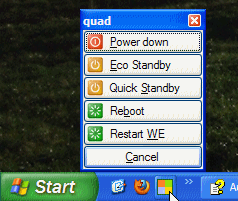
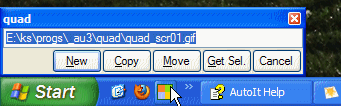
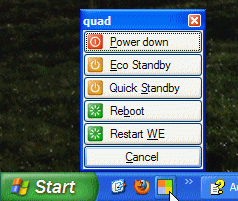
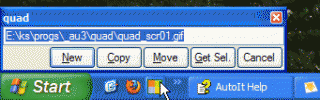
quad is a lightweight add-on for Windows Explorer on XP SP3 to ease and speed-up some common operations. The quad icon in the Quick Launch runs four different functions depending on the portion the icon gets clicked. 1.1 Upper-left Open a new Explorer window with 'root view'. 1.2 Upper-right Do an operation with the selected file or folder in Explorer: New, Copy, Move and Get Selection. 1.3 Bottom-left Open a new Explorer window. 1.4 Bottom-right Open Menu for: Power down, Eco Standby, Quick Standby, Reboot and Restart WE (Windows Explorer). 1.5 Usage To try it, link quad.exe to your Quick Launch. The quad icon must be located visibly on the Quick Launch toolbar; settings like button size must be per XP default. To remove quad, just remove it from your Quicklaunch; no files and settings are touched behind the scenes. The file operations, started by the upper-right portion might be somewhat strange to use at first, therefore select some unimportant file or folder in Explorer for testing. Read more in the attached zip-file, which also includes quad.exe and source files. -- Klaus quad_20110918.zip
-
The function cmdlog allows to write to a command window (or DOS console) without the need to compile the script. To use this function within a script, the file cmdlog_con.exe must be in the same folder. This file is created by cmdlog_con_compile.bat from cmdlog_con.au3. cmdlog_example.au3 is a small example how to use and how it works. All 5 files are packed in cmdlog.zip. Maybe this is useful for some small projects. Yet I have not tested it very thoroughly (only Windows XP SP2), suggestions to make it better or faster are very welcome. -- Klaus cmdlog.zip
-
I am wondering why _GetWindowsExplorerPath could not be realized using Shell.Application: $SHA= ObjCreate("Shell.Application") $SHW= $SHA.Windows() while 1 for $WIN in $SHW if $WIN.hwnd = $w then exitloop 2 next return "" wend $n= $WIN.document.SelectedItems.Count $SEL= $WIN.document.SelectedItems $s= $WIN.LocationURL & "," for $ITM in $SEL $s &= $ITM.path & "," next Works for me on XP/SP3. Any drawbacks or caveats known for this? --Klaus
-
Hi, here is a script to modify some features of Windows Explorer. It is mainly about removing items from the right click menu (e.g. Print) which are useless for me. The GUI is very limited, but this way the script should be easier to follow and to customize. Up to now I have tested this on two different XP's/SP3 and everything seems to work as expected. Anyway, please be careful, it is only a tool to avoid registry editing by hand based on different, mostly inofficial sources how to do this. --Klaus wemod.au3 wemod_subs.au3
-
Is there something like @SW_BUSY?
klaus.s replied to klaus.s's topic in AutoIt General Help and Support
Thanks a lot for your prompt reply. I am sorry, I missed GUISetCursor completly (just found it in the docs). Anyway I think something like GUISetState( @SW_BUSY/@SW_READY) could be handy, but actually there is no problem to do this custom function by my own. Thank you again. --Klaus -
Hi, is there a way to change the state of the GUI: cursor wait and GUI disabled ( OK, the last one is there, so probably I will need only the first one). I would like to use such a function within a GUI, which calls runwait to do some time consuming operations. --Klaus
-
Thanks to all for your comments and feedback. Until now I did not consider these animated cursors and maybe a solution will come up. Because I like this swapping functionality of LoadCursor/SetSystemCursor as already shown in my first version, I added this in my newest version, along with some cleanup. #include <GUIConstants.au3> menu() func menu() local $msg, $gc[99], $gc_roe, $gc_swap, $n, $i, $j GuiCreate( @ScriptName, 230, 520, -1, -1) $gc_roe= GUICtrlCreateCheckbox( "restore on exit", 3, 0) GUICtrlSetState( $gc_roe, $GUI_CHECKED) $n+= 1 $gc[$n]= GUICtrlCreateRadio( "000 default", 3, $n*24, 150, 24, $WS_GROUP) $n+= 1 $gc[$n]= GUICtrlCreateRadio( "101 selectGreen", 3, $n*24, 150, 24) $n+= 1 $gc[$n]= GUICtrlCreateRadio( "102 selectRed", 3, $n*24, 150, 24) $n+= 1 $gc[$n]= GUICtrlCreateRadio( "512 select (default)", 3, $n*24, 150, 24) $n+= 1 $gc[$n]= GUICtrlCreateRadio( "513 insert", 3, $n*24, 150, 24) $n+= 1 $gc[$n]= GUICtrlCreateRadio( "514 wait", 3, $n*24, 150, 24) $n+= 1 $gc[$n]= GUICtrlCreateRadio( "515 cross", 3, $n*24, 150, 24) $n+= 1 $gc[$n]= GUICtrlCreateRadio( "516 arrowUp", 3, $n*24, 150, 24) $n+= 1 $gc[$n]= GUICtrlCreateRadio( "641 select (default)", 3, $n*24, 150, 24) $n+= 1 $gc[$n]= GUICtrlCreateRadio( "642 stretchDiagonalBack", 3, $n*24, 150, 24) $n+= 1 $gc[$n]= GUICtrlCreateRadio( "643 stretchDiagonalForward", 3, $n*24, 150, 24) $n+= 1 $gc[$n]= GUICtrlCreateRadio( "644 stretchHorizontal", 3, $n*24, 150, 24) $n+= 1 $gc[$n]= GUICtrlCreateRadio( "645 stretchVertical", 3, $n*24, 150, 24) $n+= 1 $gc[$n]= GUICtrlCreateRadio( "646 move", 3, $n*24, 150, 24) $n+= 1 $gc[$n]= GUICtrlCreateRadio( "648 avoid", 3, $n*24, 150, 24) $n+= 1 $gc[$n]= GUICtrlCreateRadio( "649 hand", 3, $n*24, 150, 24) $n+= 1 $gc[$n]= GUICtrlCreateRadio( "650 selectWait", 3, $n*24, 150, 24) $n+= 1 $gc[$n]= GUICtrlCreateRadio( "651 selectQuestion", 3, $n*24, 150, 24) $n+= 1 $gc[$n]= GUICtrlCreateRadio( "663 selectCD", 3, $n*24, 150, 24) $gc_swap= GUICtrlCreateButton( "swap cursor assignments of 512 and 513", _ 3, $n*24 +30) GUISetState( @SW_SHOW) while true $msg = GUIGetMsg() if $msg == $GUI_EVENT_CLOSE then exitloop if $msg == $gc_swap then $j= 1513 syscursor( $j) msgbox( 0, @ScriptName, "Check cursor assignments " & _ "(here and in editor), then press Ok to undo.") syscursor( $j) continueloop endif for $i= 1 to $n if $gc[$i] == $msg then $j= stringleft( guictrlread( $msg, 1), 3) *1 syscursor( $j) exitloop endif next wend if GUICtrlRead( $gc_roe) = $GUI_CHECKED then syscursor( 0) ; reset to default endif endfunc func syscursor( $j) global $syscursor_save local $a, $k, $file if $j > 1500 then $k= 31000 +$j $a= DllCall( "user32.dll", "int", "LoadCursor", "int", 0, "int", $k) DllCall( "user32.dll", "int", "SetSystemCursor", "int", $a[0], "int", 32512) return endif if $syscursor_save <> "" then $a= $syscursor_save DllCall( "user32.dll", "int", "SetSystemCursor", "int", $a[0], "int", 32512) endif $a= DllCall( "user32.dll", "int", "LoadCursor", "int", 0, "int", 32512) $a= DllCall( "user32.dll", "int", "CopyIcon", "int", $a[0]) $syscursor_save= $a if $j > 500 then $k= 32000 +$j $a= DllCall( "user32.dll", "int", "LoadCursor", "int", 0, "int", $k) $a= DllCall( "user32.dll", "int", "CopyIcon", "int", $a[0]) DllCall( "user32.dll", "int", "SetSystemCursor", "int", $a[0], "int", 32512) elseif $j then $file= @scriptdir & "\" & $j & ".cur" $a= DllCall( "user32.dll", "int", "LoadCursorFromFile", "str", $file) DllCall( "user32.dll", "int", "SetSystemCursor", "int", $a[0], "int", 32512) endif endfuncsyscursor20080218.zip
-
Updated version, flaws removed by using CopyIcon (CopyCursor does not work, XP/SP2), attached zip-file includes two cur-files. #include <GUIConstants.au3> menu() func menu() local $msg, $gc[99], $n, $i, $t, $m GuiCreate( "syscursor", 155, 490, -1, -1) $n= 0 $gc_roe= GUICtrlCreateCheckbox( "restore on exit", 3, 0, 150, 24) GUICtrlSetState( $gc_roe, $GUI_CHECKED) $n+= 1 $gc[$n]= GUICtrlCreateButton( "000 default", 3, $n*24, 150, 24) $n+= 1 $gc[$n]= GUICtrlCreateButton( "101 selectGreen", 3, $n*24, 150, 24) $n+= 1 $gc[$n]= GUICtrlCreateButton( "102 selectRed", 3, $n*24, 150, 24) $n+= 1 $gc[$n]= GUICtrlCreateButton( "512 select", 3, $n*24, 150, 24) $n+= 1 $gc[$n]= GUICtrlCreateButton( "513 insert", 3, $n*24, 150, 24) $n+= 1 $gc[$n]= GUICtrlCreateButton( "514 wait", 3, $n*24, 150, 24) $n+= 1 $gc[$n]= GUICtrlCreateButton( "515 cross", 3, $n*24, 150, 24) $n+= 1 $gc[$n]= GUICtrlCreateButton( "516 arrowUp", 3, $n*24, 150, 24) $n+= 1 $gc[$n]= GUICtrlCreateButton( "641 select", 3, $n*24, 150, 24) $n+= 1 $gc[$n]= GUICtrlCreateButton( "642 stretchDiagonalBack", 3, $n*24, 150, 24) $n+= 1 $gc[$n]= GUICtrlCreateButton( "643 stretchDiagonalForward", 3, $n*24, 150, 24) $n+= 1 $gc[$n]= GUICtrlCreateButton( "644 stretchHorizontal", 3, $n*24, 150, 24) $n+= 1 $gc[$n]= GUICtrlCreateButton( "645 stretchVertical", 3, $n*24, 150, 24) $n+= 1 $gc[$n]= GUICtrlCreateButton( "646 move", 3, $n*24, 150, 24) $n+= 1 $gc[$n]= GUICtrlCreateButton( "648 avoid", 3, $n*24, 150, 24) $n+= 1 $gc[$n]= GUICtrlCreateButton( "649 hand", 3, $n*24, 150, 24) $n+= 1 $gc[$n]= GUICtrlCreateButton( "650 selectWait", 3, $n*24, 150, 24) $n+= 1 $gc[$n]= GUICtrlCreateButton( "651 selectQuestion", 3, $n*24, 150, 24) $n+= 1 $gc[$n]= GUICtrlCreateButton( "663 selectCD", 3, $n*24, 150, 24) GUISetState( @SW_SHOW) while true $msg = GUIGetMsg() if $msg = $GUI_EVENT_CLOSE then exitloop for $i= 1 to $n if $gc[$i] == $msg then syscursor( stringleft( guictrlread( $msg), 3) *1) exitloop endif next wend if GUICtrlRead( $gc_roe) = $GUI_CHECKED then syscursor( 0) ; reset to default endif endfunc func syscursor( $i) global $syscursor_save global $syscursor_saved local $a, $k, $file if $syscursor_saved then $a= $syscursor_save DllCall( "user32.dll", "int", "SetSystemCursor", "int", $a[0], "int", 32512) endif $a= DllCall( "user32.dll", "int", "LoadCursor", "int", 0, "int", 32512) $a= DllCall( "user32.dll", "int", "CopyIcon", "int", $a[0]) $syscursor_save= $a $syscursor_saved= true if $i > 500 then $k= 32000 +$i $a= DllCall( "user32.dll", "int", "LoadCursor", "int", 0, "int", $k) $a= DllCall( "user32.dll", "int", "CopyIcon", "int", $a[0]) DllCall( "user32.dll", "int", "SetSystemCursor", "int", $a[0], "int", 32512) elseif $i then $file= @scriptdir & "\" & $i & ".cur" $a= DllCall( "user32.dll", "int", "LoadCursorFromFile", "str", $file) DllCall( "user32.dll", "int", "SetSystemCursor", "int", $a[0], "int", 32512) endif endfuncsyscursor20080217.zip
-
Hi, for changing the system-cursor I found several examples using LoadCursorFromFile. Searching for LoadCursor the only hit was here: http://www.autoitscript.com/forum/index.ph...p;hl=loadcursor (This magnifier is a very nice tool by the way.) syscursor can change the system-cursor to another built-in cursor or to one stored locally in a cur-file. Only one flaw so far: a built-in cursor has to be sacrified if a custom-cursor is used. Maybe someone has further ideas about that. --Klaus syscursor.au3
-
Thanks for these suggestions. Meanwhile I found some interesting code referring to ObjCreate( "wmplayer.ocx"), here in this forum. I find it always surprising how things can be done with au3 Here my experimental code #include <GUIConstants.au3> dim $files[4]= [ "" _ ,"e:\dscf0136.avi" _ ,"e:\short1.avi" _ ,"e:\dscf2073.avi" _ ] $title= "kwmp" $n_files= 3 $i_file= 0 $trace= false $dx= 0 $dx_win= 0 $dx_dur= 0 $dx_ctrl= 0 $dx_s= "" ; ------------------------------------------------------------------------- $this_win= GUICreate( @ScriptName, 305, 50, 0, 30, _ $WS_SYSMENU, $WS_EX_TOPMOST +$WS_EX_TOOLWINDOW) $y= 0 $ui_prev= GUICtrlCreateButton( "previous", 0, $y, 100) $ui_next= GUICtrlCreateButton( "next", 100, $y, 100) $ui_close= GUICtrlCreateButton( "close", 200, $y, 100) GUISetState( @SW_SHOW) while true $msg = GUIGetMsg() select case $msg = $ui_next $trace= false $i_file+= 1 case $msg = $ui_prev $trace= false $i_file-= 1 case $msg = $ui_close $trace= false GUIdelete( $dx_win) $dx_s= "" continueloop case $msg = $GUI_EVENT_CLOSE exitloop case $trace and dx_completed() $trace= false winsettitle( $this_win, "", $title & " - " & _ $i_file & "/" & $n_files & " - completed") winactivate( $this_win) continueloop case else continueloop endselect if $i_file < 1 then $i_file= 1 if $i_file > $n_files then $i_file= $n_files $file= $files[$i_file] dx_show( $file) $trace= true winsettitle( $this_win, "", @scriptname & " - " & $i_file & "/" & $n_files) wend exit ;-------------------------------------------------------------------------- func dx_show( $file); ;{{{ local $a, $s, $b, $p $a= get_wmp_file_display_size( $file) ;local $a[2]= [ 400, 300] $s= $a[0] & "x" & $a[1] if $dx_s <> $s then $dx_s= $s $p= $dx_win $dx_win= GUICreate( "dx_win", 0,0,0,0, $WS_MAXIMIZE) $b= wingetpos( $dx_win) $left= ( $b[2] -$a[0]) /2 $top= ( $b[3] -$a[1]) /2 $dx = ObjCreate( "wmplayer.ocx") $dx.settings.autoStart = "True" $dx_ctrl= GUICtrlCreateObj( $dx, $left, $top, $a[0], $a[1]) $dx.uiMode= "none" endif $dx.URL= $file ; to avoid flicker $h= 0 while $h = 0 $h= $dx.currentMedia.imageSourceHeight wend GUISetState(@SW_SHOW) while true sleep(1) $dx_dur= $dx.currentMedia.duration if $dx_dur <> 0 then exitloop wend winsettitle( $dx_win, "", $file & " " & $dx_s & " " & $dx_dur) if $p <> 0 then GUIdelete( $p) endfunc ; }}} func dx_completed(); ;{{{ $dx_t= $dx.controls.currentPosition if $dx_t < $dx_dur then return false while not $dx.controls.isAvailable("pause") sleep(1) wend $dx.controls.pause() return true endfunc ; }}} func get_wmp_file_display_size( $file) local $obj, $ctrl, $a[2] $obj= ObjCreate( "wmplayer.ocx") $ctrl= GUICtrlCreateObj( $obj, -900, -900) $obj.URL= $file while $a[0] = 0 or $a[1] = 0 $a[0]= $obj.currentMedia.imageSourceWidth $a[1]= $obj.currentMedia.imageSourceHeight wend $obj.controls.stop() return $a endfunc Some delay is caused by the last function to get the image size, suggestions welcome. Klaus
-
Hello, here some lines to see to see the context $c= """%programfiles%\Windows Media Player\wmplayer.exe"" " & _ " """ & $f & """ /fullscreen" run( @comspec & " /c """ & $c & """", "", @sw_hide) winwaitactive( "Windows Media Player") $w= wingethandle("") This works as expected: wmp opens and the video-file $f runs in fullscreen mode. Now I would like to get a message, when the video is finished. How could this be achieved? Klaus
-
How to get a files list, which reflects the current order of a thumbnail view? After some experiments with ControlListView / ControlSend I am wondering a) if it is possible to get the complete filespec of a list item (including lnk extensions to keep them apart from subfolders) if there is another way without SendKeys Thanks for any advice. -- Klaus
-
Do we get also the information about the type of entry, text or file list? Special thanks to the developer team -- Klaus
-
It works fine with beta, thanks a lot! -- Klaus
-
Same story on my 2 comps. I use:v3.1.1 XP home 2002 SP1 What could be wrong here? -- Klaus