lainline
-
Posts
15 -
Joined
-
Last visited
lainline's Achievements

Seeker (1/7)
0
Reputation
-
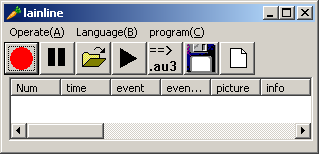
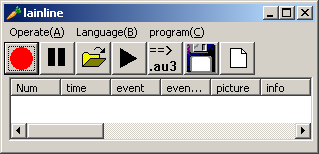
record interface event toolnot finish record interface event tool.rar
-
how can I use "Window Info Tool" like #include ***
lainline replied to lainline's topic in AutoIt General Help and Support
a part of my work Thank you #include <WinAPI.au3> HotKeySet("{ESC}", "_EXIT") _Main() Opt ("MustDeclareVars",1) Func _Main() While 1 ToolTip(_get_mouse_underclass()) Sleep(100) WEnd EndFunc Func _get_mouse_underclass();获取表示鼠标下控件详细信息的字符串 "@LF"分行 "|"分条目 Local $output,$ID,$ClassName,$Classtext,$winpos,$classpos,$hwin Local $classlist1 = _get_mouse_under() Local $classlist2 = StringSplit($classlist1,"|") $output="句柄|ID|类名|坐标|文本"& @LF For $c=1 To $classlist2[0]-1 $ID = _WinAPI_GetDlgCtrlID($classlist2[$c]);获取ID $hwin = WinGetHandle($classlist2[$classlist2[0]]) $ClassName = _WinGetClassName($classlist2[$c]);获取类名 $Classtext = ControlGetText ($hwin,"",$ClassName) ;文本 $classpos = ControlGetPos($hwin,"",$ClassName);位置 If Not @error Then $output = $output & $classlist2[$c] & "|" & $ID & "|" & $ClassName & "|" & _ $classpos[0] & "|" & $classpos[1]& "|" & $classpos[2]& _ "|" & $classpos[3] & "|" & StringLeft($Classtext,30) [email="&@LF"]&@LF[/email] EndIf Next $winpos = WinGetPos($hwin,"") $output = $output & $classlist2[$classlist2[0]] & "|0|0|" & _ $winpos[0] & "|" & $winpos[1]& "|" & $winpos[2]& "|" & _ $winpos[3] &"|" & WinGetTitle($hwin);主窗口 Return $output EndFunc Func _EXIT() Exit EndFunc Func _get_mouse_under();获取鼠标下控件句柄列表 "|"号分隔 Opt("MouseCoordMode",1) Local $Struct = DllStructCreate($tagPoint) DllStructSetData($Struct, "x", MouseGetPos(0)) DllStructSetData($Struct, "y", MouseGetPos(1)) Local $hWndp="" Local $hwnd = _WinAPI_WindowFromPoint($Struct) If @error Then SetError(1) Return 0 EndIf $hWndp = $hwnd While 1 $hwnd = _WinAPI_GetParent($hWnd) If $hwnd=0 Then Return $hWndp Else $hWndp = $hWndp & "|" & $hwnd EndIf WEnd EndFunc Func _WinGetClassName($hclass);由控件句柄查询类名 Local $hwnd = $hclass ,$hWin While 1 $hwnd = _WinAPI_GetParent($hwnd) If $hwnd=0 Then ExitLoop Else $hWin = $hwnd EndIf WEnd Local $sClassList = WinGetClassList($hWin) Local $aSplitClass = StringSplit(StringTrimRight($sClassList, 1), @LF) For $iCount = $aSplitClass[0] To 1 Step - 1 Local $nCount = 0 While 1 $nCount += 1 If ControlGetHandle($hWin,"", $aSplitClass[$iCount] & $nCount) = $hclass Then Return $aSplitClass[$iCount] & $nCount EndIf If ControlGetHandle($hWin, '', $aSplitClass[$iCount] & $nCount) = '' Then ExitLoop WEnd Next EndFunc -
how can I use "Window Info Tool" like #include ***
lainline replied to lainline's topic in AutoIt General Help and Support
_WinAPI_WindowFromPoint run exp Exactly what I want -
Help my sample Installer script..
lainline replied to eri's topic in AutoIt General Help and Support
#include <GUIConstants.au3> $Window = GUICreate("My Sample Script", 300, 56) $Location = GUICtrlCreateInput("", 8, 16, 80, 21) $Locate = GUICtrlCreateButton("Select Drive", 100, 16, 97, 25, 0) $Install = GUICtrlCreateButton("Apply", 210, 16, 89, 25, 0) GUISetState(@SW_SHOW) While 1 $msg = GUIGetMsg() Switch $msg Case $GUI_EVENT_CLOSE Exit Case $Locate $var = FileSelectFolder("Select Drive Not Folder", "", 5) If Not @error Then $var2 =StringSplit($var,"\") GUICtrlSetData($Location, $var2[1]) EndIf Case $Install $path = GUICtrlRead($Location) If $path = '' Then MsgBox(64, "Warning", "1st Select Drive Then Apply") ElseIf DirCreate($path) Then FileInstall("Exefile.exe", $path & '', 1) Else MsgBox(64, "Warning", "Can`t Apply this File To Drive") EndIf EndSwitch WEnd -
"Window Info Tool" have dll version?
-
#include <EditConstants.au3> #include <GUIConstantsEx.au3> #include <WindowsConstants.au3> #include <GuiToolTip.au3> #Include <Array.au3> #Include <GuiEdit.au3> Global $aRet2 [1] #Region ### START Koda GUI section ### Form=d:\我的文档\桌面\TextCapture\chs\Form3.kxf $Form1 = GUICreate("Form1", 442, 346, 192, 124) $Edit1 =GUICtrlCreateEdit("", 8, 8, 137, 329) $Edit2 =GUICtrlCreateEdit("", 152, 8, 137, 329) $Edit3 =GUICtrlCreateEdit("", 296, 8, 137, 329) GUISetState(@SW_SHOW) #EndRegion ### END Koda GUI section ### While 1 $nMsg = GUIGetMsg() Switch $nMsg Case $GUI_EVENT_CLOSE Exit Case Else Sleep(10) _Read_Tip() EndSwitch WEnd Func _Read_Tip() Local $aTipList = WinList("[CLASS:tooltips_class32]") Local $new $aRet2 [0] = ("tip text:") $aTip = $aTipList[0][0] For $i = 1 To $aTip Local $aRet= _GUIToolTip_GetCurrentTool($aTipList[$i][1]) If Not $aRet[8]="" Then If _ArrayFindAll($aRet2 ,$aRet[8]) = -1 Then _ArrayAdd($aRet2, $aRet[8]) _GUICtrlEdit_SetText($Edit1,_ArrayToString($aRet2 , @CRLF)) EndIf EndIf Next EndFunc
-
use HKEY_CURRENT_USER\Control Panel\Desktop\WheelScrollLines multiply one line pixel high I spell english very hard in my tast HKEY_USERS\.DEFAULT\Control Panel\Desktop WheelScrollLines can change ie Scroll Line
-
HKEY_CURRENT_USER\Control Panel\Desktop\WheelScrollLines
-
can use ie "scrollamount" parameter
-
please give the test page
-
#include <ClipBoard.au3> AutoItSetOption ("WinTitleMatchMode", 2 ) WinActivate ("Mozilla Firefox") Send("^l") Send("^c") $address=_ClipBoard_GetData($CF_TEXT) MsgBox( 0, "asdf", $address )
-
String Replace with @CRLF
lainline replied to obscurant1st's topic in AutoIt General Help and Support
#Region ;**** Directives created by AutoIt3Wrapper_GUI **** #AutoIt3Wrapper_Res_Comment=oDx #AutoIt3Wrapper_Res_Description=- obscurant1st.biz #AutoIt3Wrapper_Res_Fileversion=1.0.0.3 #AutoIt3Wrapper_Res_Fileversion_AutoIncrement=y #EndRegion ;**** Directives created by AutoIt3Wrapper_GUI **** #include <ClipBoard.au3> Dim $text, $toberplcd, $rplcwith, $modText MsgBox(0,"Info","Copy the Text to ClipBoard!!!") $text = _ClipBoard_GetData($CF_TEXT) $toberplcd = InputBox("Replace","enter the string to be replaced:") $rplcwith = InputBox("Replace","enter the Replacement string:") $rplcwith = StringReplace($rplcwith,"@CRLF",@CRLF) $modText = StringReplace($text,$toberplcd,$rplcwith) _ClipBoard_SetData($modText) -
thank you learing
-
get text for Program tooltip example: wordpad.exe or iexplore.exe it work in tabletop all right but the mouse move to wordpad.exe window script can not work [/b] #include <GUIConstantsEx.au3> #include <WindowsConstants.au3> #Region ### START Koda GUI section ### Form= $Form1 = GUICreate("Form1", 100, 100, 50, 50) GUISetState(@SW_SHOW) #EndRegion ### END Koda GUI section ### While 1 $nMsg = GUIGetMsg() Switch $nMsg Case $GUI_EVENT_CLOSE Exit Case Else ;WinWait("[CLASS:tooltips_class32]") $text=ControlGetText("[CLASS:tooltips_class32]","","") TrayTip("tooltipstext:",$text,0,0) EndSwitch WEnd [b]
-
i want get "tooltips_class32" word but my script Just work in " Program Manager" #include <GUIConstantsEx.au3> #include <WindowsConstants.au3> #Region ### START Koda GUI section ### Form= $Form1 = GUICreate("Form1", 100, 100, 50, 50) GUISetState(@SW_SHOW) #EndRegion ### END Koda GUI section ### While 1 $nMsg = GUIGetMsg() Switch $nMsg Case $GUI_EVENT_CLOSE Exit Case Else ;WinWait("[CLASS:tooltips_class32]") $text=ControlGetText("[CLASS:tooltips_class32]","","") TrayTip("tooltipstext:",$text,0,0) EndSwitch WEnd