argumentum
-
Posts
5,951 -
Joined
-
Last visited
-
Days Won
206
7 Followers
.thumb.gif.f0fcf5626c0e51d894959a28cd718fe7.gif)



About argumentum

Recent Profile Visitors
15,160 profile views






argumentum's Achievements

-
 WildByDesign reacted to a post in a topic:
Need help with Tab Control on 24H2/25H2 with the new DarkMode_DarkTheme
WildByDesign reacted to a post in a topic:
Need help with Tab Control on 24H2/25H2 with the new DarkMode_DarkTheme
-
 ... Func Example() Local $iFormW = 700, $iFormH = 300 ; resizing is important when testing Local $hGUI = GUICreate("DarkTheme TabControl", $iFormW, $iFormH, -1, -1, BitOR($GUI_SS_DEFAULT_GUI,$WS_MAXIMIZEBOX,$WS_SIZEBOX,$WS_THICKFRAME,$WS_TABSTOP)) ; <<< GUISetBkColor(0x191919) GUISetFont(10, 300) Local $idTab = GUICtrlCreateTab(20, 20, $iFormW - 40, $iFormH - 40, -1) GUICtrlSetResizing(-1, $GUI_DOCKLEFT+$GUI_DOCKRIGHT+$GUI_DOCKTOP+$GUI_DOCKBOTTOM) ; <<< ... looks good.
 -
 WildByDesign reacted to a post in a topic:
GUIDarkTheme UDF
WildByDesign reacted to a post in a topic:
GUIDarkTheme UDF
-
argumentum reacted to a post in a topic:
Unable to access hidden text
-
Default windows is light mode. Dark mode is a niche thing. If you're writing code, it's nice to have. If you're writing a letter in Word, let's say, now that's a different story altogether, because if you ever try to write a letter in a dark background, you don't feel the same. It's very awkward. So yes, you either prefer light mode or dark mode, and if you chose dark mode, then the best available dark mode for that version of Windows is the one that there is. The Buuf theme that I like so much: It's a light mode that is not so bright, that in my case hurts. But Windows theming is not there yet, if ever. Yes. No question about that. If it returns 0, it's false. If it returns a positive integer, it's true. The only difference in this "true" return, is that you can see "how true"/"degree of darkness" there is, if the coder facies to know 😅 It might make other functions irrelevant because all the information that you need comes from just one function. 🤔 ...but that refactoring is up to you. Nah, the user either chooses light more or dark more. That's it. ...that's all it was, just an idea, something for you to see if you like or not.
-
WildByDesign reacted to a post in a topic:
Need help with Tab Control on 24H2/25H2 with the new DarkMode_DarkTheme
-
looks nice

-
WildByDesign reacted to a post in a topic:
GUIDarkTheme UDF
-
argumentum reacted to a post in a topic:
ListView with Groups - inserting new rows - issue with _GUICtrlListView_InsertItem() ?
-
argumentum reacted to a post in a topic:
ListView with Groups - inserting new rows - issue with _GUICtrlListView_InsertItem() ?
-
argumentum reacted to a post in a topic:
ListView with Groups - inserting new rows - issue with _GUICtrlListView_InsertItem() ?
-
argumentum reacted to a post in a topic:
ListView with Groups - inserting new rows - issue with _GUICtrlListView_InsertItem() ?
-
"Enable/Disable GroupView" button clicked I actually couldn't click the button, I had to tab to get to it, and then use the spacebar to "click" it.
-
Never use a MsgBox in a UDF. A UDF is for the coder, not the end user. If the UDF returns an @error, or something, the one using the UDF will code accordingly. I, as a coder using this UDF, would have a menu where the modes can be selected, but if not available, I would gray them out because they are just not available ...there is a good example. The coder runs _AvailableDarkModes() and the function returns any of 0,1,2 that it can return. Then the coder has a choice of 0,1,2 when it returns 2, a choice of 0,1 when it returns 1, and no choice when it returns 0. Then the one coding knows what the OS has as options and code/execute, based on that. In the case of blindly "apply dark mode", the function will apply the highest available or the one selected. Maybe: Func myFunc($vDoThis = True) Local Static $i_AvailableDarkModes = _AvailableDarkModes() Local $iError = 0 If $vDoThis == True Then $vDoThis = $i_AvailableDarkModes If $vDoThis > $i_AvailableDarkModes Then $iError = 1 $vDoThis = $i_AvailableDarkModes EndIf Switch Int($vDoThis) ; if False, make it 0 Case 2 ; code, code, code.. Case 1 ; code, code, code.. Case 0 ; code, code, code.. EndSwitch Return SetError($iError, $i_AvailableDarkModes, "something ?") EndFunc ...the UDF executes the highest available and returns an error if the highest expected is not the highest available. That way, the user that coded their scripts are not left hanging because the exact expected mode is not available when the coder didn't first ask what is available. It also makes it easier when you automatically want to apply the highest available dark mode when wanting dark mode. The idea is to make the UDF as flexible as possible for the one coding with the UDF. In regards to true or false, they are basically 0 and 1. So in AutoIt, as a language, it's the same as 0 and 1. When people are familiar with other coding languages, they might have a preference. Mine is always an integer. Unless I have to flip it, and then it's easier true or false, because you can "not true" or "not false", and that is quite handy. Then again one could: ConsoleWrite(Int(Not 2) & @CRLF) ; 0 ConsoleWrite(Int(Not 1) & @CRLF) ; 0 ConsoleWrite(Int(Not 0) & @CRLF) ; 1 ...so it's a matter of practicality and/or personal preference. Edit: In some languages and/or devices true and false can be a bit, while an integer is a byte. In AutoIt3, I have no idea what it is, but to me it's all the same
-
WildByDesign reacted to a post in a topic:
GUIDarkTheme UDF
-
WildByDesign reacted to a post in a topic:
GUIDarkTheme UDF
-
That's why I was asking how do you like this approach?, Because you can make a Boolean, but I was thinking that could work as, is there dark mode? And if there is, what type of dark mode.... , It's just an idea. 🧐
-
"Local Static $iRet = _CanDarkMode()" will be better because it needs to be called once. In regards of using Booleans everywhere, that's an architectural choice. Say you like chocolate ice cream or vanilla ice cream, having a yes or no answer would only say that you like ice cream, but not the type. So you could have one for chocolate, two for vanilla, and zero for no thank you, I don't like ice cream. In my case, it's a Boolean because I just woke up and the question is, do I need coffee or not? And the answer is, yes, I need coffee. And I always drink expresso coffee, so there's no question on what type of coffee. But it's just for me. I would have to ask around if other people want coffee.... 🤔 "_CanDarkMode" It's not a good name, or maybe it is. Maybe "_AvailableDarkModes()" is truer to what it actually does.
-
#include <WinAPIInternals.au3> #include <WinAPISysInternals.au3> #include <WindowsSysColorConstants.au3> ; give or take #include <APIThemeConstants.au3> #include <WinAPITheme.au3> Local $hTimer = TimerInit() ConsoleWrite('+ _CanDarkMode type: ' & _CanDarkMode() & ' ( 2="DarkMode_DarkTheme", 1="DarkMode_Explorer", 0=None ) ' & TimerDiff($hTimer) & ' ms. to gather' & @CRLF) Func _CanDarkMode() If Not _WinAPI_IsThemeActive() Then Return SetError(0, 1, False) Local $hWnd = GUICreate("GUIDarkTheme") ; ADDED - temporary GUI creation Local $iCOLOR_WINDOW = _WinAPI_SwitchColor(_WinAPI_GetSysColor($COLOR_WINDOW)) ; because of alt. themes Local $iColor = __WinAPI_Simple_GetThemeColor("DarkMode_DarkTheme::Edit", $hWnd) If Not @error And Hex($iColor, 6) <> Hex($iCOLOR_WINDOW, 6) Then GUIDelete($hWnd) Return 2 ; newer, a next new type in the future would be returning 3 and not braking the prior code EndIf Local $iColor = __WinAPI_Simple_GetThemeColor("DarkMode_Explorer::Edit", $hWnd) If Not @error And Hex($iColor, 6) <> Hex($iCOLOR_WINDOW, 6) Then GUIDelete($hWnd) Return 1 ; oldest EndIf GUIDelete($hWnd) Return 0 EndFunc ;==>_CanDarkMode Func __WinAPI_Simple_GetThemeColor($sClass, $hWnd = Default) Local Const $EP_BACKGROUND = 3 Local Const $EBS_NORMAL = 1 Local $hWndWas = $hWnd If IsKeyword($hWnd) Then $hWnd = GUICreate("Simple_GetThemeColor") Local $hTheme = _WinAPI_OpenThemeData($hWnd, $sClass) If @error Then If IsKeyword($hWndWas) Then GUIDelete($hWnd) ; ADDED - GUI delete resources after theme data has been closed Return SetError(1, 0, False) EndIf Local $iColor = _WinAPI_GetThemeColor($hTheme, $EP_BACKGROUND, $EBS_NORMAL, $TMT_FILLCOLOR) If @error Then If IsKeyword($hWndWas) Then GUIDelete($hWnd) ; ADDED - GUI delete resources after theme data has been closed Return SetError(2, 0, False) EndIf _WinAPI_CloseThemeData($hTheme) Return $iColor EndFunc ;==>__WinAPI_Simple_GetThemeColor + _CanDarkMode type: 2 ( 2="DarkMode_DarkTheme", 1="DarkMode_Explorer", 0=None ) 5.4549 ms. to gather ; 25H2 + _CanDarkMode type: 1 ( 2="DarkMode_DarkTheme", 1="DarkMode_Explorer", 0=None ) 4.4149 ms. to gather ; 24H2 ..how do you like this take of the function ?
-
"The Dragon Ball Z Kai and the Z order" When you run your script the last window created is yours so all the AutoItWinGetTitle() is not that important because of the Z order. If I wanted to make mine unique I'd code: AutoItWinSetTitle("PID:" & @AutoItPID) > Use temporary GUICreate and GUIDelete after theme data is closed. That can be done too. But if you're looking for speed, test both and see what's your preference in regards to this function. I would not care much for 20 ms. more or less... as long as we don't have a bunch of 20 ms. more and more ..play with it, see what you prefer Func _isModernTheme() If Not _WinAPI_IsThemeActive() Then Return SetError(0, 1, False) Local Const $EP_BACKGROUND = 3 Local Const $EBS_NORMAL = 1 Local $hWnd = GUICreate("GUIDarkTheme") ; ADDED - temporary GUI creation ;~ Local $hTheme = _WinAPI_OpenThemeData($hWnd, "DarkMode_Explorer::Edit") ; 0x212121 ;~ Local $hTheme = _WinAPI_OpenThemeData($hWnd, "DarkMode_CFD::Edit") ; 0x383838 Local $hTheme = _WinAPI_OpenThemeData($hWnd, "DarkMode_DarkTheme::Edit") ; 0x262626 If @error Then GUIDelete($hWnd) ; ADDED - GUI delete resources after theme data has been closed <<<< Return SetError(0, 2, False) Local $iColor = _WinAPI_GetThemeColor($hTheme, $EP_BACKGROUND, $EBS_NORMAL, $TMT_FILLCOLOR) If @error Then GUIDelete($hWnd) ; ADDED - GUI delete resources after theme data has been closed <<<< Return SetError(0, 3, False) EndIf _WinAPI_CloseThemeData($hTheme) GUIDelete($hWnd) ; ADDED - GUI delete resources after theme data has been closed If Hex($iColor, 6) <> "FFFFFF" Then Return SetError(0, $iColor, True) ; 0x262626 is official Edit brush color in DarkMode_DarkTheme Return SetError(0, $iColor, False) EndFunc ;==>_isModernTheme
-
#Region ; *** Dynamically added Include files *** #include <APIThemeConstants.au3> ; added:05/10/26 18:22:06 #EndRegion ; *** Dynamically added Include files *** #include <WinAPITheme.au3> ConsoleWrite("Does OS support DarkMode_DarkTheme?" & @TAB & _isModernTheme() & " ( " & "0x" & Hex(@extended, 6) & " )" & @CRLF) Func _isModernTheme($hWnd = Default) If Not _WinAPI_IsThemeActive() Then Return SetError(0, 1, False) Local Const $BP_PUSHBUTTON = 1 Local Const $EP_BACKGROUND = 3 Local Const $EBS_NORMAL = 1 If $hWnd = Default Then $hWnd = _GetHwndFromPID(@AutoItPID) ; Obtain handle for AutoIt process without GUI ;~ Local $hTheme = _WinAPI_OpenThemeData($hWnd, "DarkMode_Explorer::Edit") ; 0x212121 ;~ Local $hTheme = _WinAPI_OpenThemeData($hWnd, "DarkMode_CFD::Edit") ; 0x383838 Local $hTheme = _WinAPI_OpenThemeData($hWnd, "DarkMode_DarkTheme::Edit") ; 0x262626 If @error Then Return SetError(0, 2, False) Local $iColor = _WinAPI_GetThemeColor($hTheme, $EP_BACKGROUND, $EBS_NORMAL, $TMT_FILLCOLOR) If @error Then Return SetError(0, 3, False) _WinAPI_CloseThemeData($hTheme) If Hex($iColor, 6) <> "FFFFFF" Then Return SetError(0, $iColor, True) ; 0x262626 is official Edit brush color in DarkMode_DarkTheme Return SetError(0, $iColor, False) EndFunc ;==>_isModernTheme ; Function for getting HWND from PID Func _GetHwndFromPID($PID) $hWnd = 0 $winlist = WinList() Do For $i = 1 To $winlist[0][0] If $winlist[$i][0] <> "" Then $iPID2 = WinGetProcess($winlist[$i][1]) If $iPID2 = $PID Then $hWnd = $winlist[$i][1] ExitLoop EndIf EndIf Next Until $hWnd <> 0 Return $hWnd EndFunc ;==>_GetHwndFromPID Does OS support DarkMode_DarkTheme? True ( 0x262626 ) for testing this is better because, if false, we'll see why.
-
...any way for it to work on x64 ?
-
... Func _CDP_Browser_FullPath($sFullPath = Default) Local Static $sBrowser = "init", $iErr = 10, $iExt = 10 If $sBrowser = "init" Or $sFullPath = "init" Then $iErr = 10 $iExt = 1 $sBrowser = @ProgramFilesDir & "\Google\Chrome\Application\chrome.exe" If Not FileGetSize($sBrowser) Then $sBrowser = @LocalAppDataDir & "\Google\Chrome\Application\chrome.exe" If Not FileGetSize($sBrowser) Then $sBrowser = "" EndIf If Not IsKeyword($sFullPath) And $sFullPath <> "" And $sFullPath <> "init" Then $iErr = 10 $iExt = 2 $sBrowser = $sFullPath EndIf If $iErr = 10 Then $iErr = Int(Not FileGetSize($sBrowser)) Return SetError($iErr, $iExt, $sBrowser) EndFunc ;==>_CDP_Browser_FullPath #Region --- Browser Class --- Func _CDP_Browser_Launch($oSelf, $browser = Default, $port = Default, $startupSwitches = Default, $profile = Default, $windowSize = Default) If $cdp.config.infoPopups = True Then SplashTextOn("AutoIt CDP", "Preparing browser ...", 420, 120) If $browser = Default Then $browser = _CDP_Browser_FullPath($browser) EndIf ... Thanks for sharing.
-
WildByDesign reacted to a post in a topic:
Need help with Tab Control on 24H2/25H2 with the new DarkMode_DarkTheme
-
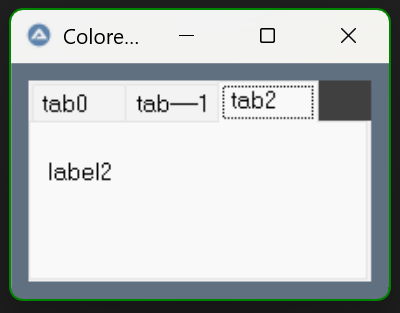
..excellent
-
Forum rules prohibit the use of the forum to aid in that 😕
-
please use the "code" button and paste your code there @xuankhanh1982