
TheAutomator
-
Posts
274 -
Joined
-
Last visited
-
Days Won
3





TheAutomator's Achievements

-
 donnyh13 reacted to a post in a topic:
Cloning VBScript, what do you guys think of my project: Directive
donnyh13 reacted to a post in a topic:
Cloning VBScript, what do you guys think of my project: Directive
-
Danyfirex reacted to a post in a topic:
VBScript with a gui!
-
ioa747 reacted to a post in a topic:
VBScript with a gui!
-
ioa747 reacted to a post in a topic:
Cloning VBScript, what do you guys think of my project: Directive
-
argumentum reacted to a post in a topic:
VBScript is deprecated in Windows 11 and Windows 10
-
argumentum reacted to a post in a topic:
Cloning VBScript, what do you guys think of my project: Directive
-
Have a look at this for making gui's with vbscript, it's the best tool out there for it: WindowSystemObject WindowSystemObject (WSO) - provides you with an easy way to create window interfaces using scripting languages such as JScript, VBScript and other This is the content of WSO.zip that can be downloaded from here: http://www.veretennikov.org/Default.aspx?f=WSO%2fDefault.aspx
-
- 2
-
-
 VBScript will be retired and eliminated from future versions of Windows, I wanna build a better alternative! Meet Directive Script: This interpreter runs the familiar VBScript-style language, but as a single self-contained native binary, cross-platform, with no dependency on the Windows Script Host. It can use COM but has the most used objects build in, in case they ever dissapear from windows. Directive is a small dynamic scripting language, one C++17 file (directive.cpp, no external dependencies) that compiles to a native executable. It stays source-compatible with the classic language where it can, while giving it a cleaner, more explicit object model of its own. Honest note: A.I. was used to debug and enhance code (Claude). I also added some new features like a list object, an in/output text window, sound functions, mouse and pixel functions, console functions, etc. Github link: https://github.com/vbscripting/Directive-The-Enhanced-VBScript-Clone
-
- 3
-
-
VBScript is deprecated in Windows 11 and Windows 10
TheAutomator replied to ptrex's topic in VBScript
Some hope for people that still want to use it (a sideproject using AI): https://github.com/vbscripting/Directive-The-Enhanced-VBScript-Clone -
pixelsearch reacted to a post in a topic:
MiniMark (a minimalistic rtf editor)
-
MiniMark (a minimalistic rtf editor)
TheAutomator replied to TheAutomator's topic in AutoIt Example Scripts
UPDATE: Scrollbar working as intended now! New buttons added. New code (uploaded + new zip file) ready for you to test. Optimizations and details like handling double clicking on controls are comming soon.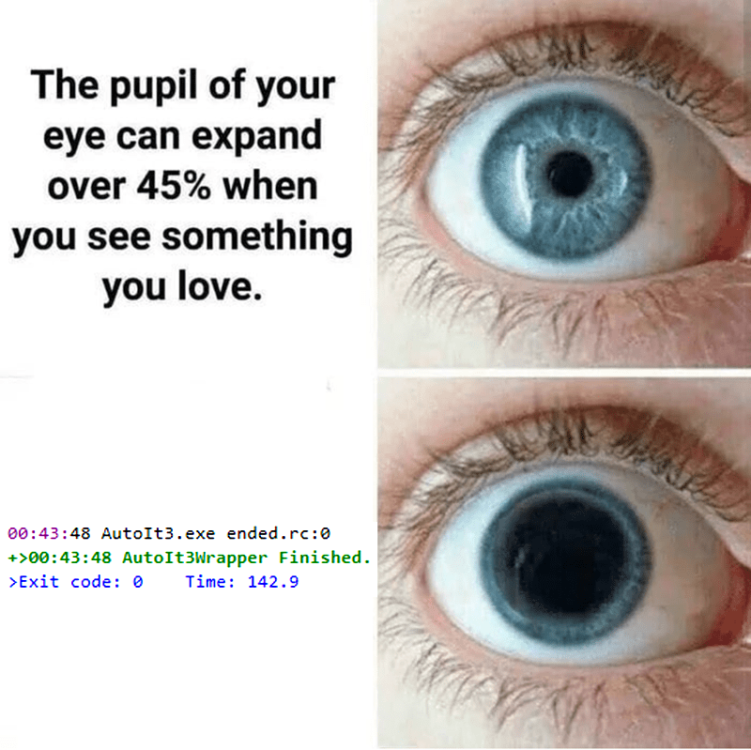
- 40 replies
-
- 1
-
-
- richedit
- richedit rich text tool
- (and 2 more)
-
MiniMark (a minimalistic rtf editor)
TheAutomator replied to TheAutomator's topic in AutoIt Example Scripts
Noted, good advice! Now I understand why you needed WS_CLIPSIBLINGS -
TheAutomator reacted to a post in a topic:
MiniMark (a minimalistic rtf editor)
-
pixelsearch reacted to a post in a topic:
MiniMark (a minimalistic rtf editor)
-
MiniMark (a minimalistic rtf editor)
TheAutomator replied to TheAutomator's topic in AutoIt Example Scripts
Yeah, and moving the cursor down or up so that the edit updates also changes the tumb position @Nine detected when the tumb was pressed in the main loop by ctrl id, and so did you, but that means an extra block of code, using _ispressed, and an extra fuction to update some variables, so i skipped that part ( not sure if that's a good approach but it's working 😛 ) Gonna put this and some other fixes in the MiniMark code soon. you helped me a lot, thanks for that!- 40 replies
-
- 1
-
-
- richedit
- richedit rich text tool
- (and 2 more)
-
TheAutomator reacted to a post in a topic:
MiniMark (a minimalistic rtf editor)
-
pixelsearch reacted to a post in a topic:
MiniMark (a minimalistic rtf editor)
-
MiniMark (a minimalistic rtf editor)
TheAutomator replied to TheAutomator's topic in AutoIt Example Scripts
@pixelsearch Found some time to make a simple example to wrap my head around the example you gave me I managed to boil it down to the code below for testing. Gonna skip resizing the tumb and double clicks for this test, do you see any flaws in the test scrollbar I made? The thing I did diffirently is how to handle the WM_COMMAND message to prevent it setting the tumb location twice while dragging the tumb: if $Scrolling then Return $GUI_RUNDEFMSG #include <GUIConstantsEx.au3> #include <GuiRichEdit.au3> #include <Misc.au3> #include <SendMessage.au3> #include <StaticConstants.au3> #include <WindowsConstants.au3> Local $s For $i = 1 To 100 $s &= 'Line ' & $i & @crlf Next AutoItSetOption('MouseCoordMode', 2) ; 2 = relative coords to the client area of the active window $Form = GUICreate('Form', 294, 432, 2034, 330) $Text = GUICtrlCreateLabel(0, 0, 0, 200, 17) $Edit = _GUICtrlRichEdit_Create($Form, $s, 120, 70, 100, 270, BitOR($es_multiline, $es_autovscroll, $es_nohidesel), 0) _GUICtrlRichEdit_SetScrollPos($Edit, 0, 0) $Bar = GUICtrlCreateLabel('', 70, 70, 40, 270, $SS_BLACKRECT) $Tumb = GUICtrlCreateLabel('', 70, 70, 40, 80, $SS_GRAYRECT) GUISetState(@SW_SHOW) ;----------------------------------------------- $BarX = 70 $BarY = 70 $BarWidth = 40 $BarHeight = 270 $TumbX = 70 $TumbY = 70 $TumbHeight = 80 $TumbMax = $BarY + $BarHeight - $TumbHeight $TumbPercent = 0 $EditHeight = 270 $LineFirst = 0 $LineLast = 0 $LineCount = 0 $LineVisible = 0 $LineTop = 0 $EditPercent = 0 $MouseY = 0 $Scrolling = False ;----------------------------------------------- func MouseOnTumb() local $MouseXY = MouseGetPos() Return $MouseXY[0] >= $BarX and $MouseXY[0] <= $BarX + $BarWidth and $MouseXY[1] >= $BarY and $MouseXY[1] <= $BarY + $BarHeight EndFunc GUIRegisterMsg($WM_COMMAND, WM_COMMAND) Func WM_COMMAND($hWnd, $iMsg, $wParam, $lParam) if $Scrolling then Return $GUI_RUNDEFMSG If $lParam = $Edit Then If BitShift($wParam, 16) = $EN_UPDATE Then UpdateTumbPosition() EndIf Return $GUI_RUNDEFMSG EndFunc Func UpdateTumbPosition() $LineFirst = _GUICtrlRichEdit_GetNumberOfFirstVisibleLine($Edit) $LineLast = _GUICtrlRichEdit_GetLineNumberFromCharPos($Edit, _GUICtrlRichEdit_GetCharPosFromXY($Edit, 1, $EditHeight)) $LineCount = _GUICtrlRichEdit_GetLineCount($Edit) $LinesVisible = $LineLast - $LineFirst + 1 ; count last visible line too (+1) $MaxScroll = $LineCount - $LinesVisible If $MaxScroll <= 0 Then $EditPercent = 0 Else $EditPercent = ($LineFirst - 1) / $MaxScroll EndIf GUICtrlSetData($text, $EditPercent) $TumbY = $BarY + $EditPercent * ($BarHeight - $TumbHeight) GUICtrlSetPos($Tumb, $TumbX, $TumbY) EndFunc Func UpdateEditPosition() $MouseY = MouseGetPos(1) $TumbY = $MouseY - $TumbHeight / 2 If $TumbY < $BarY Then $TumbY = $BarY If $TumbY > $TumbMax Then $TumbY = $TumbMax GUICtrlSetPos($Tumb, $TumbX, $TumbY) $TumbPercent = ($TumbY - $BarY) / ($TumbMax - $BarY) GUICtrlSetData($Text, $TumbPercent) $LineFirst = _GUICtrlRichEdit_GetNumberOfFirstVisibleLine($Edit) $LineLast = _GUICtrlRichEdit_GetLineNumberFromCharPos($Edit, _GUICtrlRichEdit_GetCharPosFromXY($Edit, 1, $EditHeight)) $LineCount = _GUICtrlRichEdit_GetLineCount($Edit) $LinesVisible = $LineLast - $LineFirst $LineTop = $TumbPercent * ($LineCount - $LinesVisible) + 1 _GUICtrlRichEdit_ScrollLines($Edit, $LineTop - $LineFirst) EndFunc ;----------------------------------------------- While 1 Switch GUIGetMsg() Case $GUI_EVENT_CLOSE _GUICtrlRichEdit_Destroy($Edit) GUIDelete($Form) Exit Case $gui_event_primarydown if MouseOnTumb() then $Scrolling = True Case $gui_event_mousemove if $Scrolling then UpdateEditPosition() Case $gui_event_primaryup $Scrolling = False EndSwitch WEnd- 40 replies
-
- 1
-
-
- richedit
- richedit rich text tool
- (and 2 more)
-
MiniMark (a minimalistic rtf editor)
TheAutomator replied to TheAutomator's topic in AutoIt Example Scripts
Little update: Work in progress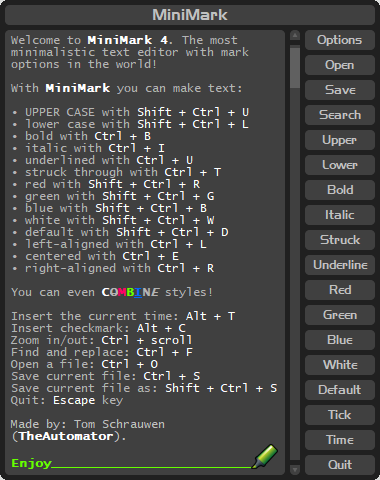
-
Skeletor reacted to a post in a topic:
MiniMark (a minimalistic rtf editor)
-
TheAutomator reacted to a post in a topic:
MiniMark (a minimalistic rtf editor)
-
MiniMark (a minimalistic rtf editor)
TheAutomator replied to TheAutomator's topic in AutoIt Example Scripts
Pixelsearch, I will have a look at it soon, looks promising thanks for this!- 40 replies
-
- 1
-
-
- richedit
- richedit rich text tool
- (and 2 more)
-
 TheAutomator reacted to a post in a topic:
MiniMark (a minimalistic rtf editor)
TheAutomator reacted to a post in a topic:
MiniMark (a minimalistic rtf editor)
-
MiniMark (a minimalistic rtf editor)
TheAutomator replied to TheAutomator's topic in AutoIt Example Scripts
yep.. but I don't understand the code of Nine very well, and I only want to implement the scrollbar part (and like to know what i'm doing instead of accidentally creating memory leaks), feel free to help if you wanna add such scrollbar and/or understand Nine's code From what I understand from it, it uses a lot of DllCallbackRegisters, DllCallbackGetPtrs, and api calls like "_WinAPI_SetWindowSubclass", a bit of Chinese to me -
TheAutomator reacted to a post in a topic:
MiniMark (a minimalistic rtf editor)
-
MiniMark (a minimalistic rtf editor)
TheAutomator replied to TheAutomator's topic in AutoIt Example Scripts
New BETA version 4 uploaded as ZIP-file! see shortcuts section in code for the new ones installer and stable release coming soon!- 40 replies
-
- 1
-
-
- richedit
- richedit rich text tool
- (and 2 more)
-
MiniMark (a minimalistic rtf editor)
TheAutomator replied to TheAutomator's topic in AutoIt Example Scripts
Update, you can now save some settings to an ini file search function done code is better organized UPLOAD HAPPENING SOON Screenshot: Issues: New bug detected for saving and loading zoom settings for the edit control: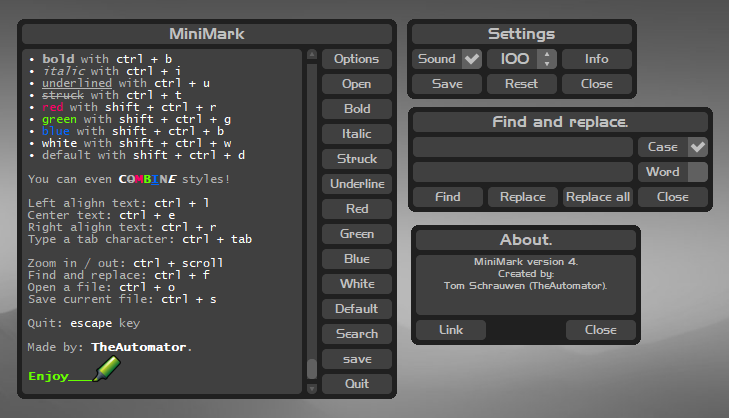
-
TheAutomator reacted to a post in a topic:
Retro fullscreen console with custom programming language!
-
MiniMark (a minimalistic rtf editor)
TheAutomator replied to TheAutomator's topic in AutoIt Example Scripts
Update, The code is getting a huge update, that's why it takes a little longer for me to post the new version. I also found a solution for the scrollbar that finds the balance between simplicty and performance, it now updates how it should and works a little diffirently. Implementing your own scrollbar is not the most easy task I learned, but a lot of people have showed me inspiring code and examples. Updates coming soon: • better search gui in same style and functions • better gui design with stylized popup messages • no 100 images anymore, but just a few with the text on them being generated on the fly • final touches on the graphics • save as function added I also wanna thank Nine for giving me some new insight in the more low level functions of autoit, and everyone in this topic for all the idea's and effort: Please have a look at Nine's UDF, it's very cool! Also the windows "dark mode" one Regards!- 40 replies
-
- 1
-
-
- richedit
- richedit rich text tool
- (and 2 more)
-
goto specific line in rich edit control
TheAutomator replied to TheAutomator's topic in AutoIt General Help and Support
Understood thanks anyways! So far I had this unfinished draft: Global $hScrollProc Func CreateCustomScrollbar() $hScrollProc = DllCallbackRegister(ScrollBarProc, 'lresult', 'hwnd;uint;wparam;lparam;uint_ptr;dword_ptr') _WinAPI_SetWindowSubclass(GUICtrlGetHandle($minimark_thumblabel), DllCallbackGetPtr($hScrollProc), 0, 0) EndFunc Func ScrollBarProc($hWnd, $iMsg, $wParam, $lParam, $iID, $iData) If $iMsg <> $WM_LBUTTONDOWN Then Return _WinAPI_DefSubclassProc($hWnd, $iMsg, $wParam, $lParam) Local $iYStart = MouseGetPos(1) Local $aEditPos = ControlGetPos("[ACTIVE]", "", $minimark_edit) Local $iScrollRange = _GUICtrlEdit_GetLineCount($minimark_edit) While _IsPressed("01") Local $iYCurrent = MouseGetPos(1) If $iYStart <> $iYCurrent Then Local $iNewPos = ($iYCurrent - $aEditPos[1]) * 100 / $iScrollRange _GUICtrlEdit_Scroll($minimark_edit, $iNewPos) EndIf WEnd Return _WinAPI_DefSubclassProc($hWnd, $iMsg, $wParam, $lParam) EndFunc But I have a lot to learn when it comes to the low level magic in your code, your UDF is fasinating -
goto specific line in rich edit control
TheAutomator replied to TheAutomator's topic in AutoIt General Help and Support
Hi Nine, Would it be to much to ask to show us a trimmed down version / function just to make a label behave like a thumb, like in this example? I tried to do it myself, but i'm afraid i'm messing up inportant calls and create memory leaks ... What I understand about your code is that it makes use of _WinAPI_SetWindowSubclass to hook the RichEdit control to handle custom scrollbar behavior? $hProc is a callback function (RichEditProc), which processes scroll messages right? Local $hProc = DllCallbackRegister(__RGUI_ScrollBarProc, 'lresult', 'hwnd;uint;wparam;lparam;uint_ptr;dword_ptr') _WinAPI_SetWindowSubclass(GUICtrlGetHandle($idScroll), DllCallbackGetPtr($hProc), $idScroll, $idCtrl) Local $aScroll = [$fCall, $hProc, $iTop + 5, $iSize - 54] $mScroll[$idScroll] = $aScroll Return $idScroll This is like chinese to me. Noob asking for help here, I know (no pressure tho).