


joseLB
-
Posts
295 -
Joined
-
Last visited
joseLB's Achievements

Universalist (6/7)
2
Reputation
-
Thanks for replies. Just as an example, I was wondering something like visual tanks of water or batteries filling when AU3 receivers data from a pic thru serial for and fields that are used today instead the windows controls (I like them, but users always ask for more modern controls).
-
Hi Besides Koda, there is today a GUI builder that is functional? One with more modern controls? Thanks
-
Hi Seems to be great. THanks! Anyone knows where I can find Metro 5.1 UDF? Thanks
-

GuiBuilderPlus [updated March 24, 2024]
joseLB replied to kurtykurtyboy's topic in AutoIt Example Scripts
Hello, It's been a while since there's been an update here... Today I still use the good old Koda on a daily basis... Anyone who is using this one in practice, can you tell me if it's a good and stable replacement for Koda ? Thanks, Jose -
 Leendert-Jan reacted to a post in a topic:
Are my AutoIt exes really infected?
Leendert-Jan reacted to a post in a topic:
Are my AutoIt exes really infected?
-
I compiled it as 64 bits and compiled OK. On this program I can do this, but in others, for example with RS232 dlls, it´s not possible. So, this is a half solution... Could not we have a better solution?
-
 joseLB reacted to a post in a topic:
Are my AutoIt exes really infected?
joseLB reacted to a post in a topic:
Are my AutoIt exes really infected?
-
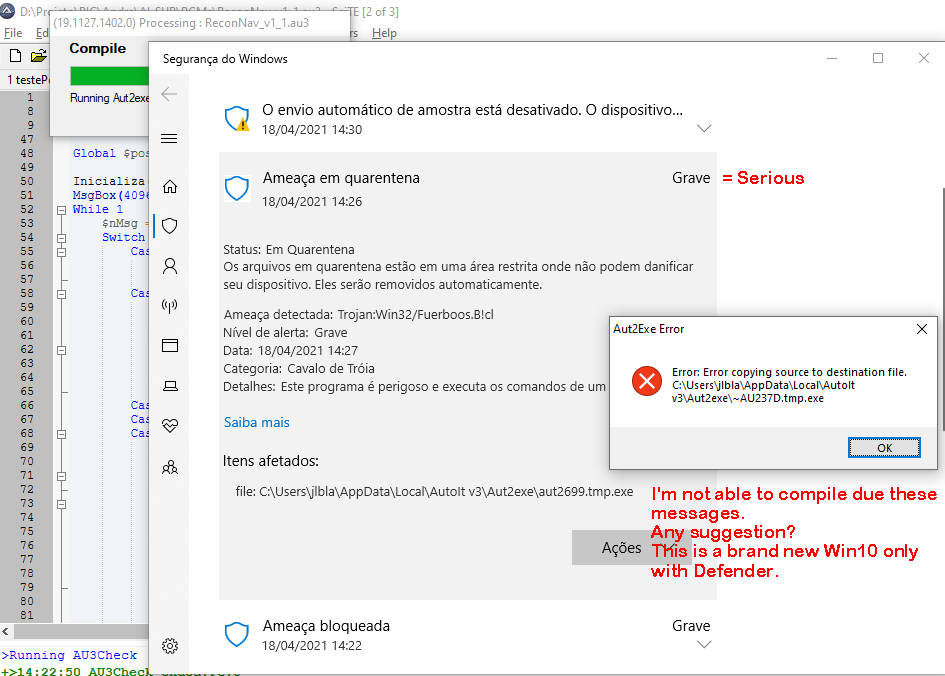
Thanks all you. My situation like this one. That is, when I compile it stops with the message, and Defender says it has Win32/Fuerboos.D!cl . At this program (very small) the noticeable point is that it writes at the registry (Current User). Without compilation, it runs and writes there OK. My question: do you know how I can tell Defender (train?) to not do that anymore when I compile? Or you know if I can deactivate Defender during my compilations?
-
joseLB reacted to a post in a topic:
Defender impairing compilations
-
joseLB reacted to a post in a topic:
Defender impairing compilations
-
I know this is a recurrent issue. THis is a brand new win10 with just Defender. How can I resolve this? Thanks in advance.
-
Hi Qdferrato Any news in your guibuikder?
-
Thanks @Danyfirex sorry I mean, using this x64 dll, I can compile in AU3 , 32 bits, or just can compile in au3 x64. The Windows/PC are 64 bits. I´m asking as with the old 32 bits dll, I only could compile in 32 bits. But with the 64, maybe due to other constrains, in some scripts I would have to use 32 bitx compilation.
-
Hi, the 64 bit dll Works also in 32 bits? Thanks Jose
-
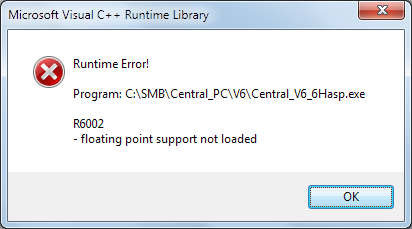
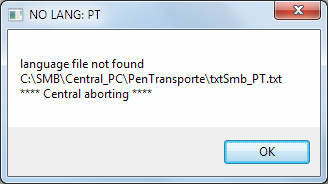
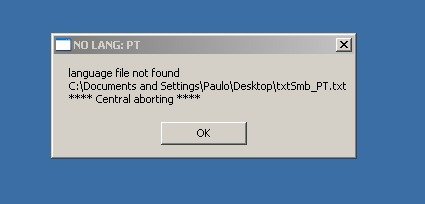
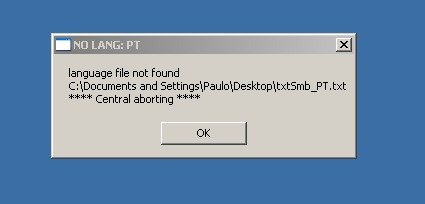
Hi I normally use HASP/sentinel dongles in executables generated in VB. It consists into "pack" the .exe and then the program only will run if the usb dongle is at the PC. So I packed the AU3 .exe same way. The image shows the message.when ran at the correct folder where the auxiliary files exists. But If I run it at a folder where there is no auxiliary folders, the messages shows that these files does not exists. That means that the program started ok, did a lot of things, but probably when needed floating point it was not able to load the runtime. Just remembering, VB .exe Works ok. Any clue? *PS: this "packing" was done at a Win XP virtual machine, as I do not have the program to pack it at Win7. Could that be the reason, as AU3 does not work at XP and VB Works? But at other hand, running at this XP machine I received the message that there is not auxiliary files at the folder... So it ran at XP... Regards Jose
-
joseLB reacted to a post in a topic:
RegWrite with Windows 10
-
RegWrite & RegRead at "HKEY_LOCAL_MACHINE"
joseLB replied to joseLB's topic in AutoIt General Help and Support
Thanks alot! -
joseLB reacted to a post in a topic:
RegWrite & RegRead at "HKEY_LOCAL_MACHINE"
-
RegWrite & RegRead at "HKEY_LOCAL_MACHINE"
joseLB replied to joseLB's topic in AutoIt General Help and Support
factfinder/and Subz Thank you really very much! I will try undestand all that, I could´nt imagine that withou your help. I´m using x32, and can´t compile in x64, due to some dlls I use, for example, rs232 serial one. But if that is stable even under KLM as the example from Subz , it´s ok for me. This script must work in win7 and win 10. Tomorrow I will try in a win10 system, but I think it will work there, correct? Thanks again Jose -
joseLB reacted to a post in a topic:
RegWrite & RegRead at "HKEY_LOCAL_MACHINE"
-
joseLB reacted to a post in a topic:
RegWrite & RegRead at "HKEY_LOCAL_MACHINE"
-
joseLB reacted to a post in a topic:
RegWrite & RegRead at "HKEY_LOCAL_MACHINE"
-
Hi This piece of code creates and reads OK a key at "HKEY_LOCAL_MACHINE" and can be changed for a key at "HKEY_CURRENT_USER" $sta= RegWrite("HKEY_LOCAL_MACHINE\SOFTWARE\Microsoft\Command Processor", "wav", "REG_SZ", "5555") MsgBox(4096,"wrote", $sta &@cr& @error) $zz= RegRead ("HKEY_LOCAL_MACHINE\SOFTWARE\Microsoft\Command Processor", "wav") MsgBox(4096,"readed","="&$zz &@cr& @error) Exit With HKEY_CURRENT_USER, in RegEdit we can see the created key, and we can create the key by hand/RegEdit and everything Works OK. At HKEY_LOCAL_MACHINE we can´t see the created key above thru RegEdit, but it Works (even not seeing, I can read). But if I create "by hand"/RegEdit the key, it can´t read it with $zz= RegRead ("HKEY_LOCAL_MACHINE.... above. I´m the PC´s WIN.7 administrator. Even so I ran RegEdit as administrator and also the compiled AU3 and also plain. No changes. edit: even if Try "HKEY_LOCAL_MACHINE\SOFTWARE\AAA", "wav", the same holds true. $sta= RegWrite("HKEY_LOCAL_MACHINE\SOFTWARE\AAA", "wav", "REG_SZ", "4444") MsgBox(4096,"wrote", $sta &@cr& @error) $zz= RegRead ("HKEY_LOCAL_MACHINE\SOFTWARE\AAA", "wav") MsgBox(4096,"readed","="&$zz &@cr& @error) Exit Seems that it creates this key at another place.... I can read the above value ("4444"), even after a boot, even the key not showing in regedit. And if I create it by hand key AAA/wav with a distinct value (666), t, it continues Reading the old value = 444. Thanks Jose
-
joseLB changed their profile photo
-
And how I eliminated eval() so I didnt have to use a long case or edit Koda output each change if I use na array? ;### we must assure that fields are in desired order at Koda... ;### group1 -> 11 radio buttons $tlNivMan_1 = GUICtrlCreateRadio("+25", 88, 35, 57, 17) $tlNivMan_2 = GUICtrlCreateRadio("+20", 88, 63, 49, 17) ... $tlNivMan_11 = GUICtrlCreateRadio("+20", 88, 63, 49, 17) ;### group2 -> 9 radio buttons $tlDenMan_1 = GUICtrlCreateRadio("até 1.125", 168, 35, 117, 17) ... $tlDenMan_9 = GUICtrlCreateRadio("1.125 a 1.150", 168, 67, 117, 17) ;### as fields are created sequentialy we can use 1st field ID value and increment for next fields of each group For $K=1 to 11 $idCtrl= $tlNivMan_1 + ($K-1) ;group1: 1st field ID value is incremented sequentially for the next 11 fields If GUICtrlRead( $idCtrl ) = $GUI_CHECKED Then $nivel= 25 - ($K-1) * 5 EndIf If $K > 9 Then ContinueLoop ;as group 2 has only 9 fields, skip 10..11 $idCtrl= $tlDenMan_1 + ($K-1) ;group2: 1st field ID value is incremented sequentially for the next 9 fields If GUICtrlRead( $idCtrl ) = $GUI_CHECKED Then $densidade= 1.101 + (($K-1)* 0.025) EndIf Next