speedi
-
Posts
144 -
Joined
-
Last visited
speedi's Achievements

Adventurer (3/7)
1
Reputation
-
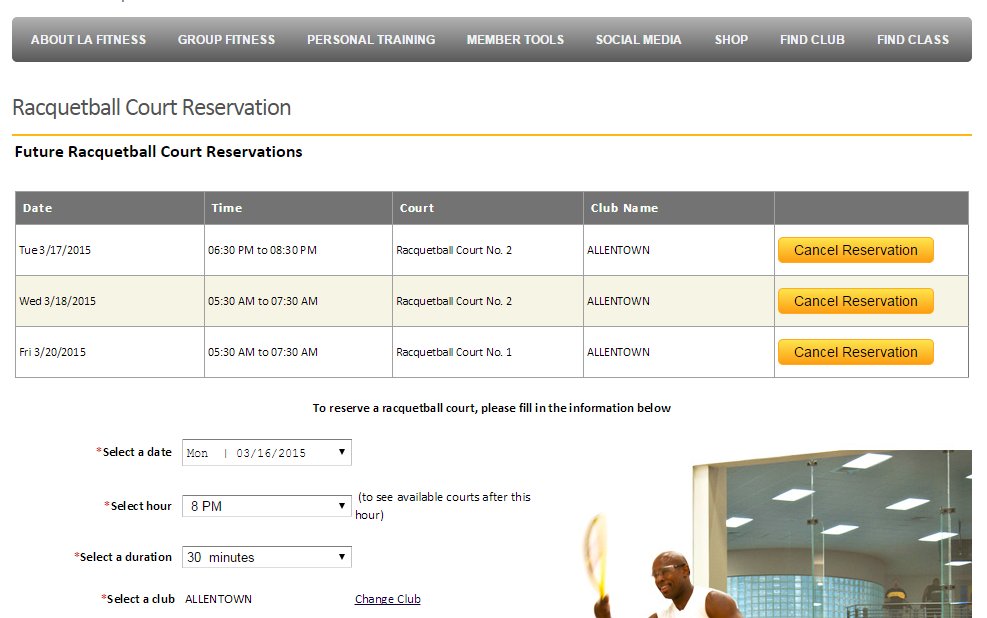
I need help with automating a web page to schedule a racquetball court at LAFITNESS. I have done several autoit scripts, but need help with web page content and choices. My platform is windows 10 on a Lenovo notebook... (screens might not be in order) screen 1 is shows the overall choices I need to make screen 2 shows the first choice which is the date. Normally the date I want is the very bottom date screen 3 is the duration choice will always be "120 minutes" screen 4 is the time will always be 5:30 screen 5 is the court choice preferential order is court 2, then court 4, then court 1 I sure would like to learn how to make these choices. I have had other occasions to need this knowledge. Thank you so very much... Jim
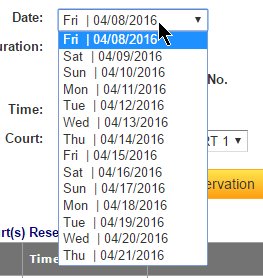
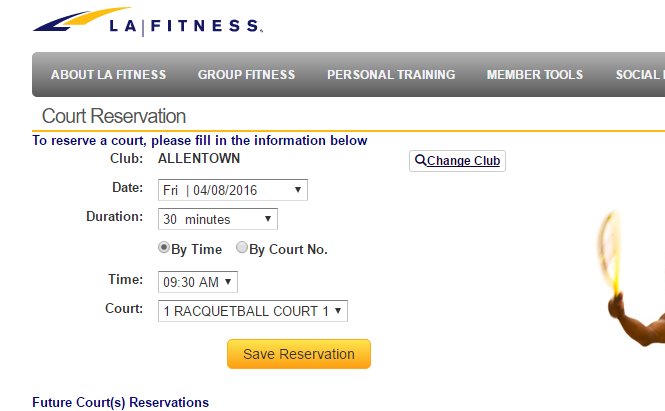
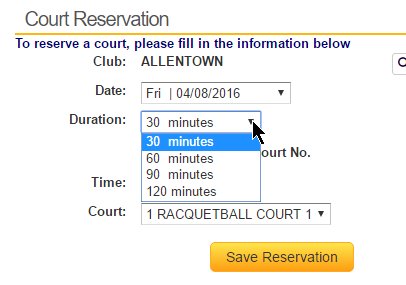
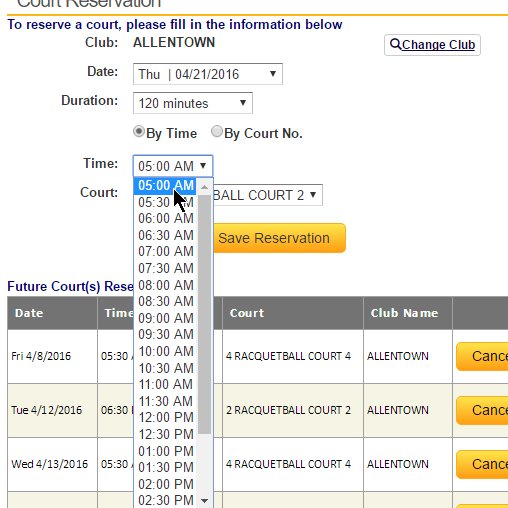
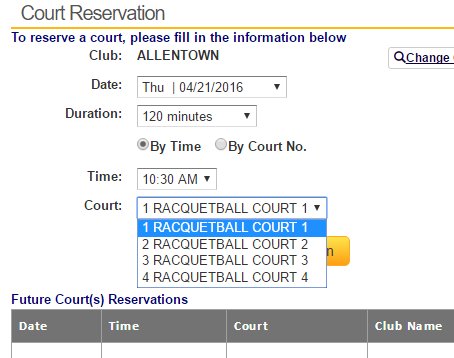
-
 I need some general direction (help) on using autoit to navigate to a drop down box (more than one actually) and then select an entry... I have attached a picture of the web page.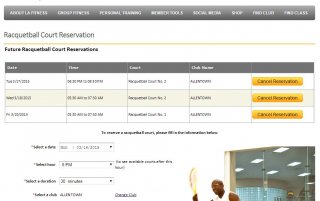
-
 Servant reacted to a post in a topic:
can't start google chrome with script.
Servant reacted to a post in a topic:
can't start google chrome with script.
-
How to copy ie8 internet options
speedi replied to speedi's topic in AutoIt General Help and Support
I thought the registry, but where can I find out which key(s)? -
how can I copy all internet explorer internet options to another computer?... that is: Tools - Internet Options including security trusted sites, custom level settings, privacy settings,advanced settings... ie 7 or ie 8 Thanks so much for any help....
-
error code for with _INetSmtpMail script
speedi replied to speedi's topic in AutoIt General Help and Support
I also wondered about the pw.. tried the UDF mentioned and it works just fine. thanks -
I want to send an email from my winxp pc using my gmail account. I get error code 4 (unable to create socket) when I execute the script... What am I doing wrong? This is my script: #include <INet.au3> $s_SmtpServer = "smtp.gmail.com" $s_FromName = "Jim Mihalski" $s_FromAddress = "myemail address here" $s_ToAddress = "myemail address here" $s_Subject = "My Test email via autoitUDF" Dim $as_Body[2] $as_Body[0] = "Testing the new email udf" $as_Body[1] = "Second Line" $Response = _INetSmtpMail ($s_SmtpServer, $s_FromName, $s_FromAddress, $s_ToAddress, $s_Subject, $as_Body) $err = @error If $Response = 1 Then MsgBox(0, "Success!", "Mail sent") Else MsgBox(0, "Error!", "Mail failed with error code " & $err) EndIf
-
I need a common path to outlook.pst file winxp for a backup script I am creating... windows XP office 2010 and older versions. thanks!
-
@mydocumentsdir points to wrong folder
speedi replied to speedi's topic in AutoIt General Help and Support
I only changed the users name in control panel. I guess that was a mistake... Can I add a new user now and copy all the users files to the new user.. I will change the name back to original user before I add the new user... Thanks fr your help... -
I use @mydocumentsdir in a few scipts... using it on an older PC that had an original owner (jeff) but had owner name changed to "robert" returns the old owners my docs folder... Can I do anything to make it reflect the new owner? I use the owners name for a backup destination.. Thanks for any help... Jim
-
This script is what I developed for a business to backup mydocs files saving up to 3 iterations of any changed file... First it copies any .bat & .txt files from the root folder (for logs and such) to a mydocs folder named "data". It also copies any office dot files to mydocs. It also does a screen capture for debugging in case it doesn't work as expected. It deletes old "temp" files also. It closes outlook before copy begins. It also saves the name of all open windows in a file named c:openwins.txt. It creates a file called c:backup.txt that shows all files backed up, where they were backed up and the date the backup was done. I use a scheduled job to print the file every morning so the user can see that in fact their backup is working... The script uses the "xcopy" command and will back up to a local drive or a network drive.. the backup does files with archive flag set and then clears the archive flag. Change the xcopy option for the archive flag if you want all files backed up the first time around...(remove /m) The destination folder and some other info is stored in an .ini file in the root directory.. You must create the folders wherever you will be backing up. The script still contains some options I do not use anymore.. they are commented out.... It also has an exclude files capability. THE SCRIPT: ; ; in the root folder (C:) create an ini file named user.ini ; that looks like this (without the semicolon) ;[sETTINGS] ;username=speedi ;dirnumber=1 9/8/2011 changed limit to 3 (three) due to disk being filled search for "if $dirno =" to change ; delete old TEMP filesI used /b and /i to check modified date only THE /a5 specifies files older than 5 days ; download decay here: http://www.linkdata.se/software/archives/ RunWait(@ComSpec & " /c " & 'c:decay.exe /a5 /b /d /i /n "C:Documents and SettingsJim MihalskiLocal SettingsTemp*.*"') ; Copy any *.bat files from root c: for backup RunWait(@ComSpec & " /c " & 'C:\Windows\System32\XCOPY.EXE " C:*.bat "C:Documents and SettingsJim MihalskiMy Documentsdata" /c/m/y') ; Copy any *.txt files from root c: for backup RunWait(@ComSpec & " /c " & 'C:\Windows\System32\XCOPY.EXE " C:*.txt "C:Documents and SettingsJim MihalskiMy Documentsdata" /c/m/y') ; Copy the MS word normal.dot file (macros, etc) to the data folder for backup RunWait(@ComSpec & " /c " & '"C:\Windows\System32\XCOPY.EXE "C:Documents and SettingsJim MihalskiApplication DataMicrosoftTemplatesNormal*.dot*" "C:Documents and SettingsJim MihalskiMy Documentsdata" /c/y"') ; following takes a screen snapshot and saves it as c:capture??.jpg ; so I can see what might have caused the daily backup ; not to run.... ; delete any prior capture jpg files FileDelete("c:capture*.jpg") ; If printscreen was started before, close it If ProcessExists("printscreen.exe") Then RunWait("C:Program FilesPrintScreenPrintScreen.exe /exit") EndIf ; Do special printscreen with parameters to capture full screen and save as capture??.jpg RunWait("C:Program FilesPrintScreenPrintScreen.exe /cptarea='2' /dir='c:' /image='1' /file='capture' /justnow") ; OK Now run regular printscreen Run("C:Program FilesPrintScreenPrintScreen.exe /cptarea='3'") Sleep(5000) ;#comments-end ; now check for any reminder or overdue Outlool windows ; if any exist close them before backup Opt("WinWaitDelay", 100) Opt("WinTitleMatchMode", 4) $loop = 0 While $loop < 2 If WinExists("Overdue -") Then If Not WinActive("Overdue -") Then WinActivate("Overdue -") Send("{ALTDOWN}c{ALTUP}1{ALTDOWN}s{ALTUP}") Sleep(500) Else $loop = 1 EndIf If WinExists("Reminder -") Then If Not WinActive("Reminder -") Then WinActivate("Reminder -") Send("{ALTDOWN}c{ALTUP}1{ALTDOWN}s{ALTUP}") Sleep(500) Else $loop = 2 EndIf WEnd ; next routine will compact Outlook pst file if Outlook is open then cloaes Outlook ; works for Outlook 2003 Opt("WinTitleMatchMode", 2) If WinExists("Microsoft Outlook") Then WinActivate("Microsoft Outlook", "") WinWaitActive("Microsoft Outlook", "") Send("{ALTDOWN}{f4}") winWaitClose("Microsoft Outlook", "") Else EndIf ; will list all open windows to file c:openwins.txt ; used to determine why outlook.pst isn't being copied FileDelete("c:openwins.txt") $file = FileOpen("c:openwins.txt", 1) ; Check if file opened for writing OK If $file = -1 Then MsgBox(0, "Error", "Unable to open file.") Exit EndIf $var = WinList() For $i = 1 To $var[0][0] ; Only display visble windows that have a title If $var[$i][0] <> "" And IsVisible($var[$i][1]) Then FileWrite($file, "Title=" & $var[$i][0] & @CRLF) ; MsgBox(0, "Details", "Title=" & $var[$i][0] & @LF & "Handle=" & $var[$i][1]) EndIf Next Func IsVisible($handle) If BitAND(WinGetState($handle), 2) Then Return 1 Else Return 0 EndIf EndFunc ;==>IsVisible $user = IniRead("c:user.ini", "settings", "username", "") $dirno = IniRead("c:user.ini", "settings", "dirnumber", "") $thedir = "I:backup" & $user & "" & $user & "-" & $dirno ; Once in four backups, do not exclude droid videos or my downloads - that will be backup dir #1 If $dirno = 1 Then FileCopy("C:excludewovideos.txt", "C:exclude.txt", 1) Else FileCopy("C:excludewithvideos.txt", "C:exclude.txt", 1) EndIf RunWait(@ComSpec & " /c " & 'C:\Windows\System32\XCOPY.EXE "' & @MyDocumentsDir & '" "' & $thedir & '" /c/s/m/y/exclude:exclude.txt >c:backup.txt') ; /A Copies files with the archive attribute set, doesn't change the attribute. ; /M Copies files with the archive attribute set, turns off the archive attribute. ; /S Copies directories and subdirectories except empty ones. ; /C Continues copying even if errors occur. ; /Y Overwrites existing files without prompting. ; Use consolewrite to see how the command will look.. can even copy and paste the consolewrite output to a DOS window to see if it works. ;ConsoleWrite('C:\Windows\System32\XCOPY.EXE "' & @MyDocumentsDir & '" "' & $thedir & '" /c/s/a/exclude:exclude.txt >c:backup.txt' & @CRLF) #comments-start WinWaitActive("C:\Windows\System32\XXCOPY.EXE") ; this code is a work around for the netwrok restriction Sleep(2000) ; two seconds If WinExists("C:\Windows\System32\XXCOPY.EXE", "") Then WinActivate("C:\Windows\System32\XXCOPY.EXE", "") Send("{Enter}") EndIf Sleep(2000) ; two seconds If WinExists("C:\Windows\System32\XXCOPY.EXE", "") Then WinActivate("C:\Windows\System32\XXCOPY.EXE", "") Send("{Enter}") EndIf #comments-end ;RunWait(@ComSpec & " /c " & "c:tm start /L >>c:backup.txt") ; MsgBox(0,"test","dir " & $thedir & " /S >>c:backup.txt") ;RunWait(@ComSpec & " /c " & "dir " & $thedir & " /S >>c:backup.txt") ;RunWait(@ComSpec & " /c " & "c:tm stop /L >>c:backup.txt") $dirno = $dirno + 1 If $dirno = 4 Then $dirno = 1 IniWrite("c:user.ini", "settings", "dirnumber", $dirno) ; now write a record of the backup end time to the backup.txt file $file = FileOpen("c:backup.txt", 1) ; (1) is write mode to append ; Check if file opened for writing OK If $file = -1 Then MsgBox(0, "Error", "Unable to open file.") Exit EndIf FileWrite($file, @CRLF & "Backup destination " & $thedir & @CRLF & @CRLF) FileWrite($file, "Backup Finished " & @MON & "/" & @MDAY & "/" & @YEAR & " -- " & @HOUR & ":" & @MIN & @CRLF) Exit
-
just figured out why it was not working.. I should have been using: runwait(@ComSpec & " /c " & etc. etc. Now it works in the script... Thanks so much for your help....
-
The debug line did produce the same result you had, but your method looks to be better... this is it.. C:\Windows\System32\XCOPY.EXE "C:Documents and SettingsJim MihalskiMy Documents" "c:testdir" /c/s/a/exclude:exclude.txt >c:backup.txt The problem is when that command is copied and pasted to a DOS window, the copy works just fine... BUT it does not work in the script.... nothing is copied. Can you try it in autoit? thanks
-
Thanks for your help but that did not work.. I did this - highlight the whole line (the part inside the parentheses) in Scite and then hit ALT-D which will give you a consolewrite line containing the data and the variables, so you can see exactly how it is going to look in the command line. Then I execute the lines and look at the console write command in the output box.. the part after "=" I copied that part and pasted into a dos window to try it... It works in the dos window, but not in autoit script.. Here is the entire script with the line you gave me. Thanks for taking the time to look at this... $thedir = "c:testdir" runwait('C:\Windows\System32\XCOPY.EXE "' & @MyDocumentsDir & '" "' & $thedir & '" /c/s/a/exclude:exclude.txt >c:backup.txt') ConsoleWrite('@@ Debug(' & @ScriptLineNumber & ') : ''C:\Windows\System32\XCOPY.EXE "'' & @MyDocumentsDir & ''" "'' & $thedir & ''" /c/s/a/exclude:exclude.txt >c:backup.txt'' = ' & 'C:\Windows\System32\XCOPY.EXE "' & @MyDocumentsDir & '" "' & $thedir & '" /c/s/a/exclude:exclude.txt >c:backup.txt' & @crlf & '>Error code: ' & @error & @crlf) ;### Debug Console
-
I have tried and tried, but I can not get this runwait command line to work.. I always have difficulty with quoted command lines... PLEASE HELP! THANK YOU SO VERY MUCH! Jim $thedir = "c:\testdir" runwait("C:\WINDOWS\SYSTEM32\XCOPY.EXE" & chr(34) & @MyDocumentsDir & CHR(34) & ' ' & chr(34) & $thedir & chr(34) & ' /c/s/a/exclude:\exclude.txt >c:\backup.txt')
-
This is an xcopy script. $thedir = "c:\testdir" runwait("C:\WINDOWS\SYSTEM32\XCOPY.EXE " & chr(34) & @MyDocumentsDir & CHR(34) & ' ' & chr(34) & $thedir & CHR(34) & ' /c/s/a/exclude:\exclude.txt >c:\backup.txt') It will not work with the ( >c:\backup.txt) command output pipe.. It does not do the copy! If I remove the pipe, the xcopy works. Any ideas are appreciated very much...