
Leaderboard


Popular Content
Showing content with the highest reputation on 11/27/2025 in all areas
-

DarkMode UDF for AutoIt's Win32GUIs
WildByDesign and one other reacted to jpm for a topic
I found in my old testing on the subject I hope it is usefullGUIDarkMode-Jpm.zip t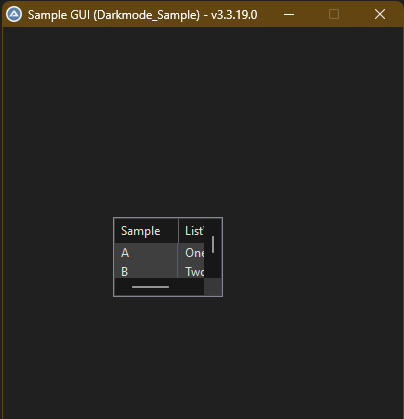 2 points
 -

DarkMode UDF for AutoIt's Win32GUIs
NoNameCode and one other reacted to argumentum for a topic
Is a theme ( BIB3 by niivu ) and the best ( and I would say the only way ) to have a theme in windows. The user shouldn't have to choose each app in a color. The OS should have a homogeneous theme throughout. This "dark mode" per app is wrong, but is what M$ does ¯\_(ツ)_/¯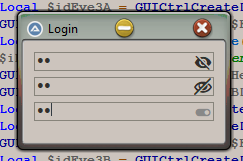
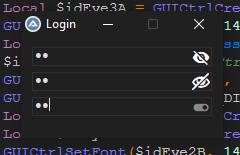
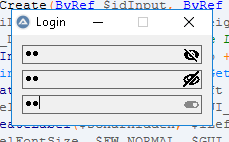 2 points
 -

DarkMode UDF for AutoIt's Win32GUIs
argumentum reacted to WildByDesign for a topic
Oops. I forgot about that. Is that the one called "tristate" or something like that?1 point -
DarkMode UDF for AutoIt's Win32GUIs
argumentum reacted to WildByDesign for a topic
This looks great and works really well. Thank you so much. This is very helpful. @argumentum This is significantly better than what I was going to post. Mine used _LVWndProc as well but did not function nearly as well. @NoNameCode By the way, if you haven't seen the awesome dark mode subclassing that @UEZ did recently in this thread, you should check it out. It's definitely the most thorough when it comes to the dark mode subclassing efforts and the final outcome of the dark mode GUI visuals.1 point -
Round buttons
ioa747 reacted to WildByDesign for a topic
@ioa747 I hope it is alright with you for me to share this example here. If not, please let me know and I can remove. I modified the example from @Nine into something that would work well for toolbar buttons and/or buttons with colors for different states that you can customize. The general design is flat, rectangle buttons. It seems to work incredibly well. I may extend if further at some point but at the moment I got distracted with other projects. However, I am definitely going to integrate this into at least one of my projects. ; From Nine #include <GUIConstants.au3> #include <WindowsConstants.au3> #include <StructureConstants.au3> #include <WinAPI.au3> #include <FrameConstants.au3> ; DPI awareness DllCall("User32.dll", "bool", "SetProcessDpiAwarenessContext" , "HWND", "DPI_AWARENESS_CONTEXT" -2) Global $iBackColorDef = 0x202020 Global $iBackColorHot = 0x808080 Global $iBackColorSel = 0x606060 Global $iBackColorDis = 0x000000 Global $iTextColorDef = 0xFFFFFF Global $iTextColorDis = 0xA0A0A0 Global Const $tagNMCUSTOMDRAWINFO = $tagNMHDR & ";dword DrawStage;handle hdc;" & $tagRECT & ";dword_ptr ItemSpec;uint ItemState;lparam lItemParam;" Global $idButton, $idButton2 Example() Func Example() Local $hGUI = GUICreate("Example") GUISetBkColor(0x000000) Local $sFont = "Segoe MDL2 Assets" GUISetFont(14, $FW_NORMAL, $GUI_FONTNORMAL, $sFont) $idButton = GUICtrlCreateButton(ChrW(0xE74D), 100, 100, -1, -1) Local $sFont = "Segoe UI" GUISetFont(14, $FW_NORMAL, $GUI_FONTNORMAL, $sFont) $idButton2 = GUICtrlCreateButton("Button", 100, 160, -1, -1) GUICtrlSendMsg($idButton, $WM_CHANGEUISTATE, 65537, 0) GUIRegisterMsg($WM_NOTIFY, WM_NOTIFY) GUISetState() While True Switch GUIGetMsg() Case $GUI_EVENT_CLOSE ExitLoop Case $idButton ConsoleWrite("Button1 was pressed" & @CRLF) Case $idButton2 ConsoleWrite("Button2 was pressed" & @CRLF) EndSwitch WEnd EndFunc ;==>Example Func WM_NOTIFY($hWnd, $iMsg, $wParam, $lParam) Local $tInfo = DllStructCreate($tagNMCUSTOMDRAWINFO, $lParam) If _WinAPI_GetClassName($tInfo.hWndFrom) = "Button" And IsString(GUICtrlRead($tInfo.IDFrom)) And $tInfo.Code = $NM_CUSTOMDRAW Then Local $tRECT = DllStructCreate($tagRECT, DllStructGetPtr($tInfo, "left")) Switch $tInfo.DrawStage Case $CDDS_PREPAINT If BitAND($tInfo.ItemState, $CDIS_HOT) Then ; set hot track back color $hBrush = _WinAPI_CreateSolidBrush($iBackColorHot) EndIf If BitAND($tInfo.ItemState, $CDIS_SELECTED) Then ; set selected back color $hBrush = _WinAPI_CreateSolidBrush($iBackColorSel) EndIf If BitAND($tInfo.ItemState, $CDIS_DISABLED) Then ; set disabled back color $hBrush = _WinAPI_CreateSolidBrush($iBackColorDis) EndIf If Not BitAND($tInfo.ItemState, $CDIS_HOT) And Not BitAND($tInfo.ItemState, $CDIS_SELECTED) And Not BitAND($tInfo.ItemState, $CDIS_DISABLED) Then $hBrush = _WinAPI_CreateSolidBrush($iBackColorDef) EndIf _WinAPI_FillRect($tInfo.hDC, $tRECT, $hBrush) _WinAPI_DeleteObject($hBrush) Return $CDRF_NOTIFYPOSTPAINT Case $CDDS_POSTPAINT _WinAPI_InflateRect($tRECT, -4, -6) If BitAND($tInfo.ItemState, $CDIS_HOT) Then ; set hot track back color _WinAPI_SetBkColor($tInfo.hDC, $iBackColorHot) ; set default text color _WinAPI_SetTextColor($tInfo.hDC, $iTextColorDef) EndIf If BitAND($tInfo.ItemState, $CDIS_SELECTED) Then ; set selected back color _WinAPI_SetBkColor($tInfo.hDC, $iBackColorSel) ; set default text color _WinAPI_SetTextColor($tInfo.hDC, $iTextColorDef) EndIf If BitAND($tInfo.ItemState, $CDIS_DISABLED) Then ; set disabled back color _WinAPI_SetBkColor($tInfo.hDC, $iBackColorDis) ; set disabled text color _WinAPI_SetTextColor($tInfo.hDC, $iTextColorDis) EndIf If Not BitAND($tInfo.ItemState, $CDIS_HOT) And Not BitAND($tInfo.ItemState, $CDIS_SELECTED) And Not BitAND($tInfo.ItemState, $CDIS_DISABLED) Then ; set default back color _WinAPI_SetBkColor($tInfo.hDC, $iBackColorDef) ; set default text color _WinAPI_SetTextColor($tInfo.hDC, $iTextColorDef) EndIf _WinAPI_DrawText($tInfo.hDC, GUICtrlRead($tInfo.IDFrom), $tRECT, BitOR($DT_CENTER, $DT_VCENTER)) EndSwitch EndIf Return $GUI_RUNDEFMSG EndFunc ;==>WM_NOTIFY1 point -
GUIFrame UDF - Melba23 version - 19 May 14
argumentum reacted to WildByDesign for a topic
This is perfect. I tested with and without ListViews and tested with that new parameter as True and False. Every possible test and scenario worked exactly as expected. I think that is the best solution. Thank you. On a side note: I found the problem (and solution) to the longstanding issue with the frames not showing. Issue with the frames not showing: Does not occur when running script from SciTE or VSCode Frames fail to show 100% of the time when running script from Explorer (or other programs as well) The previously proposed fix _WinAPI_ShowWindow does not work (confirmed) Also tried _WinAPI_SetFocus and various mouse clicking methods and all failed to resolve issue How did I track down the issue? Well, since the issue only occurs when executing the script (from Explorer, etc.), I could not use ConsoleWrite unfortunately. So I had to place a bunch of MsgBox's in various places until I nailed it down. The script is failing in the _GUIFrame_Create function. It basically pauses the script until you click anywhere in the GUI or titlebar. Failing line: GUISetState(@SW_SHOW, $hParent) It doesn't make sense to me why it fails (or technically pauses the script there). But if you put a MsgBox after it, you wont see the MsgBox pop up until you click somewhere in the GUI even if it's many minutes later. It pauses forever until you click. Very, very odd. I've never seen GUISetState just pause like that before. It doesn't even return a 1 or 0 until you click somewhere in the GUI. Solution: WinSetState($hParent, "", @SW_SHOW) Now why does this work and continue the script while the other one pauses the entire script? I have no idea. It really shocked me when I narrowed it down to GUISetState because that is not what I was expecting. Please keep in mind that this issue does not affect running the script from SciTE or VSCode. The GUI frames not showing issue only happens when running the scripts from Explorer or other programs where you are executing them. It probably would also affect running them from ShellExecute from another script as well. Anyway, I run a lot of scripts through VSCode but I also run an equal amount of scripts by double-clicking in Explorer. So in my opinion, this simple one-line fix is pretty important. I am very curious (and wish) that somebody could explain why this issue does not affect SciTE or VSCode but does happen when running from Explorer. I assumed that the command lines to the AutoIt binaries would be similar.1 point -
DarkMode UDF for AutoIt's Win32GUIs
NoNameCode reacted to argumentum for a topic
Oh no !, not "today". I've been bitching about it since 2019. You can see coders coding in a black background since the longest time. Why not the whole OS ?, ah !, why1 point -
DarkMode UDF for AutoIt's Win32GUIs
argumentum reacted to Nine for a topic
Today it is dark mode. Tomorrow it is going to be blueish mode. Next ???1 point