Search the Community
Showing results for tags 'jump'.
Found 3 results
-
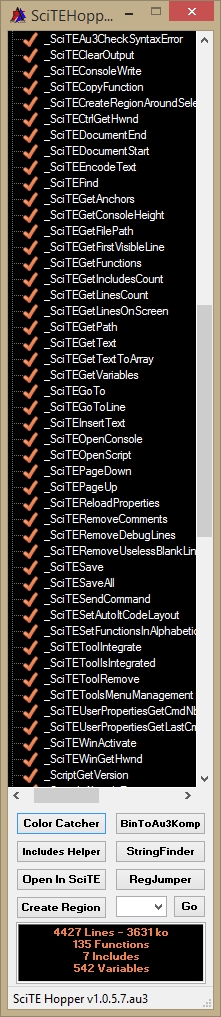
 SciTEHopper : Jump to Any function by one click and many other helpfull functions ! As Ashalshaikh suggested me after leaving me the task to continue >SciTE Hopper, i open a new Topic about it. It will be more easy for futures updates. Many helpfull functions in contextual menu. SciTE Hopper is now multipurpose. • ColorPicker added • BinaryToAu3Kompressor added • StringFinder added • RegJumper added • Edit With SciTE added (available in Options) • SpecialCharactersViewer added (available in Tray menu) New Contextual Menu : After a right Click on a function : • Copy function name • Insert a function header • Cut function • Copy function • Delete function • Create a variables List • Remove usseless Blank lines • Remove Debug lines ( all lines starting with ConsoleWrite or _ArrayDisplay ) • Set AutoIt Code Layout • Remove Comments For entire script : • Create a functions List • Create a variables List • Remove usseless Blank lines • Remove Debug lines ( all lines starting with ConsoleWrite or _ArrayDisplay ) • Set AutoIt Code Layout • Remove Comments • ( Open in SciTE a ) Duplicate of current Script in Temp Dir • ( Open in SciTE a ) Duplicate of current Script in Same Dir • Explore Parent Script Folder • Copy Script name • Copy Script path • Find Unused Functions • Find Unused Variables • Set all functions in alphabetic order.( func headers and regions ( in fact, all lines between functions ) are now supported.) SciTE Editor New Contextual Menu if SciTEHopper is added ( in Options ) to SciTE Editor : when you made a selection in SciTE Editor you can : • Open a Reg Key in Regedit using RegJumper • Open a Url in your default Browser • Search on google in your default Browser • Search on AutoIt Website in your default Browser Options are available by Tray Menu. A double click on tray icon will open clipboard content to SciTE Editor ( Handy when you have copied some code from your browser ) How to proceed for add SciTEHopper to SciTE Editor : Run Scite Editor, run Scite Hopper ( compiled! ) go to Options and select Add/Remove to SciTE Tab. then click on Add button and it's done ! Right click on SciTE Editor and choose SciTE Hopper in Contextual Menu for run it when you need it ! Update of 05 mai 2026 Previous downloads : 1287 Script and compiled version are available in the download section Now SciTEHopper Slide outside the riht side of the screen (can be disabled in options) When SciTE Window is active, put your mouse cursor on the right side of the screen for get it back SciTEHopper adapt his size to the SciTE Tabs lines count Right Click on SciTEHopper Gui for see All Context Menus Right Click on SciTEHopper TrayIcon for see All other Menus Thanks to Ashalshaikh, Melba23, Th3 MMA, Alzri2, taitel, Manadar, taz742, Yashield, Authenticity, Xenobiologist for their help and asdf8 for his >Includes Helper, azjio for his >FileSearch, BugFix and UEZ Update v1.0.7.2 2 bugs corrected and now SciTEHopper detects if a window is above SciTE to allow sliding without needing to activate the SciTE window Hope it help you and happy Scripting !
-
 Good evening everyone I was trying to insert function header to the functions of my script, but, in the SciTE console, this appears: Function or struct definition not found, unable to insert header. @Jos Any suggestion? Thanks in advance. Best Regards.
 -
In the serie of handy Tiny tools, here is RegJumper ! Open Registry Editor to the Reg Key who is copied in the clipboard. Reg Keys are automatically added to Regedit favorites. For an easy "navigation" favorites names are Reg Keys. If Key doesnt exists RegJumper offers you to open his ( existing ) parent Key. 32 or 64 bits Reg Keys will be adapted to your OS env. Favorites are limited to 20, deleting the oldest Keys. Without Reg Key in clipboard it open Registry Editor as usual to the last opened Key but if you hold "Left SHIFT" Key when clicking, it will be open to the root. Only an Icon used for compilation is downloaded at first execution. I was a bit tired of clicking in the registry editor for access a key. One day i have found a vbs script who use the fact to delete the last opened reg key for open it to the root. Playing with this astuce and after some tries for add some functionnalities, i have made this tiny tool. Previous Downloads : 795 Source : RegJumper1.0.1.7.au3.html Executable : RegJumper.exe.html (Once this html file downloaded, double click on it for start the download) Will be added to the next version of SciTE Hopper. Trying it, it's adopt it ! Hope you find it handy !