Search the Community
Showing results for tags 'sendkeys'.
Found 4 results
-
First off, Thank you for hard work on the WebDriver UDF. I would like to comment on the latest version. I love Autoit and all that have contributed. The Function _WD_ElementAction specifically where it was previously used to Send Keyboard keys for example "Enter". In previous versions a keyboard key like Enter ( "\uE007") could be sent as _WD_ElementAction($sSession,$sElement,"value","\uE007") This would send a keyboard Enter to $sElement. This works Great. I do not understand how to do this, _WD_Action($sSession,"actions","\uE007") does Not work. I realize that I may have to create a Json object to replicate this. My Solution for now will be to change wd_Core and remove "__WD_EscapeString($sOption)" and replace it with "$sOption" I always reference back to my "idea of Autoit" and that is to "Simplify windows". So if WebDriver is to be "W3C" compliant, I would hope that an additional function / option would be created to handle Keyboard Keys. Here is an Example of what I am commenting on; ===================================================================================================== Native Autoit Solution; Local $hWD=Winactivate("Autoit") WinWaitActive($hWD,3) Send("{ENTER}") Old WebDriver Solution; _WD_ElementAction($sSession,_WD_FindElement($sSession,"xpath","//*[@id="elSearchField"]"),"value","\uE007") New WebDriver Solution; Local $sAction = '{"actions":[{"type": "key", "id": "keyboard_1", "actions": [{"type": "keyDown", "value": "\uE009"}, ' & _ '{"type": "keyDown", "value": "\uE007"}, {"type": "keyUp", "value": "uE007"}"]}]}' _WD_Action($sSession, "actions", $sAction) ============================================================================================================ Thank you RobB
-
 Hello everyone, I could use some help with the following: I'm a speech recognition user and recently I've started to use AutoIt for additional scripting because sometimes it works faster. I would like to create an AutoIt script that will open the Chrome link on my desktop which is a a symbolic link, so that the Chrome cache is on my Ram drive: "C:\Program Files (x86)\Google\Chrome\Application\chrome.exe" --disk-cache-dir="A:\Browser Cache" Next I want to send the website address, in this case: https://autochords.com/ (with SendKeys) to the address bar. Then another SendKeys to send Enter. I want to use this script when I'm working on my girlfriend's computer, where speech recognition isn't installed. I could use ShellExecute ("Chrome", "https://autochords.com/") but then it won't run via my ram drive. I am a Dragon NaturallySpeaking user. The program has a scripting language similar to VBA. In Dragon the command is as follows: HeardWord "open","chrome" ; HeardWord acts as if I literally said "open Chrome" this command opens any desktop shortcut no matter which window I'm working in. Wait 1500 SendKeys "https://autochords.com/" SendKeys "{Enter}"; these last three lines are similar to AutoIt language I think..... Any help would be appreciated. Rob
 -
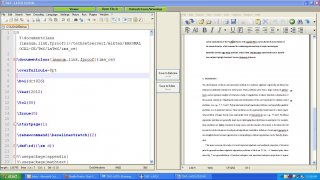
Hi Forum, I have created a VB.net Program in which i have used two panels, The panels contain two text editors (Editor1, Editor2) in each panel, I have created 2 buttons in between the panels (1. Save Editor1, 2. Save Editor2), My requirement is if i click the button (1.Save Editor 1), it shud send CTRL+S to the panel 1 which contains Editor 1, and the same with Editor 2, The Editor 1 is nothing but notepad++ text editor, i tried to send keys to notepad++ when it opened outside my VBform created Window, it works fine, but if i cal notepad++ inside my VB form, my autoit script not sending keys to the notepad++, i dont know what is the problem, i googled a lot about it, but of no use, I tried to send keys from VB.net itself and that also failing, please guide me My Autoit script Winactivate ("[class:notepad++]") sleep(500) Winwaitactive("[class:notepad++]") ControlSend("[class:notepad++]", "", "", "^{s}") I have attached the screenshot of my VB.net created form Thanks & Regards Sathish V.
-
Hey ppl, i've tried to make a script to send a Chr from the extended ascii and the only way i could make it work is this way, is there other (better) ways of doing this or is this the right approach, anyways since this works for me i thought i post it if anyone else has had troubles with special chr. #include <IE.au3> $g_szVersion = "ieatt" If WinExists($g_szVersion) Then Exit ; EXIT! AutoItWinSetTitle($g_szVersion) Local $oIE = _IEAttach("Mystart") WinActivate("Mystart") ;MsgBox(0, "The URL", _IEPropertyGet($oIE, "locationurl")) sleep(1000) Send("!y") sleep(1000) Local $var = Chr(229) send($var) sleep(1000) This example triggers a submeny link in IE with the Chr å (in my browser anyway)