
Danyfirex
-
Posts
2,682 -
Joined
-
Last visited
-
Days Won
40









About Danyfirex

- Birthday 04/04/1915



Danyfirex's Achievements

-
 Danyfirex reacted to a post in a topic:
AutoIt Wrapper For RapidOCR
Danyfirex reacted to a post in a topic:
AutoIt Wrapper For RapidOCR
-
Danyfirex reacted to a post in a topic:
MAP display - Display the contents of a MAP-type variable in a TreeView.
-
Danyfirex reacted to a post in a topic:
BrAINPLAY (intuitiveplayer)
-
Danyfirex reacted to a post in a topic:
SSH/Telnet2MQTT/GUI (VigorxDSLMonitor)
-
Danyfirex reacted to a post in a topic:
My AGENTS.md
-
Danyfirex reacted to a post in a topic:
Learning WinRt from AutoIt goal to read OCR (and understand the logic)
-
Danyfirex reacted to a post in a topic:
A sign of life; a development update; Sven (SOLVE-SMART) says Goodbye to AutoIt (Community)!
-
Danyfirex reacted to a post in a topic:
Learning WinRt from AutoIt goal to read OCR (and understand the logic)
-
Danyfirex reacted to a post in a topic:
Learning WinRt from AutoIt goal to read OCR (and understand the logic)
-
Danyfirex reacted to a post in a topic:
Google Chat Unread Notifier
-
 just for fun. clean de code (if you want) 🤣 #include <GuiConstants.au3> #include <Constants.au3> Global Const $S_OK = 0 Global Enum $eRender, $eCapture Global Enum $eConsole, $eMultimedia, $eCommunications Global Const $sCLSID_MMDeviceEnumerator = "{BCDE0395-E52F-467C-8E3D-C4579291692E}" Global Const $sIID_IMMDeviceEnumerator = "{A95664D2-9614-4F35-A746-DE8DB63617E6}" Global Const $tagIMMDeviceEnumerator = "EnumAudioEndpoints hresult(dword;dword;ptr*);" & _ "GetDefaultAudioEndpoint hresult(dword;dword;ptr*);" & _ "GetDevice hresult(wstr;ptr*);" & _ "RegisterEndpointNotificationCallback hresult(ptr);" & _ "UnregisterEndpointNotificationCallback hresult(ptr);" Global Const $IID_IMMDeviceCollection = "{0BD7A1BE-7A1A-44DB-8397-CC5392387B5E}" Global Const $tagIMMDeviceCollection = "GetCount hresult(uint*);" & _ "Item hresult(uint;ptr*)" Global Const $sIID_IMMDevice = "{D666063F-1587-4E43-81F1-B948E807363F}" Global Const $tagIMMDevice = "Activate hresult(clsid;dword;variant*;ptr*);" & _ "OpenPropertyStore hresult(dword;ptr*);" & _ "GetId hresult(ptr*);" & _ "GetState hresult(dword*);" Global Const $sIID_IAudioMeterInformation = "{C02216F6-8C67-4B5B-9D00-D008E73E0064}" Global Const $tagIAudioMeterInformation = "GetPeakValue hresult(float*);" & _ "GetMeteringChannelCount hresult(dword*);" & _ "GetChannelsPeakValues hresult(dword;float*);" & _ "QueryHardwareSupport hresult(dword*);" Global Const $sIID_IAudioClient = "{1CB9AD4C-DBFA-4c32-B178-C2F568A703B2}" Global Const $tagIAudioClient = "Initialize hresult(dword;dword;int64;int64;ptr;ptr);" & _ "GetBufferSize hresult();" & _ "GetStreamLatency hresult();" & _ "GetCurrentPadding hresult(dword*);" & _ "IsFormatSupported hresult();" & _ "GetMixFormat hresult(ptr*);" & _ "GetDevicePeriod hresult();" & _ "Start hresult();" & _ "Stop hresult();" & _ "Reset hresult();" & _ "SetEventHandle hresult();" & _ "GetService hresult(clsid;ptr*);" Global Const $IID_IAudioCaptureClient = "{C8ADBD64-E71E-48A0-A4DE-185C395CD317}" Global Const $tagIAudioCaptureClient = _ "GetBuffer hresult(ptr*;uint*;uint*;int64*;int64*);" & _ "ReleaseBuffer hresult(uint);" & _ "GetNextPacketSize hresult(uint*);" Global Const $IID_IPropertyStore = "{886d8eeb-8cf2-4446-8d02-cdba1dbdcf99}" Global Const $tagIPropertyStore = "GetCount hresult(dword*);" & _ "GetAt hresult(dword;ptr*);" & _ "GetValue hresult(struct*;variant*);" & _ "SetValue hresult(struct*;variant);" & _ "Commit hresult();" Global Const $sPKEY_Device_FriendlyName = "{a45c254e-df1c-4efd-8020-67d146a850e0} 14" Global $g_oAudioCaptureClient = 0 Global $oAudioMeterInformation = _MicVolObject("Microphone (Logi USB Headset)") If Not IsObj($oAudioMeterInformation) Then Exit MsgBox($MB_SYSTEMMODAL, "Error", "Unable to mic audio meter") Global $hGUI = GUICreate("", 80, 300, -1, -1, $WS_BORDER + $WS_POPUP) Global $hControl = GUICtrlCreateProgress(20, 20, 40, 260, $PBS_VERTICAL) AdlibRegister("_LevelMeter", 45) GUISetState() While GUIGetMsg() <> $GUI_EVENT_CLOSE WEnd AdlibUnRegister() Func _LevelMeter() Local $iPeak Local $iPacketLength $g_oAudioCaptureClient.GetNextPacketSize($iPacketLength) If $iPacketLength > 0 Then If $oAudioMeterInformation.GetPeakValue($iPeak) = $S_OK Then $iCurrentRead = 100 * $iPeak GUICtrlSetData($hControl, $iCurrentRead) If $iCurrentRead Then ConsoleWrite($iCurrentRead & @CRLF) EndIf EndIf EndFunc ;==>_LevelMeter Func _MicVolObject($sDeviceName = Default) Local Const $CLSCTX_INPROC_SERVER = 0x1 Local Const $CLSCTX_INPROC_HANDLER = 0x2 Local Const $CLSCTX_LOCAL_SERVER = 0x4 Local Const $STGM_READ = 0 Local Const $DEVICE_STATE_ACTIVE = 0x00000001 Local Const $CLSCTX_ALL = BitOR($CLSCTX_INPROC_SERVER, $CLSCTX_INPROC_HANDLER, $CLSCTX_LOCAL_SERVER) Local $oMMDeviceEnumerator = ObjCreateInterface($sCLSID_MMDeviceEnumerator, $sIID_IMMDeviceEnumerator, $tagIMMDeviceEnumerator) If @error Then Return SetError(1, 0, 0) Local $pDefaultDevice Local $oDefaultDevice If $sDeviceName = Default Then $oMMDeviceEnumerator.GetDefaultAudioEndpoint($eCapture, $eConsole, $pDefaultDevice) $oDefaultDevice = ObjCreateInterface($pDefaultDevice, $sIID_IMMDevice, $tagIMMDevice) If Not IsObj($oDefaultDevice) Then Return SetError(3, 0, 0) If Not $pDefaultDevice Then Return SetError(2, 0, 0) Local $pProps $oDefaultDevice.OpenPropertyStore($STGM_READ, $pProps) $oProps = ObjCreateInterface($pProps, $IID_IPropertyStore, $tagIPropertyStore) ; Collect FriendlyName property Local $tPKEY_Device_FriendlyName = _WinAPI_PKEYFromString($sPKEY_Device_FriendlyName) Local $sName $oProps.GetValue($tPKEY_Device_FriendlyName, $sName) ConsoleWrite(">USING DEFAULT DEVICE: " & $sName & @CRLF) Else Local $pCollection $oMMDeviceEnumerator.EnumAudioEndpoints($eCapture, $DEVICE_STATE_ACTIVE, $pCollection) Local $oCollection = ObjCreateInterface($pCollection, $IID_IMMDeviceCollection, $tagIMMDeviceCollection) Local $iCount $oCollection.GetCount($iCount) ConsoleWrite("Number of Capture Devices: " & $iCount & @CRLF) Local $bMatched = False Local $pDevice Local $oDevice Local $oDefaultDevice For $i = 0 To $iCount - 1 ;~ Item at "i" index is audio endpoint device $oCollection.Item($i, $pDevice) $oDevice = ObjCreateInterface($pDevice, $sIID_IMMDevice, $tagIMMDevice) Local $pProps $oDevice.OpenPropertyStore($STGM_READ, $pProps) $oProps = ObjCreateInterface($pProps, $IID_IPropertyStore, $tagIPropertyStore) ; Collect FriendlyName property Local $tPKEY_Device_FriendlyName = _WinAPI_PKEYFromString($sPKEY_Device_FriendlyName) Local $sName $oProps.GetValue($tPKEY_Device_FriendlyName, $sName) ConsoleWrite($sName & @CRLF) If $sName = $sDeviceName Then $oDefaultDevice = $oDevice $bMatched = True ExitLoop EndIf Next EndIf If $sDeviceName <> Default Then If Not $bMatched Then ConsoleWrite("!NOT FOUND DEVICE: " & $sDeviceName & @CRLF) Return SetError(8, 0, 0) EndIf ConsoleWrite(">USING SELECTED DEVICE: " & $sName & @CRLF) EndIf Local $pAudioClient $oDefaultDevice.Activate($sIID_IAudioClient, $CLSCTX_ALL, 0, $pAudioClient) Local $oAudioClient = ObjCreateInterface($pAudioClient, $sIID_IAudioClient, $tagIAudioClient) If Not IsObj($oAudioClient) Then Return SetError(4, 0, 0) Local $pWFX $oAudioClient.GetMixFormat($pWFX) Global $tWAVEFORMATEX = DllStructCreate("ushort wFormatTag;ushort nChannels;dword nSamplesPerSec;" & _ "dword nAvgBytesPerSec;ushort nBlockAlign;ushort wBitsPerSample;" & _ "ushort cbSize", $pWFX) ;~ ConsoleWrite($tWAVEFORMATEX.cbSize & @CRLF) ;~ ConsoleWrite($tWAVEFORMATEX.wFormatTag & @CRLF) ;~ ConsoleWrite($tWAVEFORMATEX.nChannels & @CRLF) ;~ ConsoleWrite($tWAVEFORMATEX.nSamplesPerSec & @CRLF) ;~ ConsoleWrite($tWAVEFORMATEX.nAvgBytesPerSec & @CRLF) ;~ ConsoleWrite($tWAVEFORMATEX.nBlockAlign & @CRLF) ;~ ConsoleWrite($tWAVEFORMATEX.wBitsPerSample & @CRLF) $oAudioClient.Initialize(0, 0, 10000000, 0, $pWFX, 0) Local $pAudioCaptureClient $oAudioClient.GetService($IID_IAudioCaptureClient, $pAudioCaptureClient) Local $oAudioCaptureClient = ObjCreateInterface($pAudioCaptureClient, $IID_IAudioCaptureClient, $tagIAudioCaptureClient) If Not IsObj($oAudioCaptureClient) Then Return SetError(5, 0, 0) $g_oAudioCaptureClient = $oAudioCaptureClient $oAudioClient.Start() Local $pAudioMeterInformation $oDefaultDevice.Activate($sIID_IAudioMeterInformation, $CLSCTX_ALL, 0, $pAudioMeterInformation) If Not $pAudioMeterInformation Then Return SetError(6, 0, 0) Return ObjCreateInterface($pAudioMeterInformation, $sIID_IAudioMeterInformation, $tagIAudioMeterInformation) EndFunc ;==>_MicVolObject Func _WinAPI_PKEYFromString($sPKEY, $pID = Default) Local $tPKEY = DllStructCreate("byte GUID[16]; dword PID;") DllCall("propsys.dll", "long", "PSPropertyKeyFromString", "wstr", $sPKEY, "struct*", $tPKEY) If $pID <> Default Then DllStructSetData($tPKEY, "PID", $pID) Return $tPKEY EndFunc ;==>_WinAPI_PKEYFromString Saludos
 -
Enum all devices with EnumAudioEndpoints get each IMMDevice use OpenPropertyStore to get FriendlyName and use that device instance that matches what you want. Saludos
-
Hello, You need to do some changes to initialize a Client/CaptureClient #include <GuiConstants.au3> #include <Constants.au3> Global Const $S_OK = 0 Global Enum $eRender, $eCapture Global Enum $eConsole, $eMultimedia, $eCommunications Global Const $sCLSID_MMDeviceEnumerator = "{BCDE0395-E52F-467C-8E3D-C4579291692E}" Global Const $sIID_IMMDeviceEnumerator = "{A95664D2-9614-4F35-A746-DE8DB63617E6}" Global Const $tagIMMDeviceEnumerator = "EnumAudioEndpoints hresult(dword;dword;ptr*);" & _ "GetDefaultAudioEndpoint hresult(dword;dword;ptr*);" & _ "GetDevice hresult(wstr;ptr*);" & _ "RegisterEndpointNotificationCallback hresult(ptr);" & _ "UnregisterEndpointNotificationCallback hresult(ptr);" Global Const $sIID_IMMDevice = "{D666063F-1587-4E43-81F1-B948E807363F}" Global Const $tagIMMDevice = "Activate hresult(clsid;dword;variant*;ptr*);" & _ "OpenPropertyStore hresult(dword;ptr*);" & _ "GetId hresult(ptr*);" & _ "GetState hresult(dword*);" Global Const $sIID_IAudioMeterInformation = "{C02216F6-8C67-4B5B-9D00-D008E73E0064}" Global Const $tagIAudioMeterInformation = "GetPeakValue hresult(float*);" & _ "GetMeteringChannelCount hresult(dword*);" & _ "GetChannelsPeakValues hresult(dword;float*);" & _ "QueryHardwareSupport hresult(dword*);" Global Const $sIID_IAudioClient = "{1CB9AD4C-DBFA-4c32-B178-C2F568A703B2}" Global Const $tagIAudioClient = "Initialize hresult(dword;dword;int64;int64;ptr;ptr);" & _ "GetBufferSize hresult();" & _ "GetStreamLatency hresult();" & _ "GetCurrentPadding hresult(dword*);" & _ "IsFormatSupported hresult();" & _ "GetMixFormat hresult(ptr*);" & _ "GetDevicePeriod hresult();" & _ "Start hresult();" & _ "Stop hresult();" & _ "Reset hresult();" & _ "SetEventHandle hresult();" & _ "GetService hresult(clsid;ptr*);" Global Const $IID_IAudioCaptureClient = "{C8ADBD64-E71E-48A0-A4DE-185C395CD317}" Global Const $tagIAudioCaptureClient = _ "GetBuffer hresult(ptr*;uint*;uint*;int64*;int64*);" & _ "ReleaseBuffer hresult(uint);" & _ "GetNextPacketSize hresult(uint*);" Global $g_oAudioCaptureClient = 0 Global $oAudioMeterInformation = _MicVolObject() If Not IsObj($oAudioMeterInformation) Then Exit MsgBox($MB_SYSTEMMODAL, "Error", "Unable to mic audio meter") Global $hGUI = GUICreate("", 80, 300, -1, -1, $WS_BORDER + $WS_POPUP) Global $hControl = GUICtrlCreateProgress(20, 20, 40, 260, $PBS_VERTICAL) AdlibRegister("_LevelMeter", 45) GUISetState() While GUIGetMsg() <> $GUI_EVENT_CLOSE WEnd AdlibUnRegister() Func _LevelMeter() Local $iPeak Local $iPacketLength $g_oAudioCaptureClient.GetNextPacketSize($iPacketLength) If $iPacketLength > 0 Then If $oAudioMeterInformation.GetPeakValue($iPeak) = $S_OK Then $iCurrentRead = 100 * $iPeak GUICtrlSetData($hControl, $iCurrentRead) If $iCurrentRead Then ConsoleWrite($iCurrentRead & @CRLF) EndIf EndIf EndFunc ;==>_LevelMeter Func _MicVolObject() Local Const $CLSCTX_INPROC_SERVER = 0x1 Local Const $CLSCTX_INPROC_HANDLER = 0x2 Local Const $CLSCTX_LOCAL_SERVER = 0x4 Local Const $CLSCTX_ALL = BitOR($CLSCTX_INPROC_SERVER, $CLSCTX_INPROC_HANDLER, $CLSCTX_LOCAL_SERVER) Local $oMMDeviceEnumerator = ObjCreateInterface($sCLSID_MMDeviceEnumerator, $sIID_IMMDeviceEnumerator, $tagIMMDeviceEnumerator) If @error Then Return SetError(1, 0, 0) Local $pDefaultDevice $oMMDeviceEnumerator.GetDefaultAudioEndpoint($eCapture, $eConsole, $pDefaultDevice) If Not $pDefaultDevice Then Return SetError(2, 0, 0) Local $oDefaultDevice = ObjCreateInterface($pDefaultDevice, $sIID_IMMDevice, $tagIMMDevice) If Not IsObj($oDefaultDevice) Then Return SetError(3, 0, 0) Local $pAudioClient $oDefaultDevice.Activate($sIID_IAudioClient, $CLSCTX_ALL, 0, $pAudioClient) Local $oAudioClient = ObjCreateInterface($pAudioClient, $sIID_IAudioClient, $tagIAudioClient) If Not IsObj($oAudioClient) Then Return SetError(4, 0, 0) Local $pWFX $oAudioClient.GetMixFormat($pWFX) Global $tWAVEFORMATEX = DllStructCreate("ushort wFormatTag;ushort nChannels;dword nSamplesPerSec;" & _ "dword nAvgBytesPerSec;ushort nBlockAlign;ushort wBitsPerSample;" & _ "ushort cbSize", $pWFX) ;~ ConsoleWrite($tWAVEFORMATEX.cbSize & @CRLF) ;~ ConsoleWrite($tWAVEFORMATEX.wFormatTag & @CRLF) ;~ ConsoleWrite($tWAVEFORMATEX.nChannels & @CRLF) ;~ ConsoleWrite($tWAVEFORMATEX.nSamplesPerSec & @CRLF) ;~ ConsoleWrite($tWAVEFORMATEX.nAvgBytesPerSec & @CRLF) ;~ ConsoleWrite($tWAVEFORMATEX.nBlockAlign & @CRLF) ;~ ConsoleWrite($tWAVEFORMATEX.wBitsPerSample & @CRLF) $oAudioClient.Initialize(0, 0, 10000000, 0, $pWFX, 0) Local $pAudioCaptureClient $oAudioClient.GetService($IID_IAudioCaptureClient, $pAudioCaptureClient) Local $oAudioCaptureClient = ObjCreateInterface($pAudioCaptureClient, $IID_IAudioCaptureClient, $tagIAudioCaptureClient) If Not IsObj($oAudioCaptureClient) Then Return SetError(5, 0, 0) $g_oAudioCaptureClient = $oAudioCaptureClient $oAudioClient.Start() Local $pAudioMeterInformation $oDefaultDevice.Activate($sIID_IAudioMeterInformation, $CLSCTX_ALL, 0, $pAudioMeterInformation) If Not $pAudioMeterInformation Then Return SetError(6, 0, 0) Return ObjCreateInterface($pAudioMeterInformation, $sIID_IAudioMeterInformation, $tagIAudioMeterInformation) EndFunc ;==>_MicVolObject Saludos
-
See you along the way. stay safe. A similar thing happens to me. Lately, I don’t really use AutoIt anymore. I only use it to answer questions, challenging ones entertain me. I’m even one step away from leaving technology behind and becoming a farmer. 👨🌾 Saludos
-
Do you have a valid license? try this. I'm able to make it work partially with CreateInstanceLic but I dont have a valid license to check if it works correctly. #AutoIt3Wrapper_UseX64=N #include <MsgBoxConstants.au3> _Example() Func _Example() ;========================================================= ; TEST ;========================================================= Local $sKey = "LICENSE" Local $sLog = @ScriptDir & "\tx_debug.log" Local $oTX = _TXTextControl_Create($sKey, True, $sLog) If IsObj($oTX) Then MsgBox($MB_ICONINFORMATION, "TX Text Control", "OK - control initialized") ; SAFE ACCESS $oTX.Text = "Hello TX Text Control" GUICreate("Test TX Text", 640, 580, (@DesktopWidth - 640) / 2, (@DesktopHeight - 580) / 2) GUICtrlCreateObj($oTX, 10, 40, 600, 360) GUISetState(@SW_SHOW) ;Show GUI $oTX.Text = "Hello TX Text Control" ;~ $oTX.AboutBox() ; Loop until the user exits. While 1 $iMsg = GUIGetMsg() Select Case $iMsg = -3 ExitLoop EndSelect WEnd GUIDelete() Else MsgBox($MB_ICONERROR, "TX Text Control", "Initialization error") EndIf EndFunc ;==>_Example ;========================================================= ; MAIN FUNCTION ;========================================================= Func _TXTextControl_Create($sLicenseKey, $bDebug = True, $sLogFile = "") Local Const $CLSCTX_INPROC_SERVER = 1 Local Const $CLSID_TX = "{4424D201-9EB2-11F0-BB49-7085C299DB80}" Local Const $IID_IClassFactory2 = "{B196B28F-BAB4-101A-B69C-00AA00341D07}" Local Const $IID_IDispatch = "{00020400-0000-0000-C000-000000000046}" Global Const $tagIClassFactory = "CreateInstance hresult(ptr;clsid;ptr*);" & _ "LockServer hresult(bool);" Global Const $tagIClassFactory2 = $tagIClassFactory & "GetLicInfo hresult(struct*);RequestLicKey hresult(dword;bstr*);CreateInstanceLic hresult(ptr;ptr;clsid;bstr;object*);" __log("INIT COM", $bDebug, $sLogFile) DllCall("ole32.dll", "long", "CoInitialize", "ptr", 0) ;========================================================= ; CLSID / IID ;========================================================= Local $tCLSID = DllStructCreate("byte[16]") Local $pCLSID = DllStructGetPtr($tCLSID) Local $tIIDFactory = DllStructCreate("byte[16]") Local $tIIDDispatch = DllStructCreate("byte[16]") Local $aCLSID = DllCall("ole32.dll", "long", "CLSIDFromString", _ "wstr", $CLSID_TX, _ "ptr", $pCLSID) If @error Or $aCLSID[0] <> 0 Then __log("CLSIDFromString FAILED", $bDebug, $sLogFile) Return 0 EndIf DllCall("ole32.dll", "long", "IIDFromString", _ "wstr", $IID_IClassFactory2, _ "ptr", DllStructGetPtr($tIIDFactory)) DllCall("ole32.dll", "long", "IIDFromString", _ "wstr", $IID_IDispatch, _ "ptr", DllStructGetPtr($tIIDDispatch)) ;========================================================= ; MODE 1 - SAFE IClassFactory2 (NO CRASH) ;========================================================= __log("MODE 1: CreateInstanceLic (SAFE)", $bDebug, $sLogFile) Local $aFactory = DllCall("ole32.dll", "long", "CoGetClassObject", _ "ptr", $pCLSID, _ "dword", $CLSCTX_INPROC_SERVER, _ "ptr", 0, _ "ptr", DllStructGetPtr($tIIDFactory), _ "ptr*", 0) If @error Or $aFactory[0] <> 0 Then __log("MODE 1 FAIL: CoGetClassObject", $bDebug, $sLogFile) Else Local $pFactory = $aFactory[5] ; SAFE COM WRAP (NO VTABLE, NO DLLCALLADDRESS) Local $oFactory = ObjCreateInterface($pFactory, $IID_IClassFactory2, $tagIClassFactory2) If IsObj($oFactory) Then Local $oObj = Null Local $hResult = $oFactory.CreateInstanceLic(0, 0, $IID_IDispatch, $sLicenseKey, $oObj) If IsObj($oObj) Then __log("MODE 1 SUCCESS", $bDebug, $sLogFile) Return $oObj EndIf EndIf __log("MODE 1 FAILED: CreateInstanceLic", $bDebug, $sLogFile) EndIf ;========================================================= ; MODE 2 - License Manager ;========================================================= __log("MODE 2: LicManager", $bDebug, $sLogFile) Local $oLic = ObjCreate("TIS.TX.LicManager.34") If IsObj($oLic) Then __log("LicManager OK", $bDebug, $sLogFile) Else __log("LicManager FAIL", $bDebug, $sLogFile) EndIf ;========================================================= ; MODE 3 - Direct ActiveX ;========================================================= __log("MODE 3: Direct Create", $bDebug, $sLogFile) Local $oTX = ObjCreate("TIS.TX.TextControl.34") If IsObj($oTX) Then __log("MODE 3 SUCCESS", $bDebug, $sLogFile) $oTX.LicenseKey = $sLicenseKey Return $oTX EndIf __log("ALL MODES FAILED", $bDebug, $sLogFile) Return 0 EndFunc ;==>_TXTextControl_Create ;========================================================= ; LOGGER ;========================================================= Func __log($msg, $bDebug, $sLogFile) If $bDebug Then ConsoleWrite("[TX] " & $msg & @CRLF) If $sLogFile <> "" Then FileWrite($sLogFile, "[TX] " & $msg & @CRLF) EndFunc ;==>__log Saludos
-
that support's reply is lazy as shit 😅😂 I'll will not be able to help you. sorry. Saludos
-
But I dont see any reference about how vb6 add the license. Saludos
-
@mLipok could you show documentation? Saludos
-
this part & " .txt, " should be & " .txt" , so you end up with FileWrite(@ScriptDir & "\IC w-date (70perc)- " & $sInputBoxAnswer & ".01 - JAN " & $sInputBoxAnswer & " .txt","") Saludos
-
Using ObjCreateInterface() and ObjectFromTag() Functions
Danyfirex replied to LarsJ's topic in AutoIt Example Scripts
Hello CoreWeView2_8 Extends from many other interfaces so youre adding tag for 10 vtable pointer (IUnkown + ICoreWebView2_8) and missing ICoreWebView2_2, ICoreWebView2_3 and so on. You need to add interface to the tag otherwise youre calling wrong vtable functions. #AutoIt3Wrapper_Au3Check_Parameters=-d -w- 1 -w 2 -w 3 -w 4 -w 5 -w 6 -w 7 #AutoIt3Wrapper_UseX64=y Opt("MustDeclareVars", 1) #include <WindowsConstants.au3> #include <GUIConstantsEx.au3> #include <WinAPICom.au3> #include <WinAPI.au3> Global $hGui ; Project includes #include "..\Includes\WV2Interfaces.au3" Global $dtag_ICoreWebView2Environment_mod = StringReplace($dtag_ICoreWebView2Environment, "get_BrowserVersionString hresult();", "get_BrowserVersionString hresult(wstr*);") ; == ICoreWebView2_8 Interface ==================================================== Global Const $sIID_ICoreWebView2_8 = "{E9632730-6E1E-43AB-B7B8-7B2C9E62E094}" ; ICoreWebView2_2 Global Const $dtag_ICoreWebView2_2 = $dtag_ICoreWebView2 & _ "add_WebResourceResponseReceived hresult(ptr;uint64*);" & _ "remove_WebResourceResponseReceived hresult(uint64);" & _ "NavigateWithWebResourceRequest hresult(ptr);" & _ "add_DOMContentLoaded hresult(ptr;uint64*);" & _ "remove_DOMContentLoaded hresult(uint64);" & _ "get_CookieManager hresult(ptr*);" & _ "get_Environment hresult(ptr*);" ; ICoreWebView2_3 Global Const $dtag_ICoreWebView2_3 = $dtag_ICoreWebView2_2 & _ "TrySuspend hresult(ptr);" & _ "Resume hresult();" & _ "get_IsSuspended hresult(int*);" & _ "SetVirtualHostNameToFolderMapping hresult(wstr;wstr;int);" & _ "ClearVirtualHostNameToFolderMapping hresult(wstr);" ; ICoreWebView2_4 Global Const $dtag_ICoreWebView2_4 = $dtag_ICoreWebView2_3 & _ "add_FrameCreated hresult(ptr;uint64*);" & _ "remove_FrameCreated hresult(uint64);" & _ "add_DownloadStarting hresult(ptr;uint64*);" & _ "remove_DownloadStarting hresult(uint64);" ; ICoreWebView2_5 Global Const $dtag_ICoreWebView2_5 = $dtag_ICoreWebView2_4 & _ "add_ClientCertificateRequested hresult(ptr;uint64*);" & _ "remove_ClientCertificateRequested hresult(uint64);" ; ICoreWebView2_6 Global Const $dtag_ICoreWebView2_6 = $dtag_ICoreWebView2_5 & _ "OpenTaskManagerWindow hresult();" ; ICoreWebView2_7 Global Const $dtag_ICoreWebView2_7 = $dtag_ICoreWebView2_6 & _ "PrintToPdf hresult(wstr;ptr;ptr);" ; ICoreWebView2_8 Global Const $dtag_ICoreWebView2_8 = $dtag_ICoreWebView2_7 & _ "add_IsMutedChanged hresult(ptr;uint64*);" & _ "remove_IsMutedChanged hresult(uint64);" & _ "get_IsMuted hresult(int*);" & _ "set_IsMuted hresult(int);" & _ "add_IsDocumentPlayingAudioChanged hresult(ptr;uint64*);" & _ "remove_IsDocumentPlayingAudioChanged hresult(uint64);" & _ "get_IsDocumentPlayingAudio hresult(int*);" Global $pICoreWebView2_8, $oCoreWebView2_8, $tICoreWebView2_8 Global $tRIID_ICoreWebView2_8 = _WinAPI_GUIDFromString($sIID_ICoreWebView2_8) #cs Global Const $ICoreWebView2_8_Prefix = "CoreWebView2_8_" $pICoreWebView2_8 = ObjectFromTag($ICoreWebView2_8_Prefix, $dtag_ICoreWebView2_8, $tICoreWebView2_8) #ce ; ================================================================================= WebView2() Func WebView2() ; Create WebView2 GUI $hGui = GUICreate("WebView2 Sample", 950, 600, -1, -1, $WS_OVERLAPPEDWINDOW) ; Create AutoIt controls Local $idButton1 = GUICtrlCreateButton("WebView2 version", 10, 150, 170, 40) Local $idButton2 = GUICtrlCreateButton("Test2", 190, 150, 170, 40) Local $idLabelResult = GUICtrlCreateLabel("", 370, 150, 170, 40) ; --- Initialize and embed WebView2 ---------- _WinAPI_CoInitialize($COINIT_APARTMENTTHREADED) CoreWebView2CreateCoreWebView2EnvironmentCompletedHandlerCreate(True) CoreWebView2CreateCoreWebView2ControllerCompletedHandlerCreate(True) Local $hWebView2Loader = DllOpen(@AutoItX64 ? "WebView2Loader-x64.dll" : "WebView2Loader-x86.dll") Local $aRet = DllCall($hWebView2Loader, "long", "CreateCoreWebView2EnvironmentWithOptions", "wstr", "", "wstr", @ScriptDir, _ "ptr", Null, "ptr", $pCoreWebView2CreateCoreWebView2EnvironmentCompletedHandler) If @error Or $aRet[0] Then Return ConsoleWrite("CreateCoreWebView2EnvironmentWithOptions ERR" & @CRLF) ; -------------------------------------------- ; after above initialization we have 3 main objects: ; $oCoreWebView2Environment ; $oCoreWebView2Controller ; $oCoreWebView2 ; Show WebView2 GUI GUISetState(@SW_SHOW) Local $vReturnedValue ; Loop While 1 Switch GUIGetMsg() Case $GUI_EVENT_MAXIMIZE, $GUI_EVENT_RESIZED, $GUI_EVENT_RESTORE Local $tRect = _WinAPI_GetClientRect($hGui) $oCoreWebView2Controller.put_Bounds($tRect) Case $idButton1 ; I use a simple method from the basic "Environment" interface. GUICtrlSetData($idLabelResult, "") $oCoreWebView2Environment.get_BrowserVersionString($vReturnedValue) ; get a simple synchronous property MsgBox(0, '', "WebView2 Version is " & $vReturnedValue) GUICtrlSetData($idLabelResult, "current WebView2 Version is" & @CRLF & $vReturnedValue) Case $idButton2 ; attempting to use methods of a later version interface (ICoreWebView2_8) #cs From interface ICoreWebView2_8 I would like to test this 2 synchronous methods get_IsMuted() - audio status put_IsMuted() — toggle audio get_IsDocumentPlayingAudio() - Is Audio Playing? #ce ;#cs --- This attempt to use QueryInterface fails --- Local $HRESULT = $oCoreWebView2.QueryInterface($tRIID_ICoreWebView2_8, $pICoreWebView2_8) ConsoleWrite('Debug: line ' & @ScriptLineNumber & ' @error: ' & @error & @TAB & _ '$HRESULT -> ' & VarGetType($HRESULT) & ' ' & $HRESULT & @TAB & _ '$pICoreWebView2_8 -> ' & VarGetType($pICoreWebView2_8) & ' ' & $pICoreWebView2_8 & @CRLF) $oCoreWebView2_8 = ObjCreateInterface($pICoreWebView2_8, $sIID_ICoreWebView2_8, $dtag_ICoreWebView2_8) Local $iPeek = 0 $oCoreWebView2_8.get_IsDocumentPlayingAudio($iPeek) MsgBox(32, 'Hello Gianni', $iPeek ? "I'm playing Sound" : "I'm NOT playing Sound" ) ; $oCoreWebView2.Navigate("https://learn.microsoft.com/en-us/microsoft-edge/webview2/reference/win32/icorewebview2_8") Case $GUI_EVENT_CLOSE ExitLoop EndSwitch WEnd ; Cleanup CoreWebView2CreateCoreWebView2ControllerCompletedHandlerDelete() CoreWebView2CreateCoreWebView2EnvironmentCompletedHandlerDelete() DllClose($hWebView2Loader) EndFunc ;==>WebView2 ; Copied from WV2Interfaces.au3 ; Executed automatically when the callback interface is created Func CoreWebView2CreateCoreWebView2EnvironmentCompletedHandler_Invoke($pSelf, $long, $ptr) ; Ret: long Par: long;ptr* ConsoleWrite("CoreWebView2CreateCoreWebView2EnvironmentCompletedHandler_Invoke" & @CRLF) ; Create CoreWebView2Environment object $oCoreWebView2Environment = ObjCreateInterface($ptr, $sIID_ICoreWebView2Environment, $dtag_ICoreWebView2Environment_mod) ConsoleWrite("IsObj( $oCoreWebView2Environment ) = " & IsObj($oCoreWebView2Environment) & @CRLF & @CRLF) $oCoreWebView2Environment.AddRef() ; Set $pCoreWebView2CreateCoreWebView2ControllerCompletedHandler callback pointer for the WebView2 GUI $oCoreWebView2Environment.CreateCoreWebView2Controller($hGui, $pCoreWebView2CreateCoreWebView2ControllerCompletedHandler) ; Forces CoreWebView2CreateCoreWebView2ControllerCompletedHandler_Invoke() below to be executed Return 0 ; S_OK = 0x00000000 #forceref $pSelf, $long EndFunc ;==>CoreWebView2CreateCoreWebView2EnvironmentCompletedHandler_Invoke ; Copied from WV2Interfaces.au3 ; Executed as a consequence of $oCoreWebView2Environment.CreateCoreWebView2Controller() above Func CoreWebView2CreateCoreWebView2ControllerCompletedHandler_Invoke($pSelf, $long, $ptr) ; Ret: long Par: long;ptr* ConsoleWrite("CoreWebView2CreateCoreWebView2ControllerCompletedHandler_Invoke" & @CRLF) ; Create CoreWebView2Controller object $oCoreWebView2Controller = ObjCreateInterface($ptr, $sIID_ICoreWebView2Controller, $dtag_ICoreWebView2Controller) ConsoleWrite("IsObj( $oCoreWebView2Controller ) = " & IsObj($oCoreWebView2Controller) & @CRLF) $oCoreWebView2Controller.AddRef() ; Prevent the object from being deleted when the function ends ; Set bounds for the CoreWebView2 object Local $tRect = _WinAPI_GetClientRect($hGui) $oCoreWebView2Controller.put_Bounds($tRect) ; Create CoreWebView2 object $oCoreWebView2Controller.get_CoreWebView2($pCoreWebView2) $oCoreWebView2 = ObjCreateInterface($pCoreWebView2, $sIID_ICoreWebView2, $dtag_ICoreWebView2) ConsoleWrite("IsObj( $oCoreWebView2 ) = " & IsObj($oCoreWebView2) & @CRLF & @CRLF) ; Navigate to web page $oCoreWebView2.Navigate("https://www.youtube.com/watch?v=oSexfR0Ubzw") Return 0 ; S_OK = 0x00000000 #forceref $pSelf, $long EndFunc ;==>CoreWebView2CreateCoreWebView2ControllerCompletedHandler_Invoke ; -- Callback functions ----- Func CoreWebView2_8_QueryInterface($pSelf, $pRIID, $pObj) ; Ret: long Par: ptr;ptr* Return 0 ; S_OK = 0x00000000 #forceref $pSelf, $pRIID, $pObj EndFunc ;==>CoreWebView2_8_QueryInterface Func CoreWebView2_8_AddRef($pSelf) ; Ret: dword Return 1 ; For AddRef/Release #forceref $pSelf EndFunc ;==>CoreWebView2_8_AddRef Func CoreWebView2_8_Release($pSelf) ; Ret: dword Return 1 ; For AddRef/Release #forceref $pSelf EndFunc ;==>CoreWebView2_8_Release Saludos -
@WarMan thank you I'll fix it. Saludos
-
Both are working perfect to me already Saludos
-
Hello. X64 works fine for me. But for x86 I just get this. It just exits after one or two seconds. Saludos

-
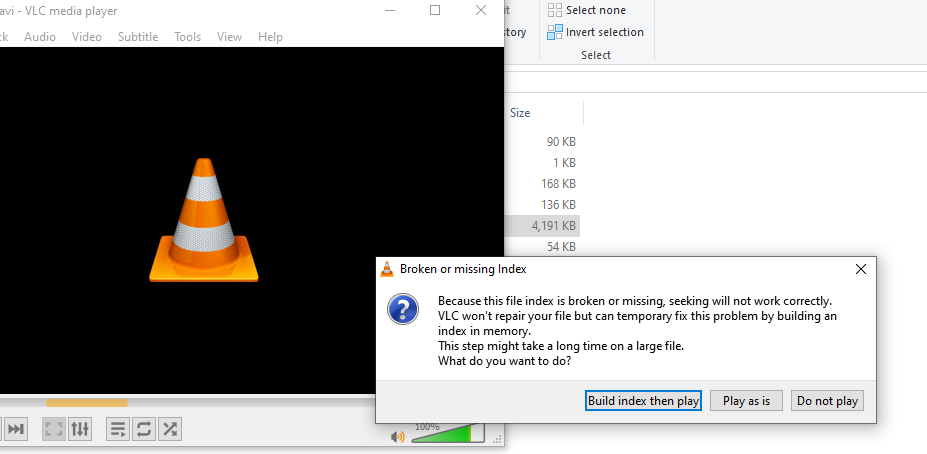
It does work but before play with VLC it says this: Saludos
-
works fine using Windows 10 21H2. Saludos