[an error occurred while processing this directive]
Navigation

SciTE4AutoIt3


AutoIt v3


News

Getting Started

Installation instructions for Autoit3 and SciTE4AutoIt3.
Download Page containing installers and separate definition files.

About SciTE4AutoIt3

People on the Forum started looking at many editors to see which one was the most useful editor for AutoIt3. We found SciTE and saw its potential so I wrote a customized Lexer for the Syntax Highlighting and Syntax folding and created a special installer called SciTE4AutoIt3. The "Package" grew to what it is today with lots of integrated utilities written by me and the AutoIt3 community.  
Read on for all the details...  
Enjoy ....

Quote Neil Hodgson:"SciTE is a SCIntilla based Text Editor. Originally built to demonstrate Scintilla, it has grown to be a generally useful editor with facilities for building and running programs."

SciTE4AutoIt3 contains SciTE, wrapped into a single installer with all needed configuration settings and lots of utility programs like Tidy, Obfuscator, AU3Check, ScriptWriter, AutoIt3Wrapper etc to enhanced SciTE for use with AutoIt3. 

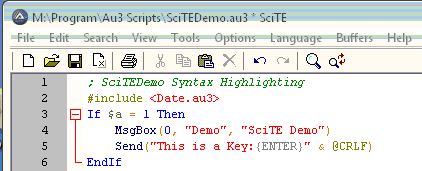
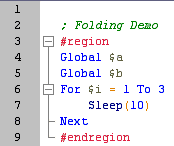
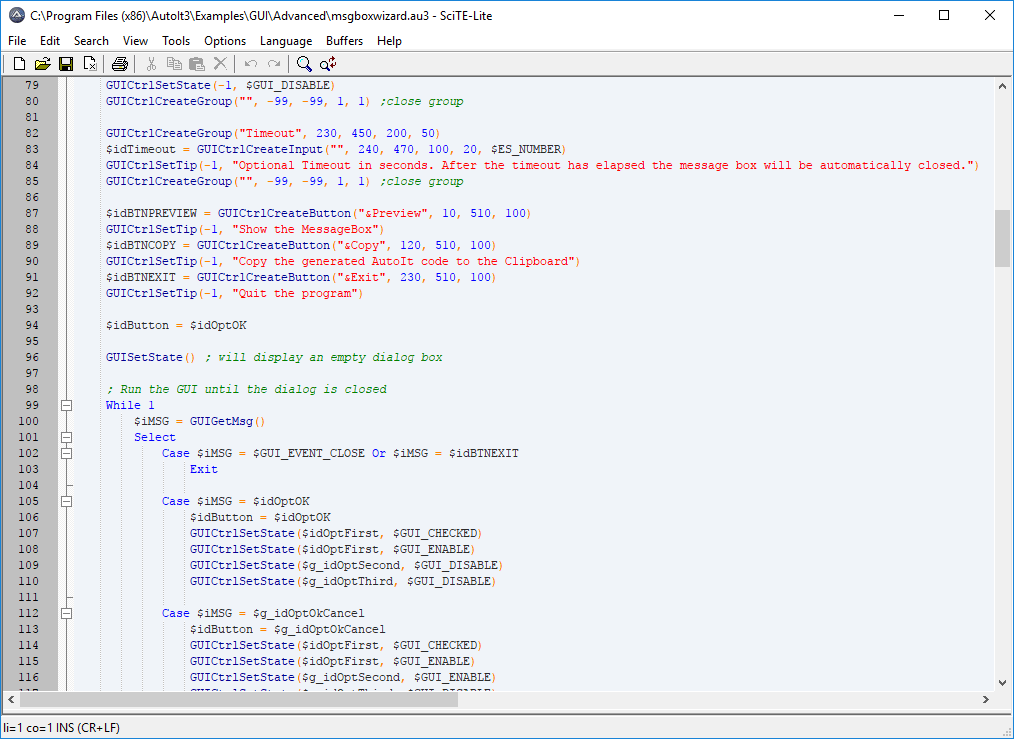
It has a customized Lexer for AutoIt3 which handles the
Syntax Highlighting and Code folding:

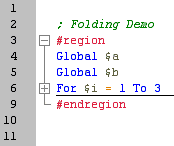
CodeFolding:

Autocomplete:

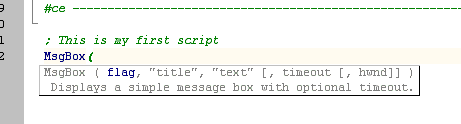
Intellisense:

This customized versions of SciTE has the following functionality:

  • Customized Syntax highlighting.
  • AutoComplete AutoIt3 commands automatically (suggest the option in a dropdownbox while typing), just hit ENTER or TAB to Autocomplete.)
  • AutoComplete anything already in the script, like variable and Func names, with Ctrl+Enter.
  • Intellisense (Show a ToolTip with the parameter expected in the selected function).
  • Code folding for easy code viewing.
  • Auto indentation while typing.
  • F1 - open Helpfile on the keyword were the cursor is located.
  • Shift+F1 will bring up a Popup screen showing all AutoIt3 functions. Just Double-Click or Enter on the function you need and it will be pasted back into your script. It Also has a dynamic Help facility!
  • Ctrl+F1 - open this Helpfile.
  • F5 - Run Tylo's Au3Check and when no errors/warnings found run AutoIt3.exe.
  • Ctrl+F5 - Run Tylo's SyntaxCheck With latest Production definitions, showing all Syntax errors and possible issues with variable declarations.
  • Ctrl+Alt+F5 - Run Tylo's SyntaxCheck With latest Beta definitions, showing all Syntax errors and possible issues with variable declarations.
  • Alt+F6 - Run Larry's ScriptWriter to record clicks and keystrokes and write this into your Autoit Script.
  • Ctrl+F6 - Run Larry's AU3_Spy program to detect the Text and Names of controls on the program windows.
  • F7 - Build (compile) your script.
  • Alt+F7 - Run VoSs2o0o's AutoItMacroGenerator ...Another recorder for script.
  • Ctrl+F7 - AutoIt3Wrapper: Build (compile) your script with Options to change Compiler version, ICON, Passphrase or compression, Update Resource info of the target program like Program version etc. Optional run Tylo's AU3Check before compiling the source and running other programs Before or After compilation.
  • Ctrl+T will run Tidy.exe (included in this install) to auto indent and Tidy your AutoIt3 source file.
  • Alt+M will run CodeWizard.exe written by Peppe which assists you in creating MsgBox or InputBox() statements.
  • Alt+G will run GuiWizard.exe written by CyberSlug which assists you in creating GUI Layouts.
  • Ctrl+Alt+s will Run the Snippet holder .
  • Several LUA scripts to enhance SciTE editing.
    • Insert a copy of the Bookmarked line(s) - Ctrl+Alt+B
      This functions will insert all Bookmarked lines at the beginning for the current line.
      Lines can be Bookmarked by pressing Ctrl+F2.
    • Jump to the "Func ???" definition of the functionname under the Cursor - Ctrl+J. It will also Bookmark the original line to enable you to jump back to the original line with F2.
    • List dropdownbox Ctrl+L with all available Func's in the current script and jumps to selected script. It will also Bookmark the original line to enable you to jump back to the original line with F2.
    • Ctrl+Shift+D - Add Debug msgbox
      This function will add a MSGBOX below the current line that contains the Var the cursor is at
      $a = $b + 1 (Put the cursor on $b and press Ctrl+Shift+D the following line will be added)
      MsgBox(4096,'debug:' & $b,$b) ;### Debug MSGBOX
    • Alt+D - Add Debug ConsoleWrite message
      This function will add a ConsoleWrite line below the current line that contains the Var the cursor is at
      $a = $b + 1 (Put the cursor on $b and press Alt+D the following line will be added)
      ConsoleWrite('Line:~4 debug ==> $b: ' & $b & @lf) ;### Debug Console
    • Alt+Shift+D - Comment ALL DEBUG MsgBox and ConsoleWrite lines.
    • Ctrl+Alt+D - UnComment ALL Debug MsgBoxes and ConsoleWrite lines.
    • Add TRACE ConsoleWrites to all lines to easily trace your program:Available under Tools/Debug: Add Trace lines
    • Remove ALL Debug MsgBoxes and ConsoleWrite lines: Available under Tools/Debug: Remove ALL lines

    Thanks to:

    • Jonathan Bennett for AutoIt.
    • Neil Hodgson for SciTE/Scintilla.
    • Jason (Valik) Boggs, for supplying LUA functions and lots of ideas and feedback.
    • Larry Keys for AU3Recorder (Scriptwriter) and AU3INFO.
    • Michael (MHz) Heath for the Abbrev.properties and testing/input.
    • Giuseppe (gcriaco) Criaco and Gary (gafrost) Frost for CodeWizard.
    • VoSs2o0o for AutoItMacroGenerator.
    • CyberSlug for GuiBuilder.
    • Lookfar and LazyCat for the Koda formdesigner.
    • Tylo for his AutoIt3 Syntax Checker.
    • Gary (gafrost) Frost for the Snippet Holder.

    For details on the SciTE editor : http://www.scintilla.org/SciTE.html
    Enjoy,
    Jos van der Zande