kabar
-
Posts
15 -
Joined
-
Last visited
Recent Profile Visitors
274 profile views

kabar's Achievements

Seeker (1/7)
0
Reputation
-
 kabar reacted to a file:
AD - Active Directory UDF
kabar reacted to a file:
AD - Active Directory UDF
-
Hey Jlogan, Just checking for any updates on this great utility. Do you have a new version? Tom
-

Active Directory UDF - Help & Support (II)
kabar replied to water's topic in AutoIt General Help and Support
Hi water, I tried added the below func to no avail. Adding the SIP just does not want to play. Am I missing something? _ADModifyAttribute($Object, "msRTCSIP-DeploymentLocator", "SRV:", $Append) _ADModifyAttribute($Object, "msRTCSIP-FederationEnabled", "TRUE", $Append) _ADModifyAttribute($Object, "msRTCSIP-InternetAccessEnabled", "TRUE", $Append) _ADModifyAttribute($Object, "msRTCSIP-OptionFlags", "257", $Append) ;385 = enterprise voice ;257 = "PC-to-PC only _ADModifyAttribute($Object, "msRTCSIP-PrimaryHomeServer", "CN=Lc Services,CN=Microsoft,CN=1:1,CN=Pools,CN=RTC Service,CN=Microsoft,CN=System,DC=AD,DC=$var,DC=com", $Append) _ADModifyAttribute($Object, "msRTCSIP-PrimaryUserAddress", "sip:" & $UserADMail, 1) _ADModifyAttribute($Object, "msRTCSIP-UserEnabled", "TRUE", $Append) _ADModifyAttribute($Object, "msRTCSIP-UserPolicies", "0=1426752696", $Append) ;1=1 enables "default" conferencing policy -
Active Directory UDF - Help & Support (II)
kabar replied to water's topic in AutoIt General Help and Support
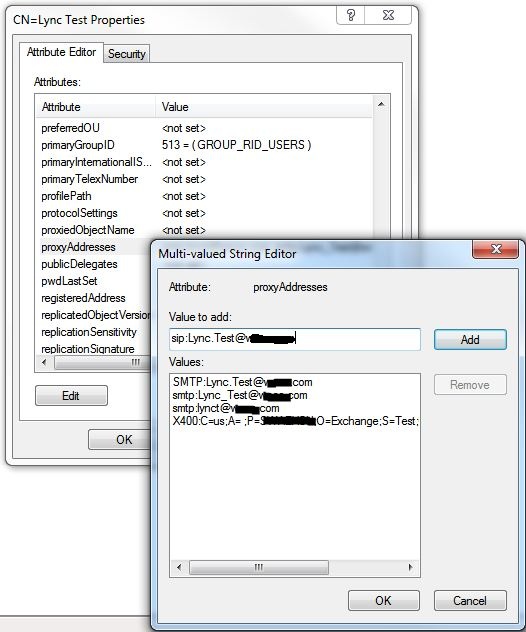
I am having trouble writing a "Multi-valued settings in AD". Specifically the "proxyaddresses" attribute. We are enabling Microsoft Lync for existing exchange users. The below snippet works fine enabling Lync, users can login and communicate via Lync. Not having the sip in the Proxyaddresses prevents users from leading Lync Meetings. Attached is the attribute we are needing to add the "sip" to. Any help would be greatly appreciated.
-
Hey J, That is awesome, I'll check back in a couple of weeks. Can wait to see what you've got. Tom
-
kabar reacted to a post in a topic:
SCCM 2007 Front End
-
Hi JLogan, this is an awesome tool. I was wondering if you could add some enhancements? * List all Apps associated with a PC * Cloning Collection memberships from on PC to another. * Select multiple applications to assign to a PC. * remove tier rights. Just some ideas, this could be a one stop SCCM Collection tool. Tom
-
kabar reacted to a post in a topic:
SCCM 2007 Front End
-
Works great on Windows 7 64!
-
kabar reacted to a post in a topic:
Remotely creating Home drive
-
Water YOU Rock. Thank you for your AD UDF. Question: Is is possible to enable and configure AD users for "Office Communications Server". We need to enable OCS assign a Server and Policy. Is this possible?
-
Thanks Martin, I appreciate your time. I'll play with GuiCtrlRead. Regards, Tom
-
Sorry I was not clear. I can't get the check boxes to respond to the buttons, for example "Select All", "Clear All", "add user". None of the buttons have any affect on the check boxes. Before I had the tabs I had no problem, but with the number of AD groups I needed to add tabbing. Hope this makes sense. Tom
-
Please be kind I'm a noob. I am having trouble controlling tab functions. I created the same GUI minus tabs and it works fine. I'm sure i need to add the tab functions to each task but I'm have no idea how to do this. The radio button text is filled via a text for easy changes. Any direction would be greatly appreciated. I have attached the text file I am using. #include <WindowsConstants.au3> #include <adfunctions.au3> #include <GUIConstantsEx.au3> #include <GUIConstants.au3> ;~ Opt('MustDeclareVars', 1) Global $Label[75] $file=FileOpen(@ScriptDir&'\List.txt',0) $i=0 While 1 $line = FileReadLine($file) If @error = -1 Then ExitLoop $Label[$i]=$line $i=$i+1 Wend FileClose($file) GUICreate("Network Access Control Panel", 1005, 850, -1, -1);( "title" [, width [, height ;Expansion GUISetBkColor(0x00E0FFFF) GUISetFont(9, 300) GUICtrlCreateLabel("Enter ID Info:", 4, 4) Global $adgroupmem = GUICtrlCreateButton("Pattern After", 20, 175, 100, 25);20, 390, 100, 25 Global $add = GUICtrlCreateButton("Add User", 20, 250, 100, 25);20, 250, 100, 25 Global $remove = GUICtrlCreateButton("Remove User", 20, 285, 100, 25);20, 355, 100, 25 Global $checks = GUICtrlCreateButton("Select All", 20, 320, 100, 25);20, 390, 100, 25 Global $clear = GUICtrlCreateButton("Clear All", 20, 355, 100, 25);20, 285, 100, 25 Global $exit = GUICtrlCreateButton("Exit", 20, 390, 100, 25);20, 320, 100, 25 GUICtrlCreateLabel("Enter ID to add", 20, 35) Global $ID1 = GUICtrlCreateInput("", 20, 50, 100, 21) ;~ GUICtrlCreateLabel("Enter 2nd ID to add", 20, 80) ;~ Global $ID2 = GUICtrlCreateInput("", 20, 95, 100, 21) GUICtrlCreateLabel("See Pattern After Apps", 20, 135) Global $PTN = GUICtrlCreateInput("", 20, 150, 100, 21) Global $tab, $tab0, $tab1 $tab = GUICtrlCreateTab(150, 5, 850, 840);left, top [, width [, height ;Expansion 150, 5, 1045, 840 $tab1 = GUICtrlCreateTabItem("Ground Ops") Global $CheckBoxes[75] For $i = 0 To 24 $CheckBoxes[$i] = GUICtrlCreateCheckbox($Label[$i], 160 + 260 * Int($i/40), 30 + 20 * Mod($i,40)) Next $tab2 = GUICtrlCreateTabItem("Maint") Global $CheckBoxes[75] For $i = 25 To 49 $y=$i-25 $CheckBoxes[$i] = GUICtrlCreateCheckbox($Label[$i], 160 + 260 * Int($y/25), 30 + 20 * Mod($y,25)) Next $tab3 = GUICtrlCreateTabItem("Technology") Global $CheckBoxes[75] For $i = 0 To UBound($CheckBoxes) - 1 $CheckBoxes[$i] = GUICtrlCreateCheckbox($Label[$i], 160 + 260 * Int($i/25), 30 + 20 * Mod($i,25)) Next ;~ $tab3 = GUICtrlCreateTabItem("") ;Holder for new tab GUISetState() While 1 $Msg = GUIGetMsg() Select Case $Msg = $checks cks() Case $Msg = $add add() Case $Msg = $clear clr() Case $Msg = $remove rmv() Case $Msg = $adgroupmem adgm() Case $Msg = $exit ext() Exit EndSelect If $msg = $GUI_EVENT_CLOSE Then ExitLoop WEnd GUIDelete() Func cks();$checks - Selects All Checkboxes For $i = 0 To UBound($CheckBoxes) - 1 If GUICtrlRead ($CheckBoxes[$i]) = $GUI_UNCHECKED Then GUICtrlSetState($CheckBoxes[$i],$GUI_CHECKED) Else EndIf Next EndFunc ;==>cks Func rmv() ;$remove - REMOVES USER FROM AD GROUPS _ Used for testing Not in production! Local $data1 = GUICtrlRead($ID1) ;~ Local $data2 = GUICtrlRead($ID2) ;future enhancement ;~ Local $data3 = GUICtrlRead($ID3) ;future enhancement ;~ Local $E1 = StringLeft($data1,1) ;~ Local $E2 = StringLeft($data2,1);future enhancement ;~ Local $E3 = StringLeft($data3,1);future enhancement ;~ If $data1 = "" or (StringLower($E1) <> "e" and StringLower($E1) <> "x") Then ;~ MsgBox(64, "Information", "ID1 missing or incorrect") ;~ Return ;~ EndIf For $i = 0 To UBound($CheckBoxes) - 1 If GUICtrlRead ($CheckBoxes[$i]) = $GUI_CHECKED Then _ADRemoveUserFromGroup(_ADSamAccountNameToFQDN($Label[$i]), _ADSamAccountNameToFQDN($data1)); Removes from the AD Group MsgBox(64, "Information", $data1 & " removed from" & @CRLF & $Label[$i]) EndIf ;~ If $data2 <> "" Then ;Verifies an E or X is the first input character. ;~ If StringLower($E1) = "e" or StringLower($E1) = "x" Then ;~ _ADRemoveUserFromGroup(_ADSamAccountNameToFQDN($CheckBoxes[$i]), _ADSamAccountNameToFQDN($data2)); Removes from the AD Group ;~ EndIf ;~ EndIf ;~ EndIf Next EndFunc ;==>rmv Func Clr();$clear - Clears all checkboxes For $i = 0 To UBound($CheckBoxes) - 1 If GUICtrlRead ($CheckBoxes[$i]) = $GUI_CHECKED Then GUICtrlSetState($CheckBoxes[$i],$GUI_UNCHECKED) Else EndIf Next EndFunc ;==>Clear all Checkboxes func add();$add - Adds ID's to checked AD groups; Local $data1 = GUICtrlRead($ID1) ;~ Local $data2 = GUICtrlRead($ID2);future enhancement ;~ Local $data3 = GUICtrlRead($ID3);future enhancement ;~ Local $E1 = StringLeft($data1,1) ;~ Local $E2 = StringLeft($data2,1);future enhancement ;~ Local $E3 = StringLeft($data3,1);future enhancement ;~ If $data1 = "" or (StringLower($E1) <> "e" and StringLower($E1) <> "x") Then ;~ MsgBox(64, "Information", "ID1 missing or incorrect") ;~ Return ;~ EndIf For $i = 0 To UBound($CheckBoxes) - 1 If GUICtrlRead ($CheckBoxes[$i]) = $GUI_CHECKED Then _ADAddUserToGroup(_ADSamAccountNameToFQDN($Label[$i]), _ADSamAccountNameToFQDN($data1)); adds to the AD Group MsgBox(64, "Information", $data1 & " added to" & @CRLF & $Label[$i]) EndIf ;~ If $data2 <> "" Then ;Verifies an E or X is the first input character. ;~ If StringLower($E1) = "e" or StringLower($E1) = "x" Then ;~ _ADAddUserToGroup(_ADSamAccountNameToFQDN($CheckBoxes[$i]), _ADSamAccountNameToFQDN($data2)); adds to the AD Group ;~ EndIf ;~ EndIf ;~ EndIf Next EndFunc ;==>Add to AD ;~ #cs func adgm();adgroupmem - retrieves "AD Group Membership" of requested ID from "Pattern After" Input Global $asGroups[100] Global $asGroups2[100] Local $data1 = GUICtrlRead($ptn) ;~ Local $E1 = StringLeft($data1,1) ;~ If $data1 = "" or (StringLower($E1) <> "e" and StringLower($E1) <> "x") Then ;~ MsgBox(64, "Information", "ID1 missing or incorrect") ;~ Return ;~ EndIf ;~ $testid = "e36747" _ADGetUserGroups($asGroups, $data1) $asGroups2[0]=$asGroups[0] for $x = 1 to $asGroups[0] ;MsgBox(0,"test",$asGroups[$x]) $asGroups2[$x]=StringTrimLeft(_ADDNToDisplayName($asGroups[$x]),3) Next _ArrayDisplay($asGroups2) EndFunc ;==>adgm ;~ #ce Func ext() ;Exit ;~ $line1 = "GOOD BYE" ;~ MsgBox(48, "Hello", $line1) exit EndFunc ;==>Ext Exit list.txt
-
GUI Interface to add user to mulitpe Active Directory Groups
kabar replied to kabar's topic in AutoIt GUI Help and Support
Thanks for the reply oMBRa. Sorry I have not replied sooner, work,work,work. Do you know of any "array" tutorials? I don't really follow the logic of array's. I play with it. Thanks Again, Tom -
First I would like to say that I am a noob (boob) at scripting. I have found that this forum is a wonderful help tool. I have created this gui that will add a user/s to multiple Active Directory groups based on selected checkboxes. I am finding that I may have to many checkboxes and the script is getting confused (I'm already confused) lol. I think that I am really missing something simple and there is a better way to get the same thing accomplished. Any input and direction would be greatly appreciated. Regards, Tom Without further ado My spanking script. Code\ #include <WindowsConstants.au3> #include <adfunctions.au3> #include <GUIConstantsEx.au3> ;~ #include <ButtonConstants.au3> ;~ #include <EditConstants.au3> ;~ #include <StaticConstants.au3> ;~ #include <file.au3> ;~ #include <GUIConstants.au3> ;~ #include <Array.au3> Global $msg $Form1 = GUICreate("Network Access Control Panel", 700, 900, 400, 300);"1100, 900, 400, 300" resize for expansion 700, 900, 400, 300 $Group1 = GUICtrlCreateGroup("Employee Number", 5, 16, 137, 417) Global $ID1 = GUICtrlCreateInput("ID 1", 8, 64, 121, 21) ;~ Global $ID2 = GUICtrlCreateInput("ID 2", 8, 96, 121, 21);expansion to include multiple ID assignments?? ;~ Global $ID3 = GUICtrlCreateInput("ID 3", 8, 128, 121, 21);expansion to include multiple ID assignments?? Global $Pattern = GUICtrlCreateInput("Pattern After", 8, 264, 121, 21);Not currently configured for use. Will bring up list of assigned AD groups for specified user. GUICtrlCreateGroup("", -99, -99, 1, 1) $Group2 = GUICtrlCreateGroup("Select Requested Active Directory Groups", 150, 20, 510, 830);"150, 20, 925, 830" resize for expansion 150, 20, 550, 830 ;Check boxes create Global $cbx1 = GUICtrlCreateCheckbox("DA_TOM_TEST_S", 160, 45, 260, 17) Global $cbx2 = GUICtrlCreateCheckbox("DA_TOM_TEST1_S", 160, 65, 260, 17) Global $cbx3 = GUICtrlCreateCheckbox("DA_TOM_TEST2_S", 160, 85, 260, 17) Global $cbx4 = GUICtrlCreateCheckbox("cbx", 160, 105, 260, 17) Global $cbx5 = GUICtrlCreateCheckbox("cbx", 160, 125, 260, 17) Global $cbx6 = GUICtrlCreateCheckbox("cbx", 160, 145, 260, 17) Global $cbx7 = GUICtrlCreateCheckbox("cbx", 160, 165, 260, 17) Global $cbx8 = GUICtrlCreateCheckbox("cbx", 160, 185, 260, 17) Global $cbx9 = GUICtrlCreateCheckbox("cbx", 160, 205, 260, 17) Global $cbx10 = GUICtrlCreateCheckbox("cbx10", 160, 225, 260, 17) Global $cbx11 = GUICtrlCreateCheckbox("cbx", 160, 245, 260, 17) Global $cbx12 = GUICtrlCreateCheckbox("cbx", 160, 265, 260, 17) Global $cbx13 = GUICtrlCreateCheckbox("cbx", 160, 285, 260, 17) Global $cbx14 = GUICtrlCreateCheckbox("cbx", 160, 305, 260, 17) Global $cbx15 = GUICtrlCreateCheckbox("cbx15", 160, 325, 260, 17) Global $cbx16 = GUICtrlCreateCheckbox("cbx", 160, 345, 260, 17) Global $cbx17 = GUICtrlCreateCheckbox("cbx", 160, 365, 260, 17) Global $cbx18 = GUICtrlCreateCheckbox("cbx", 160, 385, 260, 17) Global $cbx19 = GUICtrlCreateCheckbox("cbx", 160, 405, 260, 17) Global $cbx20 = GUICtrlCreateCheckbox("cbx20", 160, 425, 260, 17) Global $cbx21 = GUICtrlCreateCheckbox("cbx", 160, 445, 260, 17) Global $cbx22 = GUICtrlCreateCheckbox("cbx", 160, 465, 260, 17) Global $cbx23 = GUICtrlCreateCheckbox("cbx", 160, 485, 260, 17) Global $cbx24 = GUICtrlCreateCheckbox("cbx", 160, 505, 260, 17) Global $cbx25 = GUICtrlCreateCheckbox("cbx25", 160, 525, 260, 17) Global $cbx26 = GUICtrlCreateCheckbox("cbx", 160, 545, 260, 17) Global $cbx27 = GUICtrlCreateCheckbox("cbx", 160, 565, 260, 17) Global $cbx28 = GUICtrlCreateCheckbox("cbx", 160, 585, 260, 17) Global $cbx29 = GUICtrlCreateCheckbox("cbx", 160, 605, 260, 17) Global $cbx30 = GUICtrlCreateCheckbox("cbx30", 160, 625, 260, 17) Global $cbx31 = GUICtrlCreateCheckbox("cbx", 160, 645, 260, 17) Global $cbx32 = GUICtrlCreateCheckbox("cbx", 160, 665, 260, 17) Global $cbx33 = GUICtrlCreateCheckbox("cbx", 160, 685, 260, 17) Global $cbx34 = GUICtrlCreateCheckbox("cbx", 160, 705, 260, 17) Global $cbx35 = GUICtrlCreateCheckbox("cbx35", 160, 725, 260, 17) Global $cbx36 = GUICtrlCreateCheckbox("cbx", 160, 745, 260, 17) Global $cbx37 = GUICtrlCreateCheckbox("cbx", 160, 765, 260, 17) Global $cbx38 = GUICtrlCreateCheckbox("cbx", 160, 785, 260, 17) Global $cbx39 = GUICtrlCreateCheckbox("cbx", 160, 805, 260, 17) Global $cbx40 = GUICtrlCreateCheckbox("cbx40", 160, 825, 260, 17) Global $cbx41 = GUICtrlCreateCheckbox("DA_TOM_TEST3_S", 420, 45, 260, 17) Global $cbx42 = GUICtrlCreateCheckbox("DA_TOM_TEST4_S", 420, 65, 260, 17) Global $cbx43 = GUICtrlCreateCheckbox("DA_TOM_TEST5_S", 420, 85, 260, 17) Global $cbx44 = GUICtrlCreateCheckbox("cbx", 420, 105, 260, 17) Global $cbx45 = GUICtrlCreateCheckbox("cbx45", 420, 125, 260, 17) Global $cbx46 = GUICtrlCreateCheckbox("cbx2", 420, 145, 260, 17) Global $cbx47 = GUICtrlCreateCheckbox("cbx", 420, 165, 260, 17) Global $cbx48 = GUICtrlCreateCheckbox("cbx", 420, 185, 260, 17) Global $cbx49 = GUICtrlCreateCheckbox("cbx", 420, 205, 260, 17) Global $cbx50 = GUICtrlCreateCheckbox("cbx50", 420, 225, 260, 17) Global $cbx51 = GUICtrlCreateCheckbox("cbx", 420, 245, 260, 17) Global $cbx52 = GUICtrlCreateCheckbox("cbx", 420, 265, 260, 17) Global $cbx53 = GUICtrlCreateCheckbox("cbx", 420, 285, 260, 17) Global $cbx54 = GUICtrlCreateCheckbox("cbx", 420, 305, 260, 17) Global $cbx55 = GUICtrlCreateCheckbox("cbx55", 420, 325, 260, 17) Global $cbx56 = GUICtrlCreateCheckbox("cbx", 420, 345, 260, 17) Global $cbx57 = GUICtrlCreateCheckbox("cbx", 420, 365, 260, 17) Global $cbx58 = GUICtrlCreateCheckbox("cbx", 420, 385, 260, 17) Global $cbx59 = GUICtrlCreateCheckbox("cbx", 420, 405, 260, 17) Global $cbx60 = GUICtrlCreateCheckbox("cbx60", 420, 425, 260, 17) Global $cbx61 = GUICtrlCreateCheckbox("cbx", 420, 445, 260, 17) Global $cbx62 = GUICtrlCreateCheckbox("cbx", 420, 465, 260, 17) Global $cbx63 = GUICtrlCreateCheckbox("cbx", 420, 485, 260, 17) Global $cbx64 = GUICtrlCreateCheckbox("cbx", 420, 505, 260, 17) Global $cbx65 = GUICtrlCreateCheckbox("cbx65", 420, 525, 260, 17) Global $cbx66 = GUICtrlCreateCheckbox("cbx", 420, 545, 260, 17) Global $cbx67 = GUICtrlCreateCheckbox("cbx", 420, 565, 260, 17) Global $cbx68 = GUICtrlCreateCheckbox("cbx", 420, 585, 260, 17) Global $cbx69 = GUICtrlCreateCheckbox("cbx", 420, 605, 260, 17) Global $cbx70 = GUICtrlCreateCheckbox("cbx70", 420, 625, 260, 17) Global $cbx71 = GUICtrlCreateCheckbox("cbx", 420, 645, 260, 17) Global $cbx72 = GUICtrlCreateCheckbox("cbx", 420, 665, 260, 17) Global $cbx73 = GUICtrlCreateCheckbox("cbx", 420, 685, 260, 17) Global $cbx74 = GUICtrlCreateCheckbox("cbx", 420, 705, 260, 17) Global $cbx75 = GUICtrlCreateCheckbox("cbx75", 420, 725, 260, 17) Global $cbx76 = GUICtrlCreateCheckbox("cbx", 420, 745, 260, 17) Global $cbx77 = GUICtrlCreateCheckbox("cbx", 420, 765, 260, 17) Global $cbx78 = GUICtrlCreateCheckbox("cbx", 420, 785, 260, 17) Global $cbx79 = GUICtrlCreateCheckbox("cbx", 420, 805, 260, 17) Global $cbx80 = GUICtrlCreateCheckbox("cbx80", 420, 825, 260, 17) #cs Below used for expansion if needed Global $cbx81 = GUICtrlCreateCheckbox("group FS RW grdop-budget_staff_planning-leadership_S", 680, 45, 260, 17); 46 char test "group FS RW grdop-budget_staff_planning-leadership_S" Global $cbx82 = GUICtrlCreateCheckbox("cbx", 680, 65, 260, 17) Global $cbx83 = GUICtrlCreateCheckbox("cbx", 680, 85, 260, 17) Global $cbx84 = GUICtrlCreateCheckbox("cbx", 680, 105, 260, 17) Global $cbx85 = GUICtrlCreateCheckbox("cbx", 680, 125, 260, 17) Global $cbx86 = GUICtrlCreateCheckbox("cbx", 680, 145, 260, 17) Global $cbx87 = GUICtrlCreateCheckbox("cbx", 680, 165, 260, 17) Global $cbx88 = GUICtrlCreateCheckbox("cbx", 680, 185, 260, 17) Global $cbx89 = GUICtrlCreateCheckbox("cbx", 680, 205, 260, 17) Global $cbx90 = GUICtrlCreateCheckbox("cbx90", 680, 225, 260, 17) Global $cbx94 = GUICtrlCreateCheckbox("cbx", 680, 245, 260, 17) Global $cbx92 = GUICtrlCreateCheckbox("cbx", 680, 265, 260, 17) Global $cbx93 = GUICtrlCreateCheckbox("cbx", 680, 285, 260, 17) Global $cbx94 = GUICtrlCreateCheckbox("cbx", 680, 305, 260, 17) Global $cbx95 = GUICtrlCreateCheckbox("cbx95", 680, 325, 260, 17) Global $cbx96 = GUICtrlCreateCheckbox("cbx", 680, 345, 260, 17) Global $cbx97 = GUICtrlCreateCheckbox("cbx", 680, 365, 260, 17) Global $cbx98 = GUICtrlCreateCheckbox("cbx", 680, 385, 260, 17) Global $cbx99 = GUICtrlCreateCheckbox("cbx", 680, 405, 260, 17) Global $cbx100 = GUICtrlCreateCheckbox("cbx100", 680, 425, 260, 17) Global $cbx101 = GUICtrlCreateCheckbox("cbx", 680, 445, 260, 17) Global $cbx102 = GUICtrlCreateCheckbox("cbx", 680, 465, 260, 17) Global $cbx103 = GUICtrlCreateCheckbox("cbx", 680, 485, 260, 17) Global $cbx104 = GUICtrlCreateCheckbox("cbx", 680, 505, 260, 17) Global $cbx105 = GUICtrlCreateCheckbox("cbx105", 680, 525, 260, 17) Global $cbx106 = GUICtrlCreateCheckbox("cbx", 680, 545, 260, 17) Global $cbx107 = GUICtrlCreateCheckbox("cbx", 680, 565, 260, 17) Global $cbx108 = GUICtrlCreateCheckbox("cbx", 680, 585, 260, 17) Global $cbx109 = GUICtrlCreateCheckbox("cbx", 680, 605, 260, 17) Global $cbx110 = GUICtrlCreateCheckbox("cbx110", 680, 625, 260, 17) Global $cbx111 = GUICtrlCreateCheckbox("cbx", 680, 645, 260, 17) Global $cbx112 = GUICtrlCreateCheckbox("cbx", 680, 665, 260, 17) Global $cbx113 = GUICtrlCreateCheckbox("cbx", 680, 685, 260, 17) Global $cbx114 = GUICtrlCreateCheckbox("cbx", 680, 705, 260, 17) Global $cbx115 = GUICtrlCreateCheckbox("cbx115", 680, 725, 260, 17) Global $cbx116 = GUICtrlCreateCheckbox("cbx", 680, 745, 260, 17) Global $cbx117 = GUICtrlCreateCheckbox("cbx", 680, 765, 260, 17) Global $cbx118 = GUICtrlCreateCheckbox("cbx", 680, 785, 260, 17) Global $cbx119 = GUICtrlCreateCheckbox("cbx", 680, 805, 260, 17) Global $cbx120 = GUICtrlCreateCheckbox("cbx", 680, 825, 260, 17) #ce Above used for expansion if needed GUICtrlCreateGroup("", -99, -99, 1, 1) Global $add = GUICtrlCreateButton("Add User", 20, 450, 75, 25, $WS_GROUP) Global $exit = GUICtrlCreateButton("Exit", 20, 500, 75, 25, $WS_GROUP) Global $test = GUICtrlCreateButton("Test", 20, 550, 75, 25, $WS_GROUP) Global $clear = GUICtrlCreateButton("Clear All", 20, 575, 75, 25, $WS_GROUP) ;~ GUISetState(@SW_SHOW) GUISetState() While 1 $Msg = GUIGetMsg() Select Case $Msg = $exit ext() Case $Msg = $test tst() Case $Msg = $add add() Case $Msg = $clear clr() Case $Form1 Case $Form1 Case $Form1 Case $Form1 Case $ID1 ;~ Case $ID2 ;~ Case $ID3 Case $cbx1 Case $cbx2 Case $cbx3 ;~ Case $cbx41 ;~ Case $cbx42 ;~ Case $cbx43 Exit EndSelect If $msg = $GUI_EVENT_CLOSE Then Exit EndIf WEnd GUIDelete() Exit Func ext() ;Exit $line1 = "GOOD BYE" ;~ MsgBox(48, "Hello", $line1) exit EndFunc ;==>Ext Func Clr() ;Clears all checkboxes, should not uncheck if no is selected. ;~ If GUICtrlSetData($cbx1,0) = 1 Then If $cbx1 = $GUI_CHECKED = 0 Then $iresult = MsgBox(4100, "Attention", "Are you sure you want to clear all?") If $iresult = True then ;~ GUICtrlSetState($cbx1,$GUI_CHECKED) GUICtrlSetState($cbx1,$GUI_UNCHECKED) GUICtrlSetState($cbx2,$GUI_UNCHECKED) GUICtrlSetState($cbx3,$GUI_UNCHECKED) GUICtrlSetState($cbx4,$GUI_UNCHECKED) GUICtrlSetState($cbx5,$GUI_UNCHECKED) GUICtrlSetState($cbx6,$GUI_UNCHECKED) GUICtrlSetState($cbx7,$GUI_UNCHECKED) GUICtrlSetState($cbx8,$GUI_UNCHECKED) GUICtrlSetState($cbx9,$GUI_UNCHECKED) GUICtrlSetState($cbx10,$GUI_UNCHECKED) GUICtrlSetState($cbx11,$GUI_UNCHECKED) GUICtrlSetState($cbx12,$GUI_UNCHECKED) GUICtrlSetState($cbx13,$GUI_UNCHECKED) GUICtrlSetState($cbx14,$GUI_UNCHECKED) GUICtrlSetState($cbx15,$GUI_UNCHECKED) GUICtrlSetState($cbx16,$GUI_UNCHECKED) GUICtrlSetState($cbx17,$GUI_UNCHECKED) GUICtrlSetState($cbx18,$GUI_UNCHECKED) GUICtrlSetState($cbx19,$GUI_UNCHECKED) GUICtrlSetState($cbx20,$GUI_UNCHECKED) GUICtrlSetState($cbx21,$GUI_UNCHECKED) GUICtrlSetState($cbx22,$GUI_UNCHECKED) GUICtrlSetState($cbx23,$GUI_UNCHECKED) GUICtrlSetState($cbx24,$GUI_UNCHECKED) GUICtrlSetState($cbx25,$GUI_UNCHECKED) GUICtrlSetState($cbx26,$GUI_UNCHECKED) GUICtrlSetState($cbx27,$GUI_UNCHECKED) GUICtrlSetState($cbx28,$GUI_UNCHECKED) GUICtrlSetState($cbx29,$GUI_UNCHECKED) GUICtrlSetState($cbx30,$GUI_UNCHECKED) GUICtrlSetState($cbx31,$GUI_UNCHECKED) GUICtrlSetState($cbx32,$GUI_UNCHECKED) GUICtrlSetState($cbx33,$GUI_UNCHECKED) GUICtrlSetState($cbx34,$GUI_UNCHECKED) GUICtrlSetState($cbx35,$GUI_UNCHECKED) GUICtrlSetState($cbx36,$GUI_UNCHECKED) GUICtrlSetState($cbx37,$GUI_UNCHECKED) GUICtrlSetState($cbx38,$GUI_UNCHECKED) GUICtrlSetState($cbx39,$GUI_UNCHECKED) GUICtrlSetState($cbx40,$GUI_UNCHECKED) GUICtrlSetState($cbx41,$GUI_UNCHECKED) GUICtrlSetState($cbx42,$GUI_UNCHECKED) GUICtrlSetState($cbx43,$GUI_UNCHECKED) GUICtrlSetState($cbx44,$GUI_UNCHECKED) GUICtrlSetState($cbx45,$GUI_UNCHECKED) GUICtrlSetState($cbx46,$GUI_UNCHECKED) GUICtrlSetState($cbx47,$GUI_UNCHECKED) GUICtrlSetState($cbx48,$GUI_UNCHECKED) GUICtrlSetState($cbx49,$GUI_UNCHECKED) GUICtrlSetState($cbx50,$GUI_UNCHECKED) GUICtrlSetState($cbx51,$GUI_UNCHECKED) GUICtrlSetState($cbx52,$GUI_UNCHECKED) GUICtrlSetState($cbx53,$GUI_UNCHECKED) GUICtrlSetState($cbx54,$GUI_UNCHECKED) GUICtrlSetState($cbx55,$GUI_UNCHECKED) GUICtrlSetState($cbx56,$GUI_UNCHECKED) GUICtrlSetState($cbx57,$GUI_UNCHECKED) GUICtrlSetState($cbx58,$GUI_UNCHECKED) GUICtrlSetState($cbx59,$GUI_UNCHECKED) GUICtrlSetState($cbx60,$GUI_UNCHECKED) GUICtrlSetState($cbx61,$GUI_UNCHECKED) GUICtrlSetState($cbx62,$GUI_UNCHECKED) GUICtrlSetState($cbx63,$GUI_UNCHECKED) GUICtrlSetState($cbx64,$GUI_UNCHECKED) GUICtrlSetState($cbx65,$GUI_UNCHECKED) GUICtrlSetState($cbx66,$GUI_UNCHECKED) GUICtrlSetState($cbx67,$GUI_UNCHECKED) GUICtrlSetState($cbx68,$GUI_UNCHECKED) GUICtrlSetState($cbx69,$GUI_UNCHECKED) GUICtrlSetState($cbx70,$GUI_UNCHECKED) GUICtrlSetState($cbx71,$GUI_UNCHECKED) GUICtrlSetState($cbx72,$GUI_UNCHECKED) GUICtrlSetState($cbx73,$GUI_UNCHECKED) GUICtrlSetState($cbx74,$GUI_UNCHECKED) GUICtrlSetState($cbx75,$GUI_UNCHECKED) GUICtrlSetState($cbx76,$GUI_UNCHECKED) GUICtrlSetState($cbx77,$GUI_UNCHECKED) GUICtrlSetState($cbx78,$GUI_UNCHECKED) GUICtrlSetState($cbx79,$GUI_UNCHECKED) GUICtrlSetState($cbx80,$GUI_UNCHECKED) #cs Below used for expansion if needed GUICtrlSetState($cbx81,$GUI_UNCHECKED) GUICtrlSetState($cbx82,$GUI_UNCHECKED) GUICtrlSetState($cbx83,$GUI_UNCHECKED) GUICtrlSetState($cbx84,$GUI_UNCHECKED) GUICtrlSetState($cbx85,$GUI_UNCHECKED) GUICtrlSetState($cbx86,$GUI_UNCHECKED) GUICtrlSetState($cbx87,$GUI_UNCHECKED) GUICtrlSetState($cbx88,$GUI_UNCHECKED) GUICtrlSetState($cbx89,$GUI_UNCHECKED) GUICtrlSetState($cbx90,$GUI_UNCHECKED) GUICtrlSetState($cbx91,$GUI_UNCHECKED) GUICtrlSetState($cbx92,$GUI_UNCHECKED) GUICtrlSetState($cbx93,$GUI_UNCHECKED) GUICtrlSetState($cbx94,$GUI_UNCHECKED) GUICtrlSetState($cbx95,$GUI_UNCHECKED) GUICtrlSetState($cbx96,$GUI_UNCHECKED) GUICtrlSetState($cbx97,$GUI_UNCHECKED) GUICtrlSetState($cbx98,$GUI_UNCHECKED) GUICtrlSetState($cbx99,$GUI_UNCHECKED) GUICtrlSetState($cbx100,$GUI_UNCHECKED) GUICtrlSetState($cbx101,$GUI_UNCHECKED) GUICtrlSetState($cbx102,$GUI_UNCHECKED) GUICtrlSetState($cbx103,$GUI_UNCHECKED) GUICtrlSetState($cbx104,$GUI_UNCHECKED) GUICtrlSetState($cbx105,$GUI_UNCHECKED) GUICtrlSetState($cbx106,$GUI_UNCHECKED) GUICtrlSetState($cbx107,$GUI_UNCHECKED) GUICtrlSetState($cbx108,$GUI_UNCHECKED) GUICtrlSetState($cbx109,$GUI_UNCHECKED) GUICtrlSetState($cbx110,$GUI_UNCHECKED) GUICtrlSetState($cbx111,$GUI_UNCHECKED) GUICtrlSetState($cbx112,$GUI_UNCHECKED) GUICtrlSetState($cbx113,$GUI_UNCHECKED) GUICtrlSetState($cbx114,$GUI_UNCHECKED) GUICtrlSetState($cbx115,$GUI_UNCHECKED) GUICtrlSetState($cbx116,$GUI_UNCHECKED) GUICtrlSetState($cbx117,$GUI_UNCHECKED) GUICtrlSetState($cbx118,$GUI_UNCHECKED) GUICtrlSetState($cbx119,$GUI_UNCHECKED) GUICtrlSetState($cbx120,$GUI_UNCHECKED) #ce Above used for expansion if needed ;~ MsgBox(48, "AD Group Assignment","Selected Groups have been assigned") Else EndIf EndIf EndFunc ;Clear all Checkboxes ;~ #cs func add() ;Adds ID's to checked AD groups; There will be many ActiveDirectory Groups to be added. Local $data1 = GUICtrlRead($ID1) ;~ Local $data2 = GUICtrlRead($ID2) ;~ Local $data3 = GUICtrlRead($ID3) Local $E1 = StringLeft($data1,1) ;~ Local $E2 = StringLeft($data2,1) ;~ Local $E3 = StringLeft($data3,1) Local $put1 = GUICtrlRead($add) Local $DAGroup1 = "DA_Tom_Test_S" Local $DAGroup2 = "DA_Tom_Test_S1" Local $DAGroup3 = "DA_Tom_Test_S2" Local $DAGroup4 = "DA_Tom_Test_S3" Local $DAGroup5 = "DA_Tom_Test_S4" Local $DAGroup6 = "DA_Tom_Test_S5" If $data1 <> "" Then ;Verifies an E or X is the first input character. If StringLower($E1) = "e" or StringLower($E1) = "x" Then ;~ If $put1 = "1" Then _ADAddUserToGroup(_ADSamAccountNameToFQDN($DAGroup1), _ADSamAccountNameToFQDN($data1)); adds to the AD Group ;~ EndIf EndIf EndIf If $data1 <> "" Then If StringLower($E1) = "e" or StringLower($E1) = "x" Then ;~ If $put1 = "1" Then _ADAddUserToGroup(_ADSamAccountNameToFQDN($DAGroup2), _ADSamAccountNameToFQDN($data1)) ;~ EndIf Sleep(100) EndIf EndIf If $data1 <> "" Then If StringLower($E1) = "e" or StringLower($E1) = "x" Then ;~ If $put1 = "1" Then _ADAddUserToGroup(_ADSamAccountNameToFQDN($DAGroup3), _ADSamAccountNameToFQDN($data1)) ;~ EndIf EndIf EndIf If $data1 <> "" Then If StringLower($E1) = "e" or StringLower($E1) = "x" Then ;~ If $put1 = "1" Then _ADAddUserToGroup(_ADSamAccountNameToFQDN($DAGroup4), _ADSamAccountNameToFQDN($data1)) ;~ EndIf EndIf EndIf If $data1 <> "" Then If StringLower($E1) = "e" or StringLower($E1) = "x" Then ;~ If $put1 = "1" Then _ADAddUserToGroup(_ADSamAccountNameToFQDN($DAGroup5), _ADSamAccountNameToFQDN($data1)) ;~ EndIf Sleep(100) EndIf EndIf If $data1 <> "" Then If StringLower($E1) = "e" or StringLower($E1) = "x" Then ;~ If $put1 = "1" Then _ADAddUserToGroup(_ADSamAccountNameToFQDN($DAGroup6), _ADSamAccountNameToFQDN($data1)) ;~ EndIf EndIf EndIf EndFunc ;Add to AD ;~ #cs Func tst() ;Used for testing Not in production! Local $data1 = GUICtrlRead($cbx1) If $data1 = $GUI_CHECKED Then MsgBox(48, "Hello", $data1) Else MsgBox(0, "Results", $cbx1 & " Is UnChecked") EndIf ;~ Next EndFunc ;Test ;~ #ce #cs Func tst();Used for testing Not in production! toogle between above tst For $i = $cbx1 To $cbx6 If BitAnd(GuiCtrlRead($i), $GUI_Checked) Then MsgBox(0, "Results", GuiCtrlRead($i)& $i) EndIf Next EndFunc #ce Exit
-
Append to the end of a [Section] in an INI
kabar replied to kabar's topic in AutoIt General Help and Support
This is perfect. Exactly what I was looking for. Thank you. I bow to thee, wise one. -
I am a serious NOOB with scripting. So take it easy on me. I have written the below code to add a new section to an INI if it does not exist. It arrays the ini and tells me if the [section] already exists. The cheesy part is that I have it opening the INI so that it can be edited manually. I would like it to search for a existing [section] find the first available (empty line) after the existing [section] and append (incrementally as in the below ini) the "name and value" that the it will get from another source. then insert another empty space. The is part of my code in question: ;#cs********************************CODE************************************** #include <file.au3> #include <array.au3> $answer = "Section 2" Dim $logArray $AdminRights = "C:\Remote.ini" If FileExists($AdminRights) Then _FileReadToArray($AdminRights, $logArray) EndIf $result = _ArraySearch ( $logArray, $answer, 0, 0, 0, True) If $result < 0 Then Exit If $Result > 1 Then $open = MsgBox(4,"Open Remote.ini?", $answer & "* Already Exists. Do you want to open Remote.ini?") If $open = 7 then exit ;Endif Run(@comspec & ' /c start ' & $AdminRights, '', @SW_HIDE) EndIf Sleep(1000) ;WinWait("Remote.ini-Notepad") Send("^f") Sleep(1000) Send($answer) ;Sleep(1000) Send("!f") ;WinWaitClose("Remote.ini-Notepad") Exit ;#ce********************************END OF CODE************************************** Example of the INI I am working with. [section 1] ID1=LON\20298 [section 2] ID1=LON\526756 ID2=LON\7456 ID3=LON\722456 [section 3] ID1=LON\67437 [section 4] ID1=LON\851461 ID2=LON\47245 ID3=LON\456 ID4=LON\7333 ID5=LON\4456 [section 5] ID1=LON\66165 [section 6] ID1=LON\65835
-
2008-05-07 14:07:05 : ********** New Registry ************ 2008-05-07 14:07:05 : AutoIt Screen Name> trwatters 2008-05-07 14:07:05 : AutoIt Member Number> 1 2008-05-07 14:07:05 : User Location> USA 2008-05-07 14:07:05 : ********** End Registry ************ 2008-05-07 14:07:05 : Ver 1.4.8 2008-05-07 14:07:05 : 2008-05-07 14:42:39 : ********** Exam Level One ************ 2008-05-07 14:42:39 : Number of Attempts> 10 2008-05-07 14:42:39 : Exam Scores> 60,50,50,50,50,60,80,70,90,100 ( 100 Points Max ) 2008-05-07 14:42:39 : Accumulated Errors> 0 2008-05-07 14:42:39 : Point Score> 156 ( 333 Points Max ) 2008-05-07 14:42:39 : ********** End Exam Report ************ 2008-05-07 14:42:39 :