GoldenMike
-
Posts
43 -
Joined
-
Last visited
Recent Profile Visitors
408 profile views

GoldenMike's Achievements

Seeker (1/7)
0
Reputation
-
Danp2, Thank you. I feel pretty dumb now. There is another input search I did not see. Should have assumed that if they did it in one place, they would do the other as well. Thanks, Mike
-
I've been using AutoIt for years, I love it and it has helped me greatly. I recently started learning other languages to help expand my knowledge and found that other languages are much faster in some regards. I'm trying to automate a login to http://www.eedistribution.com/. I have tried this for IE with BeautifulSoup: driver = webdriver.Ie("D:\\Python\\IEDriverServer32.exe") driver.get("http://www.entertainmentearth.com/eedistribution.asp") inputName = driver.find_element_by_name("custnum").send_keys("user") passWord = driver.find_element_by_name("password").send_keys("password") submit = driver.find_element_by_xpath("//input[@type='image']").click()and this for firefox with BeautifulSoup: driver = webdriver.Firefox() driver.get("http://www.eedistribution.com/") inputName = driver.find_element_by_name("custnum").send_keys("user") passWord = driver.find_element_by_name("password").send_keys("password") submit = driver.find_element_by_xpath("//input[@type='image']").click()The website has two sides. Wholesale distribution and consumer. For some reason when I use the above scripts it takes me to the consumer side when I want to go to the wholesale side. If I manually enter user / password then I get into the wholesale side, and if use AutoIt it takes me to the wholesale side as well (this is where I want to go). I can't seem to figure out why? Here is the AutoItScript: oIE = _IEAttach("ee") $user = _IEGetObjByName($oIE, "custnum") $login = _IEGetObjByName($oIE, "password") $oInputs = _IETagNameGetCollection($oIE, "input") $user.value = "user" $login.value = "password" For $oInput in $oInputs If StringInStr($oInput.outerhtml, "signin_white.gif") > 0 Then $oInput.click() ExitLoop EndIf NextI apologize in advance for this not strictly being a AutoIt question, but am trying to learn more about how the web works in general and can't seem to understand this. As I am not a programmer and completely self taught I thought maybe someone with more experience might have an answer for this. Thanks, Mike
-
Danp2, That worked. Thank you for helping, I appreciate it. Have a good Day -Mike
-
Danp2, It is showing TCP 0.0.0.0:4242 [CrashplanService.exe] - this is my backup service I am using. Should I just change the port # for MozRepl? Would that solve the problem? Thanks again for all the help. This stuff is way over my computer understanding. -Mike
-
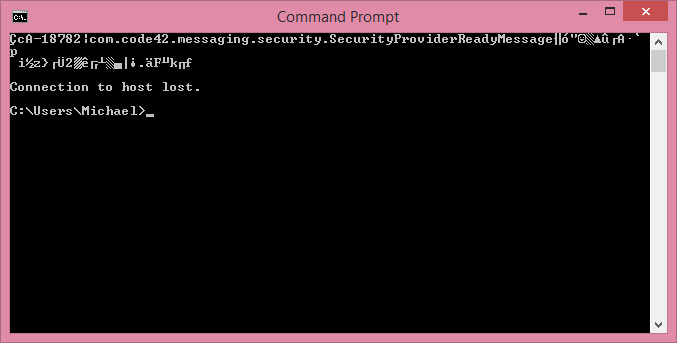
Danp2, I looked into this further, and realized I have to enable telnet under windows features. I did this, and initially the command prompt reads that it is connection to server, but I end up with this screen.
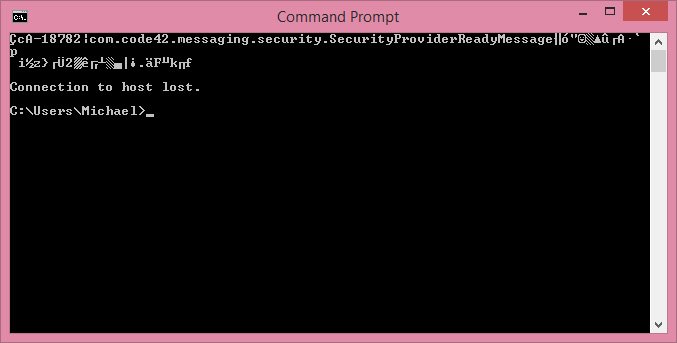
-
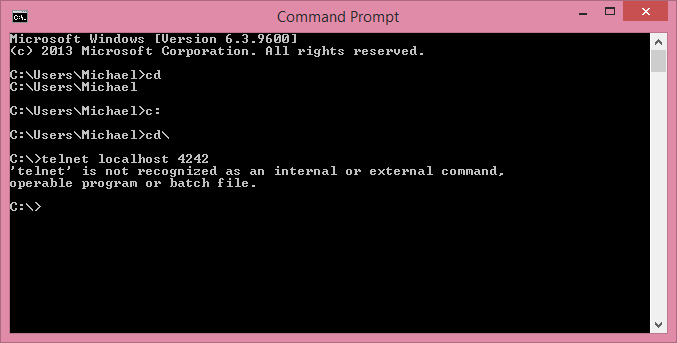
Danp2, Mozrepl, is definitely running. It shows "Stop" on the menu, as if the program is already running. Also the check box next to "activate on startup is enabled. I tried your telnet suggestion and it did not work. I have attached a screen shot of what happened. Do you have any idea why telnet would not be recognized? Am i in the wrong screen?
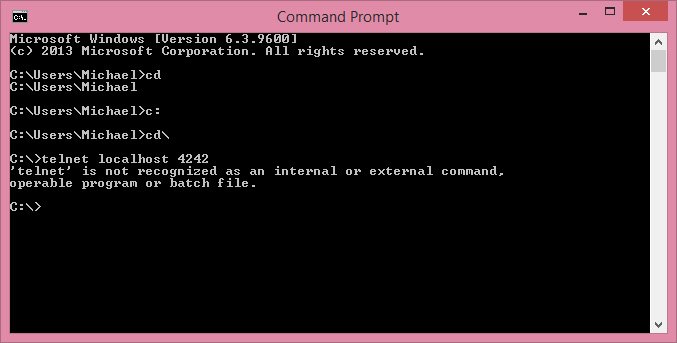
-
Hi, I've been using autoitscript for years with IE and have had great success, but I need to use it on FF for a project I am working on. I have MozRepl installed and it is running. I am using this basic script to test it out. #include <ff.au3> If _FFConnect(Default, Default, 3000) Then ; open a page _FFOpenURL("http://ff-au3-example.thorsten-willert.de/") Sleep(3000) ; disconnect from FireFox If _FFDisConnect() Then MsgBox(64, "", "Disconnected from FireFox!") Else MsgBox(64, "", "Can't connect to FireFox!") EndIfand i Keep getting an error message _FFConnect: OS: WIN_81 WIN32_NT 9600 _FFConnect: AutoIt: 3.3.12.0 _FFConnect: FF.au3: 0.6.0.1b-14 _FFConnect: IP: 127.0.0.1 _FFConnect: Port: 4242 _FFConnect: Delay: 2ms _FFConnect: Socket: 612 __FFWaitForRepl ==> Timeout: 10012ms > 10000ms $iTimeOutIs there something that could be interfering with running MozRepl where it is not forming a connecting to the autoitscript? I'm running Windows 8.1 64bit, w/ the latest version of AutoIt. Any help would be appreciated. Thank you, Mike
-
Can't Click on Button in IE
GoldenMike replied to GoldenMike's topic in AutoIt General Help and Support
j0kky - this worked. Thank you so much. Any idea why this worked, and nothing else? Exit and DanP2 - I can't show code, it is a protected healthcare site. -
Hi everyone, I've been using IE automation for about three years now and have created about 100 different automation scripts for my business mainly using IE automation. A website that I use has just updated and is giving me problems clicking on a button. I've never really encountered this before, but this is what is happening. There are two frames, both of which I can navigate into. I create a link to the button (have done this many way, either by _IEGetObjbyName, IEGetObjbyID, or even doing a _IETagNameGetCollection, and sorting this by Class name to get the object i want) All three ways give me a link to the object, which can be verified through a console write outer html read out. The button is a radio, and Autoit will let me $oButton.checked = True - to check the button But the site will not let me do $oButton.click $oButton.onclick $oButton.fireevent("onClick") $oButton.fireevent("onMouseOver") And the webpage won't respond, or update accordingly. Here is the HTML for the radio button: <input name="SearchType" id="searchTypeNumber" type="radio" CHECKED="checked" value="searchTypeNumber"> Not sure if this is any help but this is the form HTML <form name="Form" id="Form" action="/status/search" method="post" novalidate="novalidate"> I have used this website in other areas that have changed as well, and successfully navigated through other forms. Any thoughts or help on this is appreciated Thanks, Mike
-
I just picked up some SEO software and it looks like it is an embedded browser inside a window. All I want to do is extract the text out for ease of use, and I can't seem to connect or get inside the window. The AutoIt Window Info Tool, shows the Class: ApolloRuntimeContentWindow. I can confirm that the windows exists, but can't get any further than that. The finder tool is also showing the entire inside contents the same and showing no visible or hidden text where there clearly is some. Has anyone else had experience with this before? Any and all suggestions are welcome. Thanks, Mike
-
Hi all, I've been using AutoIt for a while now and have typically just double clicked on .au3 files to open them or I compile them to .exe files. Most of my programming as been web based automation for work. I figured out a solution to a common problem with Adobe Photoshop. (I created an automation to rotate the brush degree) I would like to package this out to give out to other users. Do other PC users need to have AutoIt installed on their computer if I compile an .exe file? Also I have another question. Is this something I should sell? If I did I would gladly donate some of the profit to this site, but should I just give this out as good will, or maybe sell it for a dollar. I think for any professional digital painter the $1.00 would easily offset production lag. The other option i was thinking was to just set something up like AutoIt has it and have a donation box on part of my site. I am all new to this so any and all feedback is appreciated.
-
I tried doing that and I got some type of internal server error - when you say new top-level browser window, what exactly are you referring to? Just a new instance of IE, or does it somehow have to be tied to the orignal website with whatever secure information originally brought up the page in the frame? If so, how do you do this? I am very curious about this, as this would help me greatly to automate some tasks in my business, so I will probably have a lot of questions. I apologize in advance.
-
Dale, Thank you _IEpropertyset worked great, I have the developer toolbar up, and I'm looking at the profiler and the network tabs, and there seems to be like a milliion things going on. Is there any recommendations where I can read up on this somewhere to better educate myself. Have you successfully gotten around cross browser scripting in the past? It seems pretty complicated for someone like me who understand autoIT IE.au3 pretty well, but doesn't have too much other programming experience?
-
Hi, Having some issues with frames: #include <IE.au3> _IEErrorHandlerRegister() $oIE = _IEAttach("Advanced") Local $oFrames = _IEFrameGetCollection($oIE) Local $iNumFrames = @extended For $i = 0 To ($iNumFrames - 1) Local $oFrame = _IEFrameGetCollection($oIE, $i) MsgBox(0, "Frame Info", _IEPropertyGet($oFrame, "locationurl")) Next Teh above example is mainly taken from the Help file. The website has diabled the toolbar, and I cannot gain access to IE developer tools: I've been trying to get the source or any information from the frames, not getting any errors, but nothing is happening as well. I do get the following Error from _IEErrorHandlerRegister(), does any one have any more indepth knowledge on how I would proceed with this --> COM Error Encountered in test.au3 ----> $IEComErrorScriptline = 2705 ----> $IEComErrorNumberHex = 80070005 ----> $IEComErrorNumber = -2147024891 ----> $IEComErrorWinDescription = Access is denied. ----> $IEComErrorDescription = ----> $IEComErrorSource = ----> $IEComErrorHelpFile = ----> $IEComErrorHelpContext = 0 ----> $IEComErrorLastDllError = 0 --> COM Error Encountered in test.au3 ----> $IEComErrorScriptline = 2705 ----> $IEComErrorNumberHex = 80070005 ----> $IEComErrorNumber = -2147024891 ----> $IEComErrorWinDescription = Access is denied. ----> $IEComErrorDescription = ----> $IEComErrorSource = ----> $IEComErrorHelpFile = ----> $IEComErrorHelpContext = 0 ----> $IEComErrorLastDllError = 0
-
I ran the IEErrorHandlerRegister() in three different spots and this is what I got: 1) Error Handler after _IEAttach --> COM Error Encountered in Test2.au3 ----> $IEComErrorScriptline = 46 ----> $IEComErrorNumberHex = 80020003 ----> $IEComErrorNumber = -2147352573 ----> $IEComErrorWinDescription = Member not found. ----> $IEComErrorDescription = ----> $IEComErrorSource = ----> $IEComErrorHelpFile = ----> $IEComErrorHelpContext = 0 ----> $IEComErrorLastDllError = 0 2) ErrorHandler after 1st _IEFrameGetbyObjName() --> COM Error Encountered in Test2.au3 ----> $IEComErrorScriptline = 46 ----> $IEComErrorNumberHex = 80020003 ----> $IEComErrorNumber = -2147352573 ----> $IEComErrorWinDescription = Member not found. ----> $IEComErrorDescription = ----> $IEComErrorSource = ----> $IEComErrorHelpFile = ----> $IEComErrorHelpContext = 0 ----> $IEComErrorLastDllError = 0 3) ErrorHandler after _IEFrameGetCollection() --> COM Error Encountered in Test2.au3 ----> $IEComErrorScriptline = 47 ----> $IEComErrorNumberHex = 80020003 ----> $IEComErrorNumber = -2147352573 ----> $IEComErrorWinDescription = Member not found. ----> $IEComErrorDescription = ----> $IEComErrorSource = ----> $IEComErrorHelpFile = ----> $IEComErrorHelpContext = 0 ----> $IEComErrorLastDllError = 0 I am new to IEErrorHandler where can i find what all this means? Thanks again