Search the Community
Showing results for tags 'winapi'.
-
I tried to apply dark mode to the SampleControls.au3 example. What I did so far and which will not updated anymore - only DPI code below: ;Coded by UEZ build 2026-03-18 beta ;not DPI aware! #cs +----------------------+------------------------------------------+-------------------------+ | Theme Name | Suitable for | From Windows | +----------------------+------------------------------------------+-------------------------+ | DarkMode_Explorer | Button, Scrollbar, Slider, TreeView, | Win10 1809 (Build 17763)| | | ListView, UpDown, Spinner | | +----------------------+------------------------------------------+-------------------------+ | DarkMode_CFD | Edit, ComboBox (incl. child Edit) | Win10 1809 (Build 17763)| +----------------------+------------------------------------------+-------------------------+ | DarkMode_DarkTheme | Checkbox, RadioButton, GroupBox | Win10 1809 (Build 17763)| +----------------------+------------------------------------------+-------------------------+ | DarkMode_ItemsView | ListView Header (SysHeader32) | Win10 1903 (Build 18362)| +----------------------+------------------------------------------+-------------------------+ | DarkMode_CopyEngine | ProgressBar | Win10 1809 (Build 17763)| +----------------------+------------------------------------------+-------------------------+ | DarkMode_NormalDark | general use, rarely needed | Win10 1809 (Build 17763)| +----------------------+------------------------------------------+-------------------------+ #ce #include <APIConstants.au3> #include <AVIConstants.au3> #include <GDIPlus.au3> #include <GUIConstantsEx.au3> #include <GuiDateTimePicker.au3> #include <GuiImageList.au3> #include <GuiMenu.au3> #include <GuiMonthCal.au3> #include <GuiScrollBars.au3> #include <GuiStatusBar.au3> #include <GuiTab.au3> #include <GuiTreeView.au3> #include <TreeViewConstants.au3> #include <ListViewConstants.au3> #include <WinAPIConstants.au3> #include <WinAPIGdi.au3> #include <WinAPIProc.au3> #include <WinAPIRes.au3> #include <WinAPIShellEx.au3> #include <WinAPISys.au3> #include <WinAPISysWin.au3> #include <WinAPITheme.au3> #include <WindowsConstants.au3> Enum $IHCM_USE_CACHED_VALUE, $IHCM_REFRESH Enum $APPMODE_DEFAULT = 0, $APPMODE_ALLOWDARK, $APPMODE_FORCEDARK, $APPMODE_FORCELIGHT, $APPMODE_MAX Const $PRF_CLIENT = 0x04 Const $ODS_HOTLIGHT = 0x0040 ; Dark Mode Colors (RGB) Global Const $COLOR_BG_DARK = 0x202020 Global Const $COLOR_TEXT_LIGHT = 0xF0F0F0 Global Const $COLOR_CONTROL_BG = 0x2B2B2B Global Const $COLOR_EDIT_BG = 0x1E1E1E Global Const $COLOR_BUTTON_BG = 0x333333 Global Const $COLOR_BORDER = 0x3F3F3F Global Const $COLOR_BORDER2 = 0xA0A0A0 Global Const $COLOR_HOTTRACK_MENU = 0x3A3A3A Global Const $COLOR_BORDER_LIGHT = 0xD8D8D8 Global Const $COLOR_MENU_SELECT = 0x505050 Global Const $COLOR_TAB_ACCENT = 0x0078D4 Global Const $COLOR_TAB_ACCENT_LIGHT = 0x60CDFF ; Global variables for subclassing (MUST be declared before _Example()!) Global $g_hGUI = 0, $g_hTab, $g_ListView Global $g_aControls[50][3] = [[0, 0, 0]] ; [ControlID, hWnd, OldWndProc] Global $g_iControlCount = 0 Global $g_pSubclassProc = 0 ; Global brushes for _WM_CTLCOLOR (avoids memory leaks) Global $g_hBrushEdit = 0 Global $g_hBrushButton = 0 Global $g_hBrushBg = 0 Global $g_hBrushGreen Global $g_hLabelGreen = 0, $g_idLabelGreen Global $g_idLabelPic, $g_hLabelPic Global $g_hMenu = 0, $g_hMenu1, $g_hMenu2 Global $g_idDate = 0, $g_hDate = 0 ; Global variable for tab subclassing Global $g_hTab_CB, $g_pTab_CB, $g_hProc ; Global variable for SysDateTimePick32 subclassing Global $g_hDateProc_CB, $g_pDateProc_CB, $g_hDateOldProc ; Structure for NM_CUSTOMDRAW notification Global Const $tagNMCUSTOMDRAW = $tagNMHDR & ";" & _ ; Contains NM_CUSTOMDRAW / NMHDR header among other things "dword dwDrawStage;" & _ ; Current drawing stage (CDDS_*) "handle hdc;" & _ ; Device Context Handle "long left;long top;long right;long bottom;" & _ ; Drawing rectangle "dword_ptr dwItemSpec;" & _ ; Item index or other info (depending on the control) "uint uItemState;" & _ ; State Flags (CDIS_SELECTED, CDIS_FOCUS etc.) "lparam lItemlParam" ; lParam set by the item (e.g., via LVITEM.lParam) Global $g_hMenu = 0, $hMenuFont Global $g_aMenuText = [] ; dynamic array for top-level menu texts Global $arMenuItems[1][8] $arMenuItems[0][0] = 0 Global $arSideItems[1][10] $arSideItems[0][0] = 0 Const $ODT_MENU = 1 Const $ODS_SELECTED = 0x0001 Const $ODS_DISABLED = 0x0004 Global Enum $idAbout = 5000 Global $g_hMenu_Sys, $g_idAboutMenu, $g_AboutDummy Global $g_bHover = False _GDIPlus_Startup() _Example() _GDIPlus_Shutdown() Func _Example() ; Create global brushes $g_hBrushEdit = _WinAPI_CreateSolidBrush(_ColorToCOLORREF($COLOR_EDIT_BG)) $g_hBrushButton = _WinAPI_CreateSolidBrush(_ColorToCOLORREF($COLOR_BUTTON_BG)) $g_hBrushBg = _WinAPI_CreateSolidBrush(_ColorToCOLORREF($COLOR_BG_DARK)) #Region GUI $g_hGUI = GUICreate("Sample GUI with Dark Mode", 400, 424) GUISetIcon(@SystemDir & "\mspaint.exe", 0) GUISetBkColor($COLOR_BG_DARK, $g_hGUI) $g_hMenu_Sys = _GUICtrlMenu_GetSystemMenu($g_hGUI) _GUICtrlMenu_AppendMenu($g_hMenu_Sys, $MF_SEPARATOR, 0, 0) _GUICtrlMenu_AppendMenu($g_hMenu_Sys, $MF_STRING, $idAbout, "About") ; Register GUI-level WM_CTLCOLOR messages GUIRegisterMsg($WM_CTLCOLOREDIT, "_WM_CTLCOLOR") GUIRegisterMsg($WM_CTLCOLORLISTBOX, "_WM_CTLCOLOR") GUIRegisterMsg($WM_CTLCOLORBTN, "_WM_CTLCOLOR") GUIRegisterMsg($WM_CTLCOLORSTATIC, "_WM_CTLCOLOR") GUIRegisterMsg($WM_MEASUREITEM, "_WM_MEASUREITEM") GUIRegisterMsg($WM_DRAWITEM, "_WM_DRAWITEM") GUIRegisterMsg($WM_NOTIFY, "_WM_NOTIFY") GUIRegisterMsg($WM_ACTIVATE, "_WM_ACTIVATE") GUIRegisterMsg($WM_WINDOWPOSCHANGED, "_WM_WINDOWPOSCHANGED") GUIRegisterMsg($WM_MENUCOMMAND, "_WM_MENUCOMMAND") GUIRegisterMsg($WM_SYSCOMMAND, "_WM_SYSCOMMAND") #EndRegion GUI #Region MENU Global $g_aMenuText[4] $g_aMenuText[0] = "Menu &One" $g_aMenuText[1] = "Menu &Two" $g_aMenuText[2] = "Menu Th&ree" $g_aMenuText[3] = "Menu &Four" Local $idMenu1 = GUICtrlCreateMenu($g_aMenuText[0]) Local $idMenu2 = GUICtrlCreateMenu($g_aMenuText[1]) GUICtrlCreateMenu($g_aMenuText[2]) GUICtrlCreateMenu($g_aMenuText[3]) GUICtrlCreateMenuItem('SubMenu One &A', $idMenu1) GUICtrlCreateMenuItem('SubMenu One &B', $idMenu1) $g_idAboutMenu = GUICtrlCreateMenuItem('About', $idMenu1) $g_hMenu1 = GUICtrlGetHandle($idMenu1) $g_hMenu2 = GUICtrlGetHandle($idMenu2) ; Owner-draw Top-Level Menu creation _MakeMenuOwnerDraw($g_hGUI) _EnableMenuHotTrack($g_hMenu) #EndRegion MENU #Region CONTEXT MENU Local $idContextMenu = GUICtrlCreateContextMenu() GUICtrlCreateMenuItem("Context Menu", $idContextMenu) GUICtrlCreateMenuItem("", $idContextMenu) GUICtrlCreateMenuItem("&Properties", $idContextMenu) #EndRegion CONTEXT MENU #Region PIC Local $idPic = GUICtrlCreatePic("", 0, 0, 169, 68) GUICtrlSetImage($idPic, "C:\Program Files (x86)\AutoIt3\Examples\GUI\logo4.gif") GUICtrlSetTip(-1, '#Region PIC') $g_idLabelPic = GUICtrlCreateLabel("Sample Pic", 75, 1, 53, 15) $g_hLabelPic = GUICtrlGetHandle($g_idLabelPic) #EndRegion PIC #Region AVI Local $idAvi = GUICtrlCreateAvi("C:\Program Files (x86)\AutoIt3\Examples\GUI\SampleAVI.avi", 0, 180, 10, 32, 32, $ACS_AUTOPLAY) GUICtrlSetTip(-1, '#Region AVI') GUICtrlCreateLabel("Sample avi", 175, 50) #EndRegion AVI #Region TAB Local $idTab = GUICtrlCreateTab(240, 0, 150, 70), $g_hTab = GUICtrlGetHandle($idTab) _AddControlForSubclass($idTab) GUICtrlCreateTabItem("One") GUICtrlSetTip(-1, '#Region TAB1') GUICtrlCreateLabel("Sample Tab with TabItems", 250, 40) GUICtrlCreateTabItem("Two") GUICtrlSetTip(-1, '#Region TAB2') Local $idCheckBoxTab2 = GUICtrlCreateCheckbox("Checkbox", 250, 30, 120, 20) GUICtrlSetBkColor(-1, $GUI_BKCOLOR_TRANSPARENT) _WinAPI_SetWindowTheme(GUICtrlGetHandle($idCheckBoxTab2), "DarkMode_DarkTheme", 0) GUICtrlCreateTabItem("Three") GUICtrlSetTip(-1, '#Region TAB3') GUICtrlCreateTabItem("") $g_hTab = GUICtrlGetHandle($idTab) #EndRegion TAB #Region COMBO Local $idCombo = GUICtrlCreateCombo("Sample Combo", 250, 80, 120, 100) GUICtrlSetData($idCombo, "Item 2|Item 3", "Sample Combo") _AddControlForSubclass($idCombo) GUICtrlSetTip(-1, '#Region COMBO') #EndRegion COMBO #Region PROGRESS Local $idProgress = GUICtrlCreateProgress(60, 80, 150, 20) ;_AddControlForSubclass($idProgress) GUICtrlSetTip(-1, '#Region PROGRESS') GUICtrlSetData(-1, 60) GUICtrlCreateLabel("Progress:", 5, 82) #EndRegion PROGRESS #Region EDIT Local $idEdit = GUICtrlCreateEdit(@CRLF & " Sample Edit Control", 10, 110, 150, 70), $hEditCtrl = GUICtrlGetHandle($idEdit) _WinAPI_SetWindowLong($hEditCtrl, $GWL_EXSTYLE, BitAND(_WinAPI_GetWindowLong($hEditCtrl, $GWL_EXSTYLE), BitNOT($WS_EX_CLIENTEDGE))) _AddControlForSubclass($idEdit) GUICtrlSetTip(-1, '#Region EDIT') #EndRegion EDIT #Region LIST Local $idList = GUICtrlCreateList("", 5, 190, 100, 90), $hList = GUICtrlGetHandle($idList) _WinAPI_SetWindowLong($hList, $GWL_EXSTYLE, BitAND(_WinAPI_GetWindowLong($hList, $GWL_EXSTYLE), BitNOT($WS_EX_CLIENTEDGE))) _AddControlForSubclass($idList) GUICtrlSetTip(-1, '#Region LIST') GUICtrlSetData(-1, "A.Sample|B.List|C.Control|D.Here", "B.List") #EndRegion LIST #Region ICON GUICtrlCreateIcon("explorer.exe", 0, 175, 120) GUICtrlSetTip(-1, '#Region ICON') GUICtrlCreateLabel("Icon", 180, 160, 50, 20) #EndRegion ICON #Region LIST VIEW Local $idListView = GUICtrlCreateListView("Sample|ListView|", 110, 190, 110, 80, $LVS_REPORT) _AddControlForSubclass($idListView) GUICtrlSetBkColor($idListView, $COLOR_EDIT_BG) GUICtrlSetColor($idListView, $COLOR_TEXT_LIGHT) GUICtrlSetTip(-1, '#Region LIST VIEW') GUICtrlCreateListViewItem("A|One", $idListView) GUICtrlCreateListViewItem("B|Two", $idListView) GUICtrlCreateListViewItem("C|Three", $idListView) $g_ListView = GUICtrlGetHandle($idListView) #EndRegion LIST VIEW #Region GROUP WITH RADIO BUTTONS Local $idGroup = GUICtrlCreateGroup("Sample Group", 230, 120) GUICtrlSetColor($idGroup, $COLOR_TEXT_LIGHT) Local $idRadio1 = GUICtrlCreateRadio("Radio One", 250, 140, 80) GUICtrlSetTip($idRadio1, '#Region RADIO1') GUICtrlSetState($idRadio1, $GUI_CHECKED) Local $idRadio2 = GUICtrlCreateRadio("Radio Two", 250, 165, 80) GUICtrlSetTip($idRadio2, '#Region RADIO2') GUICtrlCreateGroup("", -99, -99, 1, 1) _WinAPI_SetWindowTheme(GUICtrlGetHandle($idRadio1), "DarkMode_DarkTheme", 0) _WinAPI_SetWindowTheme(GUICtrlGetHandle($idRadio2), "DarkMode_DarkTheme", 0) _WinAPI_SetWindowTheme(GUICtrlGetHandle($idGroup), "DarkMode_DarkTheme", 0) #EndRegion GROUP WITH RADIO BUTTONS #Region UPDOWN GUICtrlCreateLabel("UpDown", 350, 115) GUICtrlSetColor(-1, $COLOR_TEXT_LIGHT) Local $idInput = GUICtrlCreateInput("42", 350, 130, 40, 20) _AddControlForSubclass($idInput) Local $idUpDown = GUICtrlCreateUpdown(-1) _AddControlForSubclass($idUpDown) #EndRegion UPDOWN #Region LABEL $g_idLabelGreen = GUICtrlCreateLabel("Green" & @CRLF & "Label", 350, 165, 40, 40) $g_hLabelGreen = GUICtrlGetHandle($g_idLabelGreen) GUICtrlSetTip($g_idLabelGreen, '#Region LABEL') $g_hBrushGreen = _WinAPI_CreateSolidBrush(_ColorToCOLORREF(0x00FF00)) ; green background #EndRegion LABEL #Region SLIDER GUICtrlCreateLabel("Slider:", 235, 215) Local $idSlider = GUICtrlCreateSlider(270, 210, 120, 30) _AddControlForSubclass($idSlider) GUICtrlSetTip(-1, '#Region SLIDER') GUICtrlSetData(-1, 30) #EndRegion SLIDER #Region INPUT Local $idInput2 = GUICtrlCreateInput("Sample Input Box", 235, 255, 130, 20) _AddControlForSubclass($idInput2) GUICtrlSetTip(-1, '#Region INPUT') #EndRegion INPUT #Region DATE $g_idDate = GUICtrlCreateDate("", 5, 280, 200, 20) $g_hDate = GUICtrlGetHandle($g_idDate) _AddControlForSubclass($g_idDate) GUICtrlSetTip(-1, '#Region DATE') GUICtrlCreateLabel("(Date control expands into a calendar)", 10, 305, 200, 20) #EndRegion DATE #Region BUTTON Local $idButton = GUICtrlCreateButton("Sample Button", 10, 330, 100, 30) _AddControlForSubclass($idButton) GUICtrlSetTip(-1, '#Region BUTTON') #EndRegion BUTTON #Region CHECKBOX Local $idCheckBox = GUICtrlCreateCheckbox("Checkbox", 130, 335, 80, 20) GUICtrlSetTip(-1, '#Region CHECKBOX') GUICtrlSetState(-1, $GUI_CHECKED) _WinAPI_SetWindowTheme(GUICtrlGetHandle($idCheckBox), "DarkMode_DarkTheme", 0) #EndRegion CHECKBOX #Region TREEVIEW ONE Local $idTreeView1 = GUICtrlCreateTreeView(210, 290, 80, 80) _AddControlForSubclass($idTreeView1) GUICtrlSetBkColor($idTreeView1, $COLOR_EDIT_BG) GUICtrlSetColor($idTreeView1, $COLOR_TEXT_LIGHT) GUICtrlSetTip(-1, '#Region TREEVIEW ONE') Local $idTreeViewItem = GUICtrlCreateTreeViewItem("TreeView", $idTreeView1) GUICtrlCreateTreeViewItem("Item1", $idTreeViewItem) GUICtrlCreateTreeViewItem("Item2", $idTreeViewItem) GUICtrlCreateTreeViewItem("Foo", -1) GUICtrlSetState($idTreeViewItem, $GUI_EXPAND) #EndRegion TREEVIEW ONE #Region TREEVIEW TWO Local $idTreeView2 = GUICtrlCreateTreeView(295, 290, 103, 80, $TVS_CHECKBOXES) _AddControlForSubclass($idTreeView2) GUICtrlSetBkColor($idTreeView2, $COLOR_EDIT_BG) GUICtrlSetColor($idTreeView2, $COLOR_TEXT_LIGHT) GUICtrlSetTip(-1, '#Region TREEVIEW TWO') GUICtrlCreateTreeViewItem("TreeView", $idTreeView2) GUICtrlCreateTreeViewItem("With", $idTreeView2) GUICtrlCreateTreeViewItem("$TVS_CHECKBOXES", $idTreeView2) GUICtrlSetState(-1, $GUI_CHECKED) GUICtrlCreateTreeViewItem("Style", $idTreeView2) _SetDarkTreeViewCheckboxes(GUICtrlGetHandle($idTreeView2), 16, 16) #EndRegion TREEVIEW TWO #Region Statusbar Local $hStatusbar = _GUICtrlStatusBar_Create($g_hGUI) _AddControlHandleForSubclass($hStatusbar) Local $aParts[4] = [75, 150, 300, 400] _GUICtrlStatusBar_SetParts($hStatusbar, $aParts) _GUICtrlStatusBar_SetText($hStatusbar, "Part 0", 0) _GUICtrlStatusBar_SetText($hStatusbar, "Part 1", 1) _GUICtrlStatusBar_SetText($hStatusbar, "Part 2", 2) _GUICtrlStatusBar_SetText($hStatusbar, "Part 3", 3) #EndRegion Statusbar ; Apply Dark Mode _ApplyDarkModeToAllControls() ; Handle scrollbars for windows that have them _EnableDarkScrollBars() ; Register a custom window procedure for the tab control for owner-drawing $g_hTab_CB = DllCallbackRegister('_WinProc', 'ptr', 'hwnd;uint;wparam;lparam') $g_pTab_CB = DllCallbackGetPtr($g_hTab_CB) $g_hProc = _WinAPI_SetWindowLong($g_hTab, $GWL_WNDPROC, $g_pTab_CB) ; Register a custom window procedure for the date control for owner-drawing $g_hDateProc_CB = DllCallbackRegister('_DateProc', 'ptr', 'hwnd;uint;wparam;lparam') $g_pDateProc_CB = DllCallbackGetPtr($g_hDateProc_CB) $g_hDateOldProc = _WinAPI_SetWindowLong($g_hDate, $GWL_WNDPROC, $g_pDateProc_CB) $g_AboutDummy = GUICtrlCreateDummy() ; Applying dark mode to Tooltips - thanks to WildByDesign Local $aData = _WinAPI_EnumProcessWindows(0, False) For $i = 1 To $aData[0][0] If $aData[$i][1] = "tooltips_class32" Then _WinAPI_SetWindowTheme($aData[$i][0], 'DarkMode_Explorer', 'ToolTip') Next GUISetState(@SW_SHOW) _OverpaintWhiteLine() _WinAPI_RedrawWindow($g_hGUI, 0, 0, BitOR($RDW_INVALIDATE, $RDW_UPDATENOW)) While 1 Switch GUIGetMsg() Case $GUI_EVENT_RESTORE _WinAPI_RedrawWindow($g_hGUI, 0, 0, BitOR($RDW_INVALIDATE, $RDW_UPDATENOW, $RDW_ERASE, $RDW_ALLCHILDREN)) Case $GUI_EVENT_CLOSE _CleanupSubclassing() _CleanupBrushes() ExitLoop Case $g_AboutDummy MsgBox($MB_SYSTEMMODAL, "About", "Example coded by UEZ :-)", 10, $g_hGUI) EndSwitch WEnd ; Restore the original window procedure for the tab control _WinAPI_SetWindowLong($g_hTab, $GWL_WNDPROC, $g_hProc) DllCallbackFree($g_hTab_CB) _WinAPI_SetWindowLong($g_hDate, $GWL_WNDPROC, $g_hDateOldProc) DllCallbackFree($g_hDateProc_CB) GUIDelete() EndFunc ;==>_Example Func _GDIPlus_DrawRoundRect($hGfx, $iX, $iY, $iW, $iH, $iDiameter, $iBrushARGB, $iPenARGB, $fPenWidth = 1.0) Local Const $hPath = _GDIPlus_PathCreate() ; Top-left arc _GDIPlus_PathAddArc($hPath, $iX, $iY, $iDiameter, $iDiameter, 180, 90) ; Top-right arc _GDIPlus_PathAddArc($hPath, $iX + $iW - $iDiameter, $iY, $iDiameter, $iDiameter, 270, 90) ; Bottom-right arc _GDIPlus_PathAddArc($hPath, $iX + $iW - $iDiameter, $iY + $iH - $iDiameter, $iDiameter, $iDiameter, 0, 90) ; Bottom-left arc _GDIPlus_PathAddArc($hPath, $iX, $iY + $iH - $iDiameter, $iDiameter, $iDiameter, 90, 90) _GDIPlus_PathCloseFigure($hPath) If $iBrushARGB <> 0 Then Local Const $hBrush = _GDIPlus_BrushCreateSolid($iBrushARGB) _GDIPlus_GraphicsFillPath($hGfx, $hPath, $hBrush) _GDIPlus_BrushDispose($hBrush) EndIf If $iPenARGB <> 0 Then Local Const $hPen = _GDIPlus_PenCreate($iPenARGB, $fPenWidth) _GDIPlus_GraphicsDrawPath($hGfx, $hPath, $hPen) _GDIPlus_PenDispose($hPen) EndIf _GDIPlus_PathDispose($hPath) EndFunc ;==>_GDIPlus_DrawRoundRect Func _SetDarkTreeViewCheckboxesGDIp($hTreeView, $iW = 16, $iH = 16) Local $hImageList = _GUIImageList_Create($iW, $iH, 5, 3) Local $hBmp = _GDIPlus_BitmapCreateFromScan0($iW, $iH) Local $hGfx = _GDIPlus_ImageGetGraphicsContext($hBmp) _GDIPlus_GraphicsSetSmoothingMode($hGfx, $GDIP_SMOOTHINGMODE_HIGHQUALITY) ; --- Index 0: Unchecked --- _GDIPlus_GraphicsClear($hGfx, 0xFF000000 + $COLOR_EDIT_BG) _GDIPlus_DrawRoundRect($hGfx, 2 / 16 * $iW, 2 / 16 * $iH, 12 / 16 * $iW, 12 / 16 * $iH, 3, 0, 0xFF000000 + $COLOR_BORDER2, 1.5) Local $hBmp_GDI = _GDIPlus_BitmapCreateHBITMAPFromBitmap($hBmp, 0) _GUIImageList_Add($hImageList, $hBmp_GDI) _WinAPI_DeleteObject($hBmp_GDI) ; --- Index 1: Checked --- _GDIPlus_GraphicsClear($hGfx, 0xFF000000 + $COLOR_EDIT_BG) _GDIPlus_DrawRoundRect($hGfx, 2 / 16 * $iW, 2 / 16 * $iH, 12 / 16 * $iW, 12 / 16 * $iH, 3, 0xFF60CDFF, 0xFF60CDFF, 1.0) Local $hCheckPen = _GDIPlus_PenCreate(0xFF0F2028, 1.5) _GDIPlus_GraphicsDrawLine($hGfx, 5 / 16 * $iW, 8 / 16 * $iH, 7 / 16 * $iW, 10 / 16 * $iH, $hCheckPen) _GDIPlus_GraphicsDrawLine($hGfx, 7 / 16 * $iW, 10 / 16 * $iH, 11 / 16 * $iW, 6 / 16 * $iH, $hCheckPen) $hBmp_GDI = _GDIPlus_BitmapCreateHBITMAPFromBitmap($hBmp, 0) _GUIImageList_Add($hImageList, $hBmp_GDI) _WinAPI_DeleteObject($hBmp_GDI) ; --- Cleanup --- _GDIPlus_PenDispose($hCheckPen) _GDIPlus_GraphicsDispose($hGfx) _GDIPlus_ImageDispose($hBmp) _GUICtrlTreeView_SetStateImageList($hTreeView, $hImageList) Return True EndFunc ;==>_SetDarkTreeViewCheckboxesGDIp Func _SetDarkTreeViewCheckboxes($hTreeView, $iW = 16, $iH = 16) Local $hImageList = _GUIImageList_Create($iW, $iH, 5, 3) Local $hBmp_GDI = _WinAPI_ExtractThemeBackground($g_hGUI, 2) ;thanks to WildByDesign for the idea! _GUIImageList_Add($hImageList, $hBmp_GDI) _WinAPI_DeleteObject($hBmp_GDI) $hBmp_GDI = _WinAPI_ExtractThemeBackground($g_hGUI, 5) _GUIImageList_Add($hImageList, $hBmp_GDI) _WinAPI_DeleteObject($hBmp_GDI) _GUICtrlTreeView_SetStateImageList($hTreeView, $hImageList) Return True EndFunc ;==>_SetDarkTreeViewCheckboxes Func _WinAPI_ExtractThemeBackground($hGUI, $iState, $iPart = 3, $iWidth = 16, $iHeight = 16) Local $hTheme = _WinAPI_OpenThemeData($hGUI, "DarkMode_DarkTheme::Button") If @error Then Return SetError(1, 0, 0) Local $hDC = _WinAPI_GetDC($hGUI) Local $hHBitmap = _WinAPI_CreateCompatibleBitmap($hDC, $iWidth, $iHeight) Local $hMemDC = _WinAPI_CreateCompatibleDC($hDC) Local $hObjOld = _WinAPI_SelectObject($hMemDC, $hHBitmap) Local $tRECT = _WinAPI_CreateRectEx(0, 0, $iWidth, $iHeight) _WinAPI_DrawThemeBackground($hTheme, $iPart, $iState, $hMemDC, $tRECT) If @error Then _WinAPI_CloseThemeData($hTheme) Return SetError(2, 0, 0) EndIf _WinAPI_SelectObject($hMemDC, $hObjOld) _WinAPI_ReleaseDC($hGUI, $hDC) _WinAPI_DeleteDC($hMemDC) _WinAPI_CloseThemeData($hTheme) Return $hHBitmap EndFunc ;==>_WinAPI_ExtractThemeBackground Func _EnableMenuHotTrack($hMenu) If Not $hMenu Then Return False Local $tagMENUINFO = "dword cbSize;dword fMask;dword dwStyle;uint cyMax;handle hbrBack;dword dwContextHelpID;ulong_ptr dwMenuData" Local Const $MIM_STYLE = 0x00000010 Local Const $MNS_HOTTRACK = 0x08000000 Local $tMI = DllStructCreate($tagMENUINFO) With $tMI .cbSize = DllStructGetSize($tMI) .fMask = $MIM_STYLE .dwStyle = $MNS_HOTTRACK EndWith _GUICtrlMenu_SetMenuInfo($hMenu, $tMI) ; redraw menus _GUICtrlMenu_DrawMenuBar($g_hGUI) Return True EndFunc ;==>_EnableMenuHotTrack Func _OverpaintWhiteLine() Local $hDC = _WinAPI_GetWindowDC($g_hGUI) If Not $hDC Then Return Local $tWndRect = _WinAPI_GetWindowRect($g_hGUI) Local $iWndWidth = $tWndRect.right - $tWndRect.left ; 1. Caption height Local $iCaptionHeight = _WinAPI_GetSystemMetrics($SM_CYCAPTION) ; 2. Border height (top) Local $iBorderHeight = _WinAPI_GetSystemMetrics($SM_CYSIZEFRAME) If $iBorderHeight = 0 Then $iBorderHeight = _WinAPI_GetSystemMetrics($SM_CYFIXEDFRAME) ; 3. Determine menu height dynamically Local $iMenuHeight = _WinAPI_GetSystemMetrics($SM_CYMENU) ; standard menu height ; Alternative: get menu height via GetMenuBarInfo Local $tMenuBarInfo = DllStructCreate("dword cbSize;long left;long top;long right;long bottom;handle hwndMenu;handle hwndItem;bool fBarFocused;bool fFocused") DllStructSetData($tMenuBarInfo, "cbSize", DllStructGetSize($tMenuBarInfo)) Local $aResult = DllCall("user32.dll", "bool", "GetMenuBarInfo", "hwnd", $g_hGUI, "long", 0xFFFFFFFD, "long", 0, "ptr", DllStructGetPtr($tMenuBarInfo)) If IsArray($aResult) And $aResult[0] Then ; Calculate the actual menu height from the coordinates Local $iMenuTop = $tMenuBarInfo.top Local $iMenuBottom = $tMenuBarInfo.bottom ; Convert to window coordinates $iMenuHeight = ($iMenuBottom - $iMenuTop) EndIf ; The white line is directly below the menu Local $iWhiteLineY = $iCaptionHeight + $iBorderHeight + $iMenuHeight - _WinAPI_GetSystemMetrics($SM_CYFIXEDFRAME) * 2 ; Overpaint the white line (1x2 pixels) Local $tRect = DllStructCreate($tagRECT) With $tRect .left = 0 .top = $iWhiteLineY .right = $iWndWidth .bottom = $iWhiteLineY + 2 ; 2 pixels high EndWith Local $hBrush = _WinAPI_CreateSolidBrush(_ColorToCOLORREF($COLOR_BG_DARK)) _WinAPI_FillRect($hDC, $tRect, $hBrush) _WinAPI_DeleteObject($hBrush) _WinAPI_ReleaseDC($g_hGUI, $hDC) EndFunc ;==>_OverpaintWhiteLine Func _ColorToCOLORREF($iColor) ;RGB to BGR Local $iR = BitAND(BitShift($iColor, 16), 0xFF) Local $iG = BitAND(BitShift($iColor, 8), 0xFF) Local $iB = BitAND($iColor, 0xFF) Return BitOR(BitShift($iB, -16), BitShift($iG, -8), $iR) EndFunc ;==>_ColorToCOLORREF Func _AddControlForSubclass($iCtrlID) Local $hCtrl = GUICtrlGetHandle($iCtrlID) If $hCtrl Then $g_aControls[$g_iControlCount][0] = $iCtrlID $g_aControls[$g_iControlCount][1] = $hCtrl $g_aControls[$g_iControlCount][2] = 0 ; Placeholder for OldWndProc $g_iControlCount += 1 EndIf EndFunc ;==>_AddControlForSubclass Func _AddControlHandleForSubclass($hCtrl) If $hCtrl Then $g_aControls[$g_iControlCount][0] = 0 $g_aControls[$g_iControlCount][1] = $hCtrl $g_aControls[$g_iControlCount][2] = 0 $g_iControlCount += 1 EndIf EndFunc ;==>_AddControlHandleForSubclass Func _ApplyDarkModeToAllControls() ; DWM Dark Mode for the main window _WinAPI_SetPreferredAppMode($APPMODE_FORCEDARK) ; Create subclass callback If Not $g_pSubclassProc Then $g_pSubclassProc = DllCallbackRegister("_SubclassProc", "lresult", "hwnd;uint;wparam;lparam;uint_ptr;dword_ptr") ; Subclass all controls Local $hCtrl, $sClass, $hEdit, $hComboLBox, $hHeader, $hUpDown For $i = 0 To $g_iControlCount - 1 $hCtrl = $g_aControls[$i][1] If $hCtrl Then $sClass = _WinAPI_GetClassName($hCtrl) ; Use SetWindowSubclass _WinAPI_SetWindowSubclass($hCtrl, DllCallbackGetPtr($g_pSubclassProc), $i, 0) ; Special themes for different control types Switch StringLower($sClass) Case "edit", "richedit", "richedit20a", "richedit20w" _WinAPI_SetWindowTheme($hCtrl, "DarkMode_CFD", 0) Case "button" _WinAPI_SetWindowTheme($hCtrl, "DarkMode_Explorer", 0) Case "combobox" _WinAPI_SetWindowTheme($hCtrl, "DarkMode_CFD", 0) ; Handle ComboBox child-edit $hEdit = _WinAPI_FindWindowEx($hCtrl, 0, "Edit", "") If $hEdit Then _WinAPI_SetWindowTheme($hEdit, "DarkMode_CFD", 0) _WinAPI_AllowDarkModeForWindow($hEdit, True) EndIf ; ComboBox dropdown list $hComboLBox = _WinAPI_FindWindowEx($hCtrl, 0, "ComboLBox", "") If $hComboLBox Then _WinAPI_SetWindowTheme($hComboLBox, "DarkMode_Explorer", 0) _WinAPI_AllowDarkModeForWindow($hComboLBox, True) EndIf Case "syslistview32" _WinAPI_SetWindowTheme($hCtrl, "DarkMode_Explorer", 0) ; ListView extended styles for better dark mode _SendMessage($hCtrl, $LVM_SETEXTENDEDLISTVIEWSTYLE, $LVS_EX_DOUBLEBUFFER, $LVS_EX_DOUBLEBUFFER) ; Also make the ListView header dark $hHeader = _SendMessage($hCtrl, $LVM_GETHEADER, 0, 0) If $hHeader Then _WinAPI_SetWindowTheme($hHeader, "DarkMode_ItemsView", 0) EndIf Case "systreeview32" _WinAPI_SetWindowTheme($hCtrl, "DarkMode_Explorer", 0) Case "msctls_trackbar32" ; Slider _WinAPI_SetWindowTheme($hCtrl, "DarkMode_Explorer", 0) Case "systabcontrol32" _WinAPI_SetWindowTheme($hCtrl, "DarkMode_Explorer", "") ;must be "" ; tab-Control background _SendMessage($hCtrl, 0x132D, 0, $COLOR_BG_DARK) ; TCM_SETBKCOLOR ; Try to make the UpDown (spinner for too many tabs) dark as well $hUpDown = _WinAPI_FindWindowEx($hCtrl, 0, "msctls_updown32", "") If $hUpDown Then _WinAPI_SetWindowTheme($hUpDown, "DarkMode_Explorer", 0) Case "listbox" _WinAPI_SetWindowTheme($hCtrl, "DarkMode_Explorer", 0) Case "msctls_progress32" _WinAPI_SetWindowTheme($hCtrl, "DarkMode_CopyEngine", 0) Case "scrollbar" _WinAPI_SetWindowTheme($hCtrl, "DarkMode_Explorer", 0) Case "sysdatetimepick32" ;~ ConsoleWrite(_WinAPI_SetWindowTheme($hCtrl, "Explorer", 0) & @CRLF) ;~ _WinAPI_AllowDarkModeForWindow($hCtrl, True) Case "msctls_statusbar32" _WinAPI_SetWindowTheme($hCtrl, "DarkMode_DarkTheme", 0) Case Else _WinAPI_SetWindowTheme($hCtrl, "DarkMode_Explorer", 0) EndSwitch _WinAPI_AllowDarkModeForWindow($hCtrl, True) EndIf Next ; Update theme system _WinAPI_RefreshImmersiveColorPolicyState() _WinAPI_FlushMenuThemes() _WinAPI_DwmSetWindowAttribute($g_hGUI, $DWMWA_USE_IMMERSIVE_DARK_MODE, True) ; Redraw GUI _WinAPI_RedrawWindow($g_hGUI, 0, 0, $RDW_UPDATENOW) EndFunc ;==>_ApplyDarkModeToAllControls Func _CleanupSubclassing() ; Remove all subclasses If $g_pSubclassProc Then Local $hCtrl For $i = 0 To $g_iControlCount - 1 $hCtrl = $g_aControls[$i][1] If $hCtrl Then _WinAPI_RemoveWindowSubclass($hCtrl, DllCallbackGetPtr($g_pSubclassProc), $i) EndIf Next DllCallbackFree($g_pSubclassProc) $g_pSubclassProc = 0 EndIf EndFunc ;==>_CleanupSubclassing Func _SubclassProc($hWnd, $iMsg, $wParam, $lParam, $iID, $pData) Switch $iMsg Case $WM_NOTIFY Local $tNMHDR = DllStructCreate($tagNMHDR, $lParam) Local $hFrom = $tNMHDR.hWndFrom Local $iCode = $tNMHDR.Code If $iCode = $NM_CUSTOMDRAW Then Local $tNMCD = DllStructCreate($tagNMCUSTOMDRAW, $lParam) Local $dwStage = $tNMCD.dwDrawStage Local $hDC = $tNMCD.hdc Switch StringLower(_WinAPI_GetClassName($hFrom)) Case "sysheader32" Switch $dwStage Case $CDDS_PREPAINT Return $CDRF_NOTIFYITEMDRAW Case $CDDS_ITEMPREPAINT _WinAPI_SetTextColor($hDC, _ColorToCOLORREF($COLOR_TEXT_LIGHT)) _WinAPI_SetBkColor($hDC, _ColorToCOLORREF($COLOR_BG_DARK)) Return BitOR($CDRF_NEWFONT, $CDRF_NOTIFYPOSTPAINT) EndSwitch EndSwitch EndIf Case $WM_PAINT Return _WinAPI_DefSubclassProc($hWnd, $iMsg, $wParam, $lParam) ; <- gehört zu Case $WM_PAINT Case $WM_NCPAINT Local $sClass = StringLower(_WinAPI_GetClassName($hWnd)) If $sClass = "edit" Or $sClass = "listbox" Then Local $iRet = _WinAPI_DefSubclassProc($hWnd, $iMsg, $wParam, $lParam) Local $hDC = _WinAPI_GetWindowDC($hWnd) Local $tRect = _WinAPI_GetWindowRect($hWnd) Local $iW = $tRect.Right - $tRect.Left Local $iH = $tRect.Bottom - $tRect.Top Local $hPen = _WinAPI_CreatePen(0, 1, _ColorToCOLORREF($COLOR_BORDER)) Local $hOldPen = _WinAPI_SelectObject($hDC, $hPen) Local $hNull = _WinAPI_GetStockObject(5) Local $hOldBr = _WinAPI_SelectObject($hDC, $hNull) DllCall("gdi32.dll", "bool", "Rectangle", "handle", $hDC, "int", 0, "int", 0, "int", $iW, "int", $iH) _WinAPI_SelectObject($hDC, $hOldPen) _WinAPI_SelectObject($hDC, $hOldBr) _WinAPI_DeleteObject($hPen) _WinAPI_ReleaseDC($hWnd, $hDC) Return $iRet EndIf EndSwitch Return _WinAPI_DefSubclassProc($hWnd, $iMsg, $wParam, $lParam) EndFunc ;==>_SubclassProc Func _DateProc($hWnd, $iMsg, $wParam, $lParam) Switch $iMsg Case $WM_PAINT Local $tPaint = DllStructCreate($tagPAINTSTRUCT) Local $hDC = _WinAPI_BeginPaint($hWnd, $tPaint) Local $tClient = _WinAPI_GetClientRect($hWnd) Local $iW = $tClient.Right Local $iH = $tClient.Bottom ; --- Memory DC for flicker-free rendering --- Local $hMemDC = _WinAPI_CreateCompatibleDC($hDC) Local $hBitmap = _WinAPI_CreateCompatibleBitmap($hDC, $iW, $iH) Local $hOldBmp = _WinAPI_SelectObject($hMemDC, $hBitmap) ; 1. Let Windows draw the light-mode control into memory DC _WinAPI_CallWindowProc($g_hDateOldProc, $hWnd, $WM_PRINTCLIENT, $hMemDC, $PRF_CLIENT) ; 2. Invert all pixels (background becomes black, text white, selection orange) Local $tRect = DllStructCreate($tagRECT) $tRect.right = $iW $tRect.bottom = $iH _WinAPI_InvertRect($hMemDC, $tRect) ; --- 3. PIXEL HACK: destroy orange highlight & set background color --- Local $iSize = $iW * $iH Local $tPixels = DllStructCreate("dword c[" & $iSize & "]") ; Load pixel array directly from bitmap memory Local $iBytes = DllCall("gdi32.dll", "long", "GetBitmapBits", "handle", $hBitmap, "long", $iSize * 4, "ptr", DllStructGetPtr($tPixels))[0] If $iBytes = $iSize * 4 Then Local $iPixel, $r, $g, $b, $iGray For $i = 1 To $iSize $iPixel = $tPixels.c(($i)) ; Split into color channels $b = BitAND($iPixel, 0xFF) $g = BitAND(BitShift($iPixel, 8), 0xFF) $r = BitAND(BitShift($iPixel, 16), 0xFF) ; Convert to grayscale (orange becomes mid-gray) $iGray = Int(($r + $g + $b) / 3) ; Very dark pixel = inverted white background If $iGray < 15 Then $iPixel = $COLOR_BG_DARK ; Replace with exact GUI background color Else ; Grayscale value for text (white) and selection (gray) ; (negative BitShift shifts left in AutoIt) $iPixel = BitOR(BitShift($iGray, -16), BitShift($iGray, -8), $iGray) EndIf $tPixels.c(($i)) = $iPixel Next ; Write cleaned pixels back into the bitmap DllCall("gdi32.dll", "long", "SetBitmapBits", "handle", $hBitmap, "long", $iSize * 4, "ptr", DllStructGetPtr($tPixels)) EndIf ; --- END PIXEL HACK --- ; --- Border color (hover effect) --- Local $iBorderColor = $COLOR_BORDER If _WinAPI_GetFocus() = $hWnd Then $iBorderColor = $COLOR_BORDER Local $tCursorPos = DllStructCreate($tagPOINT) DllCall("user32.dll", "bool", "GetCursorPos", "struct*", $tCursorPos) DllCall("user32.dll", "bool", "ScreenToClient", "hwnd", $hWnd, "struct*", $tCursorPos) If $tCursorPos.X >= 0 And $tCursorPos.X <= $iW And $tCursorPos.Y >= 0 And $tCursorPos.Y <= $iH Then $iBorderColor = $COLOR_BORDER_LIGHT EndIf ; --- Draw border --- Local $hPen = _WinAPI_CreatePen(0, 1, _ColorToCOLORREF($iBorderColor)) Local $hNullBr = _WinAPI_GetStockObject(5) Local $hOldPen = _WinAPI_SelectObject($hMemDC, $hPen) Local $hOldBr = _WinAPI_SelectObject($hMemDC, $hNullBr) DllCall("gdi32.dll", "bool", "Rectangle", "handle", $hMemDC, "int", 0, "int", 0, "int", $iW, "int", $iH) _WinAPI_SelectObject($hMemDC, $hOldPen) _WinAPI_SelectObject($hMemDC, $hOldBr) _WinAPI_DeleteObject($hPen) ; --- Copy finished result to screen in one step (no flicker) --- _WinAPI_BitBlt($hDC, 0, 0, $iW, $iH, $hMemDC, 0, 0, $SRCCOPY) ; --- Cleanup --- _WinAPI_SelectObject($hMemDC, $hOldBmp) _WinAPI_DeleteObject($hBitmap) _WinAPI_DeleteDC($hMemDC) _WinAPI_EndPaint($hWnd, $tPaint) Return 0 Case $WM_ERASEBKGND Return 1 Case $WM_SETFOCUS, $WM_KILLFOCUS Local $iRet = _WinAPI_CallWindowProc($g_hDateOldProc, $hWnd, $iMsg, $wParam, $lParam) _WinAPI_InvalidateRect($hWnd, 0, False) Return $iRet Case $WM_MOUSEMOVE Local $iRet = _WinAPI_CallWindowProc($g_hDateOldProc, $hWnd, $iMsg, $wParam, $lParam) If Not $g_bHover Then $g_bHover = True _WinAPI_InvalidateRect($hWnd, 0, False) EndIf Return $iRet Case $WM_MOUSELEAVE $g_bHover = False _WinAPI_InvalidateRect($hWnd, 0, False) EndSwitch Return _WinAPI_CallWindowProc($g_hDateOldProc, $hWnd, $iMsg, $wParam, $lParam) EndFunc ;==>_DateProc Func _MakeMenuOwnerDraw($hWnd) ; Get menu handle $g_hMenu = _GUICtrlMenu_GetMenu($hWnd) If Not $g_hMenu Then Return False Local $iCount = _GUICtrlMenu_GetItemCount($g_hMenu) If $iCount <= 0 Then Return False ReDim $g_aMenuText[$iCount] Local $tText, $iLen For $i = 0 To $iCount - 1 ; retrieve text via GetMenuStringW (works better than _GUICtrlMenu_GetItemText) $tText = DllStructCreate("wchar s[256]") $iLen = DllCall("user32.dll", "int", "GetMenuStringW", "handle", $g_hMenu, "uint", $i, "struct*", $tText, "int", 255, "uint", $MF_BYPOSITION) If IsArray($iLen) And $iLen[0] > 0 Then $g_aMenuText[$i] = $tText.s Else $g_aMenuText[$i] = "" EndIf ; set top-level item to owner-draw _GUICtrlMenu_SetItemType($g_hMenu, $i, $MFT_OWNERDRAW, True) Next ; redraw menu bar immediately _GUICtrlMenu_DrawMenuBar($hWnd) _WinAPI_RedrawWindow($hWnd, 0, 0, BitOR($RDW_INVALIDATE, $RDW_UPDATENOW)) Return True EndFunc ;==>_MakeMenuOwnerDraw Func _WM_MEASUREITEM($hWnd, $iMsg, $wParam, $lParam) Local $tagMEASUREITEM = "uint CtlType;uint CtlID;uint itemID;uint itemWidth;uint itemHeight;ulong_ptr itemData" Local $t = DllStructCreate($tagMEASUREITEM, $lParam) If Not IsDllStruct($t) Then Return $GUI_RUNDEFMSG If $t.CtlType <> $ODT_MENU Then Return $GUI_RUNDEFMSG Local $itemID = $t.itemID ; itemID is the control ID, not the position! ; We must derive the position from the itemID Local $iPos = -1 For $i = 0 To UBound($g_aMenuText) - 1 If $itemID = ($i + 3) Then ; Offset of 3 due to internal IDs $iPos = $i ExitLoop EndIf Next ; Fallback: try the itemID directly If $iPos < 0 Then $iPos = $itemID If $iPos < 0 Or $iPos >= UBound($g_aMenuText) Then $iPos = 0 Local $sText = $g_aMenuText[$iPos] ; Calculate text dimensions Local $hDC = _WinAPI_GetDC($hWnd) Local $hFont = _SendMessage($hWnd, $WM_GETFONT, 0, 0) If Not $hFont Then $hFont = _WinAPI_GetStockObject($DEFAULT_GUI_FONT) Local $hOldFont = _WinAPI_SelectObject($hDC, $hFont) Local $tSize = _WinAPI_GetTextExtentPoint32($hDC, $sText) Local $iTextWidth = $tSize.X Local $iTextHeight = $tSize.Y _WinAPI_SelectObject($hDC, $hOldFont) _WinAPI_ReleaseDC($hWnd, $hDC) ; Set dimensions with padding $t.itemWidth = $iTextWidth + 1 $t.itemHeight = $iTextHeight + 1 Return 1 EndFunc ;==>_WM_MEASUREITEM Func _WM_DRAWITEM($hWnd, $iMsg, $wParam, $lParam) Local $tagDRAWITEM = "uint CtlType;uint CtlID;uint itemID;uint itemAction;uint itemState;ptr hwndItem;handle hDC;" & _ "long left;long top;long right;long bottom;ulong_ptr itemData" Local $t = DllStructCreate($tagDRAWITEM, $lParam) If Not IsDllStruct($t) Then Return $GUI_RUNDEFMSG If $t.CtlType <> $ODT_MENU Then Return $GUI_RUNDEFMSG Local $hDC = $t.hDC Local $left = $t.left Local $top = $t.top Local $right = $t.right Local $bottom = $t.bottom Local $state = $t.itemState Local $itemID = $t.itemID ; convert itemID to position Local $iPos = -1 For $i = 0 To UBound($g_aMenuText) - 1 If $itemID = ($i + 3) Then $iPos = $i ExitLoop EndIf Next If $iPos < 0 Then $iPos = $itemID If $iPos < 0 Or $iPos >= UBound($g_aMenuText) Then $iPos = 0 Local $sText = $g_aMenuText[$iPos] $sText = StringReplace($sText, "&", "") ; Colors Local $clrBG = _ColorToCOLORREF($COLOR_BG_DARK) Local $clrSel = _ColorToCOLORREF(0x505050) Local $clrText = _ColorToCOLORREF($COLOR_TEXT_LIGHT) Static $iDrawCount = 0 Static $bFullBarDrawn = False ; Count how many items were drawn in this "draw cycle" $iDrawCount += 1 ; If we are at the first item AND the bar has not yet been drawn If $iPos = 0 And Not $bFullBarDrawn Then ; Get the full window width Local $tClient = _WinAPI_GetClientRect($hWnd) Local $iFullWidth = $tClient.right ; Fill the entire menu bar Local $tFullMenuBar = DllStructCreate($tagRECT) With $tFullMenuBar .left = 0 .top = $top .right = $iFullWidth + 3 .bottom = $bottom EndWith Local $hFullBrush = _WinAPI_CreateSolidBrush($clrBG) _WinAPI_FillRect($hDC, $tFullMenuBar, $hFullBrush) _WinAPI_DeleteObject($hFullBrush) EndIf ; After drawing all items, mark as "drawn" If $iDrawCount >= UBound($g_aMenuText) Then $bFullBarDrawn = True $iDrawCount = 0 EndIf ; Draw background for the area AFTER the last menu item If $iPos = (UBound($g_aMenuText) - 1) Then ; Last menu Local $tClient = _WinAPI_GetClientRect($hWnd) Local $iFullWidth = $tClient.right ; Fill only the area to the RIGHT of the last menu item If $right < $iFullWidth Then Local $tEmptyArea = DllStructCreate($tagRECT) With $tEmptyArea .left = $right .top = $top .right = $iFullWidth + _WinAPI_GetSystemMetrics(7) .bottom = $bottom EndWith Local $hEmptyBrush = _WinAPI_CreateSolidBrush($clrBG) _WinAPI_FillRect($hDC, $tEmptyArea, $hEmptyBrush) _WinAPI_DeleteObject($hEmptyBrush) EndIf EndIf ; Draw item background (selected = lighter) Local $bSelected = BitAND($state, $ODS_SELECTED) Local $bHot = BitAND($state, $ODS_HOTLIGHT) Local $hBrush If $bSelected Then $hBrush = _WinAPI_CreateSolidBrush($clrSel) ElseIf $bHot Then $hBrush = _WinAPI_CreateSolidBrush($COLOR_HOTTRACK_MENU) Else $hBrush = _WinAPI_CreateSolidBrush($clrBG) EndIf Local $tItemRect = DllStructCreate($tagRECT) With $tItemRect .left = $left .top = $top .right = $right .bottom = $bottom EndWith _WinAPI_FillRect($hDC, $tItemRect, $hBrush) _WinAPI_DeleteObject($hBrush) ; Setup font Local $hFont = _SendMessage($hWnd, $WM_GETFONT, 0, 0) If Not $hFont Then $hFont = _WinAPI_GetStockObject($DEFAULT_GUI_FONT) Local $hOldFont = _WinAPI_SelectObject($hDC, $hFont) _WinAPI_SetBkMode($hDC, $TRANSPARENT) _WinAPI_SetTextColor($hDC, $clrText) ; Draw text Local $tTextRect = DllStructCreate($tagRECT) With $tTextRect .left = $left + 10 .top = $top + 4 .right = $right - 10 .bottom = $bottom - 4 EndWith DllCall("user32.dll", "int", "DrawTextW", "handle", $hDC, "wstr", $sText, "int", -1, "ptr", DllStructGetPtr($tTextRect), "uint", BitOR($DT_SINGLELINE, $DT_VCENTER, $DT_LEFT)) If $hOldFont Then _WinAPI_SelectObject($hDC, $hOldFont) Return 1 EndFunc ;==>_WM_DRAWITEM Func _WM_CTLCOLOR($hWnd, $iMsg, $wParam, $lParam) Local $hDC = $wParam Local $hCtrl = $lParam ; If the control is the special green label -> return green background If $hCtrl = $g_hLabelGreen Then ; black text on a green background _WinAPI_SetTextColor($hDC, _ColorToCOLORREF(0x000000)) _WinAPI_SetBkColor($hDC, _ColorToCOLORREF(0x00FF00)) _WinAPI_SetBkMode($hDC, $OPAQUE) ; important, otherwise it remains transparent and you cannot see the background If $g_hBrushGreen Then Return $g_hBrushGreen EndIf ; --- Special case: Make "Sample Pic" label transparent --- If $hCtrl = $g_hLabelPic Then ; set transparent background _WinAPI_SetBkMode($hDC, $TRANSPARENT) ; set text color (if necessary) - e.g., white _WinAPI_SetTextColor($hDC, _ColorToCOLORREF($COLOR_TEXT_LIGHT)) ; return NULL_BRUSH (stock object), so Windows does NOT fill with your dark brush Local $hNull = _WinAPI_GetStockObject(5) ; 5 = NULL_BRUSH If $hNull Then Return $hNull ; Fallback if not available: Return $GUI_RUNDEFMSG EndIf ; --- Default behavior for all other statics / controls --- _WinAPI_SetTextColor($hDC, _ColorToCOLORREF($COLOR_TEXT_LIGHT)) Local $hBrush = $g_hBrushEdit Local $iColor = $COLOR_EDIT_BG Switch $iMsg Case $WM_CTLCOLORBTN $hBrush = $g_hBrushButton $iColor = $COLOR_BUTTON_BG Case $WM_CTLCOLORSTATIC $hBrush = $g_hBrushBg $iColor = $COLOR_BG_DARK EndSwitch _WinAPI_SetBkColor($hDC, _ColorToCOLORREF($iColor)) _WinAPI_SetBkMode($hDC, $TRANSPARENT) Return $hBrush EndFunc ;==>_WM_CTLCOLOR Func _WM_NOTIFY($hWnd, $iMsg, $wParam, $lParam) #forceref $hWnd, $iMsg, $wParam Local $hWndFrom, $iIDFrom, $iCode, $tNMHDR, $tInfo, $tBuffer, $tBuffer2, $iCtrl $tNMHDR = DllStructCreate($tagNMHDR, $lParam) $hWndFrom = HWnd($tNMHDR.hWndFrom) $iIDFrom = $tNMHDR.IDFrom $iCode = $tNMHDR.Code ; --- Slider (msctls_trackbar32) custom drawing --- If $iCode = $NM_CUSTOMDRAW And StringLower(_WinAPI_GetClassName($hWndFrom)) = "msctls_trackbar32" Then Local $tNMCD = DllStructCreate($tagNMCUSTOMDRAW, $lParam) Local $dwStage = $tNMCD.dwDrawStage Local $hDC = $tNMCD.hdc Local $dwItemSpec = $tNMCD.dwItemSpec Switch $dwStage Case $CDDS_PREPAINT $tNMCD.ItemState = BitXOR($tNMCD.ItemState, $CDIS_FOCUS) Return $CDRF_NOTIFYSUBITEMDRAW Case 0x00010001 ;BitOR($CDDS_SUBITEM, $CDDS_ITEMPREPAINT) Switch $dwItemSpec Case $TBCD_THUMB ; Determine thumb style from control style flags Local $iStyle = _WinAPI_GetWindowLong($hWndFrom, $GWL_STYLE) Local $bNoThumb = BitAND($iStyle, $TBS_NOTHUMB) <> 0 ; no thumb visible Local $bTop = BitAND($iStyle, $TBS_TOP) <> 0 ; tip points up (horizontal) Local $bBoth = BitAND($iStyle, $TBS_BOTH) <> 0 ; rectangular thumb Local $bVert = BitAND($iStyle, $TBS_VERT) <> 0 ; vertical slider Local $bDownIsLeft = BitAND($iStyle, $TBS_DOWNISLEFT) <> 0 ; vert: tip points left Local $bBottom = Not $bTop And Not $bBoth And Not $bVert ; default: tip points down ; No thumb style — skip custom drawing, let Windows handle (= invisible) If $bNoThumb Then Return $CDRF_SKIPDEFAULT Local $iL = $tNMCD.left Local $iT = $tNMCD.top Local $iR = $tNMCD.right - 1 Local $iB = $tNMCD.bottom Local $iMid = $bVert ? ($iT + $iB) / 2 : ($iL + $iR) / 2 Local $iSplit = $bVert ? $iR - ($iB - $iT) / 2 : $iB - ($iR - $iL) / 2 Local $tPt = DllStructCreate($tagPOINT) DllCall("user32.dll", "bool", "GetCursorPos", "struct*", $tPt) _WinAPI_ScreenToClient($hWndFrom, $tPt) Local $bHot = ($tPt.X >= $iL And $tPt.X <= $iR And $tPt.Y >= $iT And $tPt.Y <= $iB - 1) Local $iColor = _ColorToCOLORREF($bHot ? 0x60CDFF : 0x0078D4) Local $hBrush = _WinAPI_CreateSolidBrush($iColor) Local $hPen = _WinAPI_CreatePen(0, 1, _ColorToCOLORREF($COLOR_CONTROL_BG)) Local $hOldBrush = _WinAPI_SelectObject($hDC, $hBrush) Local $hOldPen = _WinAPI_SelectObject($hDC, $hPen) If $bBoth Then ; rectangular thumb DllCall("gdi32.dll", "bool", "Rectangle", "handle", $hDC, "int", $iL, "int", $iT, "int", $iR + 1, "int", $iB) ElseIf $bVert Then ; vertical slider — pentagon tip points right (default) or left (TBS_DOWNISLEFT) Local $iMidV = ($iT + $iB) / 2 Local $iSplitV = $bDownIsLeft ? $iL + ($iB - $iT) / 2 : $iR - ($iB - $iT) / 2 Local $tPoints = DllStructCreate("int p[10]") If $bDownIsLeft Then ; tip points LEFT $tPoints.p((1)) = $iL $tPoints.p((2)) = $iMidV $tPoints.p((3)) = $iSplitV $tPoints.p((4)) = $iT $tPoints.p((5)) = $iR $tPoints.p((6)) = $iT $tPoints.p((7)) = $iR $tPoints.p((8)) = $iB $tPoints.p((9)) = $iSplitV $tPoints.p((10)) = $iB Else ; tip points RIGHT $tPoints.p((1)) = $iR $tPoints.p((2)) = $iMidV $tPoints.p((3)) = $iSplitV $tPoints.p((4)) = $iB $tPoints.p((5)) = $iL $tPoints.p((6)) = $iB $tPoints.p((7)) = $iL $tPoints.p((8)) = $iT $tPoints.p((9)) = $iSplitV $tPoints.p((10)) = $iT EndIf DllCall("gdi32.dll", "bool", "Polygon", "handle", $hDC, "struct*", $tPoints, "int", 5) ElseIf $bTop Then ; TBS_TOP — pentagon tip points UP Local $iSplitTop = $iT + ($iR - $iL) / 2 Local $tPoints = DllStructCreate("int p[10]") $tPoints.p((1)) = $iMid $tPoints.p((2)) = $iT $tPoints.p((3)) = $iR $tPoints.p((4)) = $iSplitTop $tPoints.p((5)) = $iR $tPoints.p((6)) = $iB $tPoints.p((7)) = $iL $tPoints.p((8)) = $iB $tPoints.p((9)) = $iL $tPoints.p((10)) = $iSplitTop DllCall("gdi32.dll", "bool", "Polygon", "handle", $hDC, "struct*", $tPoints, "int", 5) Else ; TBS_BOTTOM (default) — pentagon tip points DOWN Local $tPoints = DllStructCreate("int p[10]") $tPoints.p((1)) = $iL $tPoints.p((2)) = $iT $tPoints.p((3)) = $iR $tPoints.p((4)) = $iT $tPoints.p((5)) = $iR $tPoints.p((6)) = $iSplit $tPoints.p((7)) = $iMid $tPoints.p((8)) = $iB $tPoints.p((9)) = $iL $tPoints.p((10)) = $iSplit DllCall("gdi32.dll", "bool", "Polygon", "handle", $hDC, "struct*", $tPoints, "int", 5) EndIf _WinAPI_SelectObject($hDC, $hOldBrush) _WinAPI_SelectObject($hDC, $hOldPen) _WinAPI_DeleteObject($hBrush) _WinAPI_DeleteObject($hPen) Return $CDRF_SKIPDEFAULT Case $TBCD_CHANNEL Local $hBrush = _WinAPI_CreateSolidBrush(_ColorToCOLORREF($COLOR_MENU_SELECT)) Local $tRECT2 = DllStructCreate($tagRECT) $tRECT2.Left = $tNMCD.left $tRECT2.Top = $tNMCD.top $tRECT2.Right = $tNMCD.right $tRECT2.Bottom = $tNMCD.bottom _WinAPI_FillRect($hDC, $tRECT2, $hBrush) _WinAPI_DeleteObject($hBrush) Return $CDRF_SKIPDEFAULT Case Else Return $CDRF_DODEFAULT ; channel + ticks drawn by Windows EndSwitch EndSwitch EndIf ; --- Per-control notification handling --- Local Static $iTheme Switch $hWndFrom Case $g_hDate ; thanks to argumentum for the code :-) Switch $iCode Case $NM_SETFOCUS ; Disable visual theme when DateTime control receives focus _WinAPI_SetThemeAppProperties(0) Case $NM_KILLFOCUS _WinAPI_SetThemeAppProperties($iTheme) ; argumentum Case $DTN_DROPDOWN ; Apply dark colors when the calendar dropdown opens _WinAPI_SetWindowTheme($iCtrl, "", "") Local $iCtrl = _GUICtrlDTP_GetMonthCal($hWndFrom) _GUICtrlMonthCal_SetColor($iCtrl, $MCSC_TEXT, $COLOR_TEXT_LIGHT) _GUICtrlMonthCal_SetColor($iCtrl, $MCSC_TITLEBK, $COLOR_BG_DARK) _GUICtrlMonthCal_SetColor($iCtrl, $MCSC_TITLETEXT, $COLOR_TEXT_LIGHT) _GUICtrlMonthCal_SetColor($iCtrl, $MCSC_MONTHBK, $COLOR_BG_DARK) _GUICtrlMonthCal_SetColor($iCtrl, $MCSC_TRAILINGTEXT, $COLOR_TEXT_LIGHT) Case $DTN_CLOSEUP ; Calendar dropdown closed - no action needed EndSwitch EndSwitch Return $GUI_RUNDEFMSG EndFunc ;==>_WM_NOTIFY Func _WM_ACTIVATE($hWnd, $iMsg, $wParam, $lParam) If $hWnd <> $g_hGUI Then Return $GUI_RUNDEFMSG _OverpaintWhiteLine() Return $GUI_RUNDEFMSG EndFunc ;==>_WM_ACTIVATE Func _WM_WINDOWPOSCHANGED($hWnd, $iMsg, $wParam, $lParam) If $hWnd <> $g_hGUI Then Return $GUI_RUNDEFMSG _OverpaintWhiteLine() Return $GUI_RUNDEFMSG EndFunc ;==>_WM_WINDOWPOSCHANGED Func _WM_MENUCOMMAND($hWnd, $iMsg, $wParam, $lParam) #forceref $hWnd, $iMsg Local $iPos = $wParam ;Menu Item Position (0-based index) Local $hMenu = $lParam ;Menu Handle Switch $hMenu Case $g_hMenu1 ConsoleWrite("From Menu One" & @CRLF) Switch $iPos Case 0 ; SubMenu One A ConsoleWrite("SubMenu One A clicked" & @CRLF) Case 1 ; SubMenu One B ConsoleWrite("SubMenu One B clicked" & @CRLF) Case 2 ; About ConsoleWrite("About clicked!" & @CRLF) GUICtrlSendToDummy($g_AboutDummy) Return 0 EndSwitch EndSwitch Return $GUI_RUNDEFMSG EndFunc ;==>_WM_MENUCOMMAND Func _WM_SYSCOMMAND($hWnd, $iMsg, $wParam, $lParam) #forceref $hWnd, $iMsg, $lParam Switch BitAND($wParam, 0x0000FFFF) Case $idAbout GUICtrlSendToDummy($g_AboutDummy) EndSwitch Return $GUI_RUNDEFMSG EndFunc ;==>_WM_SYSCOMMAND Func _CleanupBrushes() ; Delete all brushes If $g_hBrushEdit Then _WinAPI_DeleteObject($g_hBrushEdit) If $g_hBrushButton Then _WinAPI_DeleteObject($g_hBrushButton) If $g_hBrushBg Then _WinAPI_DeleteObject($g_hBrushBg) If $g_hBrushGreen Then _WinAPI_DeleteObject($g_hBrushGreen) EndFunc ;==>_CleanupBrushes Func _EnableDarkScrollBars() ; Try to enable Dark Mode for all scrollbars (also for TreeView with checkboxes) Local $tScrollInfo, $sClass, $hCtrl, $hCtrl For $i = 0 To $g_iControlCount - 1 $hCtrl = $g_aControls[$i][1] If Not $hCtrl Then ContinueLoop ; 1ï¸� Normal attempt (works for most controls) $tScrollInfo = _GUIScrollBars_GetScrollInfoEx($hCtrl, 1) If IsDllStruct($tScrollInfo) Then _WinAPI_SetWindowTheme($hCtrl, "DarkMode_Explorer", 0) ; 2ï¸� Extension: If the control has its own scrollbar child windows (e.g., TreeView with $TVS_CHECKBOXES) $hChild = _WinAPI_GetWindow($hCtrl, $GW_CHILD) While $hChild $sClass = _WinAPI_GetClassName($hChild) If StringCompare($sClass, "ScrollBar") = 0 Then ; Set DarkMode on the ScrollBar itself _WinAPI_SetWindowTheme($hChild, "DarkMode_Explorer", 0) _WinAPI_AllowDarkModeForWindow($hChild, True) EndIf $hChild = _WinAPI_GetWindow($hChild, $GW_HWNDNEXT) WEnd Next EndFunc ;==>_EnableDarkScrollBars Func _WinProc($hWnd, $iMsg, $wParam, $lParam) ; Custom window procedure for tab control with Dark Mode Switch $iMsg Case $WM_ERASEBKGND Return 1 ; Prevent background erase to avoid flicker Case $WM_PAINT Local $tPaint = DllStructCreate($tagPAINTSTRUCT) Local $hDC = DllCall("user32.dll", "handle", "BeginPaint", "hwnd", $hWnd, "struct*", $tPaint) If @error Or Not $hDC[0] Then Return _WinAPI_CallWindowProc($g_hProc, $hWnd, $iMsg, $wParam, $lParam) $hDC = $hDC[0] ; Get client rectangle Local $tClient = _WinAPI_GetClientRect($hWnd) If Not IsDllStruct($tClient) Then _WinAPI_EndPaint($hWnd, $tPaint) Return 0 EndIf Local $iWidth = $tClient.Right Local $iHeight = $tClient.Bottom ; Create memory DC for double buffering Local $hMemDC = _WinAPI_CreateCompatibleDC($hDC) Local $hBitmap = _WinAPI_CreateCompatibleBitmap($hDC, $iWidth, $iHeight) Local $hOldBmp = _WinAPI_SelectObject($hMemDC, $hBitmap) ; Fill background but exclude overlapping GUI controls from painting Local $hParent = _WinAPI_GetParent($hWnd) Local $hChild = _WinAPI_GetWindow($hParent, $GW_CHILD) Local $tCR, $tPR = _WinAPI_GetWindowRect($hWnd) Local $left, $top, $right, $bottom While $hChild If $hChild <> $hWnd And _WinAPI_IsWindowVisible($hChild) Then $tCR = _WinAPI_GetWindowRect($hChild) ; Only exclude controls that lie fully within the tab control area If $tCR.left >= $tPR.left And $tCR.right <= $tPR.right And $tCR.top >= $tPR.top And $tCR.bottom <= $tPR.bottom Then $left = $tCR.left - $tPR.left $top = $tCR.top - $tPR.top $right = $tCR.right - $tPR.left $bottom = $tCR.bottom - $tPR.top ; Exclude from offscreen bitmap (prevents black fill) DllCall("gdi32.dll", "int", "ExcludeClipRect", "handle", $hMemDC, "int", $left, "int", $top, "int", $right, "int", $bottom) ; Exclude from screen DC (prevents BitBlt overwrite) DllCall("gdi32.dll", "int", "ExcludeClipRect", "handle", $hDC, "int", $left, "int", $top, "int", $right, "int", $bottom) EndIf EndIf $hChild = _WinAPI_GetWindow($hChild, $GW_HWNDNEXT) WEnd ; Fill background Local $hBrush = _WinAPI_CreateSolidBrush(_ColorToCOLORREF($COLOR_BG_DARK)) _WinAPI_FillRect($hMemDC, $tClient, $hBrush) _WinAPI_DeleteObject($hBrush) ; Get tab info Local $iTabCount = _SendMessage($hWnd, $TCM_GETITEMCOUNT, 0, 0) Local $iCurSel = _SendMessage($hWnd, $TCM_GETCURSEL, 0, 0) ; Setup font Local $hFont = _SendMessage($hWnd, $WM_GETFONT, 0, 0) If Not $hFont Then $hFont = _WinAPI_GetStockObject($DEFAULT_GUI_FONT) Local $hOldFont = _WinAPI_SelectObject($hMemDC, $hFont) _WinAPI_SetBkMode($hMemDC, $TRANSPARENT) _WinAPI_SetTextColor($hMemDC, _ColorToCOLORREF($COLOR_TEXT_LIGHT)) ; Draw each tab Local $tRect, $tRect, $iLeft, $iTop, $iRight, $iBottom, $tItem, $tText, $bSelected, $iTabColor, $hTabBrush, $tTabRect, _ $sText, $hPen, $hOldPen, $hPenSep, $hOldPenSep, $tTextRect, $hBorderPen, $hOldBorderPen, $hNullBrush, $hOldBorderBrush For $i = 0 To $iTabCount - 1 ; Get tab rectangle using TCM_GETITEMRECT $tRect = DllStructCreate($tagRECT) $aResult = DllCall("user32.dll", "lresult", "SendMessageW", _ "hwnd", $hWnd, _ "uint", $TCM_GETITEMRECT, _ "wparam", $i, _ "struct*", $tRect) If @error Or Not $aResult[0] Then ContinueLoop $iLeft = $tRect.Left $iTop = $tRect.Top $iRight = $tRect.Right $iBottom = $tRect.Bottom ; Skip if rectangle is invalid If $iLeft >= $iRight Or $iTop >= $iBottom Then ContinueLoop ; Get tab text $tItem = DllStructCreate("uint Mask;dword dwState;dword dwStateMask;ptr pszText;int cchTextMax;int iImage;lparam lParam") $tText = DllStructCreate("wchar Text[256]") With $tItem .Mask = 0x0001 ; TCIF_TEXT .pszText = DllStructGetPtr($tText) .cchTextMax = 256 EndWith DllCall("user32.dll", "lresult", "SendMessageW", _ "hwnd", $hWnd, _ "uint", $TCM_GETITEMW, _ "wparam", $i, _ "struct*", $tItem) $sText = DllStructGetData($tText, "Text") ; Draw tab background $bSelected = ($i = $iCurSel) $iTabColor = $bSelected ? $COLOR_BUTTON_BG : $COLOR_BG_DARK $hTabBrush = _WinAPI_CreateSolidBrush(_ColorToCOLORREF($iTabColor)) $tTabRect = DllStructCreate($tagRECT) With $tTabRect .Left = $iLeft .Top = $iTop .Right = $iRight .Bottom = $iBottom EndWith _WinAPI_FillRect($hMemDC, $tTabRect, $hTabBrush) _WinAPI_DeleteObject($hTabBrush) ; Draw selection indicator (top border for selected tab) If $bSelected Then $hPen = _WinAPI_CreatePen(0, 2, _ColorToCOLORREF(0x0078D4)) ; Blue accent $hOldPen = _WinAPI_SelectObject($hMemDC, $hPen) _WinAPI_MoveTo($hMemDC, $iLeft, $iTop) _WinAPI_LineTo($hMemDC, $iRight - 2, $iTop) _WinAPI_SelectObject($hMemDC, $hOldPen) _WinAPI_DeleteObject($hPen) EndIf ; Draw separator between tabs If $i < $iTabCount - 1 Then $hPenSep = _WinAPI_CreatePen(0, 1, _ColorToCOLORREF($COLOR_BORDER)) $hOldPenSep = _WinAPI_SelectObject($hMemDC, $hPenSep) _WinAPI_MoveTo($hMemDC, $iRight - 1, $iTop + 4) _WinAPI_LineTo($hMemDC, $iRight - 1, $iBottom - 4) _WinAPI_SelectObject($hMemDC, $hOldPenSep) _WinAPI_DeleteObject($hPenSep) EndIf ; Draw text centered in tab $tTextRect = DllStructCreate($tagRECT) With $tTextRect .Left = $iLeft + 6 .Top = $iTop + 3 .Right = $iRight - 6 .Bottom = $iBottom - 3 EndWith DllCall("user32.dll", "int", "DrawTextW", _ "handle", $hMemDC, _ "wstr", $sText, _ "int", -1, _ "struct*", $tTextRect, _ "uint", BitOR($DT_CENTER, $DT_VCENTER, $DT_SINGLELINE)) Next ; Draw border around entire control $hBorderPen = _WinAPI_CreatePen(0, 1, _ColorToCOLORREF($COLOR_BORDER)) $hOldBorderPen = _WinAPI_SelectObject($hMemDC, $hBorderPen) $hNullBrush = _WinAPI_GetStockObject(5) ; NULL_BRUSH $hOldBorderBrush = _WinAPI_SelectObject($hMemDC, $hNullBrush) DllCall("gdi32.dll", "bool", "Rectangle", "handle", $hMemDC, "int", 0, "int", 0, "int", $iWidth, "int", $iHeight) _WinAPI_SelectObject($hMemDC, $hOldBorderPen) _WinAPI_SelectObject($hMemDC, $hOldBorderBrush) _WinAPI_DeleteObject($hBorderPen) ; Copy to screen _WinAPI_BitBlt($hDC, 0, 0, $iWidth, $iHeight, $hMemDC, 0, 0, $SRCCOPY) ; Cleanup _WinAPI_SelectObject($hMemDC, $hOldFont) _WinAPI_SelectObject($hMemDC, $hOldBmp) _WinAPI_DeleteObject($hBitmap) _WinAPI_DeleteDC($hMemDC) _WinAPI_EndPaint($hWnd, $tPaint) Return 0 Case $WM_PARENTNOTIFY If _WinAPI_LoWord($wParam) = 0x0001 Then ; 0x0001 = WM_CREATE Local $hNewChild = HWnd($lParam) If StringLower(_WinAPI_GetClassName($hNewChild)) = "msctls_updown32" Then _WinAPI_AllowDarkModeForWindow($hNewChild, True) _WinAPI_SetWindowTheme($hNewChild, "DarkMode_Explorer", 0) _SendMessage($hNewChild, $WM_THEMECHANGED, 0, 0) EndIf EndIf Return _WinAPI_CallWindowProc($g_hProc, $hWnd, $iMsg, $wParam, $lParam) EndSwitch Return _WinAPI_CallWindowProc($g_hProc, $hWnd, $iMsg, $wParam, $lParam) EndFunc ;==>_WinProc Func _WinAPI_FindWindowEx($hParent, $hAfter, $sClass, $sTitle = "") Local $ret = DllCall("user32.dll", "hwnd", "FindWindowExW", "hwnd", $hParent, "hwnd", $hAfter, "wstr", $sClass, "wstr", $sTitle) If @error Or Not IsArray($ret) Then Return 0 Return $ret[0] EndFunc ;==>_WinAPI_FindWindowEx #Region DarkMode API Func _WinAPI_ShouldAppsUseDarkMode() Local $aResult = DllCall("UxTheme.dll", "bool", 132) If @error Then Return SetError(1, 0, False) Return ($aResult[0] <> 0) EndFunc ;==>_WinAPI_ShouldAppsUseDarkMode Func _WinAPI_AllowDarkModeForWindow($hWND, $bAllow = True) Local $aResult = DllCall("UxTheme.dll", "bool", 133, "hwnd", $hWND, "bool", $bAllow) If @error Then Return SetError(1, 0, False) Return ($aResult[0] <> 0) EndFunc ;==>_WinAPI_AllowDarkModeForWindow Func _WinAPI_FlushMenuThemes() Local $aResult = DllCall("UxTheme.dll", "none", 136) If @error Then Return SetError(1, 0, False) Return True EndFunc ;==>_WinAPI_FlushMenuThemes Func _WinAPI_RefreshImmersiveColorPolicyState() Local $aResult = DllCall("UxTheme.dll", "none", 104) If @error Then Return SetError(1, 0, False) Return True EndFunc ;==>_WinAPI_RefreshImmersiveColorPolicyState Func _WinAPI_IsDarkModeAllowedForWindow($hWND) Local $aResult = DllCall("UxTheme.dll", "bool", 137, "hwnd", $hWND) If @error Then Return SetError(1, 0, False) Return ($aResult[0] <> 0) EndFunc ;==>_WinAPI_IsDarkModeAllowedForWindow Func _WinAPI_GetIsImmersiveColorUsingHighContrast($iIMMERSIVE_HC_CACHE_MODE) Local $aResult = DllCall("UxTheme.dll", "bool", 106, "long", $iIMMERSIVE_HC_CACHE_MODE) If @error Then Return SetError(1, 0, False) Return ($aResult[0] <> 0) EndFunc ;==>_WinAPI_GetIsImmersiveColorUsingHighContrast Func _WinAPI_OpenNcThemeData($hWND, $tClassList) Local $aResult = DllCall("UxTheme.dll", "hwnd", 49, "hwnd", $hWND, "struct*", $tClassList) If @error Then Return SetError(1, 0, False) Return $aResult[0] EndFunc ;==>_WinAPI_OpenNcThemeData Func _WinAPI_ShouldSystemUseDarkMode() Local $aResult = DllCall("UxTheme.dll", "bool", 138) If @error Then Return SetError(1, 0, False) Return ($aResult[0] <> 0) EndFunc ;==>_WinAPI_ShouldSystemUseDarkMode Func _WinAPI_IsDarkModeAllowedForApp() Local $aResult = DllCall("UxTheme.dll", "bool", 139) If @error Then Return SetError(1, 0, False) Return ($aResult[0] <> 0) EndFunc ;==>_WinAPI_IsDarkModeAllowedForApp Func _WinAPI_AllowDarkModeForApp($bAllow = True) ;Windows 10 Build 17763 Return _WinAPI_SetPreferredAppMode($bAllow ? 1 : 0) ; 1 = AllowDark, 0 = Default EndFunc ;==>_WinAPI_AllowDarkModeForApp Func _WinAPI_SetPreferredAppMode($iPreferredAppMode) ;Windows 10 Build 18362+ Local $aResult = DllCall("UxTheme.dll", "long", 135, "long", $iPreferredAppMode) If @error Then Return SetError(1, 0, False) Return $aResult[0] EndFunc ;==>_WinAPI_SetPreferredAppMode #EndRegion DarkMode API Does anyone know how to switch the date picker to dark mode? -> made a fake date picker. DPI aware version here:
-
 Hello! As some of you probably know, _WinAPI_DwmEnableBlurBehindWindow does not work as you'd like it to work in Windows 10. It doesn't add Aero-like blur, as seen in the new Start menu or Notification Center. I looked for a solution and found "the most elegant" one: The blur only affects the inside of the window and it is not colored. It can be enabled via an undocumented SetWindowCompositionAttribute function in user32.dll. _WinAPI_DwmEnableBlurBehindWindow for Windows 10 - this archive contains both the UDF and the example.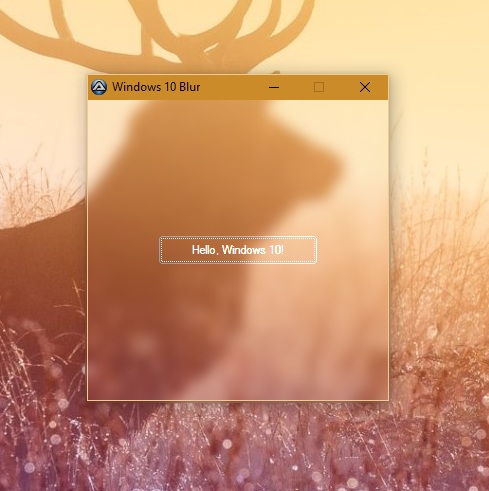
-

Button Image - Icon from shell32.dll - rotate
SirWayNe posted a topic in AutoIt GUI Help and Support
Hey, TLDR; Take Image from dll File, rotate as needed, Put into Button Control I want to use Icons from shell32 and Put them into Buttons as Images. So far so easy, Buttons are created with Style BS_ICON and the Image ist set via guictrlsetimage with specific identifier. But the Idea is to use arrows or other Icons from the shell32.dll or different files, but rotating them as needed for the Button controls. Since the Rotation has to be done at runtime, creating the icons in advance wont work. I got a bit lost, using GDI Plus in this. Every attemp i tried, failed in No Icon displayed. But i am not used to GDI Plus at all, that might be the Problem here. When i have access to the current source, i will add this to the topic. Any ideas so far how to solve this? Greetings. -
An example of monitoring when windows are created, closed or re-drawn. I just noticed there is an example (similar to mine) in the AutoIt beta v3.3.9.6+, though the more examples there are the better understanding users will have. #include <GUIConstantsEx.au3> #include <WinAPIEx.au3> Example() Func Example() Local $hGUI = GUICreate('An(other) example by guinness - 2013', Default, Default) ; Create a GUI. GUISetState(@SW_SHOW, $hGUI) GUIRegisterMsg(_WinAPI_RegisterWindowMessage('SHELLHOOK'), 'WM_SHELLHOOK') ; Define a window message and assign to the WM_SHELLHOOK function. _WinAPI_RegisterShellHookWindow($hGUI) ; Register the shell hook message to our GUI. While 1 Switch GUIGetMsg() Case $GUI_EVENT_CLOSE ExitLoop EndSwitch WEnd _WinAPI_DeregisterShellHookWindow($hGUI) GUIDelete($hGUI) EndFunc ;==>Example Func WM_SHELLHOOK($hWnd, $iMsg, $wParam, $lParam) #forceref $iMsg Switch $wParam Case $HSHELL_GETMINRECT ConsoleWrite('Minimised/Maximised: ' & @CRLF & _ @TAB & 'PID: ' & WinGetProcess($lParam) & @CRLF & _ ; This is the PID. @TAB & 'Filename: ' & _WinAPI_GetWindowFileName($lParam) & @CRLF & _ ; This is the filepath of the window. @TAB & 'hWnd: ' & $lParam & @CRLF) ; This will be the handle of the window closed. Case $HSHELL_REDRAW ConsoleWrite('Redrawn: ' & @CRLF & _ @TAB & 'PID: ' & WinGetProcess($lParam) & @CRLF & _ ; This is the PID. @TAB & 'Filename: ' & _WinAPI_GetWindowFileName($lParam) & @CRLF & _ ; This is the filepath of the window. @TAB & 'hWnd: ' & $lParam & @CRLF) ; This will be the handle of the window closed. Case $HSHELL_WINDOWCREATED ConsoleWrite('Created: ' & @CRLF & _ @TAB & 'PID: ' & WinGetProcess($lParam) & @CRLF & _ ; This is the PID. @TAB & 'Filename: ' & _WinAPI_GetWindowFileName($lParam) & @CRLF & _ ; This is the filepath of the window. @TAB & 'hWnd: ' & $lParam & @CRLF) ; This will be the handle of the window closed. Case $HSHELL_WINDOWDESTROYED ConsoleWrite('Destroyed: ' & @CRLF & _ @TAB & 'PID: ' & WinGetProcess($lParam) & @CRLF & _ ; This will be -1. @TAB & 'Filename: ' & _WinAPI_GetWindowFileName($lParam) & @CRLF & _ ; This will be empty. @TAB & 'hWnd: ' & $lParam & @CRLF) ; This will be the handle of the window closed. Case $HSHELL_WINDOWREPLACED ConsoleWrite('Replaced: ' & @CRLF & _ @TAB & 'PID: ' & WinGetProcess($lParam) & @CRLF & _ ; This is the PID. @TAB & 'Filename: ' & _WinAPI_GetWindowFileName($lParam) & @CRLF & _ ; This is the filepath of the window. @TAB & 'hWnd: ' & $lParam & @CRLF) ; This will be the handle of the window closed. EndSwitch EndFunc ;==>WM_SHELLHOOK
- 4 replies
-
- 1
-

-
- pid creation
- winapi
- (and 4 more)
-
I'm trying to make it so that any given window is unable to be resized or moved. I'm using the function _WinAPI_SetWindowLong() and _WinAPI_SetWindowPos(). I also added $SWP_NOSENDCHANGING so as to disable the window's call to move when dragged with the mouse, and removed $SWP_FRAMECHANGED, as I didn't need it in my case, Win11, apparently the sizing box went away without having to send the framechanged parameter. However, it didn't disable that window-moving function, it seems as though $SWP_NOSENDCHANGING does nothing in this instance. Here is the code I'm working with: #include <WinAPISysWin.au3> $hWnd = WinGetHandle( "[CLASS:CabinetWClass]") If @error Then MsgBox( 0, "", "FileExplorer window not found.") Exit EndIf $iStyle = _WinAPI_GetWindowLong( $hWnd, $GWL_STYLE) $iStyle = BitXOR( $iStyle, $WS_SIZEBOX) _WinAPI_SetWindowLong( $hWnd, $GWL_STYLE, $iStyle) _WinAPI_SetWindowPos( $hWnd, $HWND_TOP, 0, 0, 0, 0, BitOR( $SWP_NOSENDCHANGING, $SWP_NOMOVE, $SWP_NOSIZE)) I also tried it with $SWP_FRAMECHANGED in the SetWindowPos() flags just in case, but it didn't help. If anything, $SWP_FRAMECHANGED just adds an ugly thicker border around the window, I don't need it to update the window after removing the sizing box, to reiterate, it is changed without having to do so. Am I using $SWP_NOSENDCHANGING wrong? I am trying to disable the size box AND prevent the window from being able to be moved. Any help would be appreciated! I'm using a file explorer window for the test, so make sure it is open before running the code, and if it doesn't remove the sizing box for you, maybe you do need $SWP_FRAMECHANGED. Here is the MSDN reference if needed: https://learn.microsoft.com/en-us/windows/win32/api/winuser/nf-winuser-setwindowpos https://learn.microsoft.com/en-us/windows/win32/winmsg/wm-windowposchanging
-
I'm searching for a way to set an icon for a system menu entry in the console window. I can add / remove entries but I didn't find a way to set an icon for the entry I made. Example: #AutoIt3Wrapper_Change2CUI=y #include <GDIPlus.au3> #include <GUIConstantsEx.au3> #include <GuiMenu.au3> #include <WindowsConstants.au3> Global $id_Test = 5000 Global $hConsole = HWnd(DllCall("kernel32.dll", "hwnd", "GetConsoleWindow")[0]) If Not $hConsole Then Exit HotKeySet("{ESC}", "_Exit") Global $hSysmenu = _GUICtrlMenu_GetSystemMenu($hConsole) Global $iCount = _GUICtrlMenu_GetItemCount ($hSysmenu) _GUICtrlMenu_InsertMenuItem($hSysmenu, $iCount, "Test", $id_Test) _GDIPlus_Startup() $hBitmap_GDI = _GDIPlus_BitmapCreateFromMemory(_Test(), True) ConsoleWrite('@@ Debug(' & @ScriptLineNumber & ') : $hBitmap_GDI = ' & $hBitmap_GDI & @CRLF & '>Error code: ' & @error & @CRLF) ;### Debug Console $hBmp1 = _WinAPI_CreateSolidBitmap($hConsole, 0xFF0000, 16, 16) ConsoleWrite('@@ Debug(' & @ScriptLineNumber & ') : $hBmp1 = ' & $hBmp1 & @CRLF & '>Error code: ' & @error & @CRLF) ;### Debug Console $hBmp2 = _WinAPI_CreateSolidBitmap($hConsole, 0x00FF00, 16, 16) ConsoleWrite('@@ Debug(' & @ScriptLineNumber & ') : $hBmp2 = ' & $hBmp2 & @CRLF & '>Error code: ' & @error & @CRLF) ;### Debug Console ;ConsoleWrite(_GUICtrlMenu_SetItemBmp($hSysmenu, $id_Test, $hBitmap_GDI, False) & @CRLF) ConsoleWrite(_GUICtrlMenu_SetItemBitmaps($hSysmenu, $id_Test, $hBmp1, $hBmp2, False) & ", " & @error & @CRLF) ;_GUICtrlMenu_SetItemBmp($hSysmenu, $id_Test, 8, False) ;set the default close icon _GDIPlus_Shutdown() Do Sleep(1000) Until False Func _Exit() ConsoleWrite("Bye..." & @CRLF) _GUICtrlMenu_DeleteMenu ($hSysmenu, $id_Test, False) _WinAPI_DeleteObject($hBitmap_GDI) _WinAPI_DeleteObject($hBmp1) _WinAPI_DeleteObject($hBmp2) Exit EndFunc ;Code below was generated by: 'File to Base64 String' Code Generator v1.20 Build 2020-06-05 Func _Test($bSaveBinary = False, $sSavePath = @ScriptDir) Local $Test $Test &= 'iVBORw0KGgoAAAANSUhEUgAAABAAAAAQCAYAAAAf8/9hAAAACXBIWXMAAA3XAAAN1wFCKJt4AAADKElEQVQ4yz2RT2gcdRTHP7+Z36y7yzZZdvJv22i0rBpiAwnWCMZrUCGIBxEvpQSEHAQhePLkyUKg6Em9iZCcahH0pFYxkIqiIdHKYmPUUHcDmU2TuJnZzc7s/H7PQ5M8ePAu7/M+X56y1hKGYY+IOEDqOI6TzWY1gFIKEcF1XRzHUWmaJnF8bHBy5pfbnz9fb0hBh2F4bm5ubjWKogudTqdVqVT0/Py853kehUKBQqHA2tqaVKtVfenS2P6HH396PDri9D9+cdC/8dkXNW2t9fb29spRFPmtVqtULBaVMYZ8Pk82m8X3farVKjdv3qCn+FbpnFuXfNpQkkwlX33z3RtaKYXW2mqtcV1XtNZks9kzQCaTIeNp4sSh8rAnzSe0HO5bt1arHR51y79pEcEYo05Aylp7OqOUIk0TRp+aYO5Ki3B3VR3s70pictzZGlC5jHW0UgprLVEU4Xke29vbLCwsoLXGcRRxYjk/2MtLz2X4/tvbaO3y9XoPlUe7CI7VAMYYPM+jXC5jrcUYAwipUeSzHhV/k59+bFK5OMytOxco9ezQTQ2A4ujoqDQ+Ph4sLS2JiNiDgwM5PDyQ3SCQ/5ptubv6rsy9XJIfvnxbNv/8W+7d+9deu/aeTE9PB2EYljSAiKje3l7SNCUIAkDQXp77f3zE4uJ1Xnv9KoWRK+zs1DlfHiCXy2OtBcA5AdDpdHBdl4F+n77BEdz2z3zw/iKvvHqVZ194h0wmz0B/Ca094jjmtE4NEBFarRa7jfvkHgqp/rrKxOQzjF6+wtY/u4g9Jo5TfL+EiGCtxVqLFhGUUhhjsNZgrcvqrU948rFhKlNvEkUdtNvBoFEqPVtUSqGUQiulaDabtNttPC/D5t3fqTU0Y5dfpNFogFhEOLsaxzHtdpsgCNT6+rrSSZIwOztrhoeH' $Test &= 'qdfrRmutJp6e4q+tKsbYs3in7+7r65OhoSE9MzNjkiRBt9ttkiRxjTHkcjl3bGxMPYhjSdP0rLvdLt1uF9d1BcDzPHdyclL0yspKuLGxcT0IgkeKxaINgsADXBFxAefEQB4ImNT3/W4Yhk6z2awtLy9H/wPnrsNEnFPl4QAAAABJRU5ErkJggg==' Local $bString = _WinAPI_Base64Decode($Test) If @error Then Return SetError(1, 0, 0) $bString = Binary($bString) If $bSaveBinary Then Local Const $hFile = FileOpen($sSavePath & "\AutoSave_16x16_04.png", 18) If @error Then Return SetError(2, 0, $bString) FileWrite($hFile, $bString) FileClose($hFile) EndIf Return $bString EndFunc ;==>_Test Func _WinAPI_Base64Decode($sB64String) Local $aCrypt = DllCall("Crypt32.dll", "bool", "CryptStringToBinaryA", "str", $sB64String, "dword", 0, "dword", 1, "ptr", 0, "dword*", 0, "ptr", 0, "ptr", 0) If @error Or Not $aCrypt[0] Then Return SetError(1, 0, "") Local $bBuffer = DllStructCreate("byte[" & $aCrypt[5] & "]") $aCrypt = DllCall("Crypt32.dll", "bool", "CryptStringToBinaryA", "str", $sB64String, "dword", 0, "dword", 1, "struct*", $bBuffer, "dword*", $aCrypt[5], "ptr", 0, "ptr", 0) If @error Or Not $aCrypt[0] Then Return SetError(2, 0, "") Return DllStructGetData($bBuffer, 1) EndFunc ;==>_WinAPI_Base64Decode You must compile and run it to see the menu entry in the console window. Any idea?
-
Using some very ingenious scripts that I found on this forum, I've put together a special-purpose folder watcher that watches a specified folder for printer output files and then either send them to a printer or converts them to a PDF and prints or opens the PDF. The page about this utility is here: http://www.columbia.edu/~em36/printfileprinter.html The one serious problem that it has is that it seems not to detect a new file if there are more than two or three files already in the watched folder. I can't figure out what I'm doing wrong, and will be grateful for any help. Here is the relevant part of the script. I've left out the functions that test whether the file is in use or not, and that send the raw data to the printer or create a PDF, etc. I hope there's enough code here to make sense of it, and will be very grateful for any help. Again, the problem is that the script doesn't detect newly-created files in watched folders with more than a very few files already in it. My totally ignorant guess is that the problem is in the line $iID = _WinAPI_WaitForMultipleObjects(2, $paObj, 0, 0) - but I don't know how to change it and of course I'm only guessing whether it's relevant or not. Many thanks Global $g_ahObj[2] $g_ahObj[0] = _WinAPI_FindFirstChangeNotification($watchPath, $FILE_NOTIFY_CHANGE_FILE_NAME) $g_ahObj[1] = _WinAPI_FindFirstChangeNotification($watchPath, $FILE_NOTIFY_CHANGE_DIR_NAME) If (Not $g_ahObj[0]) Or (Not $g_ahObj[1]) Then MsgBox(BitOR($MB_ICONERROR, $MB_SYSTEMMODAL), 'Error', 'Unable to create change notification.') Exit EndIf Local $tObjs = DllStructCreate('ptr;ptr') Local $paObj = DllStructGetPtr($tObjs) For $i = 0 To 1 DllStructSetData($tObjs, $i + 1, $g_ahObj[$i]) Next Local $iID While 1 Sleep(100) $select = 0 $print = 0 $format = "" Local $tempPDF $tempPDF = 0 $iID = _WinAPI_WaitForMultipleObjects(2, $paObj, 0, 0) Switch $iID Case 0 ; WAIT_OBJECT_0 ; ConsoleWrite('A file was created, renamed, or deleted in the directory.' & @CRLF) Local $hSearch = FileFindFirstFile($watchPath & "\*") Local $sFileName = "", $iResult = 0 Local $sFilePath = "" While 1 $sFileName = FileFindNextFile($hSearch) ; If there is no more file matching the search. If @error Then ExitLoop $sFilePath = $watchPath & "\" & $sFileName Local $fileUsed $fileUsed = 0 $fileUsed = _FileIsUsed($sFilePath) If $fileUsed = 1 Then While 1 Sleep(100) $fileUsed = _FileIsUsed($sFilePath) If $fileUsed = 0 Then ExitLoop WEnd EndIf If StringInStr($sFileName, "raw") Then If StringInStr($sFileName, "select") Then $select = 1 PrintRawFile($sFilePath, $select) Else If StringInStr($sFileName, "lg.") Then $pageSize = "legal" ElseIf StringInStr($sFileName, "a4.") Then $pageSize = "a4" ElseIf StringInStr($sFileName, "us.") Then $pageSize = "letter" EndIf $pdfTemp = 0 If StringLower(StringLeft($sFileName, 7) = "pdftemp") Then $pdfTemp = 1 If StringInStr($sFileName, ".pcl") Then $format = "pcl" $print = 1 If StringLeft($sFileName, 6) = "select" Then $select = 1 $print = 1 ElseIf StringLeft($sFileName, 3) = "pdf" Then $select = 0 $print = 0 EndIf MakePDF($sFilePath, $format, $print, $select, $pageSize, $pdfTemp) ElseIf StringInStr($sFileName, ".ps") Then $format = "ps" $print = 1 If StringLeft($sFileName, 6) = "select" Then $select = 1 $print = 1 ElseIf StringLeft($sFileName, 3) = "pdf" Then $select = 0 $print = 0 EndIf MakePDF($sFilePath, $format, $print, $select, $pageSize, $pdfTemp) ElseIf StringInStr($sFileName, ".esc") Then Sleep(200) $format = "epson" $print = 1 If StringLeft($sFileName, 6) = "select" Then $select = 1 $print = 1 ElseIf StringLeft($sFileName, 3) = "pdf" Then $select = 0 $print = 0 EndIf MakePDF($sFilePath, $format, $print, $select, $pageSize, $pdfTemp) ElseIf StringInStr($sFileName, ".prn") Then $format = GetFileFormat($sFilePath) $print = 1 If StringLeft($sFileName, 6) = "select" Then $select = 1 $print = 1 ElseIf StringLeft($sFileName, 3) = "pdf" Then $select = 0 $print = 0 EndIf ConsoleWrite("PRN test format: " & $format & @CRLF) MakePDF($sFilePath, $format, $print, $select, $pageSize, $pdfTemp) EndIf EndIf ; Display the file name. ; $iResult = MsgBox(BitOR($MB_SYSTEMMODAL, $MB_OKCANCEL), "", $watchPath & "\" & $sFileName) ;~ RunWait(@ComSpec & " /c notepad.exe " & $watchPath & "\" & $sFileName) ;~ FileDelete($watchPath & "\" & $sFileName) If $iResult <> $IDOK Then ExitLoop ; If the user clicks on the cancel/close button. WEnd ; Close the search handle. FileClose($hSearch) Case 1 ; WAIT_OBJECT_0 + 1 ; ConsoleWrite('A directory was created, renamed, or deleted.' & @CRLF) Case Else ContinueLoop EndSwitch If Not _WinAPI_FindNextChangeNotification($g_ahObj[$iID]) Then MsgBox(BitOR($MB_ICONERROR, $MB_SYSTEMMODAL), 'Error', 'Unexpected error.') Exit EndIf WEnd
-
Here another approach to check if a script was already started using atoms and semaphores. Atom: #include <MsgBoxConstants.au3> Global $iSingleton = Singleton() If Not $iSingleton Then Exit MsgBox($MB_TOPMOST, "Singleton Test", "Process is already running!") EndIf MsgBox($MB_TOPMOST, "Singleton Test", "Singleton atom initialized: " & $iSingleton) Singleton_Delete($iSingleton) ; #FUNCTION# ==================================================================================================================== ; Name ..........: Singleton ; Description ...: Checks if the script has been started already. ; Syntax ........: Singleton([$sOccurrenceName = @ScriptFullPath]) ; Parameters ....: $sOccurrenceName - [optional] a string value. Default is @ScriptFullPath. ; Return values .: If the function succeeds, the return value is the newly created atom or 0 else error is set and false is returned. ; Author ........: UEZ ; Modified ......: ; Remarks .......: If Singleton finds the atom it will return 0 and the atom token will be set to extended macro. It can be used to get the atom string using _WinAPI_AtomGlobalGetName. ; Related .......: ; Link ..........: https://docs.microsoft.com/en-us/windows/win32/api/winbase/nf-winbase-globalfindatomw ; https://docs.microsoft.com/en-us/windows/win32/api/winbase/nf-winbase-globaladdatomw ; Example .......: No ; =============================================================================================================================== Func Singleton($sOccurrenceName = @ScriptFullPath) Local $iFind = _WinAPI_AtomGlobalFind($sOccurrenceName) If @error Then Return SetError(1, 0, False) If $iFind Then Return SetExtended($iFind, 0) Local $iAtom = _WinAPI_AtomGlobalAdd($sOccurrenceName) If @error Then Return SetError(2, 0, False) Return $iAtom EndFunc ;==>Singleton ; #FUNCTION# ==================================================================================================================== ; Name ..........: Singleton_Delete ; Description ...: Deletes the atom generated by the first started script. ; Syntax ........: Singleton_Delete($iAtom) ; Parameters ....: $iAtom - an integer value which was generated by Singleton ; Return values .: True if successful else false. ; Author ........: UEZ ; Modified ......: ; Remarks .......: Don't forget to call Singleton_Delete before first started script ends. ; Related .......: ; Link ..........: https://docs.microsoft.com/en-us/windows/win32/api/winbase/nf-winbase-globaldeleteatom ; Example .......: No ; =============================================================================================================================== Func Singleton_Delete($iAtom) _WinAPI_AtomGlobalDelete($iAtom) If @error Then Return SetError(1, 0, False) Return True EndFunc ;==>Singleton_Delete ;internal functions Func _WinAPI_AtomGlobalFind($sAtomString) Local $aReturn = DllCall("kernel32.dll", "short", "GlobalFindAtomW", "wstr", $sAtomString) If @error Then Return SetError(1, 0, -1) Return $aReturn[0] EndFunc ;==>_WinAPI_AtomGlobalFind Func _WinAPI_AtomGlobalAdd($sAtomString) Local $aReturn = DllCall("kernel32.dll", "short", "GlobalAddAtomW", "wstr", $sAtomString) If @error Then Return SetError(1, 0, -1) Return $aReturn[0] EndFunc ;==>_WinAPI_AtomGlobalAdd Func _WinAPI_AtomGlobalDelete($nAtom) Local $aReturn = DllCall("kernel32.dll", "short", "GlobalDeleteAtom", "short", $nAtom) If @error Then Return SetError(1, 0, -1) Return $aReturn[0] = 0 EndFunc ;==>_WinAPI_AtomGlobalDelete Func _WinAPI_AtomGlobalGetName($nAtom, $iBufferSize = 512) Local $tBufferAtom = DllStructCreate("wchar name[" & $iBufferSize & "]") Local $aReturn = DllCall("kernel32.dll", "uint", "GlobalGetAtomNameW", "short", $nAtom, "struct*", $tBufferAtom, "int", $iBufferSize) If @error Or Not $aReturn[0] Then Return SetError(1, 0, -1) Return $tBufferAtom.name EndFunc ;==>_WinAPI_AtomGlobalGetName Semaphore: #include <MsgBoxConstants.au3> #include <WinAPIError.au3> Global $iSingleton = Singleton("&]8h/x87</htFV4-K*&.b.w~") If Not $iSingleton Then Exit MsgBox($MB_TOPMOST, "Singleton Test", "Process is already running!") EndIf MsgBox($MB_TOPMOST, "Singleton Test", "Singleton Semaphore initialized: " & $iSingleton) ; #FUNCTION# ==================================================================================================================== ; Name ..........: Singleton ; Description ...: Checks if the script has been started already. ; Syntax ........: Singleton($sOccurrenceName) ; Parameters ....: $sOccurrenceName - a string value which will be used to create the semaphore handle. ; Return values .: True if Singleton started the first time. False if script was already started ; Author ........: UEZ ; Modified ......: ; Remarks .......: The system closes the handle automatically when the process terminates. The semaphore object is destroyed when its last handle has been closed. ; Related .......: ; Link ..........: https://docs.microsoft.com/en-us/windows/win32/api/winbase/nf-winbase-createsemaphorea ; Example .......: No ; =============================================================================================================================== Func Singleton($sOccurrenceName) If StringLen($sOccurrenceName) > 260 Then $sOccurrenceName = StringLeft($sOccurrenceName, 260) Local $aReturn = DllCall("kernel32.dll", "handle", "CreateSemaphoreA", "ptr", Null, "long", 0, "long", 1, "str", $sOccurrenceName) If @error Or Not $aReturn[0] Then Return SetError(1, 0, -1) Return SetExtended($aReturn[0], $aReturn[0] And _WinAPI_GetLastErrorMessage() = "The operation completed successfully.") EndFunc ;==>Singleton Just start the script twice to see if it works. The disadvantage of using atoms is that atoms have a memory that means when your app is crashing or you forgot to delete the atom then the atom does still have the $sOccurrenceName saved and thus Singleton will not work if you use the same same value for $sOccurrenceName. With semaphore you don't have this issue. Thanks to jj2007 and SARG.
- 7 replies
-
- 4
-
-
- atom
- semaphores
- (and 2 more)
-
Hello guys! I'm a rookie in AutoIt lol. I've tried to looking up in MSDN and the UDFs, but it can only get the GUID of a usual partition and with the GUID to control it. Now I have no ways😥. Thanks a lot for your help!
-
This simple dllcall gives me error 5, access denied, Func _WinAPI_VkKeyScan($__key) _WinAPI_SetLastError(0) $res = DllCall('User32.dll', 'SHORT', 'VkKeyScan', 'CHAR', $__key) _xConsole('res: '&$res) $_LastErr = _WinAPI_GetLastError() If $_LastErr <> 0 Then _xConsole('Err: {' & $_LastErr & '}> ' & _WinAPI_GetLastErrorMessage()) Return $res EndFunc Am i doing something wrong? Also tried VkKeyScanA and W Edit: I want to send `:` via PostMessage() WM_KEYDOWN
-
Not going to dump the code down because it's essentially a keylogger. <snip>
-
 Edit: If you already read this post, I updated it to better fit the scope of what I want to do. My goal is to be able to read the raw output from a usb type controller (or mouse or keyboard, don't want it to be controller-only) so i can see how / what changes when i hit buttons. I've gotten as far as finding HID page documentation and documentation for the device Struct, but I don't know where to go from here How do I tell what and Useage to use for any given controller / Keyboard / Mouse? How do I get a list of all HID devices connected and their UsagePage / Usage? How do I register multiple devices / get raw input from multiple devices at once? Here is the modified example script i am using: #include <APISysConstants.au3> #include <GUIConstantsEx.au3> #include <StaticConstants.au3> #include <WinAPIGdi.au3> #include <WinAPIMisc.au3> #include <WinAPISys.au3> #include <WindowsConstants.au3> Opt('TrayAutoPause', 0) Global $iFlagsOld = 0, $iDataOld = 0 ; Create GUI Global $g_hForm = GUICreate('Test ' & StringReplace(@ScriptName, '.au3', '()'), 160, 212, @DesktopWidth - 179, @DesktopHeight - 283, BitOR($WS_CAPTION, $WS_POPUP, $WS_SYSMENU), $WS_EX_TOPMOST) ; To obtain the values of "UsagePage" and "Usage" members of this structure read HID Usage Tables documentation ; http://www.usb.org/developers/devclass_docs/HID1_11.pdf ; Disregaurd that, official USB documention = useless. Here is a human/normal-person friendly list ; http://www.freebsddiary.org/APC/usb_hid_usages.php ; Information on the Struct (eg what Flags and hTarget do) can be found here ; https://msdn.microsoft.com/en-us/library/ms645565(v=vs.85).aspx Local $tRID = DllStructCreate($tagRAWINPUTDEVICE) DllStructSetData($tRID, 'UsagePage', 0x01) ; Generic Desktop Controls DllStructSetData($tRID, 'Usage', 0x06) ; Mouse DllStructSetData($tRID, 'Flags', $RIDEV_INPUTSINK) ; This flag makes window hTarget accept input even when it's not active. MUST define hTarget DllStructSetData($tRID, 'hTarget', $g_hForm) ; The target window that will be sent events, used with some Flags ; Register HID input to obtain row input _WinAPI_RegisterRawInputDevices($tRID) ; Register WM_INPUT message GUIRegisterMsg($WM_INPUT, 'WM_INPUT') ;~ GUISetState(@SW_SHOW) Do Until GUIGetMsg() = $GUI_EVENT_CLOSE Func WM_INPUT($hWnd, $iMsg, $wParam, $lParam) #forceref $iMsg, $wParam Switch $hWnd Case $g_hForm Local $tRIM = DllStructCreate($tagRAWINPUTMOUSE) If _WinAPI_GetRawInputData($lParam, $tRIM, DllStructGetSize($tRIM), $RID_INPUT) Then Local $iFlags = DllStructGetData($tRIM, 'Flags') Local $sFlag = "", $sData = "" $iFlags = DllStructGetData($tRIM, 'ButtonFlags') If $iFlags <> $iFlagsOld Then $sFlag = $iFlags $iFlagsOld = $iFlags EndIf $iData = DllStructGetData($tRIM, 'ButtonData') If $iData <> $iDataOld Then $sData = $iData $iDataOld = $iData EndIf If $sFlag&$sData <> "" Then ConsoleWrite($sFlag&" "&$sData&@CRLF) EndIf EndIf EndSwitch Return $GUI_RUNDEFMSG EndFunc ;==>WM_INPUT Old post:
 -
 Hi, I thought I would never post a C/WinAPI related question in this forum ever, but here we are after a few years and me having learnt enough of C to write a basic console program My issue is that I am trying to read my child process's stdout output but ReadFile never returns if the child exits or if it is killed... very strange , I have been trying to work my way around this. The options I can think of are: Create a new thread and check for existance of the process constantly while reading Somehow make the pipe asynchronous (overlapped) so that I can read it in a non-blocking manner Fix ReadFile to return when the process ends Obviously I would prefer No. 3, I just want to make my program work. Here is my code if you guys want to take a look: // No text highlighting for C/C++ but we have it for C#? Blasphemy! bool allium_start(struct TorInstance *instance, char *config, allium_pipe *output_pipes) { char *cmd; // Figure out the command string for execution if (config) { char *parameters = " -f -"; cmd = malloc(strlen(instance->tor_path) + strlen(parameters) + 1); if (!cmd) return false; strcpy(cmd, instance->tor_path); strcat(cmd, parameters); } else cmd = instance->tor_path; // Prepare startup info with appropriate information SecureZeroMemory(&instance->startup_info, sizeof instance->startup_info); instance->startup_info.dwFlags = STARTF_USESTDHANDLES; SECURITY_ATTRIBUTES pipe_secu_attribs = {sizeof(SECURITY_ATTRIBUTES), NULL, true}; HANDLE pipes[2]; if (output_pipes == NULL) { CreatePipe(&pipes[0], &pipes[1], &pipe_secu_attribs, 0); output_pipes = pipes; } instance->startup_info.hStdOutput = output_pipes[1]; instance->startup_info.hStdError = output_pipes[1]; instance->stdout_pipe = output_pipes[0]; // Stored for internal reference if (config) { // Reuse the pipes array to store standard input pipes CreatePipe(&pipes[0], &pipes[1], &pipe_secu_attribs, 0); instance->startup_info.hStdInput = pipes[0]; } // Create the process bool success = CreateProcessA( NULL, cmd, NULL, NULL, config ? true : false, 0, NULL, NULL, &instance->startup_info, SecureZeroMemory(&instance->process, sizeof instance->process) ); // Free command string if needed if (config) free(cmd); // Write config to Tor's standard input unsigned long bytes_written; if (success) { WriteFile(pipes[1], config, strlen(config), &bytes_written, NULL); // Work around for simulating Ctrl + Z which sends the substitution character (ASCII 26), // this is needed in order for Tor to detect EOT/EOF while reading the config WriteFile(pipes[1], &(char){26}, 1, &bytes_written, NULL); } CloseHandle(pipes[1]); // Return on failure if (!success) return false; } char *allium_read_stdout_line(struct TorInstance *instance) { char *buffer = instance->buffer.data; // Check for valid buffer and allocate if needed if (instance->buffer.size == 0 || !buffer) { buffer = instance->buffer.data = malloc(instance->buffer.size = 80 + 1); if (!buffer) return NULL; } // Process the input unsigned int read_len = 0; while (true) { // Read data unsigned long bytes_read; if (ReadFile(instance->stdout_pipe, buffer, 1, &bytes_read, NULL) == false || bytes_read == 0) return NULL; // Check if we have reached end of line if (buffer[0] == '\n') break; // Proceed to the next character ++buffer; ++read_len; // Resize buffer if it is full if (read_len == instance->buffer.size) { char *new_buffer = malloc(instance->buffer.size += 50); if (new_buffer) memcpy(new_buffer, instance->buffer.data, read_len); free(instance->buffer.data); if (!new_buffer) return NULL; instance->buffer.data = new_buffer; buffer = instance->buffer.data + read_len; } } // Terminate the new line with null character and return // Special handling for Windows, terminate at CR if present buffer[read_len >= 2 && buffer[-1] == '\r' ? -1 : 0] = '\0'; } The allium_start function creates the redirection pipes and the child process, the other allium_read_stdout_line function reads from the stdout pipe created by the first function, ReadFile in this function does not return when the child ends or gets killed. I appriciate the help of the WinAPI gurus here, thanks in advance!
 -
Hi guys, there is no UDF wrappers for GetAdaptersAddresses API... till now Here you are: ; #FUNCTION# ==================================================================================================================== ; Name...........: _WinAPI_GetAdaptersAddresses ; Description ...: Retrieves the addresses associated with the adapters on the local computer. ; Syntax.........: _WinAPI_GetAdaptersAddresses($iFamily = 2, $iShowAll = 1, $iShowTunnel = 0) ; Parameters ....: $iFamily - IP type. ; |0 - Both ; |2 - IPv4 (default) ; |23 - IPv6 ; $iShowAll - Presentation mode ; |0 - Short: only Unicast address(es) and Friendly Name columns are returned ; |1 - Long (default): all columns are returned but Anycast and Multicast columns return only the first address (it is not an array) ; |2 - Complete: all columns are returned, Anycast and Multicast columns return an array with the complete list of addresses ; $iShowTunnel - Shows or not tunnel interfaces ; |0 - Don't show (default) ; |1 - Show ; Return values .: On success it returns a bidimensional array: on rows there is the adapter list, these are the columns ; |0 - Preferred unicast address(es), it returns an array of addresses only if $iFamily == 0 ; |1 - Friendly name ; |2 - Anycast addresses: if $iShowAll == 1 it returns the first anycast address of the list, ; if $iShowAll == 2 it returns an array with the complete list of anycast addresses ; |3 - Multicast addresses: if $iShowAll == 1 it returns the first multicast address of the list, ; if $iShowAll == 2 it returns an array with the complete list of multicast addresses ; |4 - DNS Server 1 address ; |5 - DNS Server 2 address ; |6 - Adapter Name ; |7 - Description ; |8 - MAC address ; |9 - Interface Type ; for example $array[2][8] represents the MAC address of the third adapter ; ; On failure it returns 0 and sets @error to non zero (these values are useful only for debugging reasons): ; |1 - incorrect parameters ; |2 - DllOpen error ; |3 - DllCall error ; |4 - _WinAPI_GetString error ; |5 - Query for IPv6 addresses and IPv6 is not installed on the OS ; Author ........: j0kky ; Modified ......: 1.1.3 13/02/15 ; Remarks .......: This function is fully compatible with all OS from Windows XP onwards, there can be some problem using this function ; with $iFamily == 23 if the OS is prior to Windows XP SP1 ; Link ..........: https://msdn.microsoft.com/en-us/library/windows/desktop/aa365915(v=vs.85).aspx ; =============================================================================================================================== #include <WinAPIMisc.au3> Func _WinAPI_GetAdaptersAddresses($iFamily = 2, $iShowAll = 1, $iShowTunnel = 0) If Not ($iFamily == 0 Or $iFamily == 2 Or $iFamily == 23) Or _ Not ($iShowAll == 0 Or $iShowAll == 1 Or $iShowAll == 2) Or _ Not ($iShowTunnel == 0 Or $iShowTunnel == 1) Then Return SetError(1, 0, 0) Local $aRet If $iFamily == 23 Then $aRet = DllCall("Ws2_32.dll", "int", "WSCEnumProtocols", "ptr", Null, "ptr", Null, "dword*", Null, "ptr", Null) Local $tlpProtocolBuffer = DllStructCreate("byte[" & $aRet[3] & "]") Local $plpProtocolBuffer = DllStructGetPtr($tlpProtocolBuffer) $aRet = DllCall("Ws2_32.dll", "int", "WSCEnumProtocols", "ptr", Null, "ptr", $plpProtocolBuffer, "dword*", $aRet[3], "ptr", Null) Local $tagWSAPROTOCOL_INFOW = "dword dwServiceFlags1; dword dwServiceFlags2; dword dwServiceFlags3; dword dwServiceFlags4; dword dwServiceFlags5; byte ProviderId[16]; " & _ "dword dwCatalogEntryId; " & _ "STRUCT; int ChainLen; dword ChainEntries[7]; ENDSTRUCT;" & _ ;ProtocolChain "int iVersion; int iAddressFamily; int iMaxSockAddr; int iMinSockAddr; int iSocketType; int iProtocol; int iProtocolMaxOffset; int iNetworkByteOrder; " & _ "int iSecurityScheme; dword dwMessageSize; dword dwProviderReserved; wchar szProtocol[256]" Local $tWSAPROTOCOL_INFOW, $size For $i = 0 To $aRet[0] - 1 If $i == 0 Then $tWSAPROTOCOL_INFOW = DllStructCreate($tagWSAPROTOCOL_INFOW, $plpProtocolBuffer) Else $tWSAPROTOCOL_INFOW = DllStructCreate($tagWSAPROTOCOL_INFOW, $plpProtocolBuffer + $size) EndIf If DllStructGetData($tWSAPROTOCOL_INFOW, "iAddressFamily") == 23 Then ExitLoop If $i == ($aRet[0] - 1) Then Return SetError(5, 0, 0) ;if IPv6 is not installed on the system $size += DllStructGetSize($tWSAPROTOCOL_INFOW) Next EndIf $hIphlpapi = DllOpen("Iphlpapi.dll") If @error Then Return SetError(2, 0, 0) $aRet = DllCall($hIphlpapi, "ULONG", "GetAdaptersAddresses", "ULONG", $iFamily, "ULONG", 0, "ptr", Null, "ptr", Null, "dword*", 0) If @error Then DllClose($hIphlpapi) Return SetError(3, 0, 0) EndIf Local $tbuffer_AdapterAddresses = DllStructCreate("byte[" & $aRet[5] & "]") Local $pbuffer_AdapterAddresses = DllStructGetPtr($tbuffer_AdapterAddresses) DllCall($hIphlpapi, "ULONG", "GetAdaptersAddresses", "ULONG", $iFamily, "ULONG", 0, "ptr", Null, "ptr", $pbuffer_AdapterAddresses, "dword*", $aRet[5]) If @error Then DllClose($hIphlpapi) Return SetError(3, 0, 0) EndIf DllClose($hIphlpapi) Local Const $tagIP_ADAPTER_ADDRESSES = "ulong Length; dword IfIndex; ptr Next; ptr AdapterName; ptr FirstUnicastAddress; ptr FirstAnycastAddress; " & _ "ptr FirstMulticastAddress; ptr FirstDnsServerAddress; ptr DnsSuffix; ptr Description; ptr FriendlyName; byte PhysicalAddress[8]; dword PhysicalAddressLength; " & _ "dword Flags; dword Mtu; dword IfType; int OperStatus" ;valid on Windows XP #cs "dword Ipv6IfIndex; dword ZoneIndices[16]; ptr FirstPrefix; " & _ ;added on WinXP SP1 "uint64 TransmitLinkSpeed; uint64 ReceiveLinkSpeed; ptr FirstWinsServerAddress; ptr FirstGatewayAddress; ulong Ipv4Metric; ulong Ipv6Metric; uint64 Luid; " & _ "STRUCT; ptr Dhcpv4ServerlpSockaddr; int Dhcpv4ServeriSockaddrLength; ENDSTRUCT; " & _ ;Dhcpv4Server "uint CompartmentId; byte NetworkGuid[16]; int ConnectionType; int TunnelType; " & _ "STRUCT; ptr Dhcpv6ServerlpSockaddr; int Dhcpv6ServeriSockaddrLength; ENDSTRUCT; " & _ ;Dhcpv6Server "byte Dhcpv6ClientDuid[130]; ulong Dhcpv6ClientDuidLength; ulong Dhcpv6Iaid; " & _ ;added on WinVista "ptr FirstDnsSuffix" ;added on WinVista SP1 #ce Local Const $tagIP_ADAPTER_UNICAST_ADDRESS = "ulong Length; dword Flags; ptr Next; " & _ "STRUCT; ptr AddresslpSockaddr; int AddressiSockaddrLength; ENDSTRUCT; " & _ ;Address "int PrefixOrigin; int SuffixOrigin; int DadState; ulong ValidLifetime; ulong PreferredLifetime; ulong LeaseLifetime" #cs "byte OnLinkPrefixLength" ;added on WinVista #ce Local $tIP_ADAPTER_ADDRESSES = DllStructCreate($tagIP_ADAPTER_ADDRESSES, $pbuffer_AdapterAddresses) Local $nAdapter = 0, $pUnicastAddress, $tIP_ADAPTER_UNICAST_ADDRESS, $plpSockaddr, $iSockaddrLength, $tbuffer_lpszAddressString, $pbuffer_lpszAddressString Local Const $IfOperStatusUp = 1, $IF_TYPE_SOFTWARE_LOOPBACK = 24, $IF_TYPE_TUNNEL = 131, $IpDadStatePreferred = 4, $pNull = Ptr(0) If $iShowAll Then Local $nColumns = 10 Local Const $tagIP_ADAPTER_ANYCAST_ADDRESS = "ulong Length; dword Flags; ptr Next; " & _ "STRUCT; ptr AddresslpSockaddr; int AddressiSockaddrLength; ENDSTRUCT" ;Address Local Const $tagIP_ADAPTER_MULTICAST_ADDRESS = $tagIP_ADAPTER_ANYCAST_ADDRESS Local Const $tagIP_ADAPTER_DNS_SERVER_ADDRESS = "ulong Length; dword Reserved; ptr Next; " & _ "STRUCT; ptr AddresslpSockaddr; int AddressiSockaddrLength; ENDSTRUCT" ;Address Local $pAnycastAddress, $tIP_ADAPTER_ANYCAST_ADDRESS, $pMulticastAddress, $tIP_ADAPTER_MULTICAST_ADDRESS, $pDnsServerAddress, $tADAPTER_DNS_SERVER_ADDRESS, $sMAC Local Const $IF_TYPE_ETHERNET_CSMACD = 6, $IF_TYPE_IEEE80211 = 71, $IF_TYPE_IEEE1394 = 144 Else Local $nColumns = 2 EndIf Local $aResult[$nAdapter][$nColumns] $hWs2_32 = DllOpen("Ws2_32.dll") If @error Then Return SetError(2, 0, 0) TCPStartup() Do If DllStructGetData($tIP_ADAPTER_ADDRESSES, "OperStatus") == $IfOperStatusUp And _ Not (DllStructGetData($tIP_ADAPTER_ADDRESSES, "IfType") == $IF_TYPE_SOFTWARE_LOOPBACK) And _ (Not (DllStructGetData($tIP_ADAPTER_ADDRESSES, "IfType") == $IF_TYPE_TUNNEL) Or $iShowTunnel) Then ;if it's connected and it is not a loopback and it is a tunnel interface (only if $iShowTunnel == 1) $nAdapter += 1 ReDim $aResult[$nAdapter][$nColumns] ;Unicast address(es) $pUnicastAddress = DllStructGetData($tIP_ADAPTER_ADDRESSES, "FirstUnicastAddress") $tIP_ADAPTER_UNICAST_ADDRESS = DllStructCreate($tagIP_ADAPTER_UNICAST_ADDRESS, $pUnicastAddress) If Not $iFamily Then Local $aAddresses[0], $iCounter = -1 Do ;write the PREFERRED address for this adapter, it writes both IPV4 and IPV6 preferred addresses in an array if $iFamily == 0 If DllStructGetData($tIP_ADAPTER_UNICAST_ADDRESS, "DadState") == $IpDadStatePreferred Then $plpSockaddr = DllStructGetData($tIP_ADAPTER_UNICAST_ADDRESS, "AddresslpSockaddr") $iSockaddrLength = DllStructGetData($tIP_ADAPTER_UNICAST_ADDRESS, "AddressiSockaddrLength") $aRet = DllCall($hWs2_32, "int", "WSAAddressToString", "ptr", $plpSockaddr, "int", $iSockaddrLength, "ptr", Null, "byte*", Null, "dword*", 0) If @error Then DllClose($hWs2_32) Return SetError(3, 0, 0) EndIf $tbuffer_lpszAddressString = DllStructCreate("wchar[" & $aRet[5] & "]") $pbuffer_lpszAddressString = DllStructGetPtr($tbuffer_lpszAddressString) $aRet = DllCall($hWs2_32, "int", "WSAAddressToStringW", "ptr", $plpSockaddr, "int", $iSockaddrLength, "ptr", Null, "ptr", $pbuffer_lpszAddressString, "dword*", $aRet[5]) If @error Then DllClose($hWs2_32) Return SetError(3, 0, 0) EndIf If $iFamily Then $aResult[$nAdapter - 1][0] = _WinAPI_GetString($pbuffer_lpszAddressString) If @error And @error <> 10 Then DllClose($hWs2_32) Return SetError(4, 0, 0) EndIf ExitLoop Else $iCounter = UBound($aAddresses) ReDim $aAddresses[$iCounter + 1] $aAddresses[$iCounter] = _WinAPI_GetString($pbuffer_lpszAddressString) If @error And @error <> 10 Then DllClose($hWs2_32) Return SetError(4, 0, 0) EndIf EndIf EndIf $pUnicastAddress = DllStructGetData($tIP_ADAPTER_UNICAST_ADDRESS, "Next") If Not ($pUnicastAddress == $pNull) Then $tIP_ADAPTER_UNICAST_ADDRESS = DllStructCreate($tagIP_ADAPTER_UNICAST_ADDRESS, $pUnicastAddress) EndIf Until $pUnicastAddress == $pNull If Not $iFamily Then If $iCounter < 0 Then ReDim $aAddresses[1] ;if there is no preferred unicast addresses for this adapter, I don't know if it can happens $aResult[$nAdapter - 1][0] = $aAddresses EndIf ;FriendlyName $aResult[$nAdapter - 1][1] = _WinAPI_GetString(DllStructGetData($tIP_ADAPTER_ADDRESSES, "FriendlyName")) If @error And @error <> 10 Then DllClose($hWs2_32) Return SetError(4, 0, 0) EndIf If $iShowAll Then ;Anycast address, it shows only the first one if $iShowAll == 1 $pAnycastAddress = DllStructGetData($tIP_ADAPTER_ADDRESSES, "FirstAnycastAddress") If Not ($pAnycastAddress == $pNull) Then $tIP_ADAPTER_ANYCAST_ADDRESS = DllStructCreate($tagIP_ADAPTER_ANYCAST_ADDRESS, $pAnycastAddress) If $iShowAll == 2 Then Local $aAddresses[0] While $pMulticastAddress <> $pNull $plpSockaddr = DllStructGetData($tIP_ADAPTER_ANYCAST_ADDRESS, "AddresslpSockaddr") $iSockaddrLength = DllStructGetData($tIP_ADAPTER_ANYCAST_ADDRESS, "AddressiSockaddrLength") $aRet = DllCall($hWs2_32, "int", "WSAAddressToString", "ptr", $plpSockaddr, "int", $iSockaddrLength, "ptr", Null, "byte*", Null, "dword*", 0) If @error Then DllClose($hWs2_32) Return SetError(3, 0, 0) EndIf $tbuffer_lpszAddressString = DllStructCreate("wchar[" & $aRet[5] & "]") $pbuffer_lpszAddressString = DllStructGetPtr($tbuffer_lpszAddressString) $aRet = DllCall($hWs2_32, "int", "WSAAddressToStringW", "ptr", $plpSockaddr, "int", $iSockaddrLength, "ptr", Null, "ptr", $pbuffer_lpszAddressString, "dword*", $aRet[5]) If @error Then DllClose($hWs2_32) Return SetError(3, 0, 0) EndIf If $iShowAll == 2 Then $iCounter = UBound($aAddresses) ReDim $aAddresses[$iCounter + 1] $aAddresses[$iCounter] = _WinAPI_GetString($pbuffer_lpszAddressString) If @error And @error <> 10 Then DllClose($hWs2_32) Return SetError(4, 0, 0) EndIf Else $aResult[$nAdapter - 1][2] = _WinAPI_GetString($pbuffer_lpszAddressString) If @error And @error <> 10 Then DllClose($hWs2_32) Return SetError(4, 0, 0) EndIf ExitLoop EndIf $pAnycastAddress = DllStructGetData($tIP_ADAPTER_ANYCAST_ADDRESS, "Next") If Not ($pAnycastAddress == $pNull) Then $tIP_ADAPTER_ANYCAST_ADDRESS = DllStructCreate($tagIP_ADAPTER_ANYCAST_ADDRESS, $pAnycastAddress) EndIf WEnd If $iShowAll == 2 Then If $aAddresses[0] Then $aResult[$nAdapter - 1][2] = $aAddresses EndIf EndIf ;Multicast address, it shows only the first one if $iShowAll == 1 $pMulticastAddress = DllStructGetData($tIP_ADAPTER_ADDRESSES, "FirstMulticastAddress") If Not ($pMulticastAddress == $pNull) Then $tIP_ADAPTER_MULTICAST_ADDRESS = DllStructCreate($tagIP_ADAPTER_MULTICAST_ADDRESS, $pMulticastAddress) If $iShowAll == 2 Then Local $aAddresses[0] While $pMulticastAddress <> $pNull $plpSockaddr = DllStructGetData($tIP_ADAPTER_MULTICAST_ADDRESS, "AddresslpSockaddr") $iSockaddrLength = DllStructGetData($tIP_ADAPTER_MULTICAST_ADDRESS, "AddressiSockaddrLength") $aRet = DllCall($hWs2_32, "int", "WSAAddressToString", "ptr", $plpSockaddr, "int", $iSockaddrLength, "ptr", Null, "byte*", Null, "dword*", 0) If @error Then DllClose($hWs2_32) Return SetError(3, 0, 0) EndIf $tbuffer_lpszAddressString = DllStructCreate("wchar[" & $aRet[5] & "]") $pbuffer_lpszAddressString = DllStructGetPtr($tbuffer_lpszAddressString) $aRet = DllCall($hWs2_32, "int", "WSAAddressToStringW", "ptr", $plpSockaddr, "int", $iSockaddrLength, "ptr", Null, "ptr", $pbuffer_lpszAddressString, "dword*", $aRet[5]) If @error Then DllClose($hWs2_32) Return SetError(3, 0, 0) EndIf If $iShowAll == 2 Then $iCounter = UBound($aAddresses) ReDim $aAddresses[$iCounter + 1] $aAddresses[$iCounter] = _WinAPI_GetString($pbuffer_lpszAddressString) If @error And @error <> 10 Then DllClose($hWs2_32) Return SetError(4, 0, 0) EndIf Else $aResult[$nAdapter - 1][3] = _WinAPI_GetString($pbuffer_lpszAddressString) If @error And @error <> 10 Then DllClose($hWs2_32) Return SetError(4, 0, 0) EndIf ExitLoop EndIf $pMulticastAddress = DllStructGetData($tIP_ADAPTER_MULTICAST_ADDRESS, "Next") If Not ($pMulticastAddress == $pNull) Then $tIP_ADAPTER_MULTICAST_ADDRESS = DllStructCreate($tagIP_ADAPTER_MULTICAST_ADDRESS, $pMulticastAddress) EndIf WEnd If $iShowAll == 2 Then If $aAddresses[0] Then $aResult[$nAdapter - 1][3] = $aAddresses EndIf EndIf ;DnsServer 1 and 2 $pDnsServerAddress = DllStructGetData($tIP_ADAPTER_ADDRESSES, "FirstDnsServerAddress") If Not ($pDnsServerAddress == $pNull) Then $tADAPTER_DNS_SERVER_ADDRESS = DllStructCreate($tagIP_ADAPTER_DNS_SERVER_ADDRESS, $pDnsServerAddress) For $iCounter = 4 To 5 $plpSockaddr = DllStructGetData($tADAPTER_DNS_SERVER_ADDRESS, "AddresslpSockaddr") $iSockaddrLength = DllStructGetData($tADAPTER_DNS_SERVER_ADDRESS, "AddressiSockaddrLength") $aRet = DllCall($hWs2_32, "int", "WSAAddressToString", "ptr", $plpSockaddr, "int", $iSockaddrLength, "ptr", Null, "byte*", Null, "dword*", 0) If @error Then DllClose($hWs2_32) Return SetError(3, 0, 0) EndIf $tbuffer_lpszAddressString = DllStructCreate("wchar[" & $aRet[5] & "]") $pbuffer_lpszAddressString = DllStructGetPtr($tbuffer_lpszAddressString) $aRet = DllCall($hWs2_32, "int", "WSAAddressToStringW", "ptr", $plpSockaddr, "int", $iSockaddrLength, "ptr", Null, "ptr", $pbuffer_lpszAddressString, "dword*", $aRet[5]) If @error Then DllClose($hWs2_32) Return SetError(3, 0, 0) EndIf $aResult[$nAdapter - 1][$iCounter] = _WinAPI_GetString($pbuffer_lpszAddressString) If @error And @error <> 10 Then DllClose($hWs2_32) Return SetError(4, 0, 0) EndIf $pDnsServerAddress = DllStructGetData($tADAPTER_DNS_SERVER_ADDRESS, "Next") If Not ($pDnsServerAddress == $pNull) Then $tADAPTER_DNS_SERVER_ADDRESS = DllStructCreate($tagIP_ADAPTER_DNS_SERVER_ADDRESS, $pDnsServerAddress) Else ExitLoop EndIf Next EndIf ;AdapterName $aResult[$nAdapter - 1][6] = _WinAPI_GetString(DllStructGetData($tIP_ADAPTER_ADDRESSES, "AdapterName"), False) If @error And @error <> 10 Then DllClose($hWs2_32) Return SetError(4, 0, 0) EndIf ;Description $aResult[$nAdapter - 1][7] = _WinAPI_GetString(DllStructGetData($tIP_ADAPTER_ADDRESSES, "Description")) If @error And @error <> 10 Then DllClose($hWs2_32) Return SetError(4, 0, 0) EndIf ;MAC $sMAC = String(DllStructGetData($tIP_ADAPTER_ADDRESSES, "PhysicalAddress")) $aResult[$nAdapter - 1][8] = StringRegExpReplace( _ StringTrimRight(StringTrimLeft($sMAC, 2), _ ;0x StringLen($sMAC) - ((DllStructGetData($tIP_ADAPTER_ADDRESSES, "PhysicalAddressLength") * 2) + 2)), _ "(.{2})(?!$)", "$1-") ;from 0xG4V4B5B4V2N2000000 to G4-V4-B5-B4-V2-N2 ;IfType Switch DllStructGetData($tIP_ADAPTER_ADDRESSES, "IfType") Case $IF_TYPE_ETHERNET_CSMACD Switch @OSVersion Case "WIN_XP", "WIN_XPe", "WIN_2003" $aResult[$nAdapter - 1][9] = "Ethernet or wireless network interface" Case Else $aResult[$nAdapter - 1][9] = "Ethernet network interface" EndSwitch Case $IF_TYPE_IEEE80211 $aResult[$nAdapter - 1][9] = "Wireless network interface" Case $IF_TYPE_TUNNEL $aResult[$nAdapter - 1][9] = "Tunnel type encapsulation network interface" Case $IF_TYPE_IEEE1394 $aResult[$nAdapter - 1][9] = "Firewire network interface" Case Else $aResult[$nAdapter - 1][9] = "Other type of network interface" EndSwitch EndIf EndIf $pbuffer_AdapterAddresses = DllStructGetData($tIP_ADAPTER_ADDRESSES, "Next") If Not ($pbuffer_AdapterAddresses == $pNull) Then $tIP_ADAPTER_ADDRESSES = DllStructCreate($tagIP_ADAPTER_ADDRESSES, $pbuffer_AdapterAddresses) EndIf Until $pbuffer_AdapterAddresses == $pNull TCPShutdown() DllClose($hWs2_32) Return $aResult EndFunc ;==>_WinAPI_GetAdaptersAddresses It is really useful because it can retrieve all informations needed for every adapters and it works with IPv6 too (opposite of GetAdaptersInfo, that supports only IPv4). I've made it compatible with every OS (from Windows XP). Test it and report any bug in this topic, please! I've attached an example about how it can be used, enjoy it EDIT: Last UDF version: 13th February 2015 GetAdaptersAddresses.au3
- 10 replies
-
- 6
-
-
- getadaptersaddresses
- winapi
- (and 1 more)
-
I've encountered a problem with a single file where I cannot retrieve it's Date-time. So far my code has worked well for over 30 files, but this one is a mystery I cannot debug myself due to insufficient Au3 knowledge. In line 11 "_Date_Time_FileTimeToArray" is called and for this particular file it sets the @error to 10. I don't know what that error code means, but it's not set by the _Date functions themselves I think. Overall, it could be a problem caused by any of the functions below, how can I properly debug this? / Does anybody know a what's causing this? _WinAPI_CreateFile() / _Date_Time_GetFileTime() / _Date_Time_FileTimeToArray() Func _SetFileTimes($sFilePath) Local $monthNumber[13] = ["", "January", "February", "March", "April", "May", "Juny", "July", "August", "September", "October", "November", "December"] Local $dayNumber[7] = ["Sunday", "Monday", "Tuesday", "Wednesday", "Thursday", "Friday", "Saturday"] Local $fHandle = _WinAPI_CreateFile($sFilePath, 2, 2) ; read-only ; may NOT return a valid date for some reason! TODO Local $fTagFILETIME = _Date_Time_GetFileTime($fHandle) _WinAPI_CloseHandle($fHandle) ; This will return an empty array if theres no valid date $fModTime = _Date_Time_FileTimeToArray($fTagFILETIME[2]) ; last Modified if @error <> 10 then Local $year = $fModTime[2] Local $month = $fModTime[0] Local $day = $fModTime[1] Local $hour = $fModTime[3] Local $min = $fModTime[4] Local $sec = $fModTime[5] Local $ms = $fModTime[6] Local $weekday = $fModTime[7] Global $prettyTimestamp = StringFormat("%s, %s %d, %04d %02d:%02d:%02d", $dayNumber[$weekday], $monthNumber[$month], $day, $year, $hour, $min, $sec) Global $uploadDate = StringFormat("%04d-%02d-%02d", $year, $month, $day) $fModTime = _Date_Time_FileTimeToArray(_Date_Time_FileTimeToLocalFileTime($fTagFILETIME[2])) ; last Modified Local $year = $fModTime[2] Local $month = $fModTime[0] Local $day = $fModTime[1] Local $hour = $fModTime[3] Local $min = $fModTime[4] Local $sec = $fModTime[5] Local $ms = $fModTime[6] Local $weekday = $fModTime[7] ; GetUnixTime accounts for Local time, hence feed it local time Global $unixTimestamp = _GetUnixTime($year &"/"& $month &"/"& $day &" "& $hour&":"& $min &":"& $sec) else Global $prettyTimestamp = "N/A" Global $uploadDate = "" Global $unixTimestamp = "N/A" endif endfunc _GetUnixTime returned the year 1601 start date, showing that $fModTime is probably equal 0. (But Why?) The file reports these dates in Explorer, it's on local NTFS drive: Created: Wednesday, 31. Januar 2018, 18:55:02 Modified: Wednesday, 10. Januar 2018, 12:39:23 Accessed: Wednesday, 10. Januar 2018, 12:39:23
-
Hi ! I have difficulties to learn how to use WinAPI functions with DllCall. I red the (very good) >Tutorial on DllCall() & DllStructs. I understand the tutorial, but it's hard for me to apply it myself. For example, the function GetUserName (just an example, I know @username of course) : BOOL WINAPI GetUserName( _Out_ LPTSTR lpBuffer, _Inout_ LPDWORD lpnSize ); Parameters lpBuffer [out] A pointer to the buffer to receive the user's logon name. If this buffer is not large enough to contain the entire user name, the function fails. A buffer size of (UNLEN + 1) characters will hold the maximum length user name including the terminating null character. UNLEN is defined in Lmcons.h. lpnSize [in, out] On input, this variable specifies the size of the lpBuffer buffer, in TCHARs. On output, the variable receives the number of TCHARs copied to the buffer, including the terminating null character. If lpBuffer is too small, the function fails and GetLastError returns ERROR_INSUFFICIENT_BUFFER. This parameter receives the required buffer size, including the terminating null character. For me, the first parameter (lpBuffer) sould be a STR type (from AutoIt helpfile in DllCall) The second, a DWORD (I think), but the MSDN says it is the size of the lpBuffer, in TCHARs : what is it ? In >this topic, I found a solution for GetUserName : MsgBox(0, "", _GetUserName() ) Func _GetUserName() Local $tlpnSize = DllStructCreate("dword[255]") Local $aDLL = DllCall("Advapi32.dll", "int", "GetUserName", "str", "", "dword*", DllStructGetPtr($tlpnSize)) If @error Then Return SetError(@error, 0, 0) Return $aDLL[1] EndFunc I don't understand : - why using "int" instead of "bool" for the first parameter (as said in the MSDN page)? - why the second parameter value is empty ? - does TCHAR is equals to dword[255], how to find this by myself ? - why the last parameter is not DllStructGetPtr (I thought the size of the lpBuffer buffer should have been defined by DllStructGetSize) As you can see, I am a newbie for this, and I would like to understand more, but I don't know how .... Can someone give me some explanations or links ?? Thanks in advance, and sorry for the blurred question...
-
Hi Guys, I`m trying to record with my webcam in 5s intervalls and do some stuff between starting to record and stoping. I took code from here: https://www.autoitscript.com/forum/topic/27925-webcam-example/ and took what looked relevant to me. I use 3 different files: Is called WMS.au3 and contains all the constants for the dll calls is called rec.au3 and does all necessary dll calls to start a webcam recording to a file Is called stopcam.exe and does the dll calls to stop recording into a file WMS.au3 : $WM_CAP_START = 0x400 $WM_CAP_UNICODE_START = $WM_CAP_START +100 $WM_CAP_PAL_SAVEA = $WM_CAP_START + 81 $WM_CAP_PAL_SAVEW = $WM_CAP_UNICODE_START + 81 $WM_CAP_UNICODE_END = $WM_CAP_PAL_SAVEW $WM_CAP_ABORT = $WM_CAP_START + 69 $WM_CAP_DLG_VIDEOCOMPRESSION = $WM_CAP_START + 46 $WM_CAP_DLG_VIDEODISPLAY = $WM_CAP_START + 43 $WM_CAP_DLG_VIDEOFORMAT = $WM_CAP_START + 41 $WM_CAP_DLG_VIDEOSOURCE = $WM_CAP_START + 42 $WM_CAP_DRIVER_CONNECT = $WM_CAP_START + 10 $WM_CAP_DRIVER_DISCONNECT = $WM_CAP_START + 11 $WM_CAP_DRIVER_GET_CAPS = $WM_CAP_START + 14 $WM_CAP_DRIVER_GET_NAMEA = $WM_CAP_START + 12 $WM_CAP_DRIVER_GET_NAMEW = $WM_CAP_UNICODE_START + 12 $WM_CAP_DRIVER_GET_VERSIONA = $WM_CAP_START + 13 $WM_CAP_DRIVER_GET_VERSIONW = $WM_CAP_UNICODE_START + 13 $WM_CAP_EDIT_COPY = $WM_CAP_START + 30 $WM_CAP_END = $WM_CAP_UNICODE_END $WM_CAP_FILE_ALLOCATE = $WM_CAP_START + 22 $WM_CAP_FILE_GET_CAPTURE_FILEA = $WM_CAP_START + 21 $WM_CAP_FILE_GET_CAPTURE_FILEW = $WM_CAP_UNICODE_START + 21 $WM_CAP_FILE_SAVEASA = $WM_CAP_START + 23 $WM_CAP_FILE_SAVEASW = $WM_CAP_UNICODE_START + 23 $WM_CAP_FILE_SAVEDIBA = $WM_CAP_START + 25 $WM_CAP_FILE_SAVEDIBW = $WM_CAP_UNICODE_START + 25 $WM_CAP_FILE_SET_CAPTURE_FILEA = $WM_CAP_START + 20 $WM_CAP_FILE_SET_CAPTURE_FILEW = $WM_CAP_UNICODE_START + 20 $WM_CAP_FILE_SET_INFOCHUNK = $WM_CAP_START + 24 $WM_CAP_GET_AUDIOFORMAT = $WM_CAP_START + 36 $WM_CAP_GET_CAPSTREAMPTR = $WM_CAP_START + 1 $WM_CAP_GET_MCI_DEVICEA = $WM_CAP_START + 67 $WM_CAP_GET_MCI_DEVICEW = $WM_CAP_UNICODE_START + 67 $WM_CAP_GET_SEQUENCE_SETUP = $WM_CAP_START + 65 $WM_CAP_GET_STATUS = $WM_CAP_START + 54 $WM_CAP_GET_USER_DATA = $WM_CAP_START + 8 $WM_CAP_GET_VIDEOFORMAT = $WM_CAP_START + 44 $WM_CAP_GRAB_FRAME = $WM_CAP_START + 60 $WM_CAP_GRAB_FRAME_NOSTOP = $WM_CAP_START + 61 $WM_CAP_PAL_AUTOCREATE = $WM_CAP_START + 83 $WM_CAP_PAL_MANUALCREATE = $WM_CAP_START + 84 $WM_CAP_PAL_OPENA = $WM_CAP_START + 80 $WM_CAP_PAL_OPENW = $WM_CAP_UNICODE_START + 80 $WM_CAP_PAL_PASTE = $WM_CAP_START + 82 $WM_CAP_SEQUENCE = $WM_CAP_START + 62 $WM_CAP_SEQUENCE_NOFILE = $WM_CAP_START + 63 $WM_CAP_SET_AUDIOFORMAT = $WM_CAP_START + 35 $WM_CAP_SET_CALLBACK_CAPCONTROL = $WM_CAP_START + 85 $WM_CAP_SET_CALLBACK_ERRORA = $WM_CAP_START + 2 $WM_CAP_SET_CALLBACK_ERRORW = $WM_CAP_UNICODE_START + 2 $WM_CAP_SET_CALLBACK_FRAME = $WM_CAP_START + 5 $WM_CAP_SET_CALLBACK_STATUSA = $WM_CAP_START + 3 $WM_CAP_SET_CALLBACK_STATUSW = $WM_CAP_UNICODE_START + 3 $WM_CAP_SET_CALLBACK_VIDEOSTREAM = $WM_CAP_START + 6 $WM_CAP_SET_CALLBACK_WAVESTREAM = $WM_CAP_START + 7 $WM_CAP_SET_CALLBACK_YIELD = $WM_CAP_START + 4 $WM_CAP_SET_MCI_DEVICEA = $WM_CAP_START + 66 $WM_CAP_SET_MCI_DEVICEW = $WM_CAP_UNICODE_START + 66 $WM_CAP_SET_OVERLAY = $WM_CAP_START + 51 $WM_CAP_SET_PREVIEW = $WM_CAP_START + 50 $WM_CAP_SET_PREVIEWRATE = $WM_CAP_START + 52 $WM_CAP_SET_SCALE = $WM_CAP_START + 53 $WM_CAP_SET_SCROLL = $WM_CAP_START + 55 $WM_CAP_SET_SEQUENCE_SETUP = $WM_CAP_START + 64 $WM_CAP_SET_USER_DATA = $WM_CAP_START + 9 $WM_CAP_SET_VIDEOFORMAT = $WM_CAP_START + 45 $WM_CAP_SINGLE_FRAME = $WM_CAP_START + 72 $WM_CAP_SINGLE_FRAME_CLOSE = $WM_CAP_START + 71 $WM_CAP_SINGLE_FRAME_OPEN = $WM_CAP_START + 70 $WM_CAP_STOP = $WM_CAP_START + 68 rec.au3 : #include <WMS.au3> #include <GUIConstants.au3> if not FileExists(@ScriptDir&"\vid\"&string(@MON)&"\"&string(@mday)) Then DirCreate(@ScriptDir&"\vid\"&"\"&string(@MON)&"\"&string(@mday)) EndIf $moviefile = @ScriptDir&"\vid"&"\"&string(@MON)&"\"&string(@mday)&"\test.avi" $avi = DllOpen("avicap32.dll") $user = DllOpen("user32.dll") FileWrite(@scriptdir&"\clop.clop",$user) $Main = GUICreate("Camera",350,270) $moviefile=@ScriptDir&"\test.avi" $cap = DllCall($avi, "int", "capCreateCaptureWindow", "str", "cap", "int", BitOR($WS_CHILD,$WS_VISIBLE), "int", 15, "int", 15, "int", 320, "int", 240, "hwnd", $Main, "int", 1) FileWrite(@scriptdir&"\clip.clip",$cap[0]) run(@scriptdir&"\stopcam.exe") DllCall($user, "int", "SendMessage", "hWnd", $cap[0], "int", $WM_CAP_DRIVER_CONNECT, "int", 0, "int", 0) DllCall($user, "int", "SendMessage", "hWnd", $cap[0], "int", $WM_CAP_SET_SCALE, "int", 1, "int", 0) DllCall($user, "int", "SendMessage", "hWnd", $cap[0], "int", $WM_CAP_SET_OVERLAY, "int", 1, "int", 0) DllCall($user, "int", "SendMessage", "hWnd", $cap[0], "int", $WM_CAP_SET_PREVIEW, "int", 1, "int", 0) DllCall($user, "int", "SendMessage", "hWnd", $cap[0], "int", $WM_CAP_SET_PREVIEWRATE, "int", 1, "int", 0) DllCall($user, "int", "SendMessage", "hWnd", $cap[0], "int", $WM_CAP_FILE_SET_CAPTURE_FILEA, "int", 0, "str", $moviefile) DllCall($user, "int", "SendMessage", "hWnd", $cap[0], "int", $WM_CAP_SEQUENCE, "int", 0, "int", 0) Stopcam.exe is the compiled version of this: #include "WMS.au3" #include <GUIConstants.au3> $cap = Int(FileRead(@scriptdir&"\clip.clip")) $user = int(fileread(@scriptdir&"\clop.clop")) Sleep(10000) DllCall($user, "int", "SendMessage", "hWnd", $cap, "int", $WM_CAP_STOP, "int", 0, "int", 0) DllCall($user, "int", "SendMessage", "hWnd", $cap, "int", $WM_CAP_END, "int", 0, "int", 0) DllCall($user, "int", "SendMessage", "hWnd", $cap, "int", $WM_CAP_DRIVER_DISCONNECT, "int", 0, "int", 0) DllClose($user) FileDelete(@scriptdir&"\clip.clip") FileDelete(@scriptdir&"\clop.clop") Unfortunately this is not working as I thought it would be working. Does someone see what I´m doing wrong? It should record the webcam for about 10 seconds ( a little less) and save that to an .avi file. It does not stop the recording , I have to stop the process manually... Secondly, which confuses me more is that it creates the test.avi not in the location is specified in the script... its stored in the ScriptDir for whatever reason haha I hope you can help me ~HappyCoding
-
I was looking around the help file and I came across _GDIPlus_GraphicsDrawRect and _WinAPI_DrawLine and I seem to be having the same "problem" where every time it draws into a window and you lose or gain focus it has to redraw itself. Is there anyway around this? #include <WindowsConstants.au3> #include <WinAPI.au3> #Include <GDIPlus.au3> _GDIPlus_Startup() Run("notepad.exe") $hWnd = WinWait("Untitled") $hGraphic = _GDIPlus_GraphicsCreateFromHWND($hWnd) $Color = 0xFFFF0000 $hPen = _GDIPlus_PenCreate($Color, 2) For $i = 1 To 10 _GDIPlus_GraphicsDrawRect($hGraphic, 200, 200, 25 ,25, $hPen) ToolTip($i) Sleep(1000) Next _WinAPI_RedrawWindow($hWnd, 0, 0, $RDW_INVALIDATE + $RDW_ALLCHILDREN) _GDIPlus_GraphicsDispose($hGraphic) _GDIPlus_PenDispose($hPen) _GDIPlus_Shutdown()
-
I noticed a lack of a constants file for _WinAPI_GetSystemMetrics() so I made this for anyone who wants to add it to their library. Enjoy! (file attached below) #include-once ; #INDEX# ======================================================================================================================= ; Title .........: WinAPI GetSystemMetrics Constants ; AutoIt Version : 3.3.14.5 ; Language ......: English ; Description ...: Constants for _WinAPI_GetSystemMetrics(). ; Author(s) .....: ScriptJunky ; =============================================================================================================================== ; #CONSTANTS# =================================================================================================================== ; _WinAPI_GetSystemMetrics() Global Const $ARRANGE = 56 Global Const $CLEANBOOT = 67 Global Const $CMONITORS = 80 Global Const $CMOUSEBUTTONS = 43 Global Const $CONVERTIBLESLATEMODE = 0x2003 Global Const $CXBORDER = 5 Global Const $CXCURSOR = 13 Global Const $CXDLGFRAME = 7 Global Const $CXDOUBLECLK = 36 Global Const $CXDRAG = 68 Global Const $CXEDGE = 45 Global Const $CXFIXEDFRAME = 7 Global Const $CXFOCUSBORDER = 83 Global Const $CXFRAME = 32 Global Const $CXFULLSCREEN = 16 Global Const $CXHSCROLL = 21 Global Const $CXHTHUMB = 10 Global Const $CXICON = 11 Global Const $CXICONSPACING = 38 Global Const $CXMAXIMIZED = 61 Global Const $CXMAXTRACK = 59 Global Const $CXMENUCHECK = 71 Global Const $CXMENUSIZE = 54 Global Const $CXMIN = 28 Global Const $CXMINIMIZED = 57 Global Const $CXMINSPACING = 47 Global Const $CXMINTRACK = 34 Global Const $CXPADDEDBORDER = 92 Global Const $CXSCREEN = 0 Global Const $CXSIZE = 30 Global Const $CXSIZEFRAME = 32 Global Const $CXSMICON = 49 Global Const $CXSMSIZE = 52 Global Const $CXVIRTUALSCREEN = 78 Global Const $CXVSCROLL = 2 Global Const $CYBORDER = 6 Global Const $CYCAPTION = 4 Global Const $CYCURSOR = 14 Global Const $CYDLGFRAME = 8 Global Const $CYDOUBLECLK = 37 Global Const $CYDRAG = 69 Global Const $CYEDGE = 46 Global Const $CYFIXEDFRAME = 8 Global Const $CYFOCUSBORDER = 84 Global Const $CYFRAME = 33 Global Const $CYFULLSCREEN = 17 Global Const $CYHSCROLL = 3 Global Const $CYICON = 12 Global Const $CYICONSPACING = 39 Global Const $CYKANJIWINDOW = 18 Global Const $CYMAXIMIZED = 62 Global Const $CYMAXTRACK = 60 Global Const $CYMENU = 15 Global Const $CYMENUCHECK = 72 Global Const $CYMENUSIZE = 55 Global Const $CYMIN = 29 Global Const $CYMINIMIZED = 58 Global Const $CYMINSPACING = 48 Global Const $CYMINTRACK = 35 Global Const $CYSCREEN = 1 Global Const $CYSIZE = 31 Global Const $CYSIZEFRAME = 33 Global Const $CYSMCAPTION = 51 Global Const $CYSMICON = 50 Global Const $CYSMSIZE = 53 Global Const $CYVIRTUALSCREEN = 79 Global Const $CYVSCROLL = 20 Global Const $CYVTHUMB = 9 Global Const $DBCSENABLED = 42 Global Const $DEBUG = 22 Global Const $DIGITIZER = 94 Global Const $IMMENABLED = 82 Global Const $MAXIMUMTOUCHES = 95 Global Const $MEDIACENTER = 87 Global Const $MENUDROPALIGNMENT = 40 Global Const $MIDEASTENABLED = 74 Global Const $MOUSEPRESENT = 19 Global Const $MOUSEHORIZONTALWHEELPRESENT = 91 Global Const $MOUSEWHEELPRESENT = 75 Global Const $NETWORK = 63 Global Const $PENWINDOWS = 41 Global Const $REMOTECONTROL = 0x2001 Global Const $REMOTESESSION = 0x1000 Global Const $SAMEDISPLAYFORMAT = 81 Global Const $SECURE = 44 Global Const $SERVERR = 289 Global Const $SHOWSOUNDS = 70 Global Const $SHUTTINGDOWN = 0x2000 Global Const $SLOWMACHINE = 73 Global Const $STARTER = 88 Global Const $SWAPBUTTON = 23 Global Const $TABLETPC = 86 Global Const $XVIRTUALSCREEN = 76 Global Const $YVIRTUALSCREEN = 77 WinAPISystemMetricsConstants.au3
-
can someone plz explain how WinAPI work and some example script plz
-
So first things first the example in the help file for _WinApi_Enum_Windows has an error ;_ArrayDisplay($aResult, "_WinAPI_EnumWindows", Default, Default, Default, Default, "#|Handle|Class|Title|Text|Process") Should Be _ArrayDisplay($aResult, "_WinAPI_EnumWindows", Default, Default, Default, "Handle|Class|Title|Text|Process") Next is a bit of helpful info on LPCSTR in a callback function it needs to be passed as a PTR DllCallbackRegister($sFUNCT, $sRETURN, "ptr") Finally on to my question I'd want to call EnumPropsEX and pass a string through lparam + append to it rather than declaring anything globally I can Come up with two ways to do this The second it a lot more code but possibly safer but the first way I think Should do 1. From a bit of testing It seems AutoIt won't overflow a DllStruct? 2. Are strings passed through DLL call guaranteed to be 'an ANSI string (a minimum of 65536 chars is allocated)' as the Helpfile clearly states? #include <Array.au3> #include <WinAPI.au3> Example() Func Example() Local $aWindows = _WinAPI_EnumWindows() Local $aResult[$aWindows[0][0]][6] For $i = 1 To $aWindows[0][0] $aResult[$i - 1][0] = "0x" & Hex($aWindows[$i][0], 8) $aResult[$i - 1][1] = $aWindows[$i][1] $aResult[$i - 1][2] = WinGetTitle($aWindows[$i][0]) $aResult[$i - 1][3] = WinGetText($aWindows[$i][0]) $aResult[$i - 1][4] = WinGetProcess($aWindows[$i][0]) $aResult[$i - 1][5] = _ArrayToString(EnumProps($aWindows[$i][0]), ", ", 1) Next _ArrayDisplay($aResult, "_WinAPI_EnumWindows", Default, Default, Default, "Handle|Class|Title|Text|Process|Properties") EndFunc ;==>Example Func EnumProps($hWnd, $vDLL = 'user32.dll') ; Create callback function. Local $iErr = 0 Local $aProps[1] = [0] Local $hCb = DllCallbackRegister('_PropEnumProcEx', 'int', 'hwnd;ptr;handle;ptr') ; Call EnumPropsEx Local $aRet = DllCall($vDLL, 'int', 'EnumPropsEx', 'HWND', $hWnd, 'ptr', DllCallbackGetPtr($hCb), 'str', "") If @error Or Not $aRet[0] Then $iErr = @error ConsoleWrite("EnumProps Error:" & $iErr & @CRLF) ElseIf $aRet[3] <> "" Then $aProps = StringSplit($aRet[3], ";") EndIf DllCallbackFree($hCb) Return SetError($iErr, 0, $aProps) EndFunc ;==>EnumProps Func _PropEnumProcEx($hWnd, $sProp, $hData, $pStr) Local $iSzStr = _WinAPI_StringLenA($sProp) + 1 ; + Null Char If $iSzStr > 1 Then Local $tProp = DllStructCreate('char[' & $iSzStr & ']', $sProp) Local $tRetn = DllStructCreate('char[65535]', $pStr) DllStructSetData($tRetn, 1, DllStructGetData($tRetn, 1) & DllStructGetData($tProp, 1) & ";") EndIf Return 1 EndFunc ;==>_PropEnumProcEx ;-------------------------------------------------------------------------------------------------------------- Func EnumProps2($hWnd, $iSzBuffer = 4096, $vDLL = 'user32.dll') ; Create callback function. Local $iErr = 0 Local $sProps Local $aProps[1] = [0] Local $hCb = DllCallbackRegister('_PropEnumProcEx', 'int', 'hwnd;ptr;handle;ptr') Local $tProps = DllStructCreate('int;int;char[' & $iSzBuffer & ']') DllStructSetData($tProps, 1, $iSzBuffer) ;BufferSz DllStructSetData($tProps, 2, $iSzBuffer) ;BufferRemaining ; Call EnumPropsEx Local $aRet = DllCall($vDLL, 'int', 'EnumPropsEx', 'HWND', $hWnd, 'ptr', DllCallbackGetPtr($hCb), 'ptr', DllStructGetPtr($tProps)) If @error Or Not $aRet[0] Then $iErr = @error DllStructSetData($tProps, 2, 0) EndIf DllCallbackFree($hCb) $sProps = DllStructGetData($tProps, 3) If DllStructGetData($tProps, 2) > 0 Then If $sProps <> "" Then $aProps = StringSplit(StringTrimRight($sProps, 1), ";") EndIf Else If Not $iErr Then $iErr = 6 ;buffer overflow Return SetError($iErr, -DllStructGetData($tProps, 2), $aProps) EndIf Return $aProps EndFunc ;==>EnumProps2 Func _PropEnumProcEx2($hWnd, $sProp, $hData, $ptProp) Local $iSzStr = _WinAPI_StringLenA($sProp) + 1 Local $tProp = DllStructCreate('char[' & $iSzStr & ']', $sProp) If $iSzStr > 1 Then Local $sRet = DllStructGetData($tProp, 1) Local $iSzBuffer = DllStructGetData(DllStructCreate('int', $ptProp), 1) Local $tRetn = DllStructCreate('int;int;char[' & $iSzBuffer & ']', $ptProp) DllStructSetData($tRetn, 2, DllStructGetData($tRetn, 2) - $iSzStr) If DllStructGetData($tRetn, 2) > 0 Then DllStructSetData($tRetn, 3, DllStructGetData($tRetn, 3) & $sRet & ";") EndIf EndIf Return 1 EndFunc ;==>_PropEnumProcEx2
-
Hi, I've been translated code from FreeBasic to AutoIt. And it didn't work correctly. Please help me! FreeBasic: #Include Once "windows.bi" #Define _RGB(r,g,b) BGR(b,g,r) CONST GRADIENT_FILL_RECT_H = 0 CONST GRADIENT_FILL_RECT_V = 1 Dim Shared hInstance As HINSTANCE ' This dll is located in Windows directory DECLARE FUNCTION Gradientfill Lib "MSIMG32" ALIAS "GradientFill" _ (hDC AS HDC, pVertex As PTRIVERTEX, dwNumVertex As Integer,pMesh AS PGRADIENT_RECT, dwNumMesh As Integer, dwMode As Integer) As Integer '******************************************************************** ' A FB Control Template '******************************************************************** Declare Function NiceButt(ByVal hWnd as HWND,byval Msg as UINT,byval wParam as WPARAM,byval lParam as LPARAM) as LRESULT Declare FUNCTION IsMouseOver (hWnd As HWND )As Integer Declare SUB Draw_Gradient (hdc as HDC, x As Integer, y As integer, w As integer, h As Integer, r As integer, g As integer, b As integer) Declare FUNCTION Register_NiceButt()As Integer ' 'Windows calls this function when the dll is loaded. /'Function DllMain alias "MAIN"(byval hModule as HMODULE,byval reason as Integer,byval lpReserved as LPVOID) as BOOL Select case reason case DLL_PROCESS_ATTACH hInstance=hModule Register_NiceButt() MessageBox(GetActiveWindow(),"OK","OK",MB_OK) Return 0 case DLL_PROCESS_DETACH ' end select return TRUE end function '/ FUNCTION Register_NiceButt()As Integer Export DIM wc AS WNDCLASSEX DIM szClassName As String szClassName = "NiceButt" wc.cbSize = SIZEOF(WNDCLASSEX) wc.style = CS_HREDRAW OR CS_VREDRAW OR CS_GLOBALCLASS wc.hInstance = GetmoduleHandle(0) 'hInstance wc.hbrBackground = Cast(HBRUSH,COLOR_BTNFACE+1) wc.lpszClassName = StrPtr(szClassName) wc.lpfnWndProc = @NiceButt wc.cbClsExtra = 0 wc.cbWndExtra = 0 wc.hIcon = 0 wc.hCursor = 0 wc.lpszMenuName = 0 wc.hIconSm = 0 FUNCTION = RegisterClassEx(@wc) END FUNCTION '******************************************************************** ' Custom Control Procedure '******************************************************************** Function NiceButt(ByVal hWnd as HWND,byval Msg as UINT,byval wParam as WPARAM,byval lParam as LPARAM) as LRESULT STATIC As Integer ButtDown,mouseover STATIC Captured AS HWND SELECT Case Msg '************************** CASE WM_CREATE '************************** DIM Region AS HRGN DIM Rct AS RECT DIM As Integer x, y, w, h ButtDown = FALSE GetClientRect (hWnd,@Rct) ' <<-- Get the size of our control x = Rct.left y = Rct.top w = Rct.right - Rct.left h = Rct.bottom - Rct.top 'Region = CreateRoundRectRgn(10,10,w,h, h * 0.90 , h * 0.90 ) 'SetWindowRgn (hWnd,Region,True) InvalidateRect(hWnd,0,0) 'EXIT FUNCTION ' ******************* CASE WM_PAINT ' ******************* DIM hDC AS HDC DIM ps AS PAINTSTRUCT DIM hPen AS HPEN DIM hBrush AS HBRUSH DIM hOldBrush AS HBRUSH DIM Rct AS RECT DIM Size AS SIZE DIM T As ZString*2048 DIM As Integer i DIM As Integer XCtr DIM As Integer YCtr DIM As Integer x,y,w,h DIM As Integer r,g,b ' ******************* GetClientRect (hWnd,@Rct) ' <<-- Get the size of our control x = Rct.left y = Rct.top w = Rct.right - Rct.left h = Rct.bottom - Rct.top XCtr = (Rct.left + Rct.right) / 2 ' Horizontal center of our ctrl YCtr = (Rct.top + Rct.bottom) / 2 ' Vertical center of our ctrl GetWindowText(hWnd,T ,255) ' Grab a copy of control caption '********************************** ' Draw our control '********************************** hDC = BeginPaint (hWnd, @ps) GetTextExtentPoint32(hDC, T , LEN(T),@Size) ' Get caption size r = 30 : g = 90 : b = 90 Draw_Gradient (hDC, x, y, w, h, r, g, b) SetBkMode (hDC,TRANSPARENT) IF ButtDown THEN SetTextColor(hDC,_RGB(255,0,0)) TextOut(hDC, XCtr-(Size.cx/2)+1, YCtr-(Size.cy/2)+1,T,LEN(T)) ELSE SetTextColor(hDC,_RGB(0,0,255)) TextOut(hDC, XCtr-Size.cx/2, YCtr-Size.cy/2,T,LEN(T)) END IF EndPaint (hWnd,@ps) 'EXIT FUNCTION '****************************** CASE WM_LBUTTONUP '****************************** IF hWnd = Captured THEN DIM hParent AS HWND ReleaseCapture() ButtDown = FALSE InvalidateRect(hWnd,0,0) hParent=GetParent(hWnd) SendMessage(hParent,WM_COMMAND,MAKELONG(GetWindowLong(hWnd,GWL_ID), BN_CLICKED),Cast(LONG,hWnd)) END IF 'EXIT FUNCTION '****************************** CASE WM_LBUTTONDOWN '****************************** SetCapture(hWnd) Captured = hWnd ButtDown = TRUE SetFocus (hWnd) InvalidateRect(hWnd,0,0) 'EXIT FUNCTION '****************************** CASE WM_MOUSEMOVE '****************************** IF ButtDown THEN IF IsMouseOver(hWnd) THEN ButtDown = TRUE InvalidateRect(hWnd,0,0) ELSE ReleaseCapture() ButtDown = FALSE InvalidateRect(hWnd,0,0) END IF END IF 'EXIT FUNCTION '****************************** CASE WM_MOVING '****************************** ReleaseCapture() ButtDown = FALSE InvalidateRect(hWnd,0,0) 'EXIT FUNCTION '****************************** CASE WM_SIZE '****************************** ReleaseCapture() ButtDown = FALSE InvalidateRect(hWnd,0,0) 'EXIT FUNCTION END Select Return DefWindowProc(hwnd,Msg,wparam,lparam) END FUNCTION SUB Draw_Gradient (hdc as HDC, x As Integer, y As integer, w As integer, h As Integer, r As integer, g As integer, b As integer) DIM Vert(2) AS TRIVERTEX DIM Rect AS GRADIENT_RECT '****************************************************** Vert (0).x = 0 Vert (0).y = 0 Vert (0).Red = 65535-(65535-(r*256)) Vert (0).Green = 65535-(65535-(g*256)) Vert (0).Blue = 65535-(65535-(b*256)) Vert (0).Alpha = 0 '****************************************************** Vert (1).x = w Vert (1).y = h/2 Vert (1).Red = 65535-(65535-(255*256)) Vert (1).Green = 65535-(65535-(255*256)) Vert (1).Blue = 65535-(65535-(255*256)) Vert (1).Alpha = 0 '****************************************************** Rect.UpperLeft = 0 Rect.LowerRight = 1 '****************************************************** Gradientfill(hdc,@Vert(0),2,@Rect,1,GRADIENT_FILL_RECT_V) '****************************************************** Vert (0).x = 0 Vert (0).y = h/2 Vert (0).Red = 65535-(65535-(255*256)) Vert (0).Green = 65535-(65535-(255*256)) Vert (0).Blue = 65535-(65535-(255*256)) Vert (0).Alpha = 0 '****************************************************** Vert (1).x = w Vert (1).y = h Vert (1).Red = 65535-(65535-(r*256)) Vert (1).Green = 65535-(65535-(g*256)) Vert (1).Blue = 65535-(65535-(b*256)) Vert (1).Alpha = 0 '****************************************************** Rect.UpperLeft = 0 Rect.LowerRight = 1 '****************************************************** Gradientfill(hdc,@Vert(0),2,@Rect,1,GRADIENT_FILL_RECT_V) END SUB FUNCTION IsMouseOver (hWnd As HWND )As Integer DIM Rect As RECT DIM Pt As POINT GetWindowRect (hWnd, @Rect) GetCursorPos(@Pt) FUNCTION = PtInRect (@Rect, Pt) END FUNCTION AutoIt: #include-once #include <WinAPI.au3> #include <WinAPIGdi.au3> #include <WinAPISys.au3> #include <GUIConstantsEx.au3> #include <WindowsConstants.au3> ;~ #Include <windows.bi> Global Const $_tagRect = "struct;long left;long top;long right;long bottom;endstruct" Global Const $_tagSize = "struct;long cx;long cy;endstruct" Global Const $_tagGradient_Rect = "struct;ulong UpperLeft;ulong LowerRight;endstruct" Global Const $_tagPoint = "struct;long x;long y;endstruct" Global Const $_tagTrivertex = "struct;long x;long y;int Red;int Greed;int Blue;int Alpha;endstruct" Global Const $_tagPaintStruct = "struct;handle hdc;bool fErase;long left;long top;long right;long bottom;bool fRestore;bool fIncUpdate;byte rgbReserved[32];endstruct" Global Const $_tagWNDCLASSEX = "struct;uint cbSize;uint style;ptr lpfnWndProc;int cbClsExtra;int cbWndExtra;ptr hInstance;ptr hIcon;" & _ "ptr hCursor; ptr hbrBackground; ptr lpszMenuName;ptr lpszClassName;ptr hIconSm;endstruct" Global Const $CS_VREDRAW = 0x0001, $CS_HREDRAW =0x0002, $CS_GLOBALCLASS = 0x4000 Global Const $BN_CLICKED = 0 ;~ #Define _RGB(r,g,b) BGR(b,g,r) Global Const $GRADIENT_FILL_RECT_H = 0 Global Const $GRADIENT_FILL_RECT_V = 1 ;~ Dim Shared hInstance As HINSTANCE ;~ ' This dll is located in Windows directory ;~ DECLARE FUNCTION Gradientfill Lib "MSIMG32" ALIAS "GradientFill" _ ;~ (hDC AS HDC, pVertex As PTRIVERTEX, dwNumVertex As Integer,pMesh AS PGRADIENT_RECT, dwNumMesh As Integer, dwMode As Integer) As Integer ;~ '******************************************************************** ;~ ' A FB Control Template ;~ '******************************************************************** ;~ Declare Function NiceButt(ByVal hWnd as HWND,byval Msg as UINT,byval wParam as WPARAM,byval lParam as LPARAM) as LRESULT ;~ Declare FUNCTION IsMouseOver (hWnd As HWND )As Integer ;~ Declare SUB Draw_Gradient (hdc as HDC, x As Integer, y As integer, w As integer, h As Integer, r As integer, g As integer, b As integer) ;~ Declare FUNCTION Register_NiceButt()As Integer #cs ' 'Windows calls this function when the dll is loaded. /'Function DllMain alias "MAIN"(byval hModule as HMODULE,byval reason as Integer,byval lpReserved as LPVOID) as BOOL Select case reason case DLL_PROCESS_ATTACH hInstance=hModule Register_NiceButt() MessageBox(GetActiveWindow(),"OK","OK",MB_OK) Return 0 case DLL_PROCESS_DETACH ' end select return True end function '/ #ce #Region ### START Koda GUI section ### Form= $Form1 = GUICreate("Form1", 615, 437, 192, 124) RegisterButton() Global $Ctrl = _winapi_CreateWindowEx(0, "TestButton", "Test", BitOR($WS_VISIBLE, $WS_CHILD), 10, 10, 80, 30, $Form1) ConsoleWrite(@CRLF & $Ctrl) GUISetState(@SW_SHOW) _WinAPI_UpdateWindow($Form1) #EndRegion ### END Koda GUI section ### While 1 $nMsg = GUIGetMsg() Switch $nMsg Case $GUI_EVENT_CLOSE Exit EndSwitch WEnd Func RegisterButton() Local $hDll = DllCallbackRegister('TestButtonProc', 'lresult', 'hwnd;uint;wparam;lparam') ;~ DIM wc AS WNDCLASSEX ;~ DIM szClassName As String Local $sClass = "TestButton" Local $wc = DllStructCreate($_tagWNDCLASSEX & ';wchar szClassName[' & (StringLen($sClass) + 1) & ']') ;~ szClassName = "NiceButt" ;~ wc.cbSize = SIZEOF(WNDCLASSEX) $wc.cbSize = DllStructGetPtr($wc, 'szClassName') - DllStructGetPtr($wc) ;~ wc.style = CS_HREDRAW OR CS_VREDRAW OR CS_GLOBALCLASS $wc.style = BitOR($CS_HREDRAW, $CS_VREDRAW, $CS_GLOBALCLASS) ;~ wc.hInstance = GetmoduleHandle(0) 'hInstance $wc.hInstance = _WinAPI_GetModuleHandle(0) ;~ wc.hbrBackground = Cast(HBRUSH,COLOR_BTNFACE+1) ;/// $wc.hbrBackground = _WinAPI_CreateSolidBrush(_WinAPI_GetSysColor($COLOR_BTNFACE)) ;~ wc.lpszClassName = StrPtr(szClassName) $wc.lpszClassName = DllStructGetPtr($wc, 'szClassName') ;~ wc.lpfnWndProc = @NiceButt $wc.lpfnWndProc = DllCallbackGetPtr($hDll) ;~ wc.cbClsExtra = 0 $wc.cbClsExtra = 0 ;~ wc.cbWndExtra = 0 $wc.cbWndExtra = 0 ;~ wc.hIcon = 0 $wc.hIcon = 0 ;~ wc.hCursor = 0 $wc.hCursor = 0 ;~ wc.lpszMenuName = 0 $wc.lpszMenuName = 0 ;~ wc.hIconSm = 0 $wc.hIconSm = 0 $wc.szClassName = $sClass ;~ FUNCTION = RegisterClassEx(@wc) Local $aRet = _WinAPI_RegisterClassEx($wc) Return $aRet ;~ END FUNCTION EndFunc ;******************************************************************** ; Custom Control Procedure ;******************************************************************** ;~ Function NiceButt(ByVal hWnd as HWND,byval Msg as UINT,byval wParam as WPARAM,byval lParam as LPARAM) as LRESULT Func TestButtonProc($hWnd, $iMsg, $wParam, $lParam) Static $bBtnDown, $bMouseOver, $hCaptured Switch $iMsg Case $WM_CREATE Local $Rct = DllStructCreate($_tagRect) Local $iX, $iY, $iW, $iH $bBtnDown = False GetClientRect($hWnd, $Rct) $iX = $Rct.left $iY = $Rct.top $iW = $Rct.right - $Rct.left $iH = $Rct.bottom - $Rct.top InvalidateRect($hWnd, 0, False) ;~ EXIT FUNCTION ;~ Return 0 Case $WM_PAINT Local $ps ;= DllStructCreate($_tagPaintStruct) Local $hPen, $hBrush, $hOldBrush Dim $Rct = DllStructCreate($_tagRect) Dim $Size = DllStructCreate($_tagSize) Dim $T = "", $i Dim $XCtr, $YCtr Dim $iX, $iY, $iW, $iH Dim $iR, $iG, $iB GetClientRect($hWnd, $Rct) $iX = $Rct.left $iY = $Rct.top $iW = $Rct.right - $Rct.left $iH = $Rct.bottom - $Rct.top $XCtr = ($Rct.left + $Rct.right) / 2 $YCtr = ($Rct.top + $Rct.bottom) / 2 ;~ GetWindowText(hWnd,T ,255) ' Grab a copy of control caption ;~ DllCall("user32.dll", "int", "GetWindowTextW", "hwnd", $hWnd, "LPTSTR ", $T, "int", 255) ; not work $T = "Test" ;********************************** ; Draw our control ;********************************** Local $hDC = BeginPaint($hWnd, $ps) ;~ GetTextExtentPoint32(hDC, T , LEN(T),@Size) ' Get caption size GetTextExtentPoint32($hDC, $T, StringLen($T), $Size) $iR = 30 $iG = 90 $iB = 90 Draw_Gradient($hDC, $iX, $iY, $iW, $iH, $iR, $iG, $iB) SetBkMode($hDC, $TRANSPARENT) If $bBtnDown Then ;~ SetTextColor(hDC,_RGB(255,0,0)) SetTextColor($hDC, Dec(0xFF0000)) TextOut($hDC, $XCtr-($Size.cx/2)+1, $YCtr-($Size.cy/2)+1, $T) Else ;~ SetTextColor(hDC,_RGB(0,0,255)) SetTextColor($hDC, Dec(0x0000FF)) TextOut($hDC, $XCtr-$Size.cx/2, $YCtr-$Size.cy/2, $T) EndIf EndPaint($hWnd, $ps) ;~ EXIT FUNCTION ;~ Return 0 Case $WM_LBUTTONUP If $hWnd = $hCaptured Then ReleaseCapture() $bBtnDown = False InvalidateRect($hWnd, 0, 0) Local $hParent = GetParent($hWnd) ;~ SendMessage(hParent,WM_COMMAND,MAKELONG(GetWindowLong(hWnd,GWL_ID), BN_CLICKED),Cast(LONG,hWnd)) DllCall("user32.dll", "LRESULT", "SendMessageW", _ "hwnd", $hParent, _ "uint", $WM_COMMAND, _ "WPARAM", _WinAPI_MakeLong(_WinAPI_GetWindowLong($hWnd, $GWL_ID), $BN_CLICKED), _ "LPARAM", $hWnd) EndIf ;~ EXIT FUNCTION Return 0 Case $WM_LBUTTONDOWN SetCapture($hWnd) $hCaptured = $hWnd $bBtnDown = True SetFocus($hWnd) InvalidateRect($hWnd, 0, False) ;~ EXIT FUNCTION Return 0 Case $WM_MOUSEMOVE If $bBtnDown Then If IsMouseOver($hWnd) Then $bBtnDown = True InvalidateRect($hWnd, 0, False) ELSE ReleaseCapture() $bBtnDown = False InvalidateRect($hWnd, 0, False) EndIf EndIf ;~ EXIT FUNCTION ;~ Return 0 Case $WM_MOVING ReleaseCapture() $bBtnDown = False InvalidateRect($hWnd, 0, False) ;~ EXIT FUNCTION ;~ Return 0 Case $WM_SIZE ReleaseCapture() $bBtnDown = False InvalidateRect($hWnd, 0, False) ;~ EXIT FUNCTION ;~ Return 0 EndSwitch ;~ Return _WinAPI_DefWindowProc($hWnd, $iMsg, $wParam, $lParam) Return DllCall("user32.dll", "lresult", "DefWindowProcW", "hwnd", $hWnd, "uint", $iMsg, "wparam", $wParam, _ "lparam", $lParam)[0] EndFunc ;~ SUB Draw_Gradient (hdc as HDC, x As Integer, y As integer, w As integer, h As Integer, r As integer, g As integer, b As integer) Func Draw_Gradient($hDC, $iX, $iY, $iW, $iH, $iR, $iG, $iB) ;~ DIM Vert(2) AS TRIVERTEX Local $Vert[2] $Vert[0] = DllStructCreate($_tagTrivertex) $Vert[1] = DllStructCreate($_tagTrivertex) ;~ DIM Rect AS GRADIENT_RECT Local $Rect = DllStructCreate($_tagGradient_Rect) ;~ Vert (0).x = 0 $Vert[0].x = 0 ;~ Vert (0).y = 0 $Vert[0].y = 0 ;~ Vert (0).Red = 65535-(65535-(r*256)) $Vert[0].Red = 65535-(65535-($iR*256)) ;~ Vert (0).Green = 65535-(65535-(g*256)) $Vert[0].Green = 65535-(65535-($iG*256)) ;~ Vert (0).Blue = 65535-(65535-(b*256)) $Vert[0].Blue = 65535-(65535-($iB*256)) ;~ Vert (0).Alpha = 0 $Vert[0].Alpha = 0 ;~ '****************************************************** ;~ Vert (1).x = w $Vert[1].x = $iW ;~ Vert (1).y = h/2 $Vert[1].y = $iH/2 ;~ Vert (1).Red = 65535-(65535-(255*256)) $Vert[1].Red = 65535-(65535-(255*256)) ;~ Vert (1).Green = 65535-(65535-(255*256)) $Vert[1].Green = 65535-(65535-(255*256)) ;~ Vert (1).Blue = 65535-(65535-(255*256)) $Vert[1].Blue = 65535-(65535-(255*256)) ;~ Vert (1).Alpha = 0 $Vert[1].Alpha = 0 ;~ '****************************************************** ;~ Rect.UpperLeft = 0 $Rect.UpperLeft = 0 ;~ Rect.LowerRight = 1 $Rect.LowerRight = 1 ;~ '****************************************************** ;~ Gradientfill(hdc,@Vert(0),2,@Rect,1,GRADIENT_FILL_RECT_V) GradientFill($hDC, $Vert[0], 2, $Rect, 1, $GRADIENT_FILL_RECT_V) ;~ '****************************************************** ;~ Vert (0).x = 0 $Vert[0].x = 0 ;~ Vert (0).y = h/2 $Vert[0].y = $iH/2 ;~ Vert (0).Red = 65535-(65535-(255*256)) $Vert[0].Red = 65535-(65535-(255*256)) ;~ Vert (0).Green = 65535-(65535-(255*256)) $Vert[0].Green = 65535-(65535-(255*256)) ;~ Vert (0).Blue = 65535-(65535-(255*256)) $Vert[0].Blue = 65535-(65535-(255*256)) ;~ Vert (0).Alpha = 0 $Vert[0].Alpha = 0 ;~ '****************************************************** ;~ Vert (1).x = w $Vert[1].x = $iW ;~ Vert (1).y = h $Vert[1].y = $iH ;~ Vert (1).Red = 65535-(65535-(r*256)) $Vert[1].Red = 65535-(65535-($iR*256)) ;~ Vert (1).Green = 65535-(65535-(g*256)) $Vert[1].Green = 65535-(65535-($iG*256)) ;~ Vert (1).Blue = 65535-(65535-(b*256)) $Vert[1].Blue = 65535-(65535-($iB*256)) ;~ Vert (1).Alpha = 0 $Vert[1].Alpha = 0 ;~ '****************************************************** ;~ Rect.UpperLeft = 0 $Rect.UpperLeft = 0 ;~ Rect.LowerRight = 1 $Rect.LowerRight = 1 ;~ '****************************************************** ;~ Gradientfill(hdc,@Vert(0),2,@Rect,1,GRADIENT_FILL_RECT_V) GradientFill($hDC, $Vert[0], 2, $Rect, 1, $GRADIENT_FILL_RECT_V) ;~ END SUB EndFunc Func IsMouseOver($hWnd) Local $Rect = DllStructCreate($_tagRect) Local $Pt = DllStructCreate($_tagPoint) GetWindowRect ($hWnd, $Rect) GetCursorPos($Pt) Return PtInRect($Rect, $Pt) EndFunc Func _RGB($iR, $iG, $iB) Return ('0x' & Hex($iR, 2) & Hex($iG, 2) & Hex($iB, 2)) EndFunc Func _BGR($iB, $iG, $iR) Return ('0x' & Hex($iB, 2) & Hex($iG, 2) & Hex($iR, 2)) EndFunc Func InvalidateRect($hWnd, $tRECT = 0, $bErase = True) DllCall("user32.dll", "bool", "InvalidateRect", "hwnd", $hWnd, "struct*", $tRECT, "bool", $bErase) EndFunc Func SetFocus($hWnd) DllCall("user32.dll", "hwnd", "SetFocus", "hwnd", $hWnd) EndFunc Func PtInRect($tRect, $tPoint) Local $aRet = DllCall("user32.dll", "bool", "PtInRect", "ptr", DllStructGetPtr($tRect), "struct*", $tPoint) If IsArray($aRet) Then Return $aRet[0] Return False EndFunc Func GetWindowRect($hWnd, ByRef $tRect) DllCall("user32.dll", "bool", "GetWindowRect", "hwnd", $hWnd, "struct*", $tRect) EndFunc Func GetCursorPos(ByRef $tPoint) DllCall("user32.dll", "bool", "GetCursorPos", "struct*", $tPoint) EndFunc Func SetCapture($hWnd) DllCall("user32.dll", "hwnd", "SetCapture", "hwnd", $hWnd) EndFunc Func ReleaseCapture() DllCall("user32.dll", "bool", "ReleaseCapture") EndFunc Func SetTextColor($hDC, $iColor) DllCall("gdi32.dll", "INT", "SetTextColor", "handle", $hDC, "INT", $iColor) EndFunc Func BeginPaint($hWnd, ByRef $tPAINTSTRUCT) $tPAINTSTRUCT = DllStructCreate($tagPAINTSTRUCT) Local $aRet = DllCall('user32.dll', 'handle', 'BeginPaint', 'hwnd', $hWnd, 'struct*', $tPAINTSTRUCT) If @error Then Return SetError(@error, @extended, 0) Return $aRet[0] EndFunc Func GetTextExtentPoint32($hDC, $sText, $iTextLen, ByRef $tSize) DllCall("gdi32.dll", "bool", "GetTextExtentPoint32W", "handle", $hDC, "wstr", $sText, "int", $iTextLen, "struct*", $tSize) EndFunc Func GradientFill($hDC, $tVertex, $nVertex, $tMesh, $nMesh, $ulMode) DllCall("Msimg32.dll", "BOOL", "GradientFill", _ "handle", $hDC, _ "struct*", $tVertex, _ "ulong", $nVertex, _ "struct*", $tMesh, _ "ulong", $nMesh, _ "ulong", $ulMode) EndFunc Func GetParent($hWnd) Local $aResult = DllCall("user32.dll", "hwnd", "GetParent", "hwnd", $hWnd) If @error Then Return SetError(@error, @extended, 0) Return $aResult[0] EndFunc Func SetBkMode($hDC, $iBkMode) Local $aResult = DllCall("gdi32.dll", "int", "SetBkMode", "handle", $hDC, "int", $iBkMode) If @error Then Return SetError(@error, @extended, 0) Return $aResult[0] EndFunc Func EndPaint($hWnd, ByRef $tPAINTSTRUCT) Local $aRet = DllCall('user32.dll', 'bool', 'EndPaint', 'hwnd', $hWnd, 'struct*', $tPAINTSTRUCT) If @error Then Return SetError(@error, @extended, False) Return $aRet[0] EndFunc Func GetClientRect($hWnd, ByRef $tRect) Local $aRet = DllCall("user32.dll", "bool", "GetClientRect", "hwnd", $hWnd, "struct*", $tRect) If @error Or Not $aRet[0] Then Return SetError(@error + 10, @extended, 0) Return $tRect EndFunc Func TextOut($hDC, $iX, $iY, $sText, $iTextLen = Default) If $iTextLen = Default Then $iTextLen = StringLen($sText) DllCall('gdi32.dll', 'bool', 'TextOutW', 'handle', $hDC, 'int', $iX, 'int', $iY, 'wstr', $sText, 'int', $iTextLen) EndFunc
-
IDMs for WM_COMMAND with _WinAPI_PostMessage
r0ash posted a topic in AutoIt General Help and Support
Hey guys, MattDiesel over Stackoverflow mentioned this beautiful piece of code #include <WindowsConstants.au3> #include <WinAPI.au3> Local $IDM_FONT = 33 Local $hWindow = WinGetHandle("Untitled - Notepad") _WinAPI_PostMessage($hWindow, $WM_COMMAND, $IDM_FONT, 0) Local $hFontWin = WinWait("Font") $select = ControlCommand($hFontWin, "", "ComboBox1", "GetCurrentSelection", "") WinClose($hFontWin) MsgBox(0,"", $select) I realized that _WinAPI_PostMessage can trigger menu click event, even if Notepad is minimized. How do we know what is the decimal value of *any menu item or sub-menu item*? How we know "Format > Font" menu-item is 33 as wParam to _WinAPI_PostMessage()? Have a look at snapshot. Regards.
-
plz help explain between GDI+ and Winapi, is it desktop inside another desktop, 3 layer dimension? i can't get the picture 1. u get desktop u can visual see 2. then u create GDI+ startup another desktop screen dimension? 3. then u have Winapi command inside GDI+, is this another desktop screen dimension? cuz GDI+ could create bitmap that is one dimension? Winapi get windowDC also another dimension? plz help and explain, with picture would be nice, im not good with visualize ("dumb newbie"), still learning newbie to programming world thankyou.
-
I am working on some functionality to detect whether a standard keyboard was used for input in my UI or if a barcode scanner (that acts like a keyboard) was used. Instead of dealing with a scanner SDK, I decided I would read from the raw input to get device info and make a determination. I discovered while testing with multiple UIs is that when the WM_INPUT message is received and the function called, the $hWnd param is always the same (apparently whatever handle I set the "hTarget" to in the RAWINPUTDEVICE struct). Is this normal behavior?? Using the test code below, no matter what window you give input to the $hWnd param never changes. #include <WindowsConstants.au3> #include <GUIConstantsEx.au3> #include <WinAPISys.au3> $Form1 = GUICreate("Form 1", 300, 300, -1, 10) ConsoleWrite("$Form1 = " & $Form1 & @CRLF) $Edit1 = GUICtrlCreateEdit("", 0, 0, 300, 300) GUISetState(@SW_SHOW, $Form1) $Form2 = GUICreate("Form 2", 300, 300, -1, 350) ConsoleWrite("$Form2 = " & $Form2 & @CRLF) $Edit2 = GUICtrlCreateEdit("", 0, 0, 300, 300) GUISetState(@SW_SHOW, $Form2) GUIRegisterMsg($WM_INPUT, "WM_INPUT") ; https://msdn.microsoft.com/en-us/library/ms645590(v=vs.85).aspx $tRID = DllStructCreate($tagRAWINPUTDEVICE) ; https://msdn.microsoft.com/en-us/library/ms645565(v=vs.85).aspx DllStructSetData($tRID, "UsagePage", 1) DllStructSetData($tRID, "Usage", 6) DllStructSetData($tRID, "Flags", 0) DllStructSetData($tRID, "hTarget", $Form1) ; According to the struct def, if hTarget=NULL then it should follow keyboard focus. - nope :( $pRID = DllStructGetPtr($tRID) _WinAPI_RegisterRawInputDevices($pRID) ; https://msdn.microsoft.com/en-us/library/ms645600(v=vs.85).aspx Do Until GUIGetMsg() = $GUI_EVENT_CLOSE Func WM_INPUT($hWnd, $iMsg, $wParam, $lParam) ConsoleWrite("hWnd = " & $hWnd & " | Title = " & WinGetTitle($hWnd) & @CRLF) ConsoleWrite("Active Window = " & WinGetTitle("[ACTIVE]") & @CRLF) Return $GUI_RUNDEFMSG EndFunc ;==>WM_INPUT