Search the Community
Showing results for tags 'icons'.
Found 13 results
-
So after many weekends of battling with this I finally figured it; then I automated it. This script includes icon sushi (which is used to remove the 256 x 256 elements from each .ico) and RDG (to compile the icons into dll). I had to idiot proof this for when I inevitably forget how to do it. First GUI will ask you to choose a name (among other things) for your .dll file. Next GUI is a drag-and-drop box. Drag-and-drop your .ico files into the box and click Go. Error checking is minimal; it works fine for me but YRMV. I'm no master programmer at all but if this script can help you as much as it helped me then cool. Download: ico2dll.Exe Known issues: .ico's containing any layers larger than 256 x 256 px will be ignored by icon sushi ico2dll only registers one drag-and-drop event so put all your required icons into one folder; then drag-and-drop them into ico2dll Extra info: Basically, the RC.exe that is included with Visual Studio doesn't seem to support 256 x 256 or larger icons when creating a resource-only .dll file. This script uses icon sushi to remove all 256 x 256 elements from your .ico files (if your icon file contains any layers larger than 256 x 256 then you will have to remove those manually through a program like gimp) before compiling them into the .dll. #Region ;**** Directives created by AutoIt3Wrapper_GUI **** #AutoIt3Wrapper_Icon=..\ICONS\Capital18-Ethereal-2-Mimetypes-dll.ico #AutoIt3Wrapper_Outfile=ico2dll.Exe #EndRegion ;**** Directives created by AutoIt3Wrapper_GUI **** #include <ButtonConstants.au3> #include <ComboConstants.au3> #include <EditConstants.au3> #include <GUIConstantsEx.au3> #include <ListViewConstants.au3> #include <StaticConstants.au3> #include <WindowsConstants.au3> #include <GuiListView.au3> #include <GuiEdit.au3> #include <File.au3> #include <Misc.au3> #include <Array.au3> Opt("trayicondebug", 1) $tmp = "C:\ico2dlltemp\" $tmprmv = "C:\ico2dlltemp\rmv\" If FileExists($tmp) Then DirRemove($tmp, 1) Sleep(100) DirCreate($tmprmv) Global $FileName, $ListViewIndexSel = -1, $PathAllExist, $RCFile, $vpath Global $szDrive, $szDir, $szFName, $szExt, $dBox, $iData, $vdata2, $lang, $iData2 Global $TmpDir = @TempDir & "\ResDllGen" Global $TmpDirplusSlash = @TempDir & "\ResDllGen\" Global $Res_List, $Res_Name, $Res_Type, $Res_Path, $StrLenPath, $Bloc, $LangHex If FileExists($TmpDir) Then DirRemove($TmpDir, 1) If FileExists($TmpDirplusSlash) Then DirRemove($TmpDirplusSlash, 1) Sleep(100) DirCreate($TmpDirplusSlash) $rnd = Random(999, 99999, 1) DirCreate(@ScriptDir & "\tools\") DirCreate(@ScriptDir & "\Languages\") FileInstall("aicon.exe", @ScriptDir & "\aicon.exe") FileInstall("aicon.ini", @ScriptDir & "\aicon.ini") FileInstall("brushes", @ScriptDir & "\brushes") FileInstall("Languages\English.lng", @ScriptDir & "\Languages\English.lng") FileInstall("Languages\“ú–{Œê.lng", @ScriptDir & "\Languages\“ú–{Œê.lng") FileInstall("Languages\Default.lng", @ScriptDir & "\Languages\Default.lng") ;FileInstall("G:\autoo\resdll\generator\RDG.exe", @ScriptDir & "\RDG.exe") FileInstall("tools\cvtres.exe", @ScriptDir & "\tools\cvtres.exe") FileInstall("tools\DLLSZ.ico", @ScriptDir & "\tools\DLLSZ.ico") FileInstall("tools\link.exe", @ScriptDir & "\tools\link.exe") FileInstall("tools\mspdb50.dll", @ScriptDir & "\tools\mspdb50.dll") FileInstall("tools\rc.exe", @ScriptDir & "\tools\rc.exe") FileInstall("tools\RCdll.dll", @ScriptDir & "\tools\RCdll.dll") Const $SP = "#~#" Dim $Lang _SelectLanguage() $Res_Gui_2 = GUICreate($lang[22], 390, 470, -1, -1, -1) ; DLL Info $FileVersion_Title = GUICtrlCreateLabel($lang[23] & " :", 110, 8, 171, 28) ; DLL Informations GUICtrlSetFont(-1, 14, 800, 0, "MS Sans Serif") GUICtrlCreateLabel($lang[24], 15, 60, 125, 20) ; Dll Filename GUICtrlSetFont(-1, 10, 800, 0, "MS Sans Serif") $Dll_File_Name = GUICtrlCreateInput($lang[25], 175, 60, 140, 21) ; MyDll GUICtrlCreateLabel(".Dll", 318, 63, 30, 20) GUICtrlSetFont(-1, 10, 800, 0, "MS Sans Serif") GUICtrlCreateLabel($lang[26], 16, 92, 130, 20) ; File Version GUICtrlSetFont(-1, 10, 800, 0, "MS Sans Serif") $Dll_Ver1 = GUICtrlCreateInput("01", 175, 92, 35, 21, BitOR($ES_AUTOHSCROLL, $ES_NUMBER)) $UpD1 = GUICtrlCreateUpdown(-1) GUICtrlSetLimit(-1, 99, 01) $Dll_Ver2 = GUICtrlCreateInput("00", 220, 92, 35, 21, BitOR($ES_AUTOHSCROLL, $ES_NUMBER)) $UpD2 = GUICtrlCreateUpdown(-1) GUICtrlSetLimit(-1, 99) $Dll_Ver3 = GUICtrlCreateInput("0000", 265, 92, 49, 21, BitOR($ES_AUTOHSCROLL, $ES_NUMBER)) $UpD3 = GUICtrlCreateUpdown(-1) GUICtrlSetLimit(-1, 9999) $Dll_Ver4 = GUICtrlCreateInput("0000", 325, 92, 49, 21, BitOR($ES_AUTOHSCROLL, $ES_NUMBER)) $UpD4 = GUICtrlCreateUpdown(-1) GUICtrlSetLimit(-1, 9999) GUICtrlCreateLabel($lang[27], 16, 127, 150, 20) ; Product Version GUICtrlSetFont(-1, 10, 800, 0, "MS Sans Serif") $Dll_PVer1 = GUICtrlCreateLabel("01,00,0000,0000", 175, 130, 90, 20) $Dll_PVer2 = GUICtrlCreateInput("", 265, 127, 110, 21) GUICtrlCreateLabel($lang[28], 16, 165, 150, 20) ; Product Name GUICtrlSetFont(-1, 10, 800, 0, "MS Sans Serif") $Dll_Prod_Name = GUICtrlCreateInput($lang[29], 175, 165, 200, 21) ; Name_Of_Your_Product GUICtrlCreateLabel($lang[30], 16, 200, 150, 20) ; Compagny Name GUICtrlSetFont(-1, 10, 800, 0, "MS Sans Serif") $Dll_Compagny = GUICtrlCreateInput($lang[31], 175, 200, 200, 21) ; Type_Your_Company GUICtrlCreateLabel($lang[32], 16, 235, 150, 20) ; Legal Copyright GUICtrlSetFont(-1, 10, 800, 0, "MS Sans Serif") $Dll_Copyright = GUICtrlCreateInput($lang[33], 175, 235, 200, 21) ; Copyright_(C)_2007-2008 GUICtrlCreateLabel($lang[34], 16, 270, 150, 20) ; File Description GUICtrlSetFont(-1, 10, 800, 0, "MS Sans Serif") $Dll_File_Desc = GUICtrlCreateInput($lang[35], 175, 270, 200, 21) ; Type_Your_Description GUICtrlCreateLabel($lang[36], 16, 305, 150, 20) ; Language GUICtrlSetFont(-1, 10, 800, 0, "MS Sans Serif") $Dll_Lang = GUICtrlCreateCombo("", 175, 305, 90, 25, BitOR($CBS_DROPDOWNLIST, $CBS_AUTOHSCROLL)) GUICtrlSetData(-1, $lang[37], $lang[38]) ; English|French ; English ; See http://msdn.microsoft.com/en-us/library/aa381058%28VS.85%29.aspx for value. GUICtrlCreateLabel($lang[39], 16, 340, 150, 20) ; File OS GUICtrlSetFont(-1, 10, 800, 0, "MS Sans Serif") $Dll_OS = GUICtrlCreateCombo("", 175, 340, 90, 25, BitOR($CBS_DROPDOWNLIST, $CBS_AUTOHSCROLL)) GUICtrlSetData(-1, $lang[40], $lang[41]) ; 0x40004 ; 0x40004 GUICtrlSetState(-1, $GUI_DISABLE) GUICtrlCreateLabel($lang[42], 16, 375, 150, 20) ; File Type GUICtrlSetFont(-1, 10, 800, 0, "MS Sans Serif") $Dll_File_Type = GUICtrlCreateCombo("", 175, 375, 90, 25, BitOR($CBS_DROPDOWNLIST, $CBS_AUTOHSCROLL)) GUICtrlSetData(-1, $lang[43], $lang[44]) ; 0x2 ; 0x2 GUICtrlSetState(-1, $GUI_DISABLE) $Btn_OK2 = GUICtrlCreateButton($lang[45], 160, 432, 75, 25) ; OK GUISetState(@SW_SHOW, $Res_Gui_2) GUIRegisterMsg($WM_NOTIFY, "WM_NOTIFY") While 1 $nMsg = GUIGetMsg() Switch $nMsg Case $Btn_OK2 If GUICtrlRead($Dll_File_Name) = $lang[25] Then ; MyDll MsgBox(32 + 8192, $lang[53], $lang[54] & @TAB) ; Dll File Name ; Please, Enter The Name Of Your Dll GUICtrlSetState($Dll_File_Name, $GUI_FOCUS) Else GUICtrlSetData($Dll_File_Name, StringReplace(GUICtrlRead($Dll_File_Name), " ", "_")) SetDllData() GUIDelete($Res_Gui_2) AddIcons() EndIf Case $UpD1, $UpD2, $UpD3, $UpD4 _UpdateVerNum() Case $GUI_EVENT_PRIMARYDOWN _UpdateVerNum() Case $GUI_EVENT_CLOSE TraySetState(2) Exit EndSwitch WEnd Func AddIcons() Global $__aGUIDropFiles = 0, $aDrop_List = 0 Global $txtInput = "Drag and drop your .ico files here" $mGUI = GUICreate("ico2dll", 900, 400, -1, -1, "", $WS_EX_ACCEPTFILES) $dBox = GUICtrlCreateEdit($txtInput, 10, 10, 874, 300) GUICtrlSetState($dBox, $GUI_DROPACCEPTED) $gBut = GUICtrlCreateButton("Go", 10, 320, 75, 25) $eBut = GUICtrlCreateButton("Exit", 810, 320, 75, 25) GUISetState() GUIRegisterMsg($WM_DROPFILES, 'On_WM_DROPFILES') While 1 $nMsg = GUIGetMsg() Switch $nMsg Case $GUI_EVENT_CLOSE TraySetState(2) DirRemove($tmp, 1) Exit Case $eBut TraySetState(2) DirRemove($tmp, 1) Exit Case $GUI_EVENT_DROPPED GUICtrlSetData($dBox, "") For $i = 1 To $aDrop_List[0] $old = GUICtrlRead($dBox) $new = $old & $aDrop_List[$i] & @CRLF GUICtrlSetData($dBox, $new) Next Case $gBut $check = GUICtrlRead($dBox) If $check = $txtInput Then MsgBox(0, "Error", "You must drag-and-drop some .ico files into the box") ContinueLoop Else $iData = StringSplit($check, @LF) EndIf GUIDelete($mGUI) _MouseTrap(0, 0, 1, 1) CopyTemp() Rmv256() GenDll() _MouseTrap() EndSwitch WEnd EndFunc ;==>AddIcons Func Rmv256() DirCreate($tmprmv) IniWrite(@ScriptDir & "\aicon.ini", "Option", "ListViewMode", "0") IniWrite(@ScriptDir & "\aicon.ini", "Option", "InitialDir", "C:\ico2dlltemp") Global $PID2 = "" $last = "placeholder" $Amow = 100 $hWnd2 = "" $aPID = Run(@ScriptDir & "\aicon.exe") WinWaitActive("@icon sushi", "", 10) $theWinlist = WinList() Do For $i = 1 To $theWinlist[0][0] If $theWinlist[$i][0] <> "" Then $iPID2 = WinGetProcess($theWinlist[$i][1]) If $iPID2 = $aPID Then $hWnd2 = $theWinlist[$i][1] ExitLoop EndIf EndIf Next Until $hWnd2 <> 0 Sleep(1000) Send("{ALT}FO") WinWaitActive("Open Source File(s)", "", 10) Sleep(200) ControlClick("Open Source File(s)", "", 1) Sleep(200) Send("^a{ENTER}") Sleep(200) Do Sleep(200) If WinExists("@icon sushi", "is not a supported file") Then Sleep(200) Send("{ENTER}") EndIf $treeCtrl = ControlGetHandle($hWnd2, "", "[CLASS:TListView; INSTANCE:1]") ControlClick($hWnd2, "", $treeCtrl, "", "", 34, 29) $textCtrl = ControlGetHandle($hWnd2, "", "[CLASS:TPanel; INSTANCE:3]") Until ControlGetText($hWnd2, "", $textCtrl) <> "" Sleep(200) While 1 $textSrch = ControlGetText($hWnd2, "", $textCtrl) If $textSrch = $last Then ExitLoop If StringInStr($textSrch, "256 x 256") Then Send("{ALT}L") Sleep(30) Send("D") Sleep(30) Send("D{ENTER}") Else Send("{DOWN}") EndIf $last = $textSrch WEnd Sleep(200) Send("{ALT}LA") Sleep(200) Send("{ALT}TG") WinWaitActive("Browse for Folder", "", 10) $hnd = WinGetHandle("Browse for Folder") ControlClick($hnd, "", 14145) Sleep(100) Send("ico2dlltemp") Sleep(100) Send("{RIGHT}") Sleep(100) Send("{RIGHT}") Sleep(100) Send("{ENTER}") WinClose($hWnd2) WinWaitClose($hWnd2) EndFunc ;==>Rmv256 Func GenDll() If _GenerateRC() Then $SName = $Dll_File_Name FileInstall("./Tools/cvtres.exe", $TmpDir & "\", 1) FileInstall("./Tools/link.exe", $TmpDir & "\", 1) FileInstall("./Tools/mspdb50.dll", $TmpDir & "\", 1) FileInstall("./Tools/RC.exe", $TmpDir & "\", 1) FileInstall("./Tools/RCdll.dll", $TmpDir & "\", 1) $i = 1 $IdxCount = $vdata2[0] - 2 For $i = 0 To $IdxCount $RC_Res_FilePath = $vdata2[$i + 1] FileCopy($RC_Res_FilePath, $TmpDir & "\", 9) Next RunWait(@ComSpec & ' /c ' & 'rc /r ' & $SName & '.rc', $TmpDir, @SW_HIDE) RunWait(@ComSpec & ' /c ' & 'link /nodefaultlib /dll /machine:ix86 /noentry /out:' & _ $SName & '.dll ' & $SName & '.res', $TmpDir, @SW_HIDE) If FileExists($TmpDir & "\" & $SName & ".dll") Then FileCopy($TmpDir & "\" & $SName & ".dll", "C:\" & $SName & "-" & $rnd & ".dll", 1) MsgBox(0, "Success", "File created successfuly at:" & @CRLF & "C:\" & $SName & "-" & $rnd & ".dll") DirRemove($tmp) DirRemove($TmpDir) Exit Else MsgBox(16 + 8192, $lang[51], $lang[52] & @TAB) ; Error ; Error Creating Dll File Exit EndIf ;ShellExecute($TmpDir) EndIf EndFunc ;==>GenDll Func CopyTemp() $i = 1 For $i = 1 To $iData[0] - 1 $iData2 = StringReplace($iData[$i], @CR, "") FileCopy($iData2, $tmp & $i & ".ico", 9) If @error Then MsgBox(0, "Failed", "Unknown error. Sorry.") Exit EndIf Next EndFunc ;==>CopyTemp Func _CleanInput() _GUICtrlListView_SetItemSelected($Res_List, $ListViewIndexSel, False) $ListViewIndexSel = "" GUICtrlSetData($Res_Name, "") GUICtrlSetData($Res_Type, "ICON") GUICtrlSetData($Res_Path, "") EndFunc ;==>_CleanInput Func _PathLen($PathIn) If StringLen($PathIn) > $StrLenPath Then $StrLenPath = StringLen($PathIn) + 10 GUICtrlSendMsg($Res_List, $LVM_SETCOLUMNWIDTH, 2, $StrLenPath * 5) EndIf EndFunc ;==>_PathLen Func _UpdateVerNum() GUICtrlSetData($Dll_Ver1, StringFormat("%002s", GUICtrlRead($Dll_Ver1))) GUICtrlSetData($Dll_Ver2, StringFormat("%002s", GUICtrlRead($Dll_Ver2))) GUICtrlSetData($Dll_Ver3, StringFormat("%004s", GUICtrlRead($Dll_Ver3))) GUICtrlSetData($Dll_Ver4, StringFormat("%004s", GUICtrlRead($Dll_Ver4))) GUICtrlSetData($Dll_PVer1, StringFormat("%002s", GUICtrlRead($Dll_Ver1)) & "," & _ StringFormat("%002s", GUICtrlRead($Dll_Ver2)) & "," & _ StringFormat("%004s", GUICtrlRead($Dll_Ver3)) & "," & _ StringFormat("%004s", GUICtrlRead($Dll_Ver4))) EndFunc ;==>_UpdateVerNum Func _GenerateRC() $vdata2 = _FileListToArray($tmprmv) $i = 1 For $i = 1 To $vdata2[0] FileCopy($tmprmv & $vdata2[$i], $TmpDir & "\" & $i & ".ico", 9) Next $vdata2 = _FileListToArray($tmprmv) $IdxCount = $vdata2[0] $i = 1 If $IdxCount > 0 Then $RCFile = $TmpDir & "\" & $Dll_File_Name & ".rc" $hRCOut = FileOpen($RCFile, 1) If $hRCOut = -1 Then Return 0 $RC_Res_Type = "ICON" For $i = 1 To $IdxCount FileCopy($tmprmv & $vdata2[$i], $TmpDir & "\" & $i & ".ico", 9) $RC_Res_Name = $i $RC_Res_FilePath = $TmpDir & "\" & $i & ".ico" _PathSplit($RC_Res_FilePath, $szDrive, $szDir, $szFName, $szExt) $RC_Res_File = $szFName & $szExt FileWriteLine($RCFile, $RC_Res_Name & @TAB & $RC_Res_Type & @TAB & '"' & $RC_Res_File & '"') Next FileWriteLine($RCFile, @CRLF & '1 VERSIONINFO' & @CRLF & _ 'FILEVERSION ' & $Dll_PVer1 & @CRLF & _ 'PRODUCTVERSION ' & $Dll_PVer1 & @CRLF & _ 'FILEOS ' & $Dll_OS & @CRLF & _ 'FILETYPE ' & $Dll_File_Type & @CRLF & _ '{' & @CRLF & 'BLOCK "StringFileInfo"' & @CRLF & '{' & @CRLF & _ @TAB & 'BLOCK "' & $Bloc & '"' & @CRLF & @TAB & '{' & @CRLF & _ @TAB & @TAB & 'VALUE "CompanyName", "' & $Dll_Compagny & '"' & @CRLF & _ @TAB & @TAB & 'VALUE "FileDescription", "' & $Dll_File_Desc & '"' & @CRLF & _ @TAB & @TAB & 'VALUE "FileVersion", "' & $Dll_PVer1 & '"' & @CRLF & _ @TAB & @TAB & 'VALUE "InternalName", "' & $Dll_File_Name & '.dll"' & @CRLF & _ @TAB & @TAB & 'VALUE "LegalCopyright", "' & $Dll_Copyright & '"' & @CRLF & _ @TAB & @TAB & 'VALUE "OriginalFilename", "' & $Dll_File_Name & '.dll"' & @CRLF & _ @TAB & @TAB & 'VALUE "ProductName", "' & $Dll_Prod_Name & '"' & @CRLF & _ @TAB & @TAB & 'VALUE "ProductVersion", "' & $Dll_PVer1 & " " & $Dll_PVer2 & '"' & @CRLF & _ @TAB & @TAB & 'VALUE "Comments", ""' & @CRLF & _ @TAB & '}' & @CRLF & '}' & @CRLF & @CRLF & 'BLOCK "VarFileInfo"' & @CRLF & '{' & @CRLF & _ @TAB & 'VALUE "Translation", ' & $LangHex & @CRLF & '}' & @CRLF & '}') FileClose($hRCOut) Return 1 Else Return 0 EndIf EndFunc ;==>_GenerateRC Func On_WM_DROPFILES($hWnd, $iMsg, $wParam, $lParam) ; Credit to ProgAndy for DLL calls #forceref $hWnd, $iMsg, $lParam Local $iSize, $pFileName ; Get number of files dropped Local $aRet = DllCall("shell32.dll", "int", "DragQueryFileW", "hwnd", $wParam, "int", 0xFFFFFFFF, "ptr", 0, "int", 0) ; Reset array to correct size Global $aDrop_List[$aRet[0] + 1] = [$aRet[0]] ; And add item names For $i = 0 To $aRet[0] - 1 $aRet = DllCall("shell32.dll", "int", "DragQueryFileW", "hwnd", $wParam, "int", $i, "ptr", 0, "int", 0) $iSize = $aRet[0] + 1 $pFileName = DllStructCreate("wchar[" & $iSize & "]") DllCall("shell32.dll", "int", "DragQueryFileW", "hwnd", $wParam, "int", $i, "ptr", DllStructGetPtr($pFileName), "int", $iSize) $aDrop_List[$i + 1] = DllStructGetData($pFileName, 1) $pFileName = 0 Next ; Send the count to trigger the drop function in the main loop GUICtrlSendToDummy($dBox, $aDrop_List[0]) EndFunc ;==>On_WM_DROPFILES Func WM_NOTIFY($hWnd, $iMsg, $iwParam, $ilParam) ;#forceref $hWnd, $iMsg, $iwParam Local $hWndFrom, $iIDFrom, $iCode, $tNMHDR, $hWndListView, $tInfo $hWndListView = $Res_List If Not IsHWnd($Res_List) Then $hWndListView = GUICtrlGetHandle($Res_List) $tNMHDR = DllStructCreate($tagNMHDR, $ilParam) $hWndFrom = HWnd(DllStructGetData($tNMHDR, "hWndFrom")) $iIDFrom = DllStructGetData($tNMHDR, "IDFrom") $iCode = DllStructGetData($tNMHDR, "Code") Switch $hWndFrom Case $hWndListView Switch $iCode Case $NM_DBLCLK ; Sent by a list-view control when the user double-clicks an item with the left mouse button $tInfo = DllStructCreate($tagNMITEMACTIVATE, $ilParam) $ListViewIndexSel = DllStructGetData($tInfo, "Index") GUICtrlSetData($Res_Name, _GUICtrlListView_GetItemText($hWndListView, $ListViewIndexSel, 0)) GUICtrlSetData($Res_Type, _GUICtrlListView_GetItemText($hWndListView, $ListViewIndexSel, 1)) GUICtrlSetData($Res_Path, _GUICtrlListView_GetItemText($hWndListView, $ListViewIndexSel, 2)) EndSwitch EndSwitch Return $GUI_RUNDEFMSG EndFunc ;==>WM_NOTIFY Func SetDllData() Switch GUICtrlRead($Dll_Lang) Case 'French' Or 'Francais' $Bloc = '040C04B0' $LangHex = '0x040C 0x04B0' Case Else ; 'English' Or 'Anglais' $Bloc = '040904B0' $LangHex = '0x0409 0x04B0' EndSwitch $Dll_File_Name = StringReplace(GUICtrlRead($Dll_File_Name), " ", "_") $Dll_PVer1 = GUICtrlRead($Dll_PVer1) $Dll_PVer2 = GUICtrlRead($Dll_PVer2) $Dll_OS = GUICtrlRead($Dll_OS) $Dll_File_Type = GUICtrlRead($Dll_File_Type) $Dll_Compagny = GUICtrlRead($Dll_Compagny) $Dll_File_Desc = GUICtrlRead($Dll_File_Desc) $Dll_Copyright = GUICtrlRead($Dll_Copyright) $Dll_Prod_Name = GUICtrlRead($Dll_Prod_Name) EndFunc ;==>SetDllData ; Function to select language. Func _SelectLanguage() If StringInStr("040c,080c,0c0c,100c,140c,180c", @OSLang) Then RDG_FR() ; French Language Else RDG_EN() ; English Language EndIf $Lang = StringSplit($Lang, $SP, 1) EndFunc ; English Language. Func RDG_EN() $Lang = "Resource DLL Generator" & $SP $Lang &= "Resource Name" & $SP $Lang &= "Type Name Without Space (Max len 10)" & $SP $Lang &= "Resource Type" & $SP $Lang &= "Choose Resource Type" & $SP $Lang &= "Resource Path" & $SP $Lang &= "Select File First" & $SP $Lang &= "Path Of The Resource File" & $SP $Lang &= "Select Path Of The Resource File First" & $SP $Lang &= "Delete Resource" & $SP $Lang &= "Delete Selected Resource" & $SP $Lang &= "Add Resource" & $SP $Lang &= "Add or Update Resource" & $SP $Lang &= " Name | Type | Path " & $SP $Lang &= "Clic Twice To Edit An Item" & $SP $Lang &= "Exit" & $SP $Lang &= "Exit Program" & $SP $Lang &= "Dll Informations" & $SP $Lang &= "Chose Dll Informations" & $SP $Lang &= "Generate Dll" & $SP $Lang &= "Generate The Dll" & $SP $Lang &= "DLL Info" & $SP $Lang &= "DLL Informations" & $SP $Lang &= "Dll Filename" & $SP $Lang &= "MyDll" & $SP $Lang &= "File Version" & $SP $Lang &= "Product Version" & $SP $Lang &= "Product Name" & $SP $Lang &= "Name_Of_Your_Product" & $SP $Lang &= "Compagny Name" & $SP $Lang &= "Type_Your_Compagny" & $SP $Lang &= "Legal Copyright" & $SP $Lang &= "Copyright_(C)_2007-2008" & $SP $Lang &= "File Description" & $SP $Lang &= "Type_Your_Description" & $SP $Lang &= "Language" & $SP $Lang &= "English|French" & $SP $Lang &= "English" & $SP $Lang &= "File OS" & $SP $Lang &= "0x40004" & $SP $Lang &= "0x40004" & $SP $Lang &= "File Type" & $SP $Lang &= "0x2" & $SP $Lang &= "0x2" & $SP $Lang &= "OK" & $SP $Lang &= "Select file to add In DLL" & $SP $Lang &= "All" & $SP $Lang &= "Select The Destination Of Dll File" & $SP $Lang &= "Succes" & $SP $Lang &= "Dll successfully saved on" & $SP $Lang &= "Error" & $SP $Lang &= "Error Creating Dll File" & $SP $Lang &= "Dll File Name" & $SP $Lang &= "Please, Enter The Name Of Your Dll" EndFunc ; French Language. Func RDG_FR() $Lang = "Ressource DLL Generator" & $SP $Lang &= "Nom de la ressource" & $SP $Lang &= "Tapez le nom sans espace (Max 10 caractères)" & $SP $Lang &= "Type de la ressource" & $SP $Lang &= "Choisissez un type de ressource" & $SP $Lang &= "Chemin de la ressource" & $SP $Lang &= "Choisir d'abord le fichier de ressource" & $SP $Lang &= "Chemin du fichier de ressource" & $SP $Lang &= "Sélectionnez le fichier de ressource" & $SP $Lang &= "Supprime ressource" & $SP $Lang &= "Supprime la ressource sélectionnée." & $SP $Lang &= "Ajoute ressource" & $SP $Lang &= "Ajoute ou met à jour la ressource." & $SP $Lang &= " Nom | Type | Chemin " & $SP $Lang &= "Cliquez deux fois pour éditer une ressource." & $SP $Lang &= "Sortie" & $SP $Lang &= "Sortie du programme." & $SP $Lang &= "Informations Dll" & $SP $Lang &= "Règlez les information de la Dll." & $SP $Lang &= "Générer la Dll" & $SP $Lang &= "Générez la Dll" & $SP $Lang &= "Info DLL" & $SP $Lang &= "Informations DLL" & $SP $Lang &= "Nom de la Dll" & $SP $Lang &= "MaDll" & $SP $Lang &= "Version du fichier" & $SP $Lang &= "Version du produit" & $SP $Lang &= "Nom du produit" & $SP $Lang &= "Nom_de_votre_produit" & $SP $Lang &= "Nom de la société" & $SP $Lang &= "Nom_de_votre_société" & $SP $Lang &= "Copyright légale" & $SP $Lang &= "Copyright_(C)_2007-2008" & $SP $Lang &= "Description du fichier" & $SP $Lang &= "Entrez_votre_description" & $SP $Lang &= "Langue" & $SP $Lang &= "Anglais|Français" & $SP $Lang &= "Français" & $SP $Lang &= "Système de fichiers" & $SP $Lang &= "0x40004" & $SP $Lang &= "0x40004" & $SP $Lang &= "Type de fichiers" & $SP $Lang &= "0x2" & $SP $Lang &= "0x2" & $SP $Lang &= "OK" & $SP $Lang &= "Sélectionnez le fichier à ajouter à la DLL" & $SP $Lang &= "Tout Fichier" & $SP $Lang &= "Sélectionnez la destination de la Dll" & $SP $Lang &= "Succés" & $SP $Lang &= "Dll sauvegardée avec succés sur" & $SP $Lang &= "Erreur" & $SP $Lang &= "Erreur lors de la création de la Dll" & $SP $Lang &= "Nom du fichier Dll" & $SP $Lang &= "Veuillez entrer le nom de la Dll" EndFunc ico2dll.Exe
-
Cannot find example how to locate taskbar icon coordinates or position by window handle. I want to use PixelChecksum to check only rectangle area over specified taskbar item. Please help. What I already have found and succesfully run for whole taskbar area: $taskbar = WinGetHandle("[Class:Shell_TrayWnd]") $taskbarPos = WinGetPos($taskbar) $tasklistPos = ControlGetPos($taskbar, "", "[CLASS:MSTaskListWClass; INSTANCE:1]") $iOldCheckSum = PixelChecksum($taskbarPos[0] + $tasklistPos[0], $taskbarPos[1] + $tasklistPos[1], $taskbarPos[0] + $tasklistPos[2], $taskbarPos[1] + $tasklistPos[3]); I know also that I can pass window handle as parameter to PixelChecksum, but don't know how to do this with taskbar icon. Also I was able to find something similar but seems outdated: WatchWindows __ thanks in advance
-
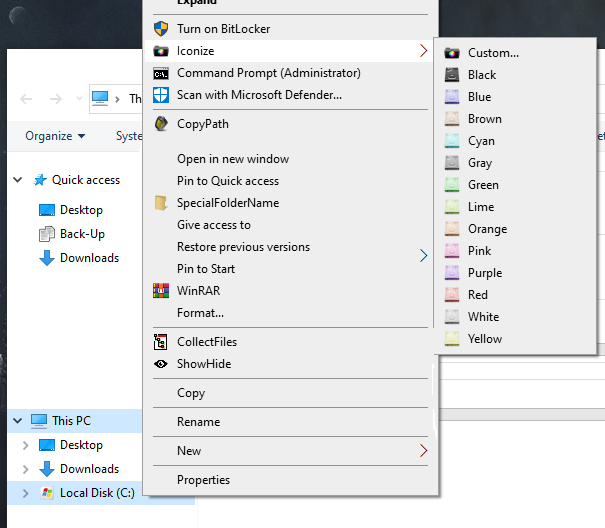
 This is Iconizer: This program is made to replace the free / pro version of folder maker. (I bundled a few icon packs with it too). How it works: Icons are copied to the selected folder, the folder icon is changed to that icon and the icon inside the folder is made hidden and read-only. By copying the icon to the folder itself you can now move it to another computer and the icon will stay! (A new icon will override the old one). I wrote a little installer for it to add or remove this program from/to the context menu of any folder, harddrives are also accepted: It runs from the contextmenu but also accepts command-line arguments if you wish. Just opening it without any parameters wil launch the 'Iconarchive' website. Let me know what you think, any tips, bugs or nice ideas are welcome I'm not sure if I can upload the icons because they were extracted from the .ICL file of foldermaker.. Kind regards! TheAutomator. test.bat Icon.ico Iconize.au3 Installer.au3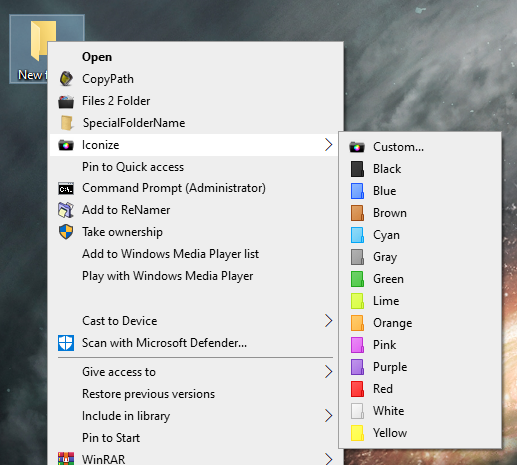
-
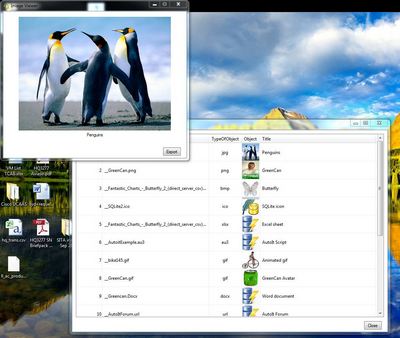
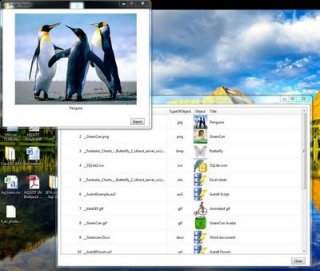
Topic Closed, please go here SQLite demonstration of native recognition of BLOB object in Listview Following an idea that was raised in a discussion with water and jchd, I have been working during the past week on a ListView SQLite demo that integrates BLOB (Binary large Object) fields. Download link at the bottom of this post This is what I have until now, version sero sero sero … one – to use the words of a well know Spanish biker . It is a fully workable example and I would be happy if you could test it and give me your comments. Pre-requisites: 1. You have to download the SQLite Database here: http://users.telenet.be/GreenCan/AutoIt/GreenCan_SQLite_Database_demo.zip 2. You have to download trancexx’ great GIFAnimation udf here: GIFAnimation or http://code.google.com/p/gif-animation/downloads/list For your comfort, I included the latest version in the above zip file. I decided to use GIFAnimation.au3 for the Image display because it works with several kinds of graphic types (except multipage tiff) including animated GIFs J . GIFAnimation? What’s in a name… 3. SQLite3.dll (also included in the zip package) In this first version, you will see two different icons in the Listview (as opposed to the screenshot where you see all images as icons) 1. Eye Icon: this is an image object, clicking once will open a preview box 2. Database with lightning arrow: any kind of other (non-image) object A BLOB field doesn’t need to be an image, it can store literally everything you can imagine, the database contains several objects that you can try-out. I didn’t include an exe file, but why not? It is possible. Up to you to find out if it is useful. These non-graph objects are not preview-able and will be executed. By the way, all these BLOB examples are inoffensive, for example the autoit code just displays an ‘Hello World’ MsgBox. If you don’t trust it, just comment out the ShellExecute in line 219 and verify the content in the Temp folder… or pass your favorite virus scanner over these files You will notice that the first execute take a bit more time to start, afterwards, everything is blinking fast. Not sure why this slow behavior, maybe it’s only on my PC. Although the example looks good, I am not completely satisfied with the result. The BLOB object is not natively recognized and I think it should, but I don’t know how to do this. Any suggestion is welcome here… I can use a isBinary() to identify the field as a BLOB, but I still don’t know how to recognize the BLOB as an image, or an Excel sheet, or anything else. So this is the reason why I have the TypeOfObject column, that links the object to the physical file. Again, any suggestion is welcome here… Another issue is that I have to export the file to a physical file to be able to display (or use) it. I tried UEZ’s _GDIPlus_BMPFromMemory() function for the bitmaps but it is too slow (not even sure it can handle anything else than BMP. And slowness will increase with very large binary objects. I am wondering what the performance would be with a database containing several hundreds of objects to export. I will come with version 0.0.0.2 within a few days. I just let you test the current version first. Version 2 has, as you can see in the screenshot above, a visible icon representation of the image object. This is how it should be but there are significant disadvantages in the way that I programmed it. But I will explain that when I publish the new example script. SQLite GreenCan_demo BLOB in Listview 0.0.0.1.au3 (Please jump immediately to version 0.0.0.2 if you do not intend to test both examples) Edit: 06 May 2013 New version! Version 0.0.0.2 This enhanced version displays a visible thumbnail of each Database image object in the ListView. The example works with the database file that you have to download or already downloaded with the first version (see Prerequisite 1 higher in this post) SQLite GreenCan_demo BLOB in Listview 0.0.0.2.au3 Edit: 10 May 2013 With this script, you can import your own objects into the GreenCan_demo.db Database (you have to download the database again from the link in Pre-requisite 1, because I modified the structure, the key column is now autoincremental) The script will work for both demo's Import Object in SQLite Database.zip Anyhow, enjoy and please give me feedback. GreenCan
-

ICU - Icon Configuration Utility [Updated 2018-Sep-16]
KaFu posted a topic in AutoIt Example Scripts
ICU - Icon Configuration Utility Current Version: v6 (2018-Sep-16) Restore your desktop when the icons get "rearranged". Melba23 and I found we were working on very similar ideas to restore the Desktop icons to their normal place if they became "rearranged" ( ). Vista seems to like this doing on occasion just for fun - but we all know some apps and games which change the display resolution or move icons around. This annoys "tidy" people who like their desktops arranged "just so" - I am particularly thinking of this desktop when I say that! We combined efforts and here is the result of our labors. Operation is easy - press "Save" to store a particular configuration and "Restore" to reset the icons to the saved positions in the selected configuration file. "Delete" allows you to remove unwanted configuration files from the list. There is a command line option so that the restoration can be run via HotKeys if required (that is why the script warns that it should be compiled for full functionality). You can decide what to do with any icons that have been added since you last saved the configuration file - the default is to put them in the top-left corner, but you can also banish them way off-screen or, more sensibly, specify a location for them. A new feature as of ICU v3.4 is the optional Desktop Contextmenu Integration (DCI) for Win7 (Win7 only because Microsoft implemented an easy way to do this through the registry as of this release). Version 3.3 should fix the empty save file bug Version 3.4 Win7: Admin rights no longer needed for DCI Version 5.0 Win8 compatibility for DCI The source and executable can be downloaded from my site: http://www.funk.eu Kudos to Ascend4nt, Melba23, Prog@ndy, & Valik for parts of the code. Please let me know if you found some piece of code in the source for which I forgot to mention a credit. Enjoy, let me know what you think of ICU and with Best Regards -
Hey, I have a problem I tried to look for it but it didn't solve the problem, I can't add an icon to the exe, I already know there were such topics I tried to all add exclusion C: \ Users \ Marcin \ AppData \ Local \ AutoIt v3 \ aut472.tm.exe to antivirus but after compilation, the name of the file changes, I uninstalled the anti-virus, but it didn't works, except that when I add the example icons from AutoIT it works, I downloaded icons using Firefox Developer Edition also don't works, just the downloaded graphics don't works also. Is there any solution to this problem?
-
I have learned how to use TraySetIcon icon and toggle between icons that I added as resources using #AutoIt3Wrapper_Res_Icon_Add=C:\Program Files (x86)\AutoIt3\Icons\au3.ico My current work around is Doit() Func Doit() Local $TestIcon = @ScriptDir&"\Test.ico" Local $ProdIcon = @ScriptDir&"\Prod.ico" Local $Test = "Test" Local $Prod = "Prod" Local $Current = RegRead("HKEY_LOCAL_MACHINE\SOFTWARE\Wow6432Node\My Program","Location") If $Current = $Prod Then FileCreateShortcut($Test,@DesktopCommonDir&"\TestLink.lnky",Default,Default,"Test Link",$TestIcon) RegWrite("HKEY_LOCAL_MACHINE\SOFTWARE\Wow6432Node\My Program",$Test) Else FileCreateShortcut($Test,@DesktopCommonDir&"\TestLink.lnky",Default,Default,"Test Link",$ProdIcon) RegWrite("HKEY_LOCAL_MACHINE\SOFTWARE\Wow6432Node\My Program",$Prod) EndIf EndFunc I did a bit of quick cutting, from my working program. Basically it creates an link on the desktop, and then deletes it and creates a new one each time it is run. If you where wondering, I made it a .lnky file so that I could add a custom right click menu for it. This example came from a something I am using to switch between prod and test environments, so the actual link created does not launch the script. You can right-click on the link and run the script to change environments. The icon lets me know at a glance which environment I am currently set for. What I am trying to figure out is if there is a way to change the icon of the executable of the script only using the resources compiled within that script. What would be nice would be to have a ScriptSetIcon function.
-
 Hey hello. I came here with maybe too specific questions about uncommon things, but as people says, I don't lose anything trying to asking here There's long time that I have a little "experimental" idea: Use windows desktop and it icon system like old videogame consoles (where "sprites" are used to draw things on screen, can be manipulated/animated to make interesting things happen). Some of that inspiration came from another experiments from demoscene. Researching the possibilities of doing something like that (maybe not so intense) I found that the Windows Desktop uses a GuiListView to show and arrange icons (and of course, AutoIt provides UDF's for that ). So, I'm used that UDF to create dummy icons (not putting files on Desktop, just modifiying the "GUI layer" of desktop for put non-working icons), setting custom values like coordinates, name and Icon (from a list of loaded icons in the GuiListView). As you can see in next image works well in Windows XP... even in Windows 95 (that's not the case from Windows Vista to 10, but I already posted another question here about that... anyways, for now I'm working that with a isolated XP machine... sigh). Another video doing an animation with that: How I make that custom icons? Here: $hWnd = ControlGetHandle("Program Manager", "", "[CLASS:SysListView32; INSTANCE:1]") $newItem = _GUICtrlListView_AddItem ( $hWnd, "TEST", 32 ) ; with an icon of index 32 _GUICtrlListView_SetItemPosition ( $hWnd, $newItem, 300, 300 ) ; set some example property. Put in X=300 Y=300 Okay, so the next phase was changing the icons with custom ones. And here starts the issues. As AutoIT help says, icons from GuiListView came from a loaded GUIImageList, which, seeing past images I conclude that it's already preloaded with some sort of most used icons (something like an icon cache?). But If I modify it (or create another GUIImageList and then put into the GuiListView) the icons became corrupted and replaced with blank ones. (can be reverted deleting IconCache.db, just like when windows shows wrong icons in desktop). How I change icons? Here $hImage = _GUIImageList_Create(48, 48, 5) ; create an image list for 48x48 icons $newIcon = _GUIImageList_AddIcon($imageList, @SystemDir & "\shell32.dll", 110) ; just adding a new icon in the image list _GUICtrlListView_SetImageList($hWnd, $hImage, 0) ; $hwnd is the desktop hwnd Another option as workaround for setting icons was getting the desktop GUIImageList, and modifiyng it directly. I otbtain a GUIImageList handle, but ... without any images inside! (That's strange beacuse, when I set desktop item icons without altering the GUIImageList, it applies correctly). And finally if I try to add new ones, it returns -1 with @error setted. How I'm trying to get desktop GUIImageList? Here. $imageList = _GUICtrlListView_GetImageList ( $hWnd, 0 ) MsgBox(0,_GUIImageList_GetImageCount ( $imageList ), $imageList) ; getting image count and GUIImageList handle $newIcon = _GUIImageList_AddIcon($imageList, @SystemDir & "\shell32.dll", 110) ; adding icons without success So, what is the question? There's something wrong I'm doing while trying to set the new icon set on desktop? Or desktop icons work in different way than the rest of the GuiListView's? Or there's something really stupid that I can't saw before that corrupts the icons? Also... if there's not known solution for that, do you have some idea for doing a workaround for that? Or another crazy idea? (Maybe putting real files instead dummy icons could be a solution ... a very slow one). Or even maybe (maybe not, I sure about that xD) do you want to help with this "experiment". Thanks in advance, have a good day
 -
 Hello everyone! I'm working on a GUI that has 2 explorer windows embedded inside of it. Eventually I'm going to put 4 explorer windows inside of the GUI since it's convenient to have 1 program opened with 4 explorer windows embedded inside it, than having 4 seperate explorer windows opened. Anyway, I ran into some space problems. I'm trying to remove the icons/toolbar that appears on top of the explorer windows since they take up so much space. Here's a pic of what I mean: Here's my code: #include <GUIConstantsEx.au3> #include <WindowsConstants.au3> #include <WinAPI.au3> #include <Constants.au3> Opt("WinTitleMatchMode", 4) Global $hMigration, $hExplHolder, $hExplorer, $hExplorer2, $sStartDir = "C:\" Global $iWidth = 800, $iHeight = 400 ;Create the Explorer GUI $hExplHolder = GUICreate("Explorer", $iWidth, $iHeight, Default, Default) Run('explorer.exe /n, "' & $sStartDir & '"') WinWait("[CLASS:CabinetWClass]") ;Wait until the window appears WinSetState("[CLASS:CabinetWClass]","",@SW_HIDE) WinMove($hExplorer, "", 0, 0, 400, 400) $hExplorer = WinGetHandle("[CLASS:CabinetWClass]") Run('explorer.exe /n, "' & $sStartDir & '"') WinWait("[CLASS:CabinetWClass]") ;Wait until the window appears WinSetState("[CLASS:CabinetWClass]","",@SW_HIDE) WinMove($hExplorer2, "", 400, 0, 400, 400) $hExplorer2 = WinGetHandle("[CLASS:CabinetWClass]") ;WinSetState($hExplorer, "", @SW_HIDE) ;WinMove($hExplorer, "", 0, 0, 400, 400) ;WinSetState($hExplorer2, "", @SW_HIDE) ;WinMove($hExplorer2, "", 400, 0, 400, 400) _WinAPI_SetParent($hExplorer, $hExplHolder) ;Puts the explorer window inside the GUI _WinAPI_SetWindowLong($hExplorer, $GWL_STYLE, -1064828928) ;Minuses the x button in the windows explorer (I think?) _WinAPI_SetParent($hExplorer2, $hExplHolder) ;Puts the explorer window inside the GUI _WinAPI_SetWindowLong($hExplorer2, $GWL_STYLE, -1064828928) ;Minuses the x button in the windows explorer (I think?) ControlListView($hExplorer, "", "[CLASS:SysListView32; INSTANCE:1]", "ViewChange", "list") ControlListView($hExplorer2, "", "[CLASS:SysListView32; INSTANCE:1]", "ViewChange", "list") $hList = GUICtrlCreateListView ("File", $iWidth + 4, 4, 292, 200, 0x0003 + 0x0008 + 0x0004) GUICtrlSetState (-1, 8) WinSetState($hExplorer, "", @SW_SHOW) WinSetState($hExplorer2, "", @SW_SHOW) GUISetState(@SW_SHOW, $hExplHolder) While 1 $msg = GUIGetMsg() Switch $msg Case -3 Exit Case -13 GUICtrlCreateListViewItem (@GUI_DRAGFILE, $hList) EndSwitch WEnd How can I remove those top icons/toolbar so that there's more room for the file listing? Edit: Extra props to whoever can make it so that the 2 explorer windows not do the brief flash before it disappears into the GUI. Thanks, Brian
 -
Background My desktop icons shift around often when I extend my screen or connect a higher resolution monitor to my laptop, or when a game crashes in an awkward resolution. Recently I've not been having very much luck with programs and scripts that save desktop icon positions. I know there are various examples on this forum - but I've been frustrated by them as well as other options (eg: an outdated layout.dll shell extension) For the record, I use Windows 7 64-bit ; I haven't tested this on anything else, but that was probably part of the problem. From some research it appears desktop positions can be saved in one of several different registry keys; older programs may not be searching for them all. So, I decided to write my own crappy program that *did* search multiple locations for position settings. TL;DR Made a program to save desktop icon positions; checks for multiple settings before attempting. Sauce Anyway, here's my badly-informed bug-ridden spaghetti code that does what I need: Note: See slightly cleaned-up code in a reply below! #RequireAdmin #include <GUIConstantsEx.au3> #include <EditConstants.au3> #include <WindowsConstants.au3> #include <StaticConstants.au3> #include <Array.au3> Global $results[11];elements are array[5]= 0:$display_name 1:$bag_key 2:$bag 3:$valueName 4:$valueDisplayName Global $ctrls[11][5] Global $selected = Int(IniRead("itempos.ini", "settings", "selected", -1)) Global $uiOps = GUICreate("Desktop Position Options", 350 + 20, 100) Global $txSel = GUICtrlCreateInput("Not Selected", 0, 0, 350, 20, $ES_READONLY) Global $btSel = GUICtrlCreateButton("...", 350, 0, 20, 20) Global $btSav = GUICtrlCreateButton("Save", 0, 20, 350 + 20, 40) Global $btRes = GUICtrlCreateButton("Restore", 0, 60, 350 + 20, 40) uiResetOptions() Global $uiSel, $btRef Local $hadSettings = load() uiPopulate($results, $ctrls, $uiSel, $btRef, (Not $hadSettings));refresh if didn't cache settings GUISetState(@SW_SHOW, $uiOps) If (Not $hadSettings) Or $selected < 1 Then GUISetState(@SW_SHOW, $uiSel) WinActivate($uiSel) Else GUISetState(@SW_HIDE, $uiSel) WinActivate($uiOps) EndIf ;------------------------------------ While 1 $amsg = GUIGetMsg(1) $msg = $amsg[0] Switch $msg Case $GUI_EVENT_CLOSE If $amsg[1] = $uiOps Then Quit() GUISetState(@SW_HIDE, $uiSel) WinActivate($uiOps) Case $btRef uiPopulate($results, $ctrls, $uiSel, $btRef) ContinueCase Case $btSel GUISetState(@SW_SHOW, $uiSel) WinActivate($uiSel) Case $btSav save() uiResetOptions() Case $btRes restore() uiResetOptions() Case $ctrls[0][0] MsgBox(0, "Position Information Locations", "This window lists system icon position settings" & @CRLF & "This selection may help if restoring settings does not work. If you do not know what to select, try `Current User`. ") EndSwitch For $n = 1 To 10 If $msg = $ctrls[$n][0] And $ctrls[$n][0] <> 0 Then uiSelect($n) ExitLoop EndIf Next WEnd ;------------------------ Func load() Global $selected Global $results Local $hadSettings = False For $i = 0 To 10 Local $entry[5] If IniRead("itempos.ini", "cache", $i, "") = "array" Then For $j = 0 To 4 $entry[$j] = IniRead("itempos.ini", "cache", $i & '_' & $j, "") Next $results[$i] = $entry $hadSettings = True Else $results[$i] = IniRead("itempos.ini", "cache", $i, "") EndIf Next Local $n = Int(IniRead("itempos.ini", "settings", "selected", -1)) If Not $hadSettings Then $n = -1 uiSelect($n) Return $hadSettings EndFunc ;==>load Func Quit() IniWrite("itempos.ini", "settings", "selected", $selected) For $i = 0 To 10 Local $entry = $results[$i] If IsArray($entry) Then IniWrite("itempos.ini", "cache", $i, "array") For $j = 0 To 4 IniWrite("itempos.ini", "cache", $i & '_' & $j, $entry[$j]) Next Else IniWrite("itempos.ini", "cache", $i, $entry) EndIf Next Exit EndFunc ;==>quit Func uiResetOptions() If $selected > 0 Then GUICtrlSetState($btSav, $GUI_ENABLE) If isSaved() Then GUICtrlSetState($btRes, $GUI_ENABLE) Else GUICtrlSetState($btRes, $GUI_DISABLE) EndIf Else GUICtrlSetState($btSav, $GUI_DISABLE) GUICtrlSetState($btRes, $GUI_DISABLE) EndIf EndFunc ;==>uiResetOptions Func isSaved() Local $entry = $results[$selected] If Not IsArray($entry) Then Return False Return StringLen(IniRead("itempos.ini", safename($entry[0] & '-' & $entry[2] & '-' & $entry[4]), safename($entry[3]), "")) > 0 EndFunc ;==>isSaved Func save() GUICtrlSetState($btSav, $GUI_DISABLE) GUICtrlSetState($btRes, $GUI_DISABLE) WinActivate("Program Manager") Sleep(250) Send("{F5}") Sleep(1000) WinActivate($uiOps) Local $entry = $results[$selected] Local $nameSafe = safename($entry[0] & '-' & $entry[2] & '-' & $entry[4]) Local $bag_key = $entry[1] Local $valueName = $entry[3] Local $valueNameSafe = safename($valueName) Local $value = RegRead($bag_key, $valueName) ConsoleWrite("Saving to " & $nameSafe & @CRLF) IniWrite("itempos.ini", $nameSafe, $valueNameSafe, $value) EndFunc ;==>save Func restore() Local $entry = $results[$selected] Local $nameSafe = safename($entry[0] & '-' & $entry[2] & '-' & $entry[4]) Local $bag_key = $entry[1] Local $valueName = $entry[3] Local $valueNameSafe = safename($valueName) Local $value = IniRead("itempos.ini", $nameSafe, $valueNameSafe, "") ConsoleWrite("Restoring from " & $nameSafe & @CRLF) If StringLen($value) = 0 Then Return MsgBox(0, 'Restore Error', "No data is available for this entry to be restored.") ProcessKill('explorer.exe') ProcessWaitClose('explorer.exe') RegWrite($bag_key, $valueName, "REG_BINARY", Binary($value)) Run('explorer.exe') EndFunc ;==>restore ;-------------------------------------------------- Func uiSelect($n) Global $selected Global $results $selected = $n Local $entry = "" If $selected > 0 Then $entry = $results[$n] If IsArray($entry) Then GUICtrlSetData($txSel, $entry[0] & '-' & $entry[2] & '-' & $entry[4]) If IsHWnd($uiSel) Then GUISetState(@SW_HIDE, $uiSel) WinActivate($uiOps) uiResetOptions() Return True Else GUICtrlSetData($txSel, "Nothing Selected") uiResetOptions() If IsHWnd($uiSel) Then GUISetState(@SW_SHOW, $uiSel) WinActivate($uiSel) EndIf Return False EndFunc ;==>uiSelect Func uiPopulate(ByRef $results, ByRef $ctrls, ByRef $ui, ByRef $button, $doRefresh = True) ;results and ctrls must have the same UBound. ProgressOn("Refreshing...", "Refreshing...") ProgressSet(1, "Cleaning up...") Sleep(250) Local $x = UBound($ctrls) - 1 GUISwitch($ui) GUICtrlDelete($button) For $n = 0 To $x For $i = 0 To 3 If $ctrls[$n][$i] Then GUICtrlDelete($ctrls[$n][$i]) Next Next If IsHWnd($ui) Then GUIDelete($ui) If $doRefresh Then For $i = 0 To UBound($results) - 1 $results[$i] = '' Next ProgressSet(5, "Finding folder information sources...") searchhive($results) EndIf ProgressSet(95, "Creating User Interface...") Sleep(250) Local $count = 0 For $n = 1 To $x Local $y = ($n - 1) * 20 If IsArray($results[$n]) Then $count += 1 Next $ui = GUICreate("Select system setting to use...", 450, 20 * ($count + 2) + 10) $ctrls[0][0] = GUICtrlCreateButton("??", 0, 0, 20, 20) $ctrls[0][1] = GUICtrlCreateLabel("Profile", 020, 5, 250, 20) $ctrls[0][2] = GUICtrlCreateLabel("Bag", 270, 5, 050, 20) $ctrls[0][3] = GUICtrlCreateLabel("ItemPos", 320, 5, 150, 20) $ctrls[0][4] = GUICtrlCreateLabel("-----------------------------------", 0, 20, 450, 5, $SS_ETCHEDHORZ) $count = 0 For $n = 1 To $x Local $y = $n * 20 + 5 Local $entry = $results[$n] If IsArray($entry) Then $count += 1 $ctrls[$n][0] = GUICtrlCreateButton($count & '.', 0, $y, 20, 20) $y += 5 $ctrls[$n][1] = GUICtrlCreateLabel($entry[0], 020, $y, 250, 20) $ctrls[$n][2] = GUICtrlCreateLabel($entry[2], 270, $y, 050, 20) $ctrls[$n][3] = GUICtrlCreateLabel($entry[4], 320, $y, 150, 20) EndIf Next $ctrls[$x][4] = GUICtrlCreateButton("Refresh", 0, 20 * ($count + 1) + 10, 450, 20) $button = $ctrls[$x][4] GUISwitch($ui) ProgressSet(100, "Showing off...") Sleep(250) ProgressOff() Return $ui EndFunc ;==>uiPopulate ;-------------------------------------------------------------------- Func searchhive(ByRef $results) ;ConsoleWrite('Current'&@CRLF) ProgressInitial(5) searchuser($results, 'HKEY_CURRENT_USER', 'Current User') ProgressSet(25) For $i = 1 To 9999 Local $u = RegEnumKey("HKEY_USERS\", $i) If @error <> 0 Then ExitLoop ;ConsoleWrite($u&@CRLF) searchuser($results, "HKEY_USERS\" & $u, $u) ProgressSet(25 + $i * 10) Next EndFunc ;==>searchhive Func searchuser(ByRef $results, $user_key, $display_name) Local $software_key[2] = ["Software\Microsoft\Windows", "Software\Classes\Local Settings\Software\Microsoft\Windows"] Local $shell_key[2] = ["Shell", "ShellNoRoam"] Local $name_suffix For $sw In $software_key $name_suffix = "" If StringInStr($sw, "Local") Then $name_suffix = "L" For $shell In $shell_key If StringInStr($shell, "NoRoam") Then $name_suffix &= "NR" Local $bags_key = $user_key & "\" & $sw & "\" & $shell & "\Bags" For $i = 1 To 9999 ProgressIncrement(0.01) Local $bag = RegEnumKey($bags_key, $i) If @error <> 0 Then ExitLoop If StringLen($name_suffix) > 0 Then $name_suffix = "(" & $name_suffix & ")" searchbag($results, $bags_key, $bag, $display_name & $name_suffix) Next Next Next EndFunc ;==>searchuser Func searchbag(ByRef $results, $bags_key, $bag, $display_name) Local $bag_key = $bags_key & '\' & $bag & '\Shell' For $i = 1 To 9999 Local $value = RegEnumVal($bag_key, $i) If @error <> 0 Then ExitLoop If StringInStr($value, 'ItemPos') Then Local $entry[5] = [$display_name, $bag_key, $bag, $value, StringTrimLeft($value, 7)] _Array_Fixed_Push($results, $entry) EndIf Next $bag_key = $bags_key & '\' & $bag & '\Desktop' For $i = 1 To 9999 Local $value = RegEnumVal($bag_key, $i) If @error <> 0 Then ExitLoop ;ConsoleWrite($value&@CRLF) If StringInStr($value, 'ItemPos') Then Local $entry[5] = [$display_name, $bag_key, $bag, $value, StringTrimLeft($value, 7)] _Array_Fixed_Push($results, $entry) EndIf Next EndFunc ;==>searchbag Func _Array_Fixed_Push(ByRef $array, $value);adds an item, overwriting the oldest item | NOTE: Edited from original intent, see comments Local $x = UBound($array) - 1 If $array[0] = $x Then Return False; *** decided later that overwriting sucked for systems with many profiles. Local $i = Mod($array[0], $x); values from 0 to x-1 Local $n = $i + 1;(0 to x-1)+1 = 1 to x $array[0] = $n; this is also the nonadjusted index for the next item :) $array[$n] = $value EndFunc ;==>_Array_Fixed_Push Func ProgressInitial($n = 0) Global $ProgressIncrement $ProgressIncrement = $n ProgressSet($n) EndFunc ;==>ProgressInitial Func ProgressIncrement($n = 1) Global $ProgressIncrement $ProgressIncrement += $n ProgressSet($ProgressIncrement) EndFunc ;==>ProgressIncrement Func safename($s) Return StringRegExpReplace($s, "[^a-zA-Z0-9_\-]", "_") EndFunc ;==>safename Func ProcessKill($p); I should probably credit someone for this function $Kernel32 = DllOpen("kernel32.dll") $hproc = DllCall($Kernel32, 'int', 'OpenProcess', 'int', 0x1F0FFF, 'int', True, 'int', ProcessExists($p)) DllCall($Kernel32, "int", "TerminateProcess", "int", $hproc[0], "dword", 1) DllClose($Kernel32) EndFunc ;==>ProcessKill Other Notes This only scans for settings/prompts you on the first run, it should keep that information for the next run. It also limits you to using one of the first 10 profiles the scan results in. Sorry about having to kill/restart explorer when restoring positions - nothing else worked for me. Clarification for the ItemPos text: from what I've read, it is <Resolution>(<Monitor>). I'm unsure how settings behave when you have icons dragged from one screen to the next and restore one of the screens.
-
Hey Gang, I dabble in alot of things these days... I script stuff that helps me in my work life, it gives me focus and initiative to complete a script. Sometimes I am successfull and want to share my script or leave it on a job site... eventually I have a small pile of things I want to run on a lets say public machine and all the icons are the generic autoit icon... I have played with gimp, and other editors, sketchup, whatever and make some pics that I try and try to somehow transform into something that autoit will accept, and magically somehow at times I have been successfull. What I am seeking is the secret location of guidance that will help me generate some format of icon that will be accepted by whatever autoit I am using that month.... Can someone kindly help with this.
-
Hi I am trying to embed an icon control and an AVI control in the status bar but the problem is they won't retain their transparency. An example: #include <GuiStatusBar.au3> #include <GUIConstantsEx.au3> Global $WindowMain = GUICreate("Example", 351, 176, -1, -1) GUISetBkColor( 0xDDDDDD, $WindowMain ) Global $Statusbar = _GUICtrlStatusBar_Create($WindowMain) Global $Statusbar_PartsWidth[2] = [324, -1] _GUICtrlStatusBar_SetParts($Statusbar, $Statusbar_PartsWidth) _GUICtrlStatusBar_SetText($Statusbar, "", 0) _GUICtrlStatusBar_SetText($Statusbar, "", 1) _GUICtrlStatusBar_SetMinHeight($Statusbar, 20) GUISetState(@SW_SHOW) $Icon = GUICtrlCreateIcon('ico.ico',-1,300,130,16,16) ;Icon on GUI ;Without this the icon will not be tranparent. No idea why. GUICtrlSetState($icon, $GUI_SHOW) $Icon2 = GUICtrlCreateIcon('ico.ico',-1,10,10,16,16) _GUICtrlStatusBar_EmbedControl($Statusbar, 1, GUICtrlGetHandle($Icon2), 1+2) ; This has no effect. Icon has a white square around it GUICtrlSetState($icon2, $GUI_SHOW) $AVI = GUICtrlCreateAvi( 'avi.avi',0,250,130,16,16) GUICtrlSetState( $AVI, 1 ) $AVI2 = GUICtrlCreateAvi( 'avi.avi',0,250,130,16,16) GUICtrlSetState( $AVI2, 1 ) _GUICtrlStatusBar_EmbedControl($Statusbar, 0, GUICtrlGetHandle($AVI2), 1+2) Global $GuiMsg Do $GuiMsg = GUIGetMsg() Until $GuiMsg = $GUI_EVENT_CLOSE I've tried a couple of things like using _GUICtrlStatusBar_SetIcon() or GDIplus for icons and that works and the icons are transparent. As for the AVI, I tried faking a status bar by drawing some lines at the buttom of the window and that worked ok too, But I'd love to be able to use it with a real status bar. example.zip
-
Not an example or script. Lets post icons! This is just a thread where I'll attempt to collect existing autoit icons and post my own version, anyone who is capable of creating them is encouraged to post theirs! Also, you might notice I have something for shiny looking things test 2.ico test.ico test2.ico Auto.ico AutoIt.ico au3.ico Here is a variation I made of the OEM autoit icon, here's the difference, when explorer displays the 32px and below version of the icons image index, you might notice that the silver ring in the original version of the autoit icon looks a little fat, in this version, it should look a little more slim and modern. Autoit 2.ico ?do=embed' frameborder='0' data-embedContent> And ?do=embed' frameborder='0' data-embedContent> designed by weaponx and converted to icon by eignxing. Posted it here since it's relevant. autoit blue.ico Here is another awesome icon created by AlmarM For anyone interested in making their own version, here's the CS5 template for the EOM icon I use, just click the image to download. Requests are considered, but I'm not a pro at this either Edit: And if anyone is a bad enough dude to let me know what font is used in the autoit logo, that would be cool. Edit: thanks damian666 for the prompt delivery!