
Hardware
7 files
-
HardwareMonitorUDF
By Trong
HardwareMonitor UDF for AutoIt
A comprehensive AutoIt User Defined Function (UDF) library for hardware monitoring on Windows systems. This library provides access to CPU, GPU, storage, RAM, battery, and motherboard sensors through a simple AutoIt interface.
📦 Package Contents
HardwareMonitor.dll - Native C++ monitoring library (x64) HardwareMonitor_x86.dll - Native C++ monitoring library (x86) The x86 driver is a conversion from x64 (may not work, x64 version is recommended) HardwareMonitor.au3 - AutoIt UDF wrapper with 88 functions test_udf.au3 - Comprehensive test script demonstrating all features 🌟 Features
Supported Hardware
Intel CPU - Temperature monitoring for package and individual cores AMD CPU - Tctl temperature and CCD (Core Complex Die) monitoring NVIDIA GPU - Complete monitoring including temperature, clocks, fan, usage, memory, and power AMD Radeon GPU - Temperature, usage, fan speed monitoring with manual fan control Storage Drives - Temperature monitoring for HDD/SSD/NVMe drives via SMART RAM - Memory usage, speed, voltage, and module information Battery - Comprehensive battery status for laptops (charge, health, capacity, cycles) Motherboard - Super I/O chip monitoring (71 chips supported: ITE, Nuvoton, Winbond, Fintek) Key Capabilities
✅ 88 Functions - Complete hardware monitoring API ✅ JSON Export - Export all hardware data in JSON format ✅ Real-time Monitoring - Live sensor data updates ✅ Fan Control - Manual fan speed control for AMD Radeon GPU and motherboard ✅ Kernel-mode Access - Uses PawnIO driver for low-level hardware access ✅ No Dependencies - Self-contained DLL with embedded resources 📋 Requirements
AutoIt 3.3.16.0+ (x64 recommended) Windows 7/8/10/11 Administrator Rights (required for driver installation and hardware access) PawnIO Driver (⚠️ RECOMMENDED: Install official driver first - see installation guide below) 🚀 Quick Start
PawnIO Driver Installation (Recommended)
⚠️ Important: For best performance and reliability, install the official PawnIO driver before using this library.
Download PawnIO Driver from official source:
GitHub: https://github.com/namazso/PawnIO.Setup/releases Or build from source: https://github.com/namazso/PawnIO Install the driver:
REM Run as Administrator sc create PawnIO binPath= "%ProgramFiles%\PawnIO\PawnIO.sys" type= kernel start= demand sc start PawnIO Verify installation:
sc query PawnIO Should show STATE: RUNNING
Why install official driver?
✅ Better stability - Official driver is tested and signed ✅ Consistent behavior - Same driver version across all apps ✅ Easier updates - Update driver independently ✅ Shared resource - Multiple applications can use same driver ⚠️ Embedded driver is fallback only - Extracted to temp, may have permission issues Library Installation
Download the latest release Extract files to your project directory Include the UDF in your script: #include "HardwareMonitor.au3" Basic Usage
#include "HardwareMonitor.au3" ; Initialize the library If Not _HWMon_Startup() Then MsgBox(0, "Error", "Failed to initialize HardwareMonitor: " & _HWMon_GetLastError()) Exit EndIf ; Check PawnIO driver status (recommended) If Not _HWMon_IsPawnIOInstalled() Then MsgBox(48, "Warning", "PawnIO driver not installed!" & @CRLF & @CRLF & _ "Some features may not work (Intel/AMD CPU temp, motherboard)." & @CRLF & @CRLF & _ "Please install official PawnIO driver from:" & @CRLF & _ "https://github.com/namazso/PawnIO.Setup/releases") EndIf ; Get CPU temperature Local $fTemp = _HWMon_Intel_GetPackageTemp() ConsoleWrite("CPU Temperature: " & $fTemp & "°C" & @CRLF) ; Get GPU information Local $iGPUCount = _HWMon_NVIDIA_GetGPUCount() If $iGPUCount > 0 Then Local $sName = _HWMon_NVIDIA_GetGPUName(0) Local $fGPUTemp = _HWMon_NVIDIA_GetGPUTemp(0) ConsoleWrite("GPU: " & $sName & " - " & $fGPUTemp & "°C" & @CRLF) EndIf ; Export all data to JSON Local $sJSON = _HWMon_GetAllInfoJSON() FileWrite("hardware_data.json", $sJSON) ; Cleanup _HWMon_Shutdown() 📚 Function Reference
Core Functions (7)
Function Description _HWMon_Startup([$sDLLPath]) Initialize the library _HWMon_Shutdown() Cleanup and close the library _HWMon_IsInitialized() Check if library is initialized ⭐NEW⭐ _HWMon_IsPawnIOInstalled() Check if PawnIO driver is available ⭐NEW⭐ _HWMon_GetModuleInfo() Get available hardware modules info _HWMon_GetLastError() Get last error message JSON Export (1)
Function Description _HWMon_GetAllInfoJSON() Export all hardware data in JSON format Intel CPU Functions (4)
Function Description _HWMon_Intel_GetCoreCount() Get number of CPU cores _HWMon_Intel_GetPackageTemp() Get CPU package temperature _HWMon_Intel_GetCoreTemp($iCoreIndex) Get individual core temperature _HWMon_Intel_GetAllCoreTemps() Get all core temperatures as array AMD CPU Functions (3)
Function Description _HWMon_AMD_GetTctlTemp() Get AMD Tctl temperature _HWMon_AMD_GetCCDCount() Get number of CCDs _HWMon_AMD_GetCCDTemp($iCCDIndex) Get CCD temperature NVIDIA GPU Functions (13)
Function Description _HWMon_NVIDIA_GetGPUCount() Get number of NVIDIA GPUs _HWMon_NVIDIA_GetGPUName([$iGPUIndex]) Get GPU name _HWMon_NVIDIA_GetGPUTemp([$iGPUIndex]) Get GPU temperature _HWMon_NVIDIA_GetCoreClock([$iGPUIndex]) Get core clock frequency (MHz) _HWMon_NVIDIA_GetMemoryClock([$iGPUIndex]) Get memory clock frequency (MHz) _HWMon_NVIDIA_GetShaderClock([$iGPUIndex]) Get shader clock frequency (MHz) _HWMon_NVIDIA_GetFanSpeed([$iGPUIndex]) Get fan speed (RPM) _HWMon_NVIDIA_GetFanSpeedPercent([$iGPUIndex]) Get fan speed (%) _HWMon_NVIDIA_GetGPUUsage([$iGPUIndex]) Get GPU usage (%) _HWMon_NVIDIA_GetMemoryUsage([$iGPUIndex]) Get memory controller usage (%) _HWMon_NVIDIA_GetVideoEngineUsage([$iGPUIndex]) Get video engine usage (%) _HWMon_NVIDIA_GetMemoryTotal([$iGPUIndex]) Get total VRAM (bytes) _HWMon_NVIDIA_GetMemoryUsed([$iGPUIndex]) Get used VRAM (bytes) _HWMon_NVIDIA_GetMemoryFree([$iGPUIndex]) Get free VRAM (bytes) _HWMon_NVIDIA_GetPowerUsage([$iGPUIndex]) Get power usage (Watts) AMD Radeon GPU Functions (7)
Function Description _HWMon_AMDRadeon_GetGPUCount() Get number of AMD GPUs _HWMon_AMDRadeon_GetGPUName([$iGPUIndex]) Get GPU name _HWMon_AMDRadeon_GetGPUTemp([$iGPUIndex]) Get GPU temperature _HWMon_AMDRadeon_GetGPUUsage([$iGPUIndex]) Get GPU usage (%) _HWMon_AMDRadeon_GetFanSpeed([$iGPUIndex]) Get fan speed (RPM) _HWMon_AMDRadeon_GetFanSpeedPercent([$iGPUIndex]) Get fan speed (%) _HWMon_AMDRadeon_SetFanSpeed($iGPUIndex, $iPercent) Set fan speed (0=auto, 30-100%) _HWMon_AMDRadeon_ResetFanToAuto($iGPUIndex) Reset fan to automatic control Storage Functions (4)
Function Description _HWMon_Storage_GetDriveCount() Get number of drives _HWMon_Storage_GetDriveModel($iDriveIndex) Get drive model name _HWMon_Storage_GetDriveType($iDriveIndex) Get drive type (HDD/SSD/NVMe) _HWMon_Storage_GetDriveTemp($iDriveIndex) Get drive temperature RAM Monitor Functions (11)
Function Description _HWMon_RAM_Initialize() Initialize RAM monitor _HWMon_RAM_Update() Update RAM data _HWMon_RAM_GetTotalMemory() Get total memory (bytes) _HWMon_RAM_GetUsedMemory() Get used memory (bytes) _HWMon_RAM_GetAvailableMemory() Get available memory (bytes) _HWMon_RAM_GetMemoryLoad() Get memory load (%) _HWMon_RAM_GetMemorySpeed() Get RAM speed (MHz) _HWMon_RAM_GetMemoryVoltage() Get RAM voltage (V) _HWMon_RAM_GetModuleCount() Get number of RAM modules _HWMon_RAM_GetModuleInfo($iModuleIndex) Get module info string Battery Monitor Functions (15)
Function Description _HWMon_Battery_IsAvailable() Check if battery is available ⭐NEW⭐ _HWMon_Battery_Initialize() Initialize battery monitor _HWMon_Battery_Update() Update battery data _HWMon_Battery_IsPresent() Check if battery is present _HWMon_Battery_GetStatus() Get battery status string _HWMon_Battery_GetChargeLevel() Get charge level (%) _HWMon_Battery_GetDesignCapacity() Get design capacity (mWh) _HWMon_Battery_GetFullChargeCapacity() Get full charge capacity (mWh) _HWMon_Battery_GetCurrentCapacity() Get current capacity (mWh) _HWMon_Battery_GetHealthPercent() Get battery health (%) _HWMon_Battery_GetVoltage() Get voltage (V) _HWMon_Battery_GetChargeRate() Get charge/discharge rate (W) _HWMon_Battery_GetTimeRemaining() Get time remaining (minutes) _HWMon_Battery_GetTimeToFullCharge() Get time to full charge (minutes) _HWMon_Battery_GetCycleCount() Get battery cycle count Motherboard Monitor Functions (14)
Function Description _HWMon_Motherboard_Initialize() Initialize motherboard monitor _HWMon_Motherboard_Update() Update motherboard data _HWMon_Motherboard_IsDetected() Check if Super I/O chip detected _HWMon_Motherboard_GetChipName() Get Super I/O chip name _HWMon_Motherboard_GetTemperatureCount() Get number of temperature sensors _HWMon_Motherboard_GetTemperature($iIndex) Get temperature value _HWMon_Motherboard_GetTemperatureName($iIndex) Get temperature sensor name _HWMon_Motherboard_GetVoltageCount() Get number of voltage sensors _HWMon_Motherboard_GetVoltage($iIndex) Get voltage value _HWMon_Motherboard_GetVoltageName($iIndex) Get voltage sensor name _HWMon_Motherboard_GetFanCount() Get number of fan sensors _HWMon_Motherboard_GetFanSpeed($iIndex) Get fan speed (RPM) _HWMon_Motherboard_GetFanName($iIndex) Get fan sensor name _HWMon_Motherboard_SetFanSpeed($iIndex, $iPercent) Set fan speed (0=auto, 30-100%) _HWMon_Motherboard_SetFanToAuto($iIndex) Reset fan to automatic control _HWMon_Motherboard_IsFanManualMode($iIndex) Check if fan is in manual mode 💡 Examples
Example 1: Monitor CPU Temperature
#include "HardwareMonitor.au3" _HWMon_Startup() While True Local $fTemp = _HWMon_Intel_GetPackageTemp() ToolTip("CPU: " & Round($fTemp, 1) & "°C") Sleep(1000) WEnd Example 2: Monitor Multiple GPUs
#include "HardwareMonitor.au3" _HWMon_Startup() Local $iGPUCount = _HWMon_NVIDIA_GetGPUCount() ConsoleWrite("Found " & $iGPUCount & " NVIDIA GPU(s)" & @CRLF) For $i = 0 To $iGPUCount - 1 Local $sName = _HWMon_NVIDIA_GetGPUName($i) Local $fTemp = _HWMon_NVIDIA_GetGPUTemp($i) Local $fUsage = _HWMon_NVIDIA_GetGPUUsage($i) Local $fPower = _HWMon_NVIDIA_GetPowerUsage($i) ConsoleWrite("GPU " & $i & ": " & $sName & @CRLF) ConsoleWrite(" Temperature: " & $fTemp & "°C" & @CRLF) ConsoleWrite(" Usage: " & $fUsage & "%" & @CRLF) ConsoleWrite(" Power: " & $fPower & "W" & @CRLF) Next _HWMon_Shutdown() Example 3: Control AMD GPU Fan Speed
#include "HardwareMonitor.au3" _HWMon_Startup() ; Set fan to 50% _HWMon_AMDRadeon_SetFanSpeed(0, 50) ConsoleWrite("Fan set to 50%" & @CRLF) Sleep(5000) ; Reset to automatic _HWMon_AMDRadeon_ResetFanToAuto(0) ConsoleWrite("Fan reset to auto" & @CRLF) _HWMon_Shutdown() Example 4: Export All Hardware Data
#include "HardwareMonitor.au3" _HWMon_Startup() ; Get all hardware info as JSON Local $sJSON = _HWMon_GetAllInfoJSON() ; Save to file FileWrite(@ScriptDir & "\hardware_report.json", $sJSON) ConsoleWrite("Hardware report saved!" & @CRLF) _HWMon_Shutdown() Example 5: Battery Monitoring (Laptop)
#include "HardwareMonitor.au3" _HWMon_Startup() ; Check if battery is available first (NEW in v2.3.0) If _HWMon_Battery_IsAvailable() And _HWMon_Battery_Initialize() Then If _HWMon_Battery_IsPresent() Then Local $fCharge = _HWMon_Battery_GetChargeLevel() Local $sStatus = _HWMon_Battery_GetStatus() Local $fHealth = _HWMon_Battery_GetHealthPercent() Local $iCycles = _HWMon_Battery_GetCycleCount() ConsoleWrite("Battery Status: " & $sStatus & @CRLF) ConsoleWrite("Charge Level: " & $fCharge & "%" & @CRLF) ConsoleWrite("Health: " & $fHealth & "%" & @CRLF) ConsoleWrite("Cycle Count: " & $iCycles & @CRLF) Else ConsoleWrite("No battery detected (Desktop system)" & @CRLF) EndIf EndIf _HWMon_Shutdown() 🔧 Supported Super I/O Chips (71 Total)
The motherboard monitor supports 71 Super I/O chips from major manufacturers:
ITE - IT8705F, IT8712F, IT8716F, IT8718F, IT8720F, IT8721F, IT8726F, IT8728F, IT8771E, IT8772E, IT8792E, and more Nuvoton - NCT6771F, NCT6776F, NCT6779D, NCT6791D, NCT6792D, NCT6793D, NCT6795D, NCT6796D, NCT6797D, NCT6798D, and more Winbond - W83627DHG, W83627EHF, W83627HF, W83627THF, W83667HG, W83687THF, and more Fintek - F71858, F71862, F71869, F71882, F71889ED, F71889AD, and more ⚠️ Important Notes
PawnIO Driver Behavior
⚠️ RECOMMENDED APPROACH: Install official PawnIO driver first (see Quick Start section)
The library checks for PawnIO driver in this order:
Official driver service (RECOMMENDED)
Installed via: sc create PawnIO ... Always used if available Best performance and stability Pre-installed driver file
Location: %ProgramFiles%\PawnIO\PawnIO.sys (x64) or PawnIO_x86.sys (x86) Used if service not running but file exists DLL will attempt to load it Embedded driver (FALLBACK ONLY)
Extracted from DLL resources if above methods fail Saved to %ProgramFiles%\PawnIO\ (requires admin) or temp folder ⚠️ Less reliable, may have permission issues Why official driver is better:
✅ Digitally signed and verified ✅ Persistent across reboots ✅ Shared between applications ✅ Easier to update and maintain ✅ No extraction delays ✅ Works without admin rights (after installation) Fan Control Safety
When using fan control functions, be aware:
0% = Automatic mode (recommended) 1-29% = Clamped to 30% (safety minimum) 30-100% = Actual speed >100% = Clamped to 100% Always monitor temperatures when using manual fan control!
Administrator Rights
Administrator rights are required for:
PawnIO driver installation (one-time setup) Driver service start (if not set to auto-start) Initial hardware access (MSR, Super I/O chip detection) Recommended setup:
Install PawnIO driver as Administrator (one time) Set driver to auto-start: sc config PawnIO start= auto Regular users can then use the library without admin rights If using embedded driver (not recommended):
Admin rights required on every run (to extract and load driver) Driver extracted to temp folder (slower, cleaned up periodically) May fail due to antivirus or permission issues Compatibility
Intel CPU: Requires MSR (Model Specific Register) support AMD CPU: Ryzen and newer recommended NVIDIA GPU: Requires NVAPI support AMD Radeon GPU: Requires ADL (AMD Display Library) support Motherboard: Requires compatible Super I/O chip 📝 Testing
A comprehensive test script is included:
#include "test_udf.au3" This will test all 88 functions and generate a detailed report in test_udf.au3.txt.
🐛 Troubleshooting
PawnIO Driver Issues (Most Common)
⚠️ If CPU temperature or motherboard features don't work:
Check if PawnIO driver is installed:
sc query PawnIO Should show STATE: RUNNING
Install official PawnIO driver if not installed:
REM Download from "https://github.com/namazso/PawnIO.Setup/releases" first REM Then run as Administrator: sc create PawnIO binPath= "%ProgramFiles%\PawnIO\PawnIO.sys" type= kernel start= demand sc start PawnIO Common PawnIO errors:
Error 1275: Driver blocked by Windows → Disable Secure Boot or sign the driver Error 5: Access denied → Run as Administrator Error 1060: Service not found → Driver not installed correctly Error 1058: Cannot start disabled service → Run sc config PawnIO start= demand Verify driver file exists:
dir "%ProgramFiles%\PawnIO\PawnIO.sys" Check Windows Event Viewer:
Open Event Viewer → Windows Logs → System Look for PawnIO-related errors Using embedded driver (not recommended):
DLL will try to extract driver if official not found Requires Administrator rights on every run May fail due to antivirus or security policies Solution: Install official driver instead! "Failed to initialize" error
Run as Administrator (required for first run or if PawnIO not installed) Check if DLL exists in correct path Verify Windows version compatibility (Win 7/8/10/11) Install official PawnIO driver (see above) "Motherboard not detected"
Ensure PawnIO driver is installed and running Your motherboard may use an unsupported Super I/O chip Check DebugView for detection logs Some laptops don't expose Super I/O chips "Battery not present" on laptop
Battery may be removed Some laptops don't expose battery info Try updating ACPI drivers 📄 License
This project is provided as-is for educational and personal use.
👤 Author
Dao Van Trong - TRONG.PRO
🔗 Version
Version 2.3.0 - Complete hardware monitoring with 88 functions
📊 Statistics
Total Functions: 88 (83 base + 5 Intel extended) Core Functions: 7 (includes initialization checks) Battery Functions: 15 (includes availability check) Supported CPUs: Intel (Core series), AMD (Ryzen series) Supported GPUs: NVIDIA (NVAPI), AMD Radeon (ADL) Supported Super I/O Chips: 71 models Code Lines: 1800+ lines of AutoIt code Test Coverage: 100% (all functions tested) Made with ❤️ for the AutoIt community
108 downloads
(0 reviews)0 comments
Updated
-

Printer Management UDF
By jguinch
Here is an UDF for managing printers.
Features are :
- add, remove or rename a printer
- add or remove a driver
- add or remove a TCP/IP printer port
- add or remove a LPR printer port
- connect to a remote printer
- enum printers and there configuration and properties
- pause resume or cancel all jobs of a printer
- checks if a printer exists
- print a test page
- set the default printer
766 downloads
- management
- printer
- (and 2 more)
-

Five9 UDF
By rcmaehl
A UDF to connect and control Five9 on the Local Network via it's provided HTTP API
THIS UDF IS STILL IN TESTING
Current Features:
Agent Ready
* Contains most functions needed to control Agent Status
PLANNED Features:
Heavyweight
* Control most Five9 API functions
* Full Control over own Status as well as Supervisor functionality
Helpful Premade Examples Files
* Examples for almost every function
* Premade CUI and GUI clients
Ready for all users, beginner and up
* Detailed Error Reporting to help pin-point problems
* Thorough parameter checking to prevent accidental script crashes
Support:
Support for this UDF can be obtained in my Discord Server
379 downloads
- automation
- call center
- (and 2 more)
(0 reviews)0 comments
Updated
-

Cisco Finesse UDF
By rcmaehl
A UDF to connect and control Cisco Finesse on the Local Network via it's provided HTTP API
Current Features:
Heavyweight
* Large feature set, containing most Finesse Desktop API functions
PLANNED Features:
Heavyweight
* Control over own Status as well as Supervisor functionality
Helpful Premade Examples Files
* Examples for almost every function
* Premade CUI and GUI clients
Ready for all users, beginner and up
* Detailed Error Reporting to help pin-point problems
* Thorough parameter checking to prevent accidental script crashes
Support:
Support for this UDF can be obtained in my Discord Server
397 downloads
- automation
- call center
- (and 3 more)
(0 reviews)0 comments
Updated
-
ATCmd.au3 UDF
By Danyfirex
AT Command UDF - for control AT Modems, send SMS, get SMS
Changelog:
#cs 1.0.0 2020/10/03 . First version - Danyfirex + mLipok 1.0.1 2020/10/04 . Added - Function - _ATCmd_IsPINReady - Danyfirex . Added - Function - _ATCmd_IsPINRequired - Danyfirex . Added - Function - _ATCmd_IsSIMInserted - Danyfirex . Added - Function - _ATCmd_IsSenderSupported - Danyfirex . Added - Function - _ATCmd_OnPINReques - Danyfirex . Added - Function - _ATCmd_SMS_ListTextMessages - Danyfirex . Added - Function - _ATCmd_SetPIN - Danyfirex . Added - Function - __ATCmd_GetPINCounter - Danyfirex - Added - ENUM - $ATCmd_ERR_PIN - Danyfirex - Added - ENUM - $ATCmd_ERR_SIM - Danyfirex . Changed - __ATCmd_ComposePDU() - using _ATCmd_UseUCS2() internally instead parameter - Danyfirex . Suplemented - #CURRENT# - Danyfirex . . 1.0.2 2020/10/05 . Added - ENUM - $ATCmd_MSGLIST_* - mLipok . Added - ENUM - $ATCmd_STATUS__* - mLipok - Added - ENUM - $ATCmd_ERR_PARAMETER - mLipok . Added - _ATCmd_UsePDU() - parameter validation - mLipok . Added - _ATCmd_UseUCS2() - parameter validation - mLipok . Added - more error logs . Changed - MagicNumber replaced with Standard UDF constants - mLipok . Small refactoring - mLipok . . 1.0.3 2020/10/05 . CleanUp - Danyfirex . . 1.0.4 2020/10/05 . Small refactoring - Danyfirex . CleanUp - Danyfirex . . 1.0.5 2020/10/23 . _ATCmd_FullLoging - mLipok . _ATCmd_CMEESetup() ... @WIP - mLipok . $ATCMD_STATUS_11_SUBSCRIBERNUMBER - mLipok . . 1.0.6 2020/10/25 . __ATCmd_CMSErrorParser() - mLipok . . @LAST https://www.nowsms.com/gsm-modem-cms-error-code-list https://m2msupport.net/m2msupport/at-command-to-enable-error-codes/ https://www.micromedia-int.com/en/gsm-2/73-gsm/669-cme-error-gsm-equipment-related-errors https://assets.nagios.com/downloads/nagiosxi/docs/ATCommandReference.pdf https://www.maritex.com.pl/product/attachment/40451/15b4db6d1a10eada42700f7293353776 https://www.multitech.net/developer/wp-content/uploads/2010/10/S000463C.pdf https://www.telit.com/wp-content/uploads/2017/09/Telit_AT_Commands_Reference_Guide_r24_B.pdf https://docs.rs-online.com/5931/0900766b80bec52c.pdf PDU Format / Testers / Encoders / decoders https://m2msupport.net/m2msupport/sms-at-commands/#pduformat http://smstools3.kekekasvi.com/topic.php?id=288 #ce
Saludos
505 downloads
(0 reviews)0 comments
Submitted
-
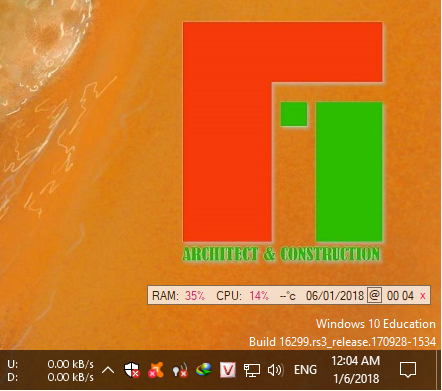
CPU_Widget_TimeSync
By Trong
The simple widget shows the percentage of cpu, ram used and the CPU temperature (WMI).
- Every 30s check, sync and update time for computer.
- Drag adn Drop any files on GUI for reset Attribute (-RAHS) and set Full Access to Everyone !
- Righ Click on x and click Un/Install app to boot with Windows!
CPU_Widget_TimeSync.exe CRC32: 1956339E MD5: BFC2B596BD1EDA35D6B02B97F8FB57AE SHA-1: 796A663739EA5AC9890D9FA324A98E987F35E7C8
Function code from:
CPU:
RAM: MemGetStats ( )
Memory: _WinAPI_EmptyWorkingSet ()
510 downloads
-

CUDA UDF
This is a small wrapper UDF for NVIDIA CUDA Driver API. It enables AutoIt scripts to execute pre-compiled .cubin programs on NVIDIA GPU's and receive data from them.
1,096 downloads
- cuda
- gpu acceleration
- (and 1 more)
(0 reviews)0 comments
Updated