Search the Community
Showing results for tags 'activex'.
Found 18 results
-
AcrobatReader.au3 UDF Embed and manage an Adobe PDF preview in an AutoIt GUI. The caller creates and owns the GUI. _AcrobatReader_Create() attaches a lazy preview context; _AcrobatReader_Open() creates the embedded control when a PDF is first opened. _AcrobatReader_Clear() and _AcrobatReader_Destroy() never delete the caller's GUI. _AcrobatReader_SimpleViewer() is available when a ready-made, blocking viewer window is preferable. Requirements Windows and AutoIt 3.3.18.0 (the version used for static validation). For direct mode, an installed Adobe Acrobat or Reader installation exposing the AcroPDF.PDF.1 ActiveX control. The included examples select 32-bit AutoIt with #AutoIt3Wrapper_UseX64=N. The UDF depends only on standard AutoIt includes. Shell mode ($bShell = True) uses Shell.Explorer.2 and the local PDF integration; its availability depends on the machine's configuration. More info and download on: https://github.com/mlipok/AcrobatReader.au3-UDF Any comments are welcome. Cheers mLipok
- 21 replies
-
- 2
-

-
- acrobat reader
- activex
- (and 3 more)
-
AutoIt Registration-Free COM Manifest Tools A small set of AutoIt utilities for creating, testing, and merging Windows Registration-Free COM manifests. The project is intended to simplify working with native COM DLLs that normally require system registration through regsvr32.exe. FULL INFO: LINKS: https://github.com/mlipok/ManifestManagement.au3 https://github.com/mlipok/ManifestManagement.au3/blob/main/ManifestManagement.au3
-
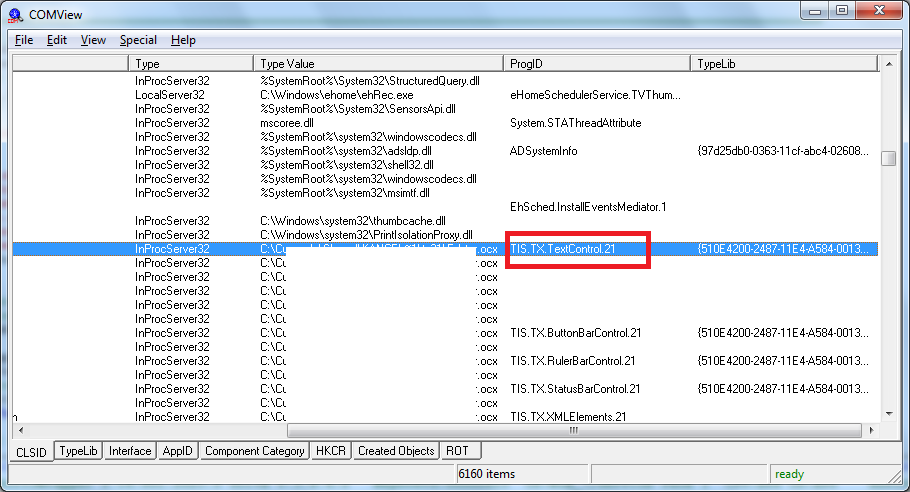
 I'am trying to use http://www.textcontrol.com/en_US/products/activex/overview/ How you can see here this object is registered: but when I'am trying $oTXTextControl = ObjCreate("TIS.TX.TextControl.21") Then I get: err.windescription: Klasa niezarejestrowana. >>> Class not registered even if I add #RequireAdmin then the same problem happend. Any concept why ? mLipok EDIT: added tags to topic
-
Hi all. Today I would like to introduce the beginning of the UDF. How to get started: http://winscp.net/eng/docs/library http://winscp.net/eng/docs/library_install Original readme_automation.txt: now I have only one function (standard FTP on standard port) to show the future possibilities: Local $oErrorHandler = ObjEvent("AutoIt.Error", "_ErrFunc") Const Enum _ $__eWSCP_SO_Protocol_Sftp, _ $__eWSCP_SO_Protocol_Scp, _ $__eWSCP_SO_Protocol_Ftp Const Enum _ $__eWSCP_TO_TransferMode_Binary, _ $__eWSCP_TO_TransferMode_Ascii, _ $__eWSCP_TO_TransferMode_Automatic Example_PutFile('YOUR FTP HOST NAME', 'YOUR USER NAME', 'YOUR PASSWORD') Func Example_PutFile($sHostName, $sUserName, $sPassword) Local $sFileFullPath = StringReplace(@ScriptFullPath, '\', '\\') Local $sFilesToPut = StringReplace(@ScriptDir & '\*.au3', '\', '\\') ; based on: ; http://winscp.net/eng/docs/library_com_wsh#vbscript Local $oSessionOptions = ObjCreate("WinSCP.SessionOptions"); With $oSessionOptions .Protocol = $__eWSCP_SO_Protocol_Ftp .HostName = $sHostName; .UserName = $sUserName; .Password = $sPassword; ; below not jet tested ; .SshHostKeyFingerprint = "ssh-rsa 2048 xx:xx:xx:xx:xx:xx:xx:xx:xx:xx:xx:xx:xx:xx:xx:xx" EndWith Local $oSession = ObjCreate("WinSCP.Session"); With $oSession ; Connect: Open sesion with defined options .Open($oSessionOptions); ; Set TransferOptions Local $oTransferOptions = ObjCreate("WinSCP.TransferOptions") $oTransferOptions.TransferMode = $__eWSCP_TO_TransferMode_Binary ; Upload files: put @ScriptFullPath to the ROOT directory Local $oTransferResult = .PutFiles($sFilesToPut, '/'); ; Throw on any error $oTransferResult.Check ; Print results For $oTransfer In $oTransferResult.Transfers ConsoleWrite("Upload of " & $oTransfer.FileName & " succeeded" & @CRLF) Next ;' Disconnect, clean up .Dispose() EndWith ; CleanUp $oSession = '' $oSessionOptions = '' EndFunc ;==>Example_PutFile Func _ErrFunc($oError) ; Do anything here. ConsoleWrite(@ScriptName & " (" & $oError.scriptline & ") : ==> COM Error intercepted !" & @CRLF & _ @TAB & "err.number is: " & @TAB & @TAB & "0x" & Hex($oError.number) & @CRLF & _ @TAB & "err.windescription:" & @TAB & $oError.windescription & @CRLF & _ @TAB & "err.description is: " & @TAB & $oError.description & @CRLF & _ @TAB & "err.source is: " & @TAB & @TAB & $oError.source & @CRLF & _ @TAB & "err.helpfile is: " & @TAB & $oError.helpfile & @CRLF & _ @TAB & "err.helpcontext is: " & @TAB & $oError.helpcontext & @CRLF & _ @TAB & "err.lastdllerror is: " & @TAB & $oError.lastdllerror & @CRLF & _ @TAB & "err.scriptline is: " & @TAB & $oError.scriptline & @CRLF & _ @TAB & "err.retcode is: " & @TAB & "0x" & Hex($oError.retcode) & @CRLF & @CRLF) EndFunc ;==>_ErrFunc EDIT: 2014-06-20 04:47 - script changed
-
 Hello, I am currently trying to automatically click the "Yes" button in the ActiveX prompt/popup message after opening the IE (html). At 1st, I encounter the "Allow Blocked Content". I already resolve it just by changing settings in the IE Options. But after resolving the "Allow Blocked Content", there's a popup message appear. I have attached the ActiveX Prompt. Here is the 1st code that I try to use. #include <IE.au3> #include <MsgBoxConstants.au3> #include <WinAPI.au3> _IECreate("C:\Users\april\Documents\Logo\JRB\AutoIt\AutoBOT\AWD10\sampleAWD10.html",0,1,0) Local $oIE = _IEAttach("", "instance", 1) _IELoadWait($oIE) AdlibRegister("_ActiveXRun",250) Local $oLastName = _IEGetObjByName($oIE, "Text4") Local $oGetItem = _IEGetObjByName($oIE, "getitem") _IEAction($oGetItem, "click") MsgBox($MB_SYSTEMMODAL, "Form Element Value", _IEFormElementGetValue($oGetItem)) Func _ActiveXRun() $retWin = WinGetHandle("[Class:Button]","") $winTitle = "[HANDLE:" & $retWin &"]" $ctrlHandle = ControlGetHandle($winTitle,"", "[CLASS:Button; INSTANCE:2]") $ctrlTitle = "HANDLE:" & $ctrlHandle &"]" WinWaitActive($ctrlTitle,"[CLASS:Button; INSTANCE:2]",10) $k = ControlGetPos($winTitle, "","[CLASS:Button; INSTANCE:2]") $x = $k[0] $y = $k[1] WinActivate ($winTitle,"An ActiveX control on this page might be unsafe to interact with other parts of the page. Do you want to allow this interaction?") ControlFocus($winTitle,"An ActiveX control on this page might be unsafe to interact with other parts of the page. Do you want to allow this interaction?","[CLASS:Button; INSTANCE:2]") ControlClick($winTitle, "","[CLASS:Button; INSTANCE:2]","primary",1,$x,$y) ControlSend($winTitle, "", "[CLASS:Button; INSTANCE:2]", "{ENTER}", 0) EndFunc Here is the console output. >"C:\Program Files (x86)\AutoIt3\SciTE\..\AutoIt3.exe" "C:\Program Files (x86)\AutoIt3\SciTE\AutoIt3Wrapper\AutoIt3Wrapper.au3" /run /prod /ErrorStdOut /in "C:\Users\april\Documents\Logo\JRB\AutoIt\AutoBOT\AWD10\AWD10.1.au3" /UserParams +>12:44:11 Starting AutoIt3Wrapper v.17.224.935.0 SciTE v.3.7.3.0 Keyboard:00000409 OS:WIN_10/ CPU:X64 OS:X64 Environment(Language:0409) CodePage:0 utf8.auto.check:4 +> SciTEDir => C:\Program Files (x86)\AutoIt3\SciTE UserDir => C:\Users\april\AppData\Local\AutoIt v3\SciTE\AutoIt3Wrapper SCITE_USERHOME => C:\Users\april\AppData\Local\AutoIt v3\SciTE >Running AU3Check (3.3.14.2) from:C:\Program Files (x86)\AutoIt3 input:C:\Users\april\Documents\Logo\JRB\AutoIt\AutoBOT\AWD10\AWD10.1.au3 +>12:44:11 AU3Check ended.rc:0 >Running:(3.3.14.2):C:\Program Files (x86)\AutoIt3\autoit3.exe "C:\Users\april\Documents\Logo\JRB\AutoIt\AutoBOT\AWD10\AWD10.1.au3" --> Press Ctrl+Alt+Break to Restart or Ctrl+Break to Stop "C:\Users\april\Documents\Logo\JRB\AutoIt\AutoBOT\AWD10\AWD10.1.au3" (31) : ==> Subscript used on non-accessible variable.: $x = $k[0] $x = $k^ ERROR ->12:44:24 AutoIt3.exe ended.rc:1 +>12:44:24 AutoIt3Wrapper Finished. >Exit code: 1 Time: 13.76 I also tried a simpler code. include <IE.au3> #include <MsgBoxConstants.au3> #include <WinAPI.au3> _IECreate("C:\Users\april\Documents\Logo\JRB\AutoIt\AutoBOT\AWD10\sampleAWD10.html",0,1,0) Local $oIE = _IEAttach("", "instance", 1) _IELoadWait($oIE) $k = ControlGetPos("[CLASS:#32770]", "","[CLASS:Button; INSTANCE:2]") $x = $k[0] $y = $k[1] ControlClick("[CLASS:#32770]", "","[CLASS:Button; INSTANCE:2]","primary",1,$x,$y) Local $oLastName = _IEGetObjByName($oIE, "Text4") Local $oGetItem = _IEGetObjByName($oIE, "getitem") _IEAction($oGetItem, "click") MsgBox($MB_SYSTEMMODAL, "Form Element Value", _IEFormElementGetValue($oGetItem)) There's no error in the console output for the 2nd code I have tried. And here is the Window Info for the ActiveX prompt. >>>> Window <<<< Title: Internet Explorer Class: #32770 Position: 580, 338 Size: 376, 146 Style: 0x94C808C4 ExStyle: 0x00010101 Handle: 0x00000000001516FA >>>> Control <<<< Class: Button Instance: 2 ClassnameNN: Button2 Name: Advanced (Class): [CLASS:Button; INSTANCE:2] ID: 1 Text: &Yes Position: 184, 77 Size: 80, 22 ControlClick Coords: 37, 12 Style: 0x50010000 ExStyle: 0x00000004 Handle: 0x00000000001215DE >>>> Mouse <<<< Position: 228, 120 Cursor ID: 0 Color: 0xFFFFFF >>>> StatusBar <<<< >>>> ToolsBar <<<< >>>> Visible Text <<<< &No An ActiveX control on this page might be unsafe to interact with other parts of the page. Do you want to allow this interaction? &Yes >>>> Hidden Text <<<<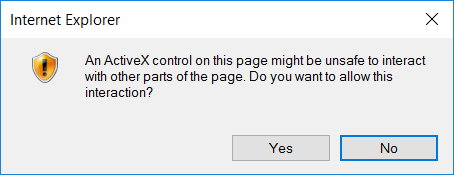
-
I played around a little with http://www.chilkatsoft.com/ ActiveX components. Here is an example based on examples from this page. #include <FileConstants.au3> #include <MsgBoxConstants.au3> ;~ http://www.chilkatsoft.com/downloads_ActiveX.asp ;~ http://www.chilkatsoft.com/support.asp ;~ http://www.chilkatsoft.com/refdoc/activex.asp ;~ http://www.chilkatsoft.com/refdoc/xChilkatCertStoreRef.html ;~ http://www.chilkatsoft.com/refdoc/xChilkatCertChainRef.html ;~ Email ActiveX Reference Documentation ;~ http://www.chilkatsoft.com/refdoc/xChilkatEmailRef.html ;~ http://www.example-code.com/vbscript/emailObj.asp ;~ http://www.example-code.com/vbscript/pop3.asp Global $_sPOP3_Server = 'xxxxxx' Global $_sPOP3_UserName = 'xxxxxx' Global $_sPOP3_Password = 'xxxxxx' _Example_1_Version() _Example_2_Get_number_of_mesages() _Example_3_Retrieve_UIDLs_from_POP3_Server() _Example_4_Save_Email_Attachments_to_Filesystem() Func _Example_1_Version() Local $oCrypt = ObjCreate("Chilkat_9_5_0.Crypt2") MsgBox(0, '', $oCrypt.Version) EndFunc ;==>_Example_1_Version Func _Example_2_Get_number_of_mesages() ; http://www.example-code.com/vbscript/pop3_mailboxCount.asp ; The mailman object is used for receiving (POP3) ; and sending (SMTP) email. ; This ObjCreate statement uses the new single-DLL ActiveX for v9.5.0 Local $oMailman = ObjCreate("Chilkat_9_5_0.MailMan") ; Any string argument automatically begins the 30-day trial. $success = $oMailman.UnlockComponent("30-day trial") If ($success <> 1) Then MsgBox(0, 'UnlockComponent', $oMailman.LastErrorText) Return EndIf ; Set the POP3 server's hostname $oMailman.MailHost = $_sPOP3_Server ; Set the POP3 login/password. $oMailman.PopUsername = $_sPOP3_UserName $oMailman.PopPassword = $_sPOP3_Password ; Get the number of messages in the mailbox. Local $iNumMessages = $oMailman.GetMailboxCount() MsgBox(0, '', $iNumMessages) EndFunc ;==>_Example_2_Get_number_of_mesages Func _Example_3_Retrieve_UIDLs_from_POP3_Server() ; Retrieve UIDL's from POP3 Server ; http://www.example-code.com/vbscript/pop3_getUidls.asp ; The mailman object is used for receiving (POP3) ; and sending (SMTP) email. ; This ObjCreate statement uses the new single-DLL ActiveX for v9.5.0 Local $oMailman = ObjCreate("Chilkat_9_5_0.MailMan") ; Any string argument automatically begins the 30-day trial. $success = $oMailman.UnlockComponent("30-day trial") If ($success <> 1) Then MsgBox(0, 'UnlockComponent', $oMailman.LastErrorText) Return EndIf ; Set the POP3 server's hostname $oMailman.MailHost = $_sPOP3_Server ; Set the POP3 login/password. $oMailman.PopUsername = $_sPOP3_UserName $oMailman.PopPassword = $_sPOP3_Password ; sa is a Chilkat_9_5_0.StringArray Local $oSA = $oMailman.GetUidls() Local $iCount = $oSA.Count For $i = 0 To $iCount - 1 ConsoleWrite($oSA.GetString($i) & @CRLF) Next EndFunc ;==>_Example_3_Retrieve_UIDLs_from_POP3_Server Func _Example_4_Save_Email_Attachments_to_Filesystem() ; Save Email Attachments to Filesystem ; http://www.example-code.com/vbscript/emailObject_saveAttachments.asp Local $oEmail = ObjCreate("Chilkat_9_5_0.Email") ; Load an email object containing attachments. ; This .eml can be downloaded from: ; http://www.example-code.com/testData/HtmlEmail.eml Local $sEML_FileFullPath = FileOpenDialog('Choose EML File', @ScriptDir, 'EML file (*.eml)', $FD_FILEMUSTEXIST) If @error Then ; Display the error message. MsgBox($MB_SYSTEMMODAL, "", "No file(s) were selected.") Return 0 EndIf Local $iSuccess = $oEmail.LoadEml($sEML_FileFullPath) If ($iSuccess <> 1) Then ConsoleWrite($oEmail.LastErrorText & @CRLF) Return 0 EndIf ; If OverwriteExisting is turned on, files with the same ; name are overwritten. If turned off, new/unique filenames ; are automatically generated. The filenames actually saved ; are accessible via the GetAttachmentFilename method. $oEmail.OverwriteExisting = 1 ; Save all attachments to the "myAttachments" subdirectory ; found under the calling process;s current working directory. ; This directory is automatically created if it does not already ; exist. $iSuccess = $oEmail.SaveAllAttachments("myAttachments") If ($iSuccess <> 1) Then ConsoleWrite($oEmail.LastErrorText & @CRLF) Return 0 EndIf ; List the attachment filenames: For $i = 0 To $oEmail.NumAttachments - 1 ConsoleWrite($oEmail.GetAttachmentFilename($i) & @CRLF) Next EndFunc ;==>_Example_4_Save_Email_Attachments_to_Filesystem Best regards mLipok
-
I'm trying to add an excel object into a GUI for the purpose of using it for graphing functions. I'm currently stuck at the following example set of code, as I cannot seem to remove the menu that comes from Excel (note, you will need an excel file to open with this): #include <GUIConstants.au3> #include <GUIConstantsEx.au3> #include <WindowsConstants.au3> ; ; Embedding an Excel document inside an AutoIt GUI ; ; Limitations: ; ; 1. Integrating the GUI Menu with the Objects Menu does not work. ; (they have seperate menu bars) ; ; Initialize my error handler $oMyError = ObjEvent("AutoIt.Error","MyErrFunc") ;~ $FileName=@ScriptDir & "\Worksheet.xls" $FileName = FileOpenDialog("Pick a file", @ScriptDir, "Excel Files (*.xls;*.xlsx)") if not FileExists($FileName) then Msgbox (0,"Excel File Test","Can't run this test, because it requires an Excel file in "& $FileName) Exit endif $oExcelDoc = ObjGet($FileName) ; Get an Excel Object from an existing filename if IsObj($oExcelDoc) then GUICreate ( "Embedded ActiveX Test", 640, 580, (@DesktopWidth-640)/2, (@DesktopHeight-580)/2 , $WS_MINIMIZEBOX +$WS_SYSMENU + $WS_CLIPCHILDREN) $GUI_ActiveX = GUICtrlCreateObj ( $oExcelDoc, 1, 95 , 400 , 300 ) For $Bar In $oExcelDoc.CommandBars If $Bar.Enabled = True Then $Bar.Enabled = False If $Bar.Visible = True Then $Bar.Visible = False Next $oExcelDoc.Application.DisplayFormulaBar = False $oExcelDoc.Application.CommandBars("Shadow Settings").Visible = False $oExcelDoc.Application.DisplayScrollBars = True $oExcelDoc.Application.DisplayStatusBar = False GUISetState (@SW_SHOW) ;Show GUI ; GUI Message loop While 1 $msg = GUIGetMsg() Select Case $msg = $GUI_EVENT_CLOSE;or $msg = $GUI_FileExit ExitLoop EndSelect Wend GUIDelete () ; Don't forget to close your workbook, otherwise Excel will stay in memory after the script exits ! $oExcelDoc.Close (0) ; Close the Excel workbook - Save prompt will not open EndIf Exit ; This is my custom error handler Func MyErrFunc() $HexNumber=hex($oMyError.number,8) Msgbox(0,"AutoItCOM Test","We intercepted a COM Error !" & @CRLF & @CRLF & _ "err.description is: " & @TAB & $oMyError.description & @CRLF & _ "err.windescription:" & @TAB & $oMyError.windescription & @CRLF & _ "err.number is: " & @TAB & $HexNumber & @CRLF & _ "err.lastdllerror is: " & @TAB & $oMyError.lastdllerror & @CRLF & _ "err.scriptline is: " & @TAB & $oMyError.scriptline & @CRLF & _ "err.source is: " & @TAB & $oMyError.source & @CRLF & _ "err.helpfile is: " & @TAB & $oMyError.helpfile & @CRLF & _ "err.helpcontext is: " & @TAB & $oMyError.helpcontext _ ) SetError(1) ; to check for after this function returns Endfunc Is there any way to remove the menu bar? All I search seem to still have this issue unresolved.
-
 Hello I'm not so familiar with the scriptcontrol, can you help me with this little problem? Why is this script not working correctly? Global $oVbs = ObjCreate('MSScriptControl.ScriptControl') With $ovbs .Language = "VBScript" .AllowUI = True .AddCode('Class Test:Public Function X:X = 123:End Function:Set C = New Test') .AddCode('MsgBox IsObject(C)'); should be true, no? EndWith MsgBox(0,'',$oVbs.Eval('C').X)Also: how do I add code to the global module? Thanks, TheAutomator
 -
Hello, I am a total NOOB in programming, I don't have any idea about ActiveX/COM objects. Please briefly explain about them in noob friendly language, if possible you can post some reference links Thanks in Advance!
-
hi everyone i have an interesting question about the gold parser: info: http://www.goldparser.org/index.htm download (regsvr32 to register): http://www.goldparser.org/engine/1/vb6/index.htm on the website it seems that this dll can be used as an activex object, does that mean that it can be used in autoit to? help for the activeX dll: http://www.goldparser.org/engine/1/vb6/doc/index.htm it gives me error code '4' if i try to use it... Const $gpMsgAccept = 3 Const $gpMsgCommentBlockRead = 9 Const $gpMsgCommentError = 7 Const $gpMsgCommentLineRead = 10 Const $gpMsgInternalError = 8 Const $gpMsgLexicalError = 5 Const $gpMsgNotLoadedError = 4 Const $gpMsgReduction = 2 Const $gpMsgSyntaxError = 6 Const $gpMsgTokenRead = 1 $Parser = ObjCreate("goldparserengine.goldparser") $Parser.LoadCompiledGrammar("test_script.cgt") $Parser.OpenFile("Program.txt") $Response = $Parser.Parse() MsgBox(0,'test',$Response) If there are people interested in answering or helping feel free to reply and then i will upload the "test_script.cgt" somewhere if you want i know this question is a bit specific but you never know.. Thanks for reading! TheAutomator.
-
I was looking for a simple and small freeware ActiveX component for ZIP archive. And behold, here it is: http://www.xstandard.com/en/documentation/xzip/ HERE IS MY UDF (look also to attachment): #include-once #Tidy_Parameters=/sort_funcs /reel ; #AutoIt3Wrapper_Run_Debug_Mode=Y OnAutoItExitRegister("_XZIP_Shutdown") ; in case the script exit without calling _XZIP_Shutdown() #Region XZIP Include #include-once #include <MsgBoxConstants.au3> #include <FileConstants.au3> #include <String.au3> #include <WinAPIFiles.au3> #EndRegion XZIP Include #Region XZIP Header ; #INDEX# ======================================================================================================================= ; Title .........: UDF for "XStandard XZIP Component" ; AutoIt Version : 3.3.10.2++ ; Language ......: English ; Description ...: A collection of functions for "XStandard XZIP Component" ; Author(s) .....: mLipok ; Modified ......: ; =============================================================================================================================== #cs Title: UDF for "XStandard XZIP Component" Filename: XZip.au3 Description: A collection of functions for "XStandard XZIP Component" Author: mLipok Modified: Last Update: 2014/06/04 Requirements: AutoIt 3.3.10.2 or higher XStandard XZIP Component http://www.xstandard.com/en/documentation/xzip/ Update History: =================================================== 2014/06/04 v0.1 First official version #ce #EndRegion XZIP Header #Region #XZIP Constants# ; #CONSTANTS# =================================================================================================================== ; $__<UDF>_CONSTANT_<NAME> Global Const $__sXZIP_ClassName = "XStandard.Zip.1" Global Const $__sXZIP_CLSID = '{13D6BDE3-46AA-4FF2-A622-EBC43110D95C}' Global Const $__sXZIP_IID = '{0B2D411B-7A91-483A-95C4-53DDC6B17895}' Global Enum _ $tFolder = 1, _ $tFile #EndRegion #XZIP Constants# #Region XZIP Global Variables ; #VARIABLES# =================================================================================================================== ; $__g<VARNAME>_<UDF> Global $__hDll_XZIP = 0 Global $__oXZIP_ErrorHandler = '' Global $__fXPDF_Notification = True Global $__sXZIP_DllFileFullPath = @ScriptDir & '\XZIP.dll' #EndRegion XZIP Global Variables #Region EXAMPLES ;~ _XZIP_UseErrorHandler() ;~ _TEST() ;~ _Examples() Func _Examples() Local $oXZIP $sFilePath = @ScriptFullPath $sArchive = @ScriptFullPath & '.zip' $fStorePath = 0 $sNewPath = "" ;~ Sleep(1000) _XZIP_Pack($oXZIP, $sFilePath, $sArchive, $fStorePath, $sNewPath) ;~ _XZIP_ErrorCode($oXZIP) $output = _XZIP_Contents($oXZIP, $sArchive) ;~ MsgBox(1, 'VarGetType', VarGetType($output)) For $out In $output ConsoleWrite($out.Path & $out.Name & @CRLF) Next _XZIP_UnPack($oXZIP, @ScriptDir & '\xZIP.zip', @ScriptDir & '\TESTING') $oXZIP = '' ; CleanUp EndFunc ;==>_Examples #EndRegion EXAMPLES #Region #XZIP INTERNAL# ; =============================================================================================================================== ; #INTERNAL# ==================================================================================================================== #EndRegion #XZIP INTERNAL# #Region #XZIP CURRENT# ; #FUNCTION# ==================================================================================================================== ; Name ..........: _XZIP_Contents ; Description ...: Get a list of files and folder in the archive ; Syntax ........: _XZIP_Contents(ByRef $oXZIP, $sArchive) ; Parameters ....: $oXZIP - [in/out] Reference to xZIP object. ; $sArchive - A string value. ; Return values .: None ; Author ........: mLipok ; Modified ......: ; Remarks .......: ; Related .......: ; Link ..........: http://www.xstandard.com/en/documentation/XZIP/ ; Example .......: No ; =============================================================================================================================== Func _XZIP_Contents(ByRef $oXZIP, $sArchive) _XZIP_CreateObject($oXZIP) If @error Then Return SetError(1, '', '') Else Return $oXZIP.Contents($sArchive) EndIf EndFunc ;==>_XZIP_Contents ; #FUNCTION# ==================================================================================================================== ; Name ..........: _XZIP_CreateObject ; Description ...: Create Object for XZIP ; Syntax ........: _XZIP_CreateObject(Byref $oXZIP) ; Parameters ....: $oXZIP - [in/out] Reference to xZIP object. ; Return values .: Success: $oXZIP object ; Failure: 0 and set @error to non zero ; Author ........: mLipok ; Modified ......: ; Remarks .......: ; Related .......: ; Link ..........: ; Example .......: No ; =============================================================================================================================== Func _XZIP_CreateObject(ByRef $oXZIP) ;~ $oXZIP = ObjCreate($__sXZIP_ClassName) ;~ Return If _XZIP_StartUp() Then If Not IsObj($oXZIP) Then $oXZIP = ObjCreate($__sXZIP_CLSID, $__sXZIP_IID, $__hDll_XZIP) ; $__sClassName_XZIP_Commercial ;~ _XZIP_ErrorCode($oXZIP) Return SetError(@error, 0, $oXZIP) EndIf EndIf EndFunc ;==>_XZIP_CreateObject ; #FUNCTION# ==================================================================================================================== ; Name ..........: _XZIP_Delete ; Description ...: Remove a file from an archive. ; Syntax ........: _XZIP_Delete(ByRef $oXZIP, $sFile, $sArchive) ; Parameters ....: $oXZIP - [in/out] Reference to xZIP object. ; $sFile - A string value. ; $sArchive - A string value. ; Return values .: None ; Author ........: mLipok ; Modified ......: ; Remarks .......: ; Related .......: ; Link ..........: http://www.xstandard.com/en/documentation/XZIP/ ; Example .......: No ; =============================================================================================================================== Func _XZIP_Delete(ByRef $oXZIP, $sFile, $sArchive) EndFunc ;==>_XZIP_Delete ; #FUNCTION# ==================================================================================================================== ; Name ..........: _XZIP_ErrFunc ; Description ...: AutoIt COM Error Handling Functionality ; Syntax ........: _XZIP_ErrFunc($oError) ; Parameters ....: $oError - An unknown value. ; Return values .: None ; Author ........: mLipok ; Modified ......: ; Remarks .......: ; Related .......: ; Link ..........: ; Example .......: No ; =============================================================================================================================== Func _XZIP_ErrFunc($oError) ConsoleWrite(@ScriptName & " (" & $oError.scriptline & ") : ==> COM Error intercepted !" & @CRLF & _ @TAB & "err.number is: " & @TAB & @TAB & "0x" & Hex($oError.number) & @CRLF & _ @TAB & "err.windescription:" & @TAB & $oError.windescription & @CRLF & _ @TAB & "err.description is: " & @TAB & $oError.description & @CRLF & _ @TAB & "err.source is: " & @TAB & @TAB & $oError.source & @CRLF & _ @TAB & "err.helpfile is: " & @TAB & $oError.helpfile & @CRLF & _ @TAB & "err.helpcontext is: " & @TAB & $oError.helpcontext & @CRLF & _ @TAB & "err.lastdllerror is: " & @TAB & $oError.lastdllerror & @CRLF & _ @TAB & "err.scriptline is: " & @TAB & $oError.scriptline & @CRLF & _ @TAB & "err.retcode is: " & @TAB & "0x" & Hex($oError.retcode) & @CRLF & @CRLF) EndFunc ;==>_XZIP_ErrFunc ; #FUNCTION# ==================================================================================================================== ; Name ..........: _XZIP_ErrorCode ; Description ...: Return the code of last operation. ; Syntax ........: _XZIP_ErrorCode(Byref $oXZIP) ; Parameters ....: $oXZIP - [in/out] Reference to xZIP object. ; Return values .: ErrorCode of last operation. ; Author ........: mLipok ; Modified ......: ; Remarks .......: ; Related .......: ; Link ..........: http://www.xstandard.com/en/documentation/XZIP/ ; Example .......: No ; =============================================================================================================================== Func _XZIP_ErrorCode(ByRef $oXZIP) If IsObj($oXZIP) Then Local $oXZIP_ErrorCode = $oXZIP.ErrorCode($oXZIP) Local $oXZIP_ErrorDescription = $oXZIP.ErrorDescription($oXZIP) ConsoleWrite('! _XZIP_ErrorCode:' & @CRLF) ConsoleWrite('> $oXZIP_ErrorCode = ' & $oXZIP_ErrorCode & @CRLF) ConsoleWrite('> $oXZIP_ErrorDescription = ' & $oXZIP_ErrorDescription & @CRLF) Return SetError(0, $oXZIP_ErrorDescription, $oXZIP_ErrorCode) Else ConsoleWrite('! _XZIP_ErrorCode:' & @CRLF) ConsoleWrite('> $oXZIP is not an object.' & @CRLF) Return SetError(1, '', 0) EndIf EndFunc ;==>_XZIP_ErrorCode ; #FUNCTION# ==================================================================================================================== ; Name ..........: _XZIP_ErrorDescription ; Description ...: Return the error code description of last operation. ; Syntax ........: _XZIP_ErrorDescription(Byref $oXZIP) ; Parameters ....: $oXZIP - [in/out] An unknown value. ; Return values .: None ; Author ........: mLipok ; Modified ......: ; Remarks .......: ; Related .......: ; Link ..........: ; Example .......: No ; =============================================================================================================================== Func _XZIP_ErrorDescription(ByRef $oXZIP) Return $oXZIP.ErrorDescription() EndFunc ;==>_XZIP_ErrorDescription ; #FUNCTION# ==================================================================================================================== ; Name ..........: _XZIP_Move ; Description ...: Move or rename a file in the archive. ; Syntax ........: _XZIP_Move(ByRef $oXZIP, $sFrom, $sTo, $sArchive) ; Parameters ....: $oXZIP - [in/out] Reference to xZIP object. ; $sFrom - A string value. ; $sTo - A string value. ; $sArchive - A string value. ; Return values .: None ; Author ........: mLipok ; Modified ......: ; Remarks .......: ; Related .......: ; Link ..........: http://www.xstandard.com/en/documentation/XZIP/ ; Example .......: No ; =============================================================================================================================== Func _XZIP_Move(ByRef $oXZIP, $sFrom, $sTo, $sArchive) EndFunc ;==>_XZIP_Move ; #CURRENT# ===================================================================================================================== ; =============================================================================================================================== ; #FUNCTION# ==================================================================================================================== ; Name ..........: _XZIP_Pack ; Description ...: Add file or folder to an archive. ; Syntax ........: _XZIP_Pack(ByRef $oXZIP, $sFilePath, $sArchive[, $fStorePath = False[, $sNewPath = Default[, $iCompressionLevel = -1]]]) ; Parameters ....: $oXZIP - [in/out] Reference to xZIP object. ; $sFilePath - A string value. ; $sArchive - A string value. ; $fStorePath - [optional] A boolean value. Default is False. ; $sNewPath - [optional] A string value. Default is "". ; $iCompressionLevel - [optional] An integer value. Default is -1. Compression level 1 is minimum, level 9 is maximum, all other values default to level 6. ; Return values .: None ; Author ........: mLipok ; Modified ......: ; Remarks .......: ; Related .......: ; Link ..........: http://www.xstandard.com/en/documentation/XZIP/ ; Example .......: No ; =============================================================================================================================== Func _XZIP_Pack(ByRef $oXZIP, $sFilePath, $sArchive, $fStorePath = False, $sNewPath = "", $iCompressionLevel = -1) _XZIP_CreateObject($oXZIP) If @error Then Return -1 Else $oXZIP.Pack($sFilePath, $sArchive, $fStorePath, $sNewPath, $iCompressionLevel) ConsoleWrite('> $oXZIP.ErrorCode = ' & $oXZIP.ErrorCode() & @CRLF) ConsoleWrite('> $oXZIP.ErrorDescription = ' & $oXZIP.ErrorDescription() & @CRLF) ConsoleWrite('! $oXZIP.Version = ' & $oXZIP.Version() & @CRLF) EndIf EndFunc ;==>_XZIP_Pack ; #FUNCTION# ==================================================================================================================== ; Name ..........: _XZIP_Shutdown ; Description ...: Close the XZip.dll library ; Syntax ........: _XZIP_Shutdown() ; Parameters ....: None ; Return values .: None ; Author ........: mLipok ; Modified ......: ; Remarks .......: ; Related .......: ; Link ..........: ; Example .......: No ; =============================================================================================================================== Func _XZIP_Shutdown() $oXZIP = '' If $__hDll_XZIP > 0 Then DllClose($__hDll_XZIP) $__hDll_XZIP = 0 OnAutoItExitUnRegister("_XZIP_Shutdown") EndFunc ;==>_XZIP_Shutdown ; #FUNCTION# ==================================================================================================================== ; Name ..........: _XZIP_StartUp ; Description ...: Open the XZip.dll library ; Syntax ........: _XZIP_StartUp() ; Parameters ....: None ; Return values .: TODO ; Author ........: mLipok ; Modified ......: ; Remarks .......: If you not set $__sLicenseKey_XZIP then DebenuPDFLibraryLite1012.dll will be used (Lite version). SET YOUR LICENSE KEY in your main script using _XZIP_SetLicenseKey() ; Related .......: ; Link ..........: ; Example .......: No ; =============================================================================================================================== Func _XZIP_StartUp() If $__hDll_XZIP = 0 Then If FileExists($__sXZIP_DllFileFullPath) Then $__hDll_XZIP = DllOpen($__sXZIP_DllFileFullPath) If @error = -1 Then MsgBox($MB_SYSTEMMODAL + $MB_OK, "DllOpen Error", "Can not open: " & @CRLF & $__sXZIP_DllFileFullPath) Return SetError(2, '', 0) EndIf Return 1 Else MsgBox($MB_SYSTEMMODAL + $MB_OK, "DllOpen Error", "Dll File not exist: " & @CRLF & $__sXZIP_DllFileFullPath) Return SetError(1, '', 0) EndIf Else EndIf EndFunc ;==>_XZIP_StartUp ; #FUNCTION# ==================================================================================================================== ; Name ..........: _XZIP_UnPack ; Description ...: Extract contents of an archive to a folder. ; Syntax ........: _XZIP_UnPack(ByRef $oXZIP, $sArchive, $sFolderPath[, $sPattern = ""]) ; Parameters ....: $oXZIP - [in/out] Reference to xZIP object. ; $sArchive - A string value. ; $sFolderPath - A string value. ; $sPattern - [optional] A string value. Default is "". ; Return values .: None ; Author ........: mLipok ; Modified ......: ; Remarks .......: ; Related .......: ; Link ..........: http://www.xstandard.com/en/documentation/XZIP/ ; Example .......: No ; =============================================================================================================================== Func _XZIP_UnPack(ByRef $oXZIP, $sArchive, $sFolderPath, $sPattern = "") Return $oXZIP.UnPack($sArchive, $sFolderPath, $sPattern) EndFunc ;==>_XZIP_UnPack ; #FUNCTION# ==================================================================================================================== ; Name ..........: _XZIP_UseErrorHandler ; Description ...: Handles incoming events from the given Object. ; Syntax ........: _XZIP_UseErrorHandler() ; Parameters ....: ; Return values .: None ; Author ........: mLipok ; Modified ......: ; Remarks .......: Use it only if you do not use your own COM Error Handling. ; Related .......: _XZIP_ErrFunc ; Link ..........: ; Example .......: No ; =============================================================================================================================== Func _XZIP_UseErrorHandler() $__oXZIP_ErrorHandler = ObjEvent("AutoIt.Error", "_XZIP_ErrFunc") EndFunc ;==>_XZIP_UseErrorHandler #EndRegion #XZIP CURRENT# #Region TODO Func _TEST() $oXZIP = '' _XZIP_CreateObject($oXZIP) If Not IsObj($oXZIP) Then MsgBox(1, 'IsObj ERROR', '') Else $sFilePath = @ScriptFullPath $sArchive = @ScriptFullPath & '.zip' ConsoleWrite('> $oXZIP.ErrorCode = ' & $oXZIP.ErrorCode() & @CRLF) ConsoleWrite('> $oXZIP.ErrorDescription = ' & $oXZIP.ErrorDescription() & @CRLF) ConsoleWrite('! $oXZIP.Version = ' & $oXZIP.Version() & @CRLF) EndIf $oXZIP = '' EndFunc ;==>_TEST #EndRegion TODO HOW TO USE IT: look at #Region EXAMPLES ;~ _XZIP_UseErrorHandler() ;~ _TEST() ;~ _Examples() Func _Examples() Local $oXZIP $sFilePath = @ScriptFullPath $sArchive = @ScriptFullPath & '.zip' $fStorePath = 0 $sNewPath = "" ;~ Sleep(1000) _XZIP_Pack($oXZIP, $sFilePath, $sArchive, $fStorePath, $sNewPath) ;~ _XZIP_ErrorCode($oXZIP) $output = _XZIP_Contents($oXZIP, $sArchive) ;~ MsgBox(1, 'VarGetType', VarGetType($output)) For $out In $output ConsoleWrite($out.Path & $out.Name & @CRLF) Next _XZIP_UnPack($oXZIP, @ScriptDir & '\xZIP.zip', @ScriptDir & '\TESTING') $oXZIP = '' ; CleanUp EndFunc ;==>_Examples #EndRegion EXAMPLES Have fun mLipok XZip.au3.Download.html
-
Based on this: http://tortoisesvn.net/docs/nightly/TortoiseSVN_en/tsvn-subwcrev-com-interface.html#tsvn-subwcrev-COM-table here is some small example: ConsoleWrite(@CRLF) ConsoleWrite(@CRLF) _TortoiseSVN_GetInfo() ConsoleWrite(@CRLF) ConsoleWrite(@CRLF) Func _TortoiseSVN_GetInfo($sFile = @ScriptFullPath) Local $obj = ObjCreate("SubWCRev.object") ConsoleWrite('GetWCInfo = ' & $obj.GetWCInfo($sFile, True, True) & @CRLF) ConsoleWrite('GetWCInfo2 = ' & $obj.GetWCInfo2($sFile, True, True, True) & @CRLF) ConsoleWrite('Revision = ' & $obj.Revision & @CRLF) ConsoleWrite('Date = ' & $obj.Date & @CRLF) ConsoleWrite('Author = ' & $obj.Author & @CRLF) ConsoleWrite('MinRev = ' & $obj.MinRev & @CRLF) ConsoleWrite('MaxRev = ' & $obj.MaxRev & @CRLF) ConsoleWrite('HasModifications = ' & $obj.HasModifications & @CRLF) ConsoleWrite('HasUnversioned = ' & $obj.HasUnversioned & @CRLF) ConsoleWrite('Url = ' & $obj.Url & @CRLF) ConsoleWrite('IsSvnItem = ' & $obj.IsSvnItem & @CRLF) ConsoleWrite('NeedsLocking = ' & $obj.NeedsLocking & @CRLF) ConsoleWrite('IsLocked = ' & $obj.IsLocked & @CRLF) ConsoleWrite('LockCreationDate = ' & $obj.LockCreationDate & @CRLF) ConsoleWrite('LockOwner = ' & $obj.LockOwner & @CRLF) ConsoleWrite('LockComment = ' & $obj.LockComment & @CRLF) ConsoleWrite(@CRLF) ConsoleWrite(@CRLF) EndFunc ;==>_TortoiseSVN_GetInfo cheers mLipok
-
I have this ActiveX editor - Lite version: Description: http://www.xstandard.com/en/products/#lite Developer's Guide: http://www.xstandard.com/en/documentation/xstandard-dev-guide/ Download: http://www.xstandard.com/en/downloads/?product=lite Or download OCX directly: https://dl.dropboxusercontent.com/u/37917586/XStandard.ocx I have absolutelly no ideea how to use it. I have this little piece of code from another forum page, foxitreader activex: #include<GUIConstantsEx.au3> #include<WindowsConstants.au3> $PDFViewer = ObjCreate("xxxxxxxxxxxxxxxxxxxxxxxxxxxxxxxxxxxxxxxx") If Not IsObj($PDFViewer) Then MsgBox(0,'','not') Exit EndIf $Gui = GUICreate ( "Test", 830, 580,(@DesktopWidth-830)/2, (@DesktopHeight-580)/2 , Bitor($WS_OVERLAPPEDWINDOW ,$WS_VISIBLE , $WS_CLIPSIBLINGS)) $GUIActiveX = GUICtrlCreateObj ( $PDFViewer, -1, -1, @DesktopWidth, @DesktopHeight) GUICtrlSetResizing ( $GUIActiveX, $GUI_DOCKAUTO) GUISetState () ; $PDFViewer.OpenFile ("C:\test.pdf" ,"" ); While 1 $msg = GUIGetMsg() If $msg = $GUI_EVENT_CLOSE Then ExitLoop Wend GUIDelete() But, I have absolutely no ideea how to get the ObjCreate name/ID/whatever it's called and then the functions (like .OpenFile from example). I have already tried MS OLE/COM Object Viewer (oleview.exe), PE Explorer, Nirsoft DLL Export Viewer - they showed some events and functions, but I was unable to use them properly. I have registered the OCX successfully (regsvr32 XStandard.ocx)
-
I need a little help- I have an ActiveX control that requires a run-time license. I do have the license. I've searched the forums extensively and only see a few fleeting references to this. I'm not sure where to go from here. From what I can see, other programming languages just have the functionality to supply the built in. I have a large-ish project I want to use these controls in, so switching languages is not really feasible. Thanks!
-
Hi, i have an AutoIt app that i want to launch from a HTA app. The autoit app is a simple file drop area, and i'd like to position it ontop of the HTA. Is there a way i can trigger positioning in my AutoIT app from the HTA. Or a way that let the AutoITApp read the position of the HTA app? Thanks
-
 Hi, when I render a web page embedded in a GUI and the height of the ActiveX control is greater than 8192 pixel then the web page will be shown only as an empty white page. #include <windowsconstants.au3> $hGUI = GUICreate("", 1024, 600) GUISetState(@SW_SHOW, $hGUI) $oIE = ObjCreate("Shell.Explorer.2") $GUIActiveX = GUICtrlCreateObj($oIE, 0, 0, 1048, 8200) Global Const $BrowserNavConstant = 2 + 128 + 256 + 512 + 4096 + 3276 $t = TimerInit() With $oIE .Silent = True .FullScreen = True .Resizable = False .Visible = False .StatusBar = False .AddressBar = False .Navigate("www.stern.de", $BrowserNavConstant, "_top") Do Sleep(500) If .ReadyState = 4 Or TimerDiff($t) > 20000 Then ExitLoop Until False .Stop EndWith $oDocument = $oIE.document $oBody = $oDocument.body $oHtml = $oDocument.documentElement $oBody.scroll = "no" $oBody.style.borderStyle = "none" $oBody.style.border = "0px" $oHtml.style.overflow = 'hidden' Do Until GUIGetMsg() = -3 GUIDelete($hGUI) Versions: IE: 9.0.8112.1623 Autoit: 3.3.8.1 (running as x86) Os: Win7 x64 No problems on Win8 (IE 10.0) Can somebody confirm or even know why this happens? Br, UEZ
 -
This is an example of how you can use the Xml ActiveX component provided by Chilkat for Free even commercial use. Works on: Microsoft Windows 7, Vista, XP, 2000, 2003 Server, 2008 Server, and Windows 95/98/NT4. (32 bit / 64 bit) License:. If you want to see the Documentation, that can be found Here. Some Examples in Vbscript (That is the closest to AutoIt) can be found Here. Chilkats Description: High-level non-validating XML parser component that is free for both commercial and non-commercial use. Load/save XML files to an in-memory document object model (DOM).Add name/value attribtes to nodes.Compress nodes or entire sub-trees using in-memory Zip compression.AES encrypt the content of a node.Numerous methods for iterating over the nodes in a document.Numerous methods for searching and sorting nodes in a document.API designed to make it easy to do frequently encountered tasks when working with XML.Makes it easy to handle binary data (such as image data) within XML files.Download contains: 32 bit & 64 bit file compressed with MPRESS, example AutoIt script and related files. Download Now
-
how can i active ActiveX in IE Control? i want use activex in java script & then load html file in IE Control in my program but i dont know how can i do it. (run autoit code in javascript and i just run Au3Code in IE Control in my program not in IE Windows(Not Separate Windows) ) My Au3Code: #include <GUIConstantsEx.au3> #include <WindowsConstants.au3> #include <IE.au3> $oIE = _IECreateEmbedded() $form_main = GUICreate("AI in JS", 483, 385, 302, 218) $ctrl_ie = GUICtrlCreateObj($oIE, 0, 0, 482, 384) GUISetState(@SW_SHOW) _IENavigate($oIE,@ScriptDir&"\Test.htm") While 1 $nMsg = GUIGetMsg() Switch $nMsg Case $GUI_EVENT_CLOSE Exit EndSwitch WEnd & Test.htm Code: <html> <head></head> <body> <script language="javascript" type="text/javascript"> var oAutoIt = new ActiveXObject("AutoItX3.Control"); oAutoIt.Run("notepad.exe"); oAutoIt.MsgBox(0,"","HelloWorld!"); </script> </body> </html>