
Automation
63 files
-
.thumb.jpg.8c34e2f27e1d708c2bb675af9d09b7ec.jpg)
_ClipFileToVar
By Deye
This is for reading a file and converting it to a paste-able $Var
Double clicking the executable sends a copy of the executable to the windows explorer SendTo directory
Usage: right click any text file (needed for your script) bringing explorer's context menu and and selecting ( Send To > _ClipFileToVar. Exe )
Whatever option you get selected from the GUI's options will fill the output to the clipboard where you then can paste the result straight into your main script
the options are
converting text files:
considering line breaks and shortening empty lines + breaking lines that exceed 100 notes
all so that the output remains readable as with plain reading the file
The other option is for converting the file's read data to _Base64Encoded data
the last option fills the clipboard with the functions and an example that shows how to convert the _Base64encoded $Var back to a readable form that your script can then use
So far with what I put here, plus the example is for working with text files only
Deye
390 downloads
-

Acro.au3
By seadoggie01
A collection of functions for accessing and manipulating PDFs though Adobe Acrobat Pro
600 downloads
(0 reviews)0 comments
Updated
-
AD - Active Directory UDF
By water
Extensive library to control and manipulate Microsoft Active Directory.
Threads: Development - General Help & Support - Example Scripts - Wiki
Previous downloads: 30467
Known Bugs: (last changed: 2020-10-05)
None Things to come: (last changed: 2020-07-21)
None
BTW: If you like this UDF please click the "I like this" button. This tells me where to next put my development effort
18,992 downloads
-
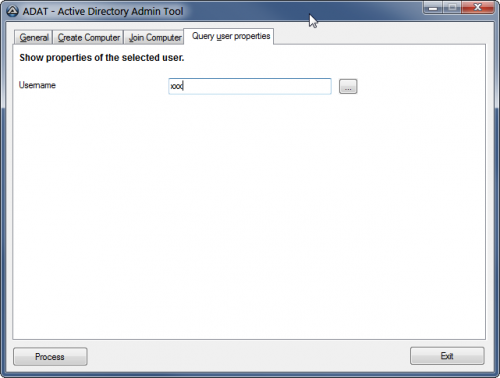
ADAT - Active Directory Administration Tool
By water
ADAT is a tool to simplify common AD administration tasks. Every administration task has its own tab. It is easy to add new functions (tabs) to the tool. Some often used functions are already available: list users, computers, OUs. File ADAT.ini can be customized to hold the AD logon information if necessary.
Known Bugs:
2018-03-07: If the Script started from SciTE works but the "Process" button in the compiled exe does not do anything then please add the following line at the top of your script:
#Au3Stripper_Ignore_Funcs=Process_Tab*
BTW: If you like this tool please click the "I like this" button. This tells me where to next put my development effort
2,044 downloads
(0 reviews)0 comments
Updated
-
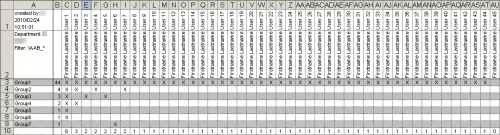
ADAudit - Active Directory Report
By water
On one/multiple big sheet(s) you get users (columns) and groups (rows). The list is sorted descending by number of members so you get the users with most groups and the groups with most members on top of the page. You can filter by (multiple) samaccountname(s), department or you can create your own LDAP query filter. You can filter the resulting list of groups using a Regular Expression.
Version 2.0 uses maps so at the moment it requires the latest beta version of AutoIt!
BTW: If you like this tool please click the "I like this" button. This tells me where to next put my development effort
1,271 downloads
(0 reviews)0 comments
Updated
-
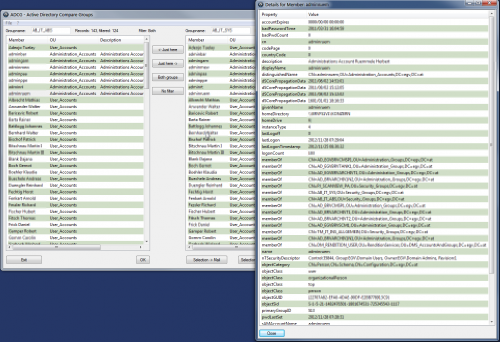
ADCG - Active Directory Compare Groups
By water
ADCG displays two Active Directory groups and their direct members in two listviews. You can filter and export the data to Excel, Outlook mail and the clipboard.
Before running the script you need to change file AD-Tools.ini and function _Check_Access in AD-Tools_User.au3.
BTW: If you like this UDF please click the "I like this" button. This tells me where to next put my development effort
Needs to be run with the latest AutoIt production version (>= 3.3.12.0).
Needs to be run with the latest version of the AD UDF (>= 1.4.2.0).
1,029 downloads
(0 reviews)0 comments
Updated
-
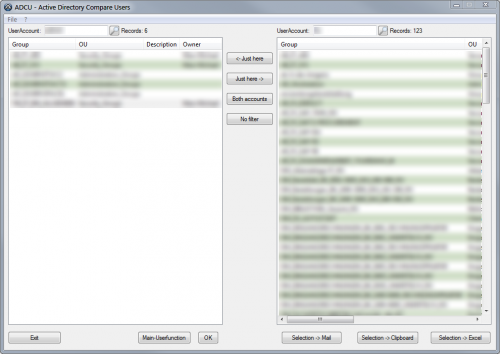
ADCU - Active Directory Compare Users
By water
ADCU displays two Active Directory users and their group membership in two listviews. You can filter and export the data to Excel, Outlook mail and the clipboard.
Before running the script you need to change file AD-Tools.ini and function _Check_Access in AD-Tools_User.au3.
BTW: If you like this UDF please click the "I like this" button. This tells me where to next put my development effort
Needs to be run with the latest AutoIt production version (>= 3.3.12.0).
Needs to be run with the latest version of the AD UDF (>= 1.4.2.0).
1,785 downloads
(0 reviews)0 comments
Updated
-
ADFunctions.Au3 -- Active Directory Functions
UDF Library containing functions for manipulating data in Active Directory / Exchange
13,498 downloads
(7 reviews)0 comments
Updated
-

Adobe Photoshop UDF
UDF for automating Adobe Photoshop software.
Features:
Creating, opening and saving documents Manipulating layer settings Applying effects to layers More features soon!
925 downloads
(0 reviews)0 comments
Updated
-
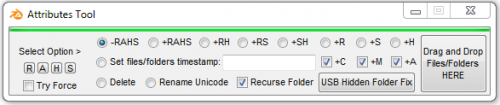
Attributes Tool
By Trong
Attributes Tool
Features :
USB Hidden Folder Fix: Show hidden files in USB and delete (.ink) files. Rename Unicode (Vietnamese to ASCII - Loại bỏ dấu Tiếng Việt ở tên tập tin và thư mục). Set timestamp for the files/folders. Quickly delete files/folders. |R|: cleanup junk file on computer. |H|: Hide HIDDEN files in Windows. |S|: Show HIDDEN files in Windows.
Use :
Select mode Drag and drop files/folder into program window Or press buttons and select files/folders. Or Run: AttributesTool.exe "AnyFilesPath.ext" "AnyFilesPath.ext" "AnyFilesPath.ext" (Using the previous configuration was selected!)
Run as Administrator and select Try Force to the best use!
Function:
#RequireAdmin Func _SetAttributes($sFileDirIN, $sAttribSet, $sRecurseDir = 1, $sForce = 1) If Not FileExists($sFileDirIN) Then Return SetError(1, 0, 0) $sAttribSet = StringStripWS($sAttribSet, 8) If $sAttribSet = "" Then Return SetError(2, 0, 0) If $sRecurseDir = 1 Then If StringInStr(FileGetAttrib($sFileDirIN), 'D') <> 1 Then $sRecurseDir = 0 EndIf Local $SetAttrib = FileSetAttrib($sFileDirIN, $sAttribSet, $sRecurseDir) If (@error Or $SetAttrib = 0) And $sForce = 1 Then _TakeOwnership($sFileDirIN) $SetAttrib = FileSetAttrib($sFileDirIN, $sAttribSet, $sRecurseDir) EndIf Return SetError($SetAttrib = 0, 0, $SetAttrib > 0) EndFunc ;==>_SetAttributes Func _TakeOwnership($xFile) If Not FileExists($xFile) Then Return SetError(1, 0, $xFile) If StringInStr(FileGetAttrib($xFile), 'D') <> 0 Then RunWait(@ComSpec & ' /c takeown /f "' & $xFile & '" /R /D Y', '', @SW_HIDE) RunWait(@ComSpec & ' /c Echo y|cacls "' & $xFile & '" /T /C /G Administrators:F', '', @SW_HIDE) RunWait(@ComSpec & ' /c icacls "' & $xFile & '" /grant Administrators:F /T /C /Q', '', @SW_HIDE) Return SetError(0, 0, 0) Else RunWait(@ComSpec & ' /c takeown /f "' & $xFile & '"', '', @SW_HIDE) RunWait(@ComSpec & ' /c Echo y|cacls "' & $xFile & '" /C /G Administrators:F', '', @SW_HIDE) RunWait(@ComSpec & ' /c icacls "' & $xFile & '" /grant Administrators:F /Q', '', @SW_HIDE) Return SetError(0, 0, 1) EndIf Return $xFile EndFunc ;==>_TakeOwnership Func _IsUSB($sDrive) Local $sIsUSB = 0, $sType = DriveGetType($sDrive, 3) If DriveGetType($sDrive, 1) = "Removable" Or $sType = "USB" Or $sType = "SD" Or $sType = "MMC" Then $sIsUSB = 1 Return $sIsUSB EndFunc ;==>_IsUSB Func _SplitPath($sFilePath, $sType = 0) Local $sDrive, $sDir, $sFileName, $sExtension, $sReturn Local $aArray = StringRegExp($sFilePath, "^\h*((?:\\\\\?\\)*(\\\\[^\?\/\\]+|[A-Za-z]:)?(.*[\/\\]\h*)?((?:[^\.\/\\]|(?(?=\.[^\/\\]*\.)\.))*)?([^\/\\]*))$", 1) If @error Then ReDim $aArray[5] $aArray[0] = $sFilePath EndIf $sDrive = $aArray[1] If StringLeft($aArray[2], 1) == "/" Then $sDir = StringRegExpReplace($aArray[2], "\h*[\/\\]+\h*", "\/") Else $sDir = StringRegExpReplace($aArray[2], "\h*[\/\\]+\h*", "\\") EndIf $aArray[2] = $sDir $sFileName = $aArray[3] $sExtension = $aArray[4] If $sType = 1 Then Return $sDrive If $sType = 2 Then Return $sDir If $sType = 3 Then Return $sFileName If $sType = 4 Then Return $sExtension If $sType = 5 Then Return $sFileName & $sExtension If $sType = 6 Then Return $sDrive & $sDir If $sType = 7 Then Return $sDrive & $sDir & $sFileName Return $aArray EndFunc ;==>_SplitPath
458 downloads
(0 reviews)0 comments
Updated
-
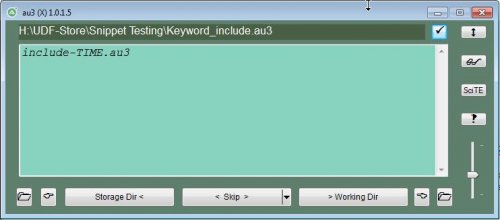
au3 (X) shell extension
By Deye
Manage UDF's and file includes as backup\restore or import\export method To register the extension: Double click the executable from inside any folder of your choosing, For instance "My Documents\UDF-Store\au3_X.exe"
To change the location of what is to be the "UDF-Store", move au3_X.exe to the new path and just repeat the above.
Starting it up :
Right click any *.au3, In the explorer context menu showing up choose the option "au3 (X)", The GUI will show up with an overview of all the action buttons + available options
513 downloads
(0 reviews)0 comments
Updated
-
Auto-SignIn
By ur
Usage: Create a shortcut pointing to this file and pass arguments username and password to it in target location.
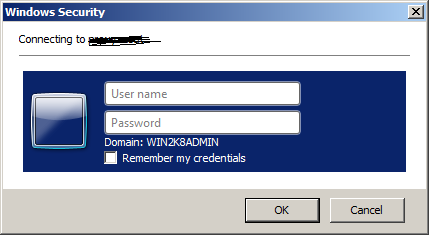
Auto-SignIn: When it is running in background it will pass credentials automatically to Windows Security Windows.Please check the forum mentioned for more details.
It will pass data to below type of window.
747 downloads
- auto
- credentials
- (and 2 more)
(0 reviews)0 comments
Updated
-
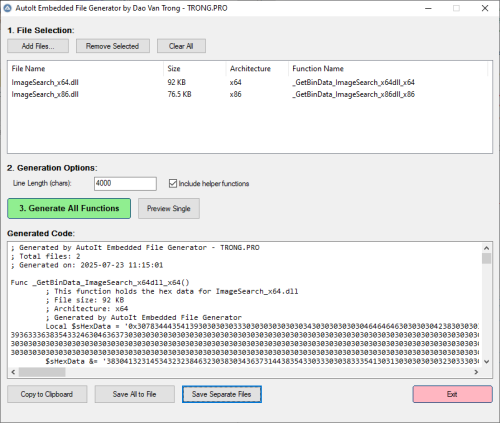
AutoIt Embedded File Generator
By Trong
A professional tool to convert binary files into self-contained AutoIt hex functions.
Features architecture detection, GUI and CLI modes, and robust code generation.
120 downloads
(0 reviews)0 comments
Updated
-
AutoIt Menu for Opera Browser
By MrCreatoR
This menu is designed for easy/convenient access to the AutoIt language tools and AutoIt forums from Opera Browser.
Screenshots:
Main Menu [AutoIt Forum Expanded]
Tools Menu
Preferences Dialog ("Items Prefs" Tab)
Preferences Dialog ("Sel.Code Prefs" Tab)
Integration Dialog ("Main" Tab)
Integration Dialog ("Tools" Tab)
P.S
Read AutMenu_Readme.txt (in the archive) for more details.
* Source/Resources available here.
5,117 downloads
(2 reviews)0 comments
Updated
-
AutoIt Protocol
A small script that allows you to run AutoIt code from any web browser by creating a special 'autoit:' protocol. Before you use the protocol, run 'install.au3'!
1,515 downloads
-
AutoTimeSync
By Trong
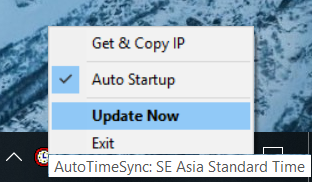
AutoTimeSync 2.2 - Automatically update time for computers!
_________________________________________________
AutoTimeSync.exe
CRC32: 8D2169F6
MD5: 8B0346B4D84A0A0434F048AC564D4199
SHA-1: FB02C3D93DD828B5305B3D373094F0229DCB8F55
SHA-256: EB57E99520C003E582D1DD37E39B26942C014597FDF8DF5FDB00AE32B0803906
AutoTimeSync_Debug.exe - Version Show Debug infomation
CRC32: 9CC5E35E
MD5: 090BDAD428BF3F5DDBF3978FEB23DC7D
SHA-1: 5572360A0D181CFB2C147CF325AE87747F7BA007
SHA-256: 5537DA23E60B5FB5A52C1BAF98745DEC3F9C7309398F7B18C56B3DD124B44003
1,005 downloads
(0 reviews)0 comments
Updated
-

Blender UDF (Experimental)
This is an experimental UDF for automating Blender 3D software using AutoIt. The package comes with a Python addon for Blender, allowing such automation and a simple example of how to use this UDF.
Enjoy!
965 downloads
-
Chilkat UDF
By mLipok
; #INDEX# ======================================================================== ; Title .........: Chilkat.au3 ; AutoIt Version : 3.3.10.2++ ; Language ......: English ; Description ...: A collection of Function for use with Chilkat component ; Author ........: mLipok ; Modified ......: ; URL ...........: https://www.chilkatsoft.com/refdoc/activex.asp ; URL ...........: https://www.chilkatsoft.com/downloads_ActiveX.asp ; Date ..........: 2017/02/01 ; Version .......: 0.1.1 BETA - Work in progress ; ================================================================================ This is an UDF modest beginning for Chilkat component:
https://www.chilkatsoft.com/downloads_ActiveX.asp
Some of AcitveX object bundled int this component (dll file) are Free, some other are commercial.
Support topic:
1,535 downloads
(0 reviews)0 comments
Updated
-

ChromeProtectedTabs.exe
By Deye
Small example script to Protect Tabs in chrome + close other tabs and duplicates
Local $sFilePath = @ScriptDir & "\ChromeProtectedTabs.exe" ;Close other tabs not containg these key words or duplicates Local $sProtectedTabs = "msdn, developer, autoit, Gmail, amazon, DuckDuckGo, YouTube" Run($sFilePath & " " & $sProtectedTabs)
851 downloads
(0 reviews)0 comments
Updated
-
CoreTempAidThrottler - CPU throttle automation
By argumentum
The back story:
I've got a Dell XPS w/ i7-8700K. The fastest, by single core, I could get, by well known PC maker.
The problem is that the fan can get so loud, like, REALLY LOUD, I can not use the CPU at its max. clock speed.
I could leave it at 90% all the time and not use this but I want to have the full 4.x Ghz and no parked cores, at all times, if I can.
But as room temperature and CPU load changes, a set throttle, may still make fan noise.
The solution:
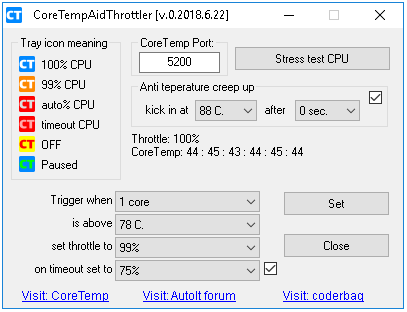
To avoid the fan from going "airplane turbine mode", the utility gets the temp. from "Core Temp" ( you can google it )
It has a"plug-in" called "Core Temp Remote Server". The utility gets the values via TCP.
When it "feels" it's gonna get hot, drops the CPU throttle to a selected value, lets say 99% ( where is quieter ) and back up to 100% when it "feels" is ok to go back.
Now temperature can creep up to higher than expected if load is sustained or room temperature changes. So there is an "anti creep up" feature, to temporarily set the throttle even lower, 5% at a time, until the known quiet temperature is achieved.
If don't know how to find the temperature you should use, check out these videos. They will tell you how.
https://www.youtube.com/watch?v=p3B5WCJZTuw&ab_channel=SergeantPope-KomadaComputerRepair
https://www.youtube.com/watch?v=VuP6I0mOb1s&ab_channel=Techquickie
https://www.google.com/search?q=find+max+cpu+temperature
The end result:
Any thermal problem, is a hardware problem. No way around that, other than attending to the CPU cooling and case ventilation. Software can not fix that.
But without this utility, the PC would slow down the CPU anyway, to keep it from melting.
This software preemptively slow down the CPU, keeping the CPU related fan speeds from going to maximum RPM. Hence having a slower, but a quieter box.
1,750 downloads
(0 reviews)0 comments
Updated
-
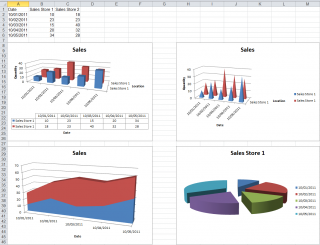
ExcelChart
By water
Extensive library to control and manipulate Microsoft Excel charts.
Written by GreenCan and water.
Theads: General Help & Support - Example Scripts
BTW: If you like this UDF please click the "I like this" button. This tells me where to next put my development effort
KNOWN BUGS (last changed: 2017-07-21)
None. The COM error handling related bugs have been fixed.
1,852 downloads
(2 reviews)0 comments
Updated
-
Full Package of computer Inventory and File Manageent Software
By great77
System Requirements : It will run on all windows operating system : Windows server 2003, 2008, 2012 and also Windows XP, 7,8,10 and other windows platform.
This is full package of the software which includes
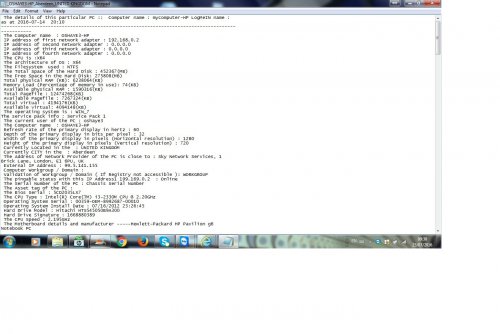
Automatic webpage refreshment, Changing date stamp of files from one to many files or any extension type, File Management (Transfer files from data centre with network path and direct directory either by Date (from last to first modified date or from first to last modified date) and also by Name Computer Inventory- Display hardware and software information in text file and also can use to centralize all your computer information Automation to zip and unzip files and folders. Paste file to many folders Recycling Empty files and folders Searching files and folders Trim Filenames automatically (from end or beginning or combined) Note: If you are having problem using the application, do not hesitate to contact me or comment on it . I am still working on improving it and also adding some features.
Computer Information Inventory program :
The Files :
Get Computer Detailes.exe - This application will create path C:\M-Omega containing two folders for hardware info and one for software info. You can use One2many tasks in Logmein to put info in that path for many computers. It can work to centralized about thousands of computers.
Centralized_all_Computer_Details Folder : You will find 3 files in this folder. Right click the central.ini file and select Edit and change the path name in the file as Input1="\\network_path\pathfile\". Make sure all the computers have access to this share network path... Copy also the user_interface_combo in the same place where the \\network_path\pathfile is located.
After this, select all the computers you will like to get their computer information. For example, if using Logmein, use one2many tasks. Double click the replicate_inifile.bat. This will copy the cenral.ini to all the required PC path into this location -- "C:\M-Omega\Config_centralize_inventory\central.ini". If your PC is not using C drive, then you can change the C drive to D or E or F which is available. Please note this is when you do not have C drive, that is when you can change the C Drive in the batch script to D or E or F
You can now use other remote software such as LogmeIn (One2Many tasks) to run this application "Centralize_all_Computer_details.exe" on all your target computers selected. This will look for the network path you inputed into the central.ini file located in each computer and Within 1 minutes, the hardware and software info is generated on two folders on the network path provided. This can work on thousands of computers.
User Interface Combo... This is GUI of the application which can help you interact with the software and hardware info in these folders. I have included files in these folders to understand how this combo GUI works. Make sure this file is located in the same place where you define your network path in the central.ini file.
1,123 downloads
- automation
- computer inventory
- (and 1 more)
-
GPO Tool
By careca
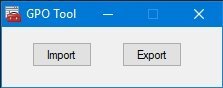
This is a tool to back up/export current settings in the group policy, or to import.
The export button simply exports the group policies to a folder with a random name.
The import prompts for a folder selection, and then tries to import the policy present in that folder.
I made this because i found it was the most reliable and simpler way of doing it, now i just saved the exported folder, renamed it, and when i install windows again i just
import the folder and all settings are placed.
1,222 downloads
(0 reviews)0 comments
Submitted
-
GUICtrlTuner_Limitless.au3
By Deye
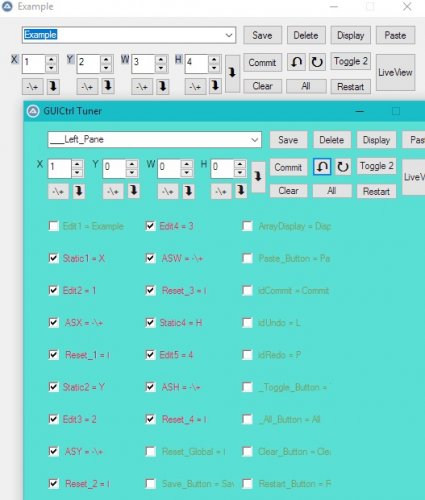
Macro Usage :
2 ways for selecting more than one control
Holding the X while selecting or drawing a temp rectangle over desired controls
Mouse wheel to cycle through previous selections of checks
Mouse wheel+ CTRL = As an alternative to using Undo\Redo (buttons)
key combo's :
+ SHIFT When needing to Perform actions while keeping the checked controls in check, for instance, when dragging a group of checked controls @ keeping them checked (See Aligning options for the other use)
+ Space-Bar For applying actions to all controls Specified in a preset where only one of the controls belonging to the same preset is actually checked
+ CTRL Makes an action continues
+ ALT Resize actions
+ CTRL Click a control that belongs to a configured preset, makes all the other controls in that preset to get Checked (or Unchecked - with another CTRL + click)
Tabs :
In order to move controls into tabs you will need to drag the control\s on to a tab label other then the one selected
so if you want a control\s to go into a tab labeled :"one" first select some other tab then you can drag drop the control\s on to the tab labeled "one"
Aligning options:
Checked items are parameterized by right clicking any odd control which is checked or unchecked (in the group or out of the group \ anywhere), using its size or position as a parameter for the chosen sizing action on whatever controls that are shown as checked in the control pannel Gui
In cases where more than one control are checked. The aligning will aim to size the group of controls relatively to each other, if you will need the sizing to be absolute when using the "equal in" :"Top", "Bottom", "Left", "Right" "Size", Width", "Height" than hold down the SHIFT key while clicking or choosing an action
How to have Equal spacing between groups (Shift+SpaceBar_Combo_Demo.flv).7z
606 downloads
-

HT Images Converter
By Trong
HT Image Converter is a kind of file converter that converts one image file format (like a JPG, BMP, TIF, etc.) into another.
If you're unable to use a photo, graphic, or any kind of image file the way you'd like because the format isn't supported, image converter software can help.
HT Image Converter also supports batch conversion, folder imports, resizing, drag and drop, command line.
Input/Output Formats: BMP, JPG, PNG, GIF, TIF, and many more
1,078 downloads
(0 reviews)0 comments
Updated