
Windows
24 files
-
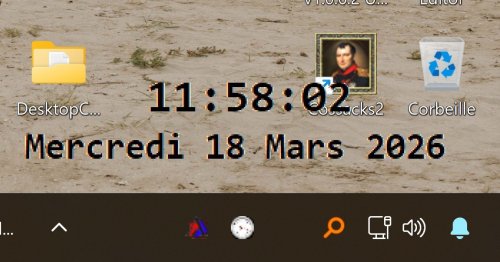
Desktop Clock
By wakillon
Draggable digital desktop Clock with transparent background
and the display color (dark/light) adapts to the color of the window behind it for easier reading of the time
See tray menu for options
109 downloads
(0 reviews)0 comments
Updated
-
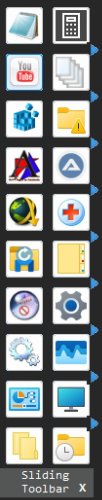
SlidingToolbar Update of 09/02/2026
By wakillon
A Toolbar for Open/Launch what you want
No need to click for see it, just put your mouse on the left side or at the top of your screen, depends of your choice in tray menu
You can add Shortcut, InternetShortcut, Files, and Folder by drag and drop on any button (special folders not supported)
Right click menu on it for delete item
"Display Name" and Icon can be changed by new context menu
All Changes are saved in SlidingToolBar.ini file located to TempDir & "\SlidingToolBar" directory
Added by default some basic special folders
See tray menu for options
To exit, click on the InfoBar at the bottom of the GUI or by tray menu
105 downloads
(0 reviews)0 comments
Updated
-
AutoIt DLL Guide
By Trong
📚 AutoIt DLL Integration - Complete Guide
🎯 Overview
This repository contains comprehensive examples and templates for creating two types of DLL calling conventions for use with AutoIt:
__stdcall Convention (Windows API Standard) __cdecl Convention (C Default) Both conventions work perfectly with AutoIt, but each has its own advantages and use cases. This guide will help you understand the differences and choose the right one for your project.
📂 Repository Structure
AutoIT_DLL/ ├── 📁 AutoIT_DLL_StdCall/ ← Windows API standard (__stdcall) │ ├── Template_DLL.cpp │ ├── TestDLL.cpp │ ├── TestDLL_Master.cpp │ ├── template_test.au3 │ ├── *.def files │ └── Documentation files │ ├── 📁 AutoIT_DLL_cdecl/ ← C default convention (__cdecl) │ ├── Template_DLL.cpp │ ├── TestDLL.cpp │ ├── TestDLL_Master.cpp │ ├── template_test.au3 │ └── Documentation files │ └── 📄 README.md (this file) 🔍 Key Differences Summary
Feature StdCall (__stdcall) Cdecl (__cdecl) Calling Convention Callee cleans stack Caller cleans stack Windows API Standard ✅ Yes (same as kernel32.dll) ❌ No Variable Arguments ❌ Not supported ✅ Supported (printf-style) Binary Size Smaller (cleanup in one place) Larger (cleanup in multiple places) AutoIt Syntax Clean: "int" Explicit: "int:cdecl" DEF File Required ✅ Yes (for exports) ❌ No (exports work without) Performance Slightly faster Slightly slower Name Decoration _Function@bytes _Function C++ Declaration EXPORT int __stdcall Func() EXPORT int Func() AutoIt DllCall DllCall($h, "int", "Func") DllCall($h, "int:cdecl", "Func") 📖 Detailed Comparison
1️⃣ StdCall Convention (__stdcall)
🎯 What is StdCall?
StdCall is the standard calling convention for Windows API functions. The callee (the function being called) is responsible for cleaning up the stack after the function returns.
✅ Advantages
Windows API Compatibility
Same convention used by user32.dll, kernel32.dll, and all Windows system DLLs Familiar to Windows developers Matches Microsoft documentation examples Cleaner AutoIt Syntax
No need for :stdcall suffix in DllCall More intuitive for beginners ; Clean and simple $result = DllCall($hDll, "int", "Add", "int", 5, "int", 3) Smaller Binary Size
Stack cleanup code exists in only one place (inside the function) Results in smaller DLL files Slightly Better Performance
Function knows exactly how many bytes to clean More efficient stack cleanup Name Mangling Predictability
Decorated names follow pattern: _FunctionName@bytes Easier to debug with dependency walker tools ❌ Disadvantages
Requires DEF File
Must create .def file to export functions without name decoration Additional maintenance overhead LIBRARY MyDLL EXPORTS Add Subtract No Variable Arguments
Cannot create functions like printf(const char* fmt, ...) All parameters must be known at compile time Less Portable
Primarily a Windows convention Not commonly used on other platforms 🔧 Implementation in C++
// Define export macro with __stdcall #define EXPORT extern "C" __declspec(dllexport) __stdcall // Simple integer function EXPORT int Add(int a, int b) { return a + b; } // String function EXPORT const char* ToUpperCase(const char* input) { static char buffer[1024]; // ... convert to uppercase ... return buffer; } // Array function EXPORT int SumArray(int* array, int size) { int sum = 0; for (int i = 0; i < size; i++) { sum += array[i]; } return sum; } Required DEF File (MyDLL.def😞
LIBRARY MyDLL EXPORTS Add ToUpperCase SumArray 🔧 Calling from AutoIt
; Open the DLL Global $hDll = DllOpen("MyDLL.dll") If $hDll = -1 Then MsgBox(0, "Error", "Failed to open DLL!") Exit EndIf ; Call integer function - Clean syntax! $result = DllCall($hDll, "int", "Add", "int", 10, "int", 20) ConsoleWrite("10 + 20 = " & $result[0] & @CRLF) ; Output: 30 ; Call string function $result = DllCall($hDll, "str", "ToUpperCase", "str", "hello world") ConsoleWrite("Result: " & $result[0] & @CRLF) ; Output: HELLO WORLD ; Call array function Local $array = DllStructCreate("int[5]") DllStructSetData($array, 1, 10, 1) ; array[0] = 10 DllStructSetData($array, 1, 20, 2) ; array[1] = 20 DllStructSetData($array, 1, 30, 3) ; array[2] = 30 DllStructSetData($array, 1, 40, 4) ; array[3] = 40 DllStructSetData($array, 1, 50, 5) ; array[4] = 50 $result = DllCall($hDll, "int", "SumArray", "ptr", DllStructGetPtr($array), "int", 5) ConsoleWrite("Sum: " & $result[0] & @CRLF) ; Output: 150 ; Close the DLL DllClose($hDll) 2️⃣ Cdecl Convention (__cdecl)
🎯 What is Cdecl?
Cdecl is the default calling convention in C and C++. The caller is responsible for cleaning up the stack after the function call, which allows variable-length argument lists.
✅ Advantages
Variable Arguments Support
Can create functions with variable argument lists Supports printf-style functions EXPORT void LogMessage(const char* format, ...) { va_list args; va_start(args, format); vprintf(format, args); va_end(args); } No DEF File Required
Functions export cleanly without .def file Simpler project structure C/C++ Default Convention
Standard in C/C++ world Most portable across compilers and platforms Easier Debugging
Function names not decorated in DLL Simpler with tools like Dependency Walker ❌ Disadvantages
Requires :cdecl Suffix in AutoIt
Must specify calling convention explicitly More verbose syntax ; Must use :cdecl suffix $result = DllCall($hDll, "int:cdecl", "Add", "int", 5, "int", 3) Slightly Larger Binaries
Stack cleanup code duplicated at each call site Every caller must include cleanup code Not Windows API Standard
Different from Windows system DLLs May confuse Windows API developers Slightly Slower
Caller must clean up stack More instructions per call 🔧 Implementation in C++
// Define export macro WITHOUT calling convention (defaults to __cdecl) #define EXPORT extern "C" __declspec(dllexport) // Simple integer function EXPORT int Add(int a, int b) { return a + b; } // String function EXPORT const char* ToUpperCase(const char* input) { static char buffer[1024]; // ... convert to uppercase ... return buffer; } // Array function EXPORT int SumArray(int* array, int size) { int sum = 0; for (int i = 0; i < size; i++) { sum += array[i]; } return sum; } // Variable arguments function (ONLY POSSIBLE WITH CDECL!) EXPORT int SumVariadic(int count, ...) { va_list args; va_start(args, count); int sum = 0; for (int i = 0; i < count; i++) { sum += va_arg(args, int); } va_end(args); return sum; } No DEF File Needed! - Functions export automatically.
🔧 Calling from AutoIt
; Open the DLL Global $hDll = DllOpen("MyDLL.dll") If $hDll = -1 Then MsgBox(0, "Error", "Failed to open DLL!") Exit EndIf ; Call integer function - Must use :cdecl suffix $result = DllCall($hDll, "int:cdecl", "Add", "int", 10, "int", 20) ConsoleWrite("10 + 20 = " & $result[0] & @CRLF) ; Output: 30 ; Call string function $result = DllCall($hDll, "str:cdecl", "ToUpperCase", "str", "hello world") ConsoleWrite("Result: " & $result[0] & @CRLF) ; Output: HELLO WORLD ; Call array function Local $array = DllStructCreate("int[5]") DllStructSetData($array, 1, 10, 1) DllStructSetData($array, 1, 20, 2) DllStructSetData($array, 1, 30, 3) DllStructSetData($array, 1, 40, 4) DllStructSetData($array, 1, 50, 5) $result = DllCall($hDll, "int:cdecl", "SumArray", "ptr", DllStructGetPtr($array), "int", 5) ConsoleWrite("Sum: " & $result[0] & @CRLF) ; Output: 150 ; Note: Variable argument functions are difficult to call from AutoIt ; Even though cdecl supports them in C++, AutoIt's DllCall doesn't handle varargs ; Close the DLL DllClose($hDll) 🎓 Which One Should You Choose?
Choose StdCall (__stdcall) if:
✅ You want cleaner AutoIt syntax without :cdecl suffix
✅ You're making Windows-specific DLLs
✅ You want maximum compatibility with Windows API conventions
✅ You want slightly better performance
✅ You don't need variable argument functions
✅ You're comfortable creating .def files
👉 Recommended for most AutoIt users!
Choose Cdecl (__cdecl) if:
✅ You need variable argument functions (printf-style)
✅ You want simpler project structure (no .def files)
✅ You prefer C/C++ standard conventions
✅ You're porting existing C/C++ libraries
✅ You don't mind the :cdecl suffix in AutoIt
👉 Recommended for advanced C++ developers or when porting existing code
🚀 Quick Start Guide
For StdCall Version:
Navigate to folder:
cd AutoIT_DLL_StdCall Build DLL:
msbuild Template_DLL.vcxproj /p:Configuration=Release /p:Platform=x64 /t:Rebuild Test with AutoIt:
"C:\Program Files (x86)\AutoIt3\AutoIt3_x64.exe" template_test.au3 Read documentation:
README.md - Project overview TEMPLATE_QUICKSTART.md - 5-minute getting started CODING_GUIDE.md - Complete coding reference For Cdecl Version:
Navigate to folder:
cd AutoIT_DLL_cdecl Build DLL:
msbuild Template_DLL.vcxproj /p:Configuration=Release /p:Platform=x64 /t:Rebuild Test with AutoIt:
"C:\Program Files (x86)\AutoIt3\AutoIt3_x64.exe" template_test.au3 Read documentation:
README_TEMPLATE.md - Template guide TEMPLATE_QUICKSTART.md - Quick start CODING_GUIDE.md - Complete reference 📋 Data Type Reference (Both Conventions)
C++ Type AutoIt Type Description Example int "int" 32-bit integer DllCall($h, "int", "Add", "int", 5) long "long" 32-bit integer DllCall($h, "long", "GetSize") float "float" 32-bit float DllCall($h, "float", "Sqrt", "float", 16.0) double "double" 64-bit float DllCall($h, "double", "Pi") bool "boolean" Boolean value DllCall($h, "boolean", "IsValid") const char* "str" String (ANSI) DllCall($h, "str", "Echo", "str", "hi") const wchar_t* "wstr" String (Unicode) DllCall($h, "wstr", "Echo", "wstr", "hi") void* "ptr" Pointer DllCall($h, "int", "Sum", "ptr", $array) BYTE* "byte*" Byte array DllCall($h, "int", "Read", "byte*", $buf) void "none" No return DllCall($h, "none", "Print", "str", "hi") int64_t "int64" 64-bit integer DllCall($h, "int64", "BigSum") HWND "hwnd" Window handle DllCall($h, "int", "Proc", "hwnd", $hwnd) Important: For cdecl, add :cdecl suffix to return type:
; StdCall $r = DllCall($h, "int", "Add", "int", 5, "int", 3) ; Cdecl $r = DllCall($h, "int:cdecl", "Add", "int", 5, "int", 3) 🛡️ Common Best Practices (Both Conventions)
1. Always Validate Inputs
EXPORT int SafeDivide(int a, int b) { if (b == 0) { SetLastError("Division by zero!"); return 0; } return a / b; } 2. Use Thread-Safe Code
// Use mutex for shared data static std::mutex g_stringMutex; static char g_stringBuffer[4096]; EXPORT const char* ProcessString(const char* input) { std::lock_guard<std::mutex> lock(g_stringMutex); // ... process string into g_stringBuffer ... return g_stringBuffer; } 3. Provide Error Retrieval
static char g_lastError[512] = {0}; void SetLastError(const char* error) { strncpy_s(g_lastError, sizeof(g_lastError), error, _TRUNCATE); } EXPORT const char* GetLastError() { return g_lastError; } 4. Track Statistics
static std::atomic<uint64_t> g_totalCalls{0}; static std::atomic<uint64_t> g_errorCount{0}; EXPORT int MyFunction(int x) { g_totalCalls++; if (x < 0) { g_errorCount++; return -1; } return x * 2; } EXPORT uint64_t GetTotalCalls() { return g_totalCalls; } 5. Always Check in AutoIt
$result = DllCall($hDll, "int", "Divide", "int", 10, "int", 0) If @error Then MsgBox(0, "Error", "DllCall failed!") Else ; Check the result If $result[0] = 0 Then ; Get DLL error message $err = DllCall($hDll, "str", "GetLastError") MsgBox(0, "Error", $err[0]) EndIf EndIf 📚 Available Examples
Both folders contain identical functionality, just different calling conventions:
1. Template_DLL - Production Template
Safe coding skeleton Error handling system Statistics tracking Ready to customize 2. TestDLL - Basic Operations
Integer, float, double math String processing Array handling Structure operations 3. TestDLL_Async - Concurrency
Thread pools Async operations Blocking/non-blocking calls Race condition demos 4. TestDLL_Extended - Advanced Types
All AutoIt data types Complex structures Callback functions Windows types (HWND, LPARAM) 5. TestDLL_Master - Complete Library
100+ functions 12 feature sections Production-ready Comprehensive examples 6. TestDLL_StressTest - Performance
Million+ call tests Memory leak detection Throughput measurement Stability testing ⚠️ Important Warnings
1. Don't Mix Calling Conventions!
// ❌ WRONG - Will cause stack corruption! // DLL uses __stdcall but AutoIt calls with :cdecl EXPORT int __stdcall Add(int a, int b) { return a + b; } // AutoIt: DllCall($h, "int:cdecl", "Add", "int", 5, "int", 3) ❌ // ✅ CORRECT - Calling convention matches EXPORT int __stdcall Add(int a, int b) { return a + b; } // AutoIt: DllCall($h, "int", "Add", "int", 5, "int", 3) ✅ 2. Rebuild Everything When Switching
If you switch from cdecl to stdcall (or vice versa):
Delete all old .dll and .obj files Rebuild everything from scratch Update all AutoIt scripts 3. String Buffer Safety
// ❌ WRONG - Local buffer destroyed after return! EXPORT const char* GetName() { char buffer[100] = "John"; return buffer; // Danger! Buffer goes out of scope } // ✅ CORRECT - Static buffer persists EXPORT const char* GetName() { static char buffer[100] = "John"; return buffer; // Safe! } 4. Check DLL Architecture
; Make sure DLL architecture matches AutoIt If @AutoItX64 Then $dll = "MyDLL_x64.dll" ; 64-bit DLL for 64-bit AutoIt Else $dll = "MyDLL_x86.dll" ; 32-bit DLL for 32-bit AutoIt EndIf 🔧 Build Requirements
Visual Studio 2019 or later (Community Edition works) Windows SDK (usually installed with Visual Studio) AutoIt v3 (for testing scripts) Build Commands:
# For x64 (64-bit) msbuild YourProject.vcxproj /p:Configuration=Release /p:Platform=x64 /t:Rebuild # For x86 (32-bit) msbuild YourProject.vcxproj /p:Configuration=Release /p:Platform=Win32 /t:Rebuild 📖 Learning Path
For Beginners:
✅ Read this README completely ✅ Choose StdCall (simpler AutoIt syntax) ✅ Read AutoIT_DLL_StdCall/TEMPLATE_QUICKSTART.md ✅ Build and test Template_DLL ✅ Modify template for your needs ✅ Read CODING_GUIDE.md for details For Advanced Users:
✅ Understand both calling conventions ✅ Study TestDLL_Master.cpp source code ✅ Learn async patterns in TestDLL_Async ✅ Test all data types in TestDLL_Extended ✅ Run performance tests with TestDLL_StressTest ✅ Contribute improvements! 🤝 Contributing
If you find issues or want to improve the examples:
Test your changes thoroughly Document any new patterns Update relevant README files Ensure both x86 and x64 builds work 📄 License
These examples are provided as educational resources. Feel free to use, modify, and distribute for any purpose.
🎓 Additional Resources
AutoIt DllCall Documentation: https://www.autoitscript.com/autoit3/docs/functions/DllCall.htm AutoIt DllStruct Documentation: https://www.autoitscript.com/autoit3/docs/functions/DllStructCreate.htm Microsoft Calling Conventions: https://docs.microsoft.com/en-us/cpp/cpp/calling-conventions Windows API Reference: https://docs.microsoft.com/en-us/windows/win32/api/ 📞 Support
For questions and issues:
Check the documentation in each folder Review the example code and tests Search AutoIt forums Review Microsoft's calling convention documentation Happy Coding! 🚀
Remember: Both conventions work perfectly - choose based on your specific needs!
🔖 Quick Reference Card
╔══════════════════════════════════════════════════════════════════╗ ║ QUICK REFERENCE ║ ╠══════════════════════════════════════════════════════════════════╣ ║ ║ ║ 📌 STDCALL (Windows API Standard) ║ ║ ───────────────────────────────────────────────────────────── ║ ║ C++: EXPORT int __stdcall Add(int a, int b) ║ ║ DEF: Required (exports in .def file) ║ ║ AutoIt: DllCall($h, "int", "Add", "int", 5, "int", 3) ║ ║ Use: ✅ Most Windows projects, cleaner syntax ║ ║ ║ ║ ───────────────────────────────────────────────────────────── ║ ║ ║ ║ 📌 CDECL (C Default Convention) ║ ║ ───────────────────────────────────────────────────────────── ║ ║ C++: EXPORT int Add(int a, int b) ║ ║ DEF: Not required ║ ║ AutoIt: DllCall($h, "int:cdecl", "Add", "int", 5, "int", 3) ║ ║ Use: ✅ Variable args, porting C libraries ║ ║ ║ ╚══════════════════════════════════════════════════════════════════╝ Author
Dao Van Trong - TRONG.PRO
98 downloads
(0 reviews)0 comments
Updated
-
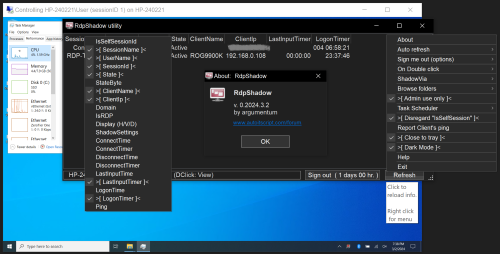
RdpShadow utility
By argumentum
..so I have to help someone and remember how to get the session ID,
then remember how to shadow. All from a command prompt. Not cool.
So I wrote this,
Is coded for Windows in English. May work in other languages too.
( as long as "qwinsta" runs, this should work ) It now calls wtsapi32.dll
For this to work as intended, uncheck "noPrompt", or make the changes
to the group policy, only if you know what you are doing.
( I will not aid anyone on how what, as I'm not qualified )
This is for when all works as you wish, but have to use the
command line to shadow a user ( and everyone is in a hurry ).
This gives you a list of users to just click to help the
user on a remote session, by guiding them ( view ) or
interacting with the desktop ( control ).
I do not advise to change anything on your system, nor to use this,
but if you find it useful, then, it is a very practical utility.
I did not post in the examples forum as is not an example worth posting.
It grabs the text out of qwinsta Calls wtsapi32.dll and runs mstsc. Not a noteworthy example.
3,081 downloads
-

MousePointerWithCircle
By argumentum
This started in help thread. ( https://www.autoitscript.com/forum/topic/210715-special-effect-for-the-mouse-cursor )
Moved the files here, so I can free the user forum file quota.
The ini file has the comments to get you going.
What is not there is that you can run this again and will close the one loaded before,
add to that, that you can declare an ini file as a command and you can test different settings.
Hence can create shortcuts with different ini profile files.
Ex: MousePointerWithCircle.exe MousePointerWithCircle_NoRing.ini
The compiled ZIP, is compiled with v3.2 to run anywhere.
There are 2 pictures of it running on Windows 2000 just to show. And yes, it runs in all versions of Windows, including the current, Windows 11.
That is something the newer versions of AutoIt no longer support.
2,632 downloads
(0 reviews)0 comments
Updated
-
Ascend4nt's PDHPerfCounters.zip
By argumentum
PDH Performance Counters
Measure Process, CPU, Network, Process, Disk (etc) Usage
...read all about it at /topic/90736-performance-counters-in-windows-measure-process-cpu-network-disk-usage/
you can reach the old site via the WaybackMachine, and get any other material you may need from there.
324 downloads
(0 reviews)0 comments
Updated
-
Autoit-DD
About AutoIt-DD
AutoIt-DD is an carbon copy of Laravels dd helper. DD stands for "Dump and DIE" and is a great tool for debugging AutoIt variables
Features
Get useful information about any AutoIt variable Nested Arrays and Scripting dictionaries Multi DIM arrays Great structure and colored output Example
In Example.au3 you can run a fully featured example, but I also provided a print screen for you lazy people
910 downloads
(0 reviews)0 comments
Submitted
-

Utter Speech Recognition UDF
By Surya
Utter is simply a UDF created for the maximum utilization of SAPI (Speech Recognition API) in windows you can add your own words to be recognized by the computer you can set speed,picth and select the voice you want by speech synthesis included in windows.Utter can create a free grammar recognition engine as well as custom made grammar recognition engine suiting according to your need also it is flexible.The shutdown function of the UDF must be called before calling another one to destroy the current engine running when autoit closes the engine will also close many functionalities are included an update will be soon in future
github: https://github.com/thesunRider/Utter
2,377 downloads
- adding grammar
- sapi
- (and 3 more)
-
.thumb.png.b2a7b60f509f3301f71b2c5c04e8dd0e.png)
My fine tuned High Contrast theme
By argumentum
My fine tuned High Contrast theme, came from the need of a better "Dark Mode", that is still not there yet.
Okay, let's use a "High Contrast Theme", but then again, the available colors to tweak are quite limited.
So I'm like
But since we can code: Behold !, an expanded theme color chooser 😁
And none of the changes, add or remove anything to the OS. Is just color tweaking.
...is incomplete as far as I would like it to be but, fully functional at this stage. ( I'll continue as time permits )
1,744 downloads
(0 reviews)0 comments
Updated
-
Embed DLLs in script and call functions from memory (MemoryDll UDF)
By argumentum
file was not found in this site. This is that file.
1,074 downloads
(0 reviews)0 comments
Updated
-
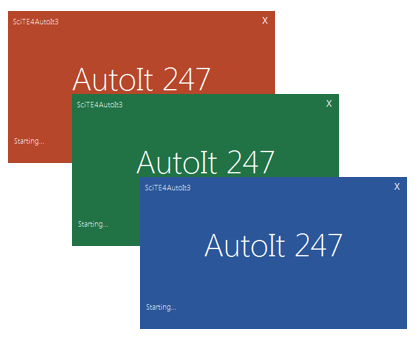
Splash Screen GUI - MS Office Style
By Skeletor
A gui splash screen. Themed after the famous MS Office Suite.
Three colours to choose from, Red, Blue and Green.
You can change the labels to your own application.
Animated side scrolling dots just like MS does.
Also bundled with this is the KODA form. So you can open up and see the basic structure of this splash screen.
1,440 downloads
-
_AutoItErrorTrap.zip
By argumentum
UDF to intercept the error window of AutoIt, showing more details about the error, including ability to save and send by email!
591 downloads
(0 reviews)0 comments
Submitted
-
SubstWrapper - UDF
By mLipok
I encourted a problem with FilePath Length ( > 260 chars)
https://msdn.microsoft.com/en-us/library/windows/desktop/aa365247(v=vs.85).aspx
As a solution I try to use Windows "subst" command:
And I make a wrraper UDF for this.
Here is example how to use:
#include <AutoItConstants.au3> #include <FileConstants.au3> #include <MsgBoxConstants.au3> #include "SubstWrapper.au3" _Subst_Example1() ;~ _Subst_Example2() Func _Subst_Example1() _Subst_SetCallback(ConsoleWrite) ; Generate LONG FILE NAME Local $sFileName = '' For $i = 1 To 25 $sFileName &= '1234567890' Next $sFileName = $sFileName & '.au3' Local $sDestDir = StringLeft(@WindowsDir, 1) & ':\Subst_testing' ; usually C:\Subst_testing Local $sDest = $sDestDir & '\' & $sFileName MsgBox($MB_OK, _ StringLen($sFileName) & ' ' & StringLen($sDest), _ FileCopy(@ScriptFullPath, $sDest, $FC_CREATEPATH + $FC_OVERWRITE) _ ) ; Of course according to: https://msdn.microsoft.com/en-us/library/windows/desktop/aa365247(v=vs.85).aspx ; To specify an extended-length path, use the "\\?\" prefix. For example, "\\?\D:\very long path". ; ; I could use ; FileCopy(@ScriptFullPath, "\\?\" & $sDest, $FC_CREATEPATH + $FC_OVERWRITE) ; ; but for showing how SubstWrapper.au3 works I will not add "\\?\" prefix Local $sDrive = 'r' $sDest = $sDrive & ':\' & $sFileName DirCreate($sDestDir) ; Associates a path with a drive letter. _Subst_Add($sDrive, $sDestDir) If @error Then MsgBox($MB_ICONERROR, '_Subst_Add', '@error = ' & @error & @CRLF & '@extended = ' & @extended) ShellExecute($sDrive & ':') MsgBox($MB_OK, _ StringLen($sFileName) & ' ' & StringLen($sDest), _ FileCopy(@ScriptFullPath, $sDest, $FC_OVERWRITE) _ ) MsgBox($MB_OK, 'Waiting', _ 'Check the content of ' & $sDrive & ':' & @CRLF & _ 'When you Click "OK" button the ' & $sDrive & ': will be Deleted ' & @CRLF & _ 'REMARK: Content should be save - not deleted' _ ) ; Deletes a substituted (virtual) drive. _Subst_Del($sDrive) If @error Then MsgBox($MB_ICONERROR, '_Subst_Del', '@error = ' & @error & @CRLF & '@extended = ' & @extended) EndFunc ;==>_Subst_Example1 Func _Subst_Example2() _Subst_SetCallback(ConsoleWrite) ; set drive letter with out colon and backspace Local $sDrive = 's' ; Associates a path with a drive letter. _Subst_Add($sDrive, @WorkingDir) If @error Then MsgBox($MB_ICONERROR, '_Subst_Add', '@error = ' & @error & @CRLF & '@extended = ' & @extended) ; list of current virtual drives Local $aResult_outer = _Subst_ListToArray() If @error Then MsgBox($MB_ICONERROR, '_Subst_List', '@error = ' & @error & @CRLF & '@extended = ' & @extended) Local $aResult_inner For $iOuter_idx = 0 To UBound($aResult_outer) - 1 $aResult_inner = $aResult_outer[$iOuter_idx] _ArrayDisplay($aResult_inner, '$aResult_inner[' & $iOuter_idx & ']') Next ShellExecute($sDrive & ':') MsgBox($MB_OK, 'Waiting', _ 'Check the content of ' & $sDrive & ':' & @CRLF & _ 'When you Click "OK" button the ' & $sDrive & ': will be Deleted ' & @CRLF & _ 'REMARK: Content should be save - not deleted' _ ) ; Deletes a substituted (virtual) drive. _Subst_Del($sDrive) If @error Then MsgBox($MB_ICONERROR, '_Subst_Del', '@error = ' & @error & @CRLF & '@extended = ' & @extended) ; list of current virtual drives _Subst_List() If @error Then MsgBox($MB_ICONERROR, '_Subst_List', '@error = ' & @error & @CRLF & '@extended = ' & @extended) EndFunc ;==>_Subst_Example2
SUPPORT TOPIC IS HERE.
1,111 downloads
(0 reviews)0 comments
Updated
-
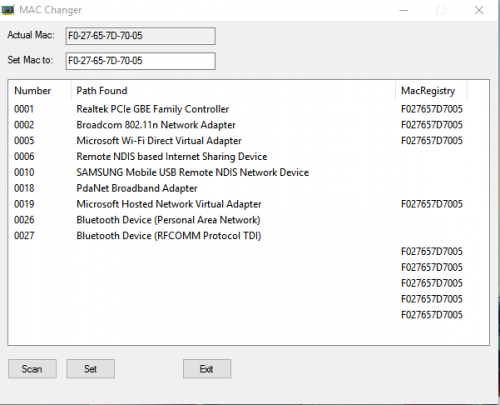
Mac Address Changer
By careca
Did this because i needed, retrieves a list of adapters from the registry, shows you your current Mac Address of the adapter in use, the user simply changes the second input field to the address he wants, then select the adapter on the list, and click 'set', after a reboot, the mac should be changed.
(The field to input the mac to set accepts '-' ':' or no separation character. ex: AA:BB:CC... or AA-BB-CC... or AABBCC...)
1,642 downloads
-

wallpaper V8
By cramaboule
Autoit Airliners.net wallpaper changer Works from XP to W10
1,773 downloads
(0 reviews)0 comments
Updated
-
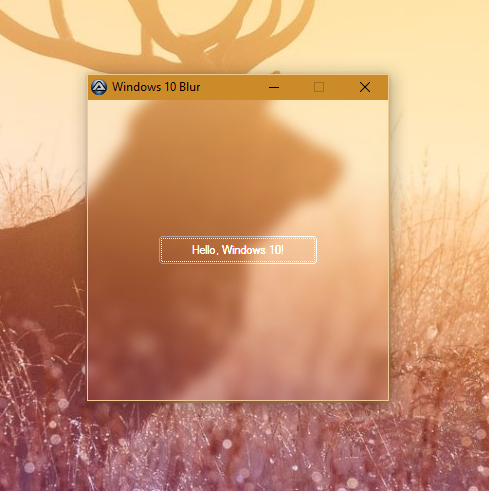
_WinAPI_DwmEnableBlurBehindWindow for Windows 10
Function for enabling Aero-like blur effect in Windows 10.
1,956 downloads
(0 reviews)0 comments
Updated
-
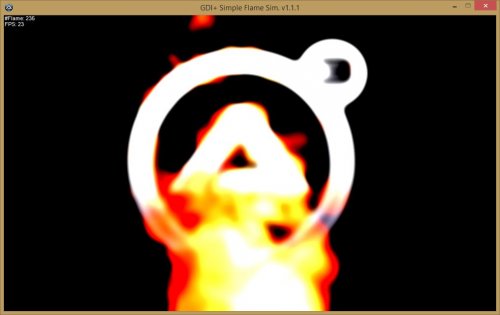
Some Graphical Examples using GDI+ Vol. II
By UEZ
Some Graphical Examples using GDI+ Vol. II (33 examples)
This is the continuation of "Some Graphical Examples using GDI+ Vol. I".
Have fun.
1,845 downloads
-
 (0 reviews)
0 comments
Updated
-
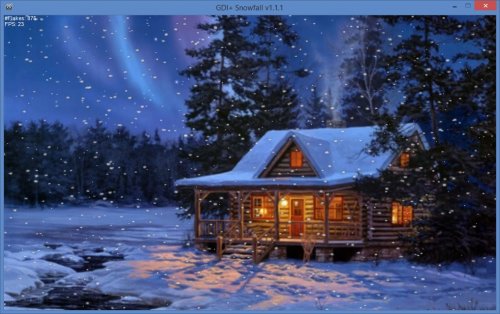
GDI+ Snowfall
By UEZ
Simple snowfall using GDI+ & ASM.
Thanks to Eukalyptus for the ASM codes.
If the script runs too slow reduce the amount of flakes in line 48.
For more information please visit the forum thread.
Happy snowing.
1,192 downloads
(0 reviews)0 comments
Updated
-
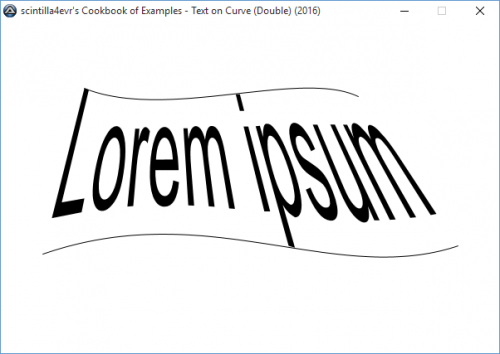
Distorting GDI+ Paths with other Paths
This is a simple example of distorting GDI+ Paths using other Paths, instead of using Matrix objects.
A PDF file explaining the process is included.
858 downloads
(0 reviews)0 comments
Updated
-
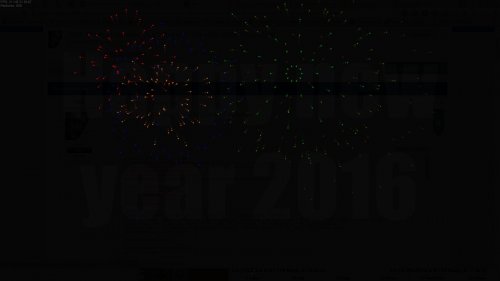
GDI+ Simple Firework
By UEZ
A simple firework for New Year's Eve with sound fx build 2016-01-08.
1,399 downloads
(0 reviews)0 comments
Updated
-

AutoIt OOP Extender
By minxomat
Introduction
Since the introduction of ObjCreateInterface, AutoIt is able to create native, real objects. However, this is quite difficult for non-experienced users. This UDF here enables a "classic" syntax for declaring classes and instantiating objects from them. Before you ask: No, it is not just another preprocessor that's "faking" OOP syntax - this is the real deal. While it assists users with a more familiar syntax, objects are created at runtime.
Care has been put into this UDF and it is in the authors interest to fix all bugs remaining and implement features as long as the result works in the Stable release of AutoIt.
Features
Define an unlimited number of classes. Classes can be defined in other includes of the script. Create unlimited instances of objects. Create arrays of objects. Mix and match different data types in arrays (one or more elements can be objects). Define custom constructors and destructors. Pass an unlimited number of arguments to the constructor (even to all objects in one array at the same time). Automatic garbage collection. Compatible with Object-enabled AutoIt keywords (With etc.), optional parentheses on parameterless functions. Fully AU3Check enabled. IntelliSense catches class-names for auto-completion. Automatically generates a compilable version of the script. Non-instantated classes get optimzed away. Read the tutorial.
1,101 downloads
(0 reviews)0 comments
Updated
-

Transpond UDF (Sent varibles to Programs)
By Surya
Transpond UDF helps in making complied scripts communicate with each other it has basic functions which are easy to use.you can send data to other windows as well as recieve them directly.you can help scripts share there data via transpond Udf.
Features:
* Compressed zip with examples
* Reading data and sending data to windows
* Calling functions when data is available to read
TRANSPOND UDF IS NOT AVAILABLE AND REMOVED DUE TO COMPLAINTS DOWNLOAD IT BY GOOGLING..
968 downloads
- giving words to other windows
- passing words to windows
- (and 3 more)
(1 review)0 comments
Updated
-
(2 reviews)
0 comments
Submitted